

Originally designed for gamers, Discord has evolved into an all-encompassing communication platform. Today, it is used for community interactions, lessons, work-related conversations, and even casual chats with friends. As with any other service, users may face blocks, IP limits, multi-account complications, low connection speed, and other problems. One efficient method for resolving these issues is employing Discord proxy settings. Once configured, it will change the address through which the platform connects to the internet.
In this article, we will discuss the importance of proxy for Discord, the most suitable addresses to use, and appropriate options for accomplishing specific tasks.

As described above, a proxy server is an intermediary that serves as a gateway between your computer and the internet. Bypasses your internet provider’s firewall with IP masking and geolocation spoofing/tweaking.
Most relevant use cases where Discord through proxy is beneficial include:
Utilizing a Discord with proxy provides two essential features: it permits working with multiple accounts simultaneously while preventing associated bans by employing distinct addresses and geolocations tailored to each account.
Numerous types of these servers are accessible today. While all of them redirect traffic, they differ in price, quality, and the area they serve. Here we highlight the main types and identify which ones are most ideal for the platform.
| Type | Description | Advantages | Disadvantages |
|---|---|---|---|
| Data Center IPv4/IPv6 | Located in data centers. Not tied to a real device. | Fast, inexpensive, easily scalable. | May be identified as proxy servers; higher chance of being banned. |
| Residential | Provide IP addresses of ordinary users through their devices. | Dynamic realistic IPs; hard to track. | Expensive, lower speed. |
| Mobile | Use IP addresses provided by mobile operators (via 3G/4G/5G networks) | Maximum anonymity, suitable for mass actions due to dynamic nature. | Relatively expensive; stability and speed depend on mobile network quality. |
| ISP | Addresses officially registered to internet providers but located in data centers. | High speed, stability. | More expensive than data center options: often a limited choice of geolocations. |
Regardless of the option you choose for the platform, their set goals and intended use determine the best selection of proxy for Discord.
If your actions require minimal communication and the use of IP masking, then ISP proxies will certainly serve you well. As the provider issues these addresses and hosts them on their own servers, the speed of such a proxy will be good with minimal delay. They are also suitable for keeping a single account permanently. Mobile or residential solutions appear most natural to systems, which makes them ideal for bot operation because they need stability and reliability.
When creating multiple accounts, each profile needs to be associated with an address, which should be unique. Mobile solutions provide the best options due to the vast pool of addresses alongside their dynamic rotation. These factors reduce the chances of being blocked while enhancing scaling options.
These low-risk conditions allow the use of low-cost, high-speed data center solutions when dealing with temporary tasks.
Such settings cannot be configured on an app level, so they have to be adjusted using other tools or system settings. In Windows, macOS, Android, and iOS devices, we will guide you on how Discord proxy settings can be adjusted.
While the platform applies the network settings of Windows, its basic configuration cannot allow entering a username and password. For private solutions, Proxifier is recommended. With the detailed instructions here, you will complete this task with ease. It requires choosing the application file from the PC while configuring the Discord proxy settings.
Here’s what you need to do in case macOS is used:
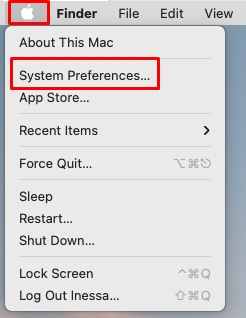
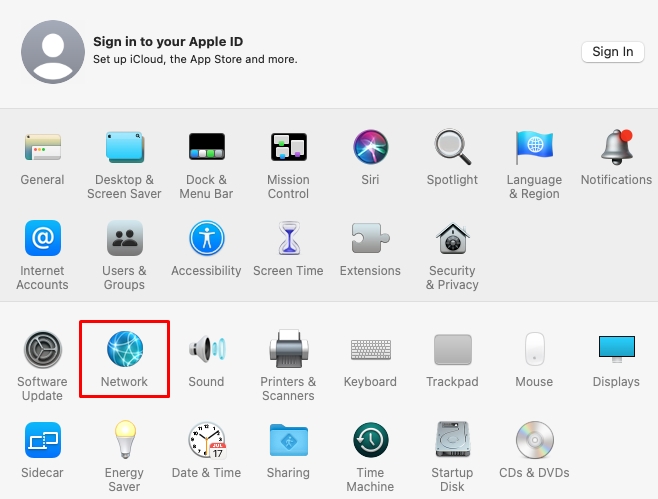
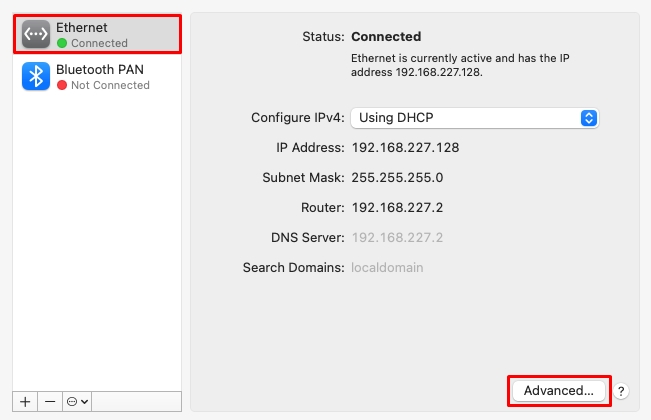
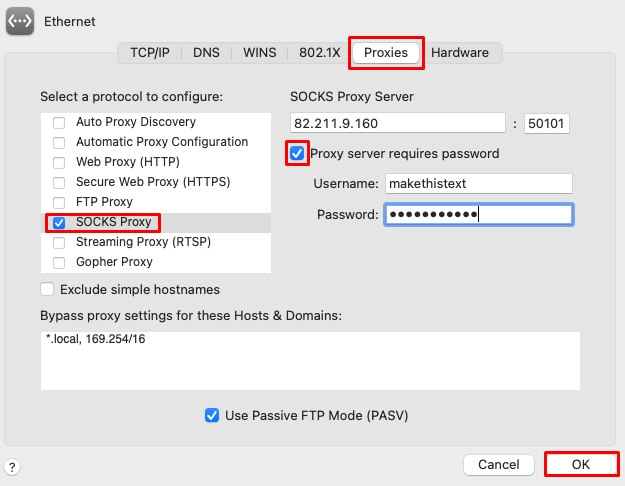
To confirm that the location-based IP address has been adjusted to the proxy address set for Discord, you can utilize the tools from a specific site. Proxy checker users also have the option of verifying its correct functionality.
For Android devices, the proxy setting can be done at the level of the Wi-Fi network. This makes it possible to funnel all the traffic, including the platform's, through the configured proxy server. Nevertheless, you cannot put in login details, so it has to be IP authorization based. Check the entire guide with explanations for each method to select the best-suited option. Read more about instructions in this guide.
For iOS mobile devices, settings are done at the system level, and other settings are given in this article.
Only the most common problems where a proxy might serve as a solution have been highlighted, but the scenarios and issues are endless. In most cases, the standard setup as described above is sufficient. Other times a solution is needed for a work that does not involve a lot of labor-intensive steps and is not a user-adjustable network configuration.
| Web Proxy | VPN | Tor Browser | |
|---|---|---|---|
| Description | Free online services that enable users to access specific websites through an intermediary server that masks their address. | Routes all internet traffic through a server, changing the IP address and encrypting the connection. | Ensures the highest anonymity of a user, as it uses the Tor network. |
| Pros | Do not require installation and elaborate configuration but are limited to temporary access to the web version. | Easy to connect and rather effective at bypassing blocks. | Useful only in cases where the platform is fully blocked and is intended solely as a means for accessing the web version of the platform. |
| Cons | Web Proxy for Discord often do not support authorization, file transfer, or voice channel functionalities. Minimal connection stability, low speed, and lack of encryption. | Can dramatically slow down Internet speed, which is critical for voice communication. Discord may restrict access from commonly or suspiciously used IP addresses, especially when using free VPNs, which is a known concern. | Has a very low connection speed. |
Using such servers creates a range of possible problems, including but not limited to losing connection entirely or the platform itself blocking your address because of the proxy. Below is a table with the most common errors and ways to fix them:
| Problem | Possible cause | Solution |
|---|---|---|
| Discord with proxy does not connect to the internet | Incorrect IP, port, or protocol (HTTP instead of SOCKS5); server unavailable | Check settings, change the type of server, or select another working IP |
| IP address blocked | Suspicious activity: frequent authorization, switching accounts, mass actions | Purchase mobile or individual solutions; do not overload one IP |
| Slow connection speed | Proxy server overload; great distance from the user | Choose geographically close and faster options (e.g., ISP proxy) |
| Request for re-authorization or login failure | Frequent IP changes; verification required | Link your account to a phone number, use one IP per session, enable 2FA |
| Platform does not open in the browser through a proxy server | Proxy server blocks WebSocket connections or has limited access | If the Discord proxy settings do not suit you, try a full-featured VPN or a proxy with WebSocket support |
To use a reliable Discord proxy, you need a provider that fits your needs perfectly. The top proxy sellers that specialize in Discord proxies are RapidSeedbox, Bright Data, Soax, Smartproxy, and Oxylabs. Each offers unique features and benefits. Here’s how to evaluate them based on important criteria:
To test these proxy providers yourself, look for trial accounts or money-back guarantees. This way, you can experience their speeds, reliability, and proxy Discord server compatibility before committing. Proxy-Seller, for example, offers flexible trial options and strong customer support. This testing phase ensures you get the best Discord unblocked proxy with minimal risk.
By comparing these key points, you’ll find the best proxy for Discord that fits your budget and technical needs.
Choosing the right proxy type for Discord can be confusing. You’ll learn how residential, datacenter, and mobile proxies differ, and which suits your specific use case.
| Residential Proxies | Datacenter Proxies | Mobile Proxies | |
|---|---|---|---|
| Anonymity |
Highest level
IPs come from real devices |
Lower
IPs come from data centers. |
High
IPs come from mobile carriers |
| Speed/Bandwidth |
Moderate
suitable for most tasks |
Very high
stable connections |
Moderate
varies by provider |
| Geo-Restriction Bypass |
Excellent
works well for region-locked Discord servers |
Limited
often easier to detect and block |
Excellent
very effective at bypassing blocks |
| Detection Risk |
Low
very hard for Discord to block |
Higher
Discord may flag these proxies more |
Very low
very natural traffic patterns. |
| Best for | Account management, avoiding bans, accessing geo-restricted content. | Gaming, automation where speed is critical and geo-restrictions are less strict. | High security needs, sensitive activities, and advanced account automation. |
You can also use mixed proxy strategies to balance speed, anonymity, and unblocking effectiveness. For example, use datacenter proxies for fast gaming and residential or mobile proxies for sensitive account management.
Proxy-Seller provides a wide range of proxy Discord server options covering residential, ISP, datacenter (both IPv4 and IPv6), and mobile personal proxies. It supports fast speeds up to 1 Gbps, geo-coverage in 220+ countries, and flexible rotation such as time-based, per-request, and sticky sessions. This versatility makes Proxy-Seller ideal for all types of Discord activities. Plus, their proxies are ethically sourced and comply with GDPR, ensuring security and privacy.
Automating proxy rotation is key to managing multiple Discord accounts without getting banned from using the same IP repeatedly. Here’s how you do it:
Start by choosing proxy manager tools like ProxyMesh or FoxyProxy. These let you switch proxies automatically without manual input. Alternatively, you can write custom scripts that use your proxy provider’s API to rotate IPs based on your schedule.
When setting your rotation schedule, decide whether you want:
Integrate proxy rotation with your Discord bots or automation scripts. This prevents patterns that Discord could detect and ban. Always throttle your requests and avoid rapid IP switching to simulate realistic user activity.
Beware of aggressive rotation – it can backfire by triggering Discord’s security. Best practices include:
In summary, automating proxy rotation with the right tools and thoughtful schedules lets you maintain many Discord accounts safely. This approach reduces detection risk while keeping your workflows smooth and uninterrupted.
A proxy server is not simply a technical application but an indispensable component for smooth, secure, and safe usage within a platform in unique circumstances. They are particularly indispensable when an individual seeks to navigate account restrictions, manages multiple accounts, or utilizes high-risk activities on the platform.
In terms of versatility and ease of access, proxy servers still outclass all other methods of bypassing restrictions and maintaining a stable connection to Discord. Given the many types available, they may be precisely tailored for particular uses, from one-time access to extensive automated systems. Discord proxy settings can be employed through various programs, anti-detecting browsers, and systems that support IP rotation, manage connections, and provide full control over connection parameters. Because of this, they provide the most optimal outcomes when managing numerous accounts or bots under restricted access conditions.

 PHP
PHP Node.js
 Python
 Java
Java Golang
 en
en  Español
  中國人
中國人  Tiếng Việt
  Deutsch
  Українська
  Português
  Français
  भारतीय
  Türkçe
  한국인
한국인  Italiano
  Gaeilge
  اردو
اردو  Indonesia
  Polski
Comments: 0