
 Proxy for Telegram
 Proxy for LinkedIn
 Proxy for Google
 Proxy for Ebay
 Proxy for Twitter
 Proxy for TikTok
What is a residential proxy? Definition, types, and how they work

When businesses collect public web data, run geographic testing, or need reliable web access at scale, residential proxy servers are critical. Besides knowing what is a residential proxy, it is equally important to examine its function and application in the real world.
Choosing a residential proxy is important for session stability, data quality, and overall workflow efficiency. Now, let’s explore what is a residential proxy, how it functions, what types are available, and the best use cases for each.
What are residential proxies?
The short answer to “what is a residential proxy” is this: your ISP-assigned IP gets replaced with the household IP of another real internet user in the location you pick, so websites see traffic coming from a genuine local device rather than from you.
On protected real-world targets like Amazon, Google, and Instagram, top residential pools average around 80% success rate, while shared datacenter proxies drop to the 40-60% range, according to Proxyway's 2026 Proxy Market Research. On simpler targets, residential rates climb into the high 90s; the practical takeaway is that residential proxies keep working where datacenter IPs stop.
Compared to datacenter proxies, the practical residential proxies meaning is that the IPs display normal user traffic and are treated as real visitors. Therefore, a residential IP of a user in Berlin would translate to search results, local prices, and ads relevant to that Berlin household, unlike a datacenter IP, which gets a generic version of the page.
A working residential proxy definition is easier to grasp through the practical benefits this setup delivers:
- These are authentic IPs issued by Internet Service Providers to regular home users, so your target websites trust them by default.
- They can be targeted to a specific location, down to country, city, or region.
- They are more reliable for controlling session management, both for rotating and longer sticky sessions.
- They perform better for tasks that require scraping public web data, where server IPs are typically blocked.
- They provide greater privacy and are more difficult to block or detect.
Video: quick start guide to using residential proxies
For a visual answer to what is a residential proxy and how to launch one in a couple of minutes, check out the quick start guide below.
How residential proxies work in different use cases
Automated traffic surpassed human traffic for the first time in a decade by making up 51% of all web activity (Imperva 2025 Bad Bot Report). In response, websites began to filter traffic aggressively, and datacenter IP ranges are the first to get blocked. Every use case below exists because a verifiable residential footprint continues to work where server ranges are unsuccessful.
Collection of public web data
Residential IP addresses used for web scraping are commonly paired with scraping frameworks including Scrapy, Puppeteer, Selenium, and Playwright to access product pages, listings, and directories on sites with strict rate limits. A residential proxy solves the IP-reputation layer, while your scraping stack has to handle the other layers, such as TLS fingerprints, HTTP headers, and browser behavior. When both layers are handled right, the difference is measurable.
Search results and SEO monitoring
Since Google customizes and personalizes search results, checking a rank from the wrong location returns the wrong data. City-level geo-targeting is one quality that lets you load the search results a user in Munich or Miami actually sees.
Another is a clean IP reputation to avoid CAPTCHAs that distort position data while crawling. SEO PowerSuite Rank Tracker and ScrapeBox are a few of the tools built for this, letting you import your own proxies and set per-engine delays for large keyword sets, which is another common answer to what is a residential proxy used for.
E-commerce and marketplace monitoring
Retailers track competitor catalogs, prices, and stock across Amazon, eBay, and other regional marketplaces, as these listings can differ based on device and location. Price-monitoring tools like Price2Spy and Prisync run on scraping infrastructure by design, and their enterprise plans allow you to add your own proxy credentials to reach difficult targets. The only way to ensure an accurate price comparison is to use residential geo-targeting. This makes sure the price and availability actually shown in each market, not what one datacenter location gets served.
Ad verification and brand protection
Digital ad fraud costs advertisers billions each year, and one tactic that specifically defeats server-based verification is cloaking. This is when fraud perpetrators create a clean page for IPs from data centers and ad platforms and serve the real fraud page to everyone else. The only real vantage point is a residential IP, as it is the only one that presents the page to the user as it really is. Ad ops and affiliate compliance teams often direct their verifications using geo-specific residential IPs and systems like DoubleVerify or Bluepear to validate ad placements, redirects, and the entire landing flow in the various target markets.
QA, localization, and multi-step sessions
Product and Quality Assurance (QA) teams test the localized content for the markets they are shipping to and also test the entire user flow along the various steps from signup to checkout. Sticky sessions are the key quality here, maintaining a single household IP for the entire flow to prevent a session from being reset mid-way. This is done by running a suite of QA tests using Playwright, Selenium, or Cypress through a residential endpoint, or one added to a cloud grid like BrowserStack, to reproduce what a real local user experiences.
Travel and fare aggregation
Travel is a classic example of geo-based pricing. Flight prices for identical bookings can differ significantly depending on the booking country. To record actual quoted prices, fare aggregators and Online Travel Agency (OTA) analytics teams use residential IPs in their respective target markets, typically feeding Playwright or Scrapy based collectors.
Cybersecurity and threat intelligence
To examine phishing pages, counterfeit shops, and brand impersonations that cloak themselves, security teams employ screening methods. The harmful page is displayed only to visitors from residential IP addresses, while traffic from datacenter IP ranges gets a harmless placeholder. When examining suspicious links using an IP from a residential network, the page shown to the victim is revealed. Threat intelligence teams conduct these screenings using in-house scripts alongside monitoring services such as ZeroFox and Recorded Future. IP sourcing is kept on record in case of a legal audit.
These instances help explain what is residential proxy best used for across business workflows. The common thread is consistent: whenever your data or operations depend on where you appear to be located and how trustworthy your IP looks, residential networks will display the exact version of the web that a real user is seeing.
Stop paying for blocked requests. Buy residential proxies from Proxy-Seller and route your traffic through 47M+ consent-sourced household IPs in 220+ locations, with sticky or per-request rotation and HTTP/HTTPS/SOCKS5 support on every endpoint, from $1.45/GB.
What are the types of residential proxies?
While the market segments these networks into "dedicated" and "shared," such classification is not technically accurate. A residential IP is the mutable address of a real person's device, and the real person can go offline or receive a new address from their ISP at any moment.
Thus, no service can permanently reserve a household IP for a client. The real question behind what is a residential proxy type is not who owns the IP, but how long the IP stays with your session.
What are static residential proxies: ISP as alternative
What you may see advertised as “static residential proxies” is more accurately placed into a different product category: ISP proxies. The name overlap causes real confusion, so this is a line worth drawing clearly.
An ISP proxy is an IP address registered with an Internet Service Provider but housed in a data center. There is no household user behind it: ISPs allocate these blocks to proxy companies through business agreements. Residential IPs, in contrast, come from household devices whose owners gave direct consent to share their connection. The sourcing and technology differ, but websites see the same ISP-level trust in both cases.
Because of this, ISP proxies are a reliable option when the IP has to stay the same, such as for continuous sessions, consistent logins, or workflows that could potentially be disrupted by an unexpected IP change. The combination gives you the speed and reliability of a data center on an IP address websites treat like a residential connection.
If a mobile footprint is what you are after, a mobile web proxy does a similar thing by routing requests through carrier-assigned IPs. This is also a completely different product, rented from carrier infrastructure providers rather than real home users, so it does not fall into the residential category either.
What are rotating residential proxies?
For rotating proxies, the IP address from which requests are sent is changed after a pre-set number of requests or time. It is the market standard for accomplishing web data scraping at scale, as it allows the requests to be sent from a wider pool of household IPs instead of one address.
Rotating residential proxies are even more advantageous when large volumes of requests across many pages are needed, especially for geographically distributed requests, which explains what is a residential proxy at scale.
Residential proxies can rotate IPs in one of three ways, each with its own tradeoff between the frequency of IP rotation and session stability:
- Sticky sessions keep the same IP for the entire session, which is useful for longer, uninterrupted web sessions.
- Time-based rotation allows the proxy to change the IP after a set period. We at Proxy-Seller offer 5, 10, 15, 20, or 60 minutes, or any custom length in seconds, up to 3,600.
- Request-based rotation sends every request from a different IP address. This is the most common configuration for large-volume automation and web data scraping.
Sourcing methods for residential IPs
What is a residential proxy legal sourcing model? At its core, every residential network is a network of individuals who consent to sharing their home connection bandwidth. There are currently four methods:
- Paid bandwidth-sharing services: These are networks such as Honeygain, Pawns.app, EarnApp, and PacketStream, which pay end users a small per-GB payout for sharing idle bandwidth. Since the user knowingly signs up to sell traffic, this is the cleanest consent model on the market.
- Free app monetization (SDK): A developer adds a proxy SDK (notable examples include Bright SDK and Infatica SDK) to a free app. To avoid ads, users allow apps to use their bandwidth. This is a legitimate business model on paper, but the level of real consent is tied to whether the opt-in screen is truthful.
- Partner VPNs: Free VPN apps monetize their free tier by routing paying proxy customers through those users' connections. The user gets free VPN access, and the provider gets an exit node. The consent is supposed to be there, but the description usually hides deep in the terms and conditions, making most users totally unaware of the trade.
- Illegal sourcing: Malware, pre-infected devices, and hijacked IoT systems, with no consent involved at all. Functionally, it is the same as a legitimate network: same routing, same seller dashboard, and same per-GB costs. The difference is that the “peers” never agreed to anything, and a botnet is effectively wrapped in a proxy provider's logo.
When you evaluate what is a residential proxy worth to your workflow, the method of sourcing is the first variable to take into account. It determines the legal risk and the stability of the pool, since consent-based IPs stay online because users want them there.
How are residential proxies priced?
Residential proxies charge for traffic, not for each IP. You buy a volume of GB, every request consumes it, and the cost for each GB tumbles the higher the volume. Proxy-Seller offers residential packages starting at $3.5/GB and discounting to as low as $0.3/GB for the largest packages.
Unlike residential proxies, our ISP, datacenter, and mobile proxies charge a flat fee per IP, and traffic is otherwise unlimited. This is possible because these do not have household bandwidth that is metered. Successful teams also employ a hybrid approach using both models: route all requests first through cheap datacenter IPs, and then only the leftover blocked requests are routed through the more expensive pool of residential IPs. This way, the failures become the only traffic billed at premium rates, which keeps the blended cost per successful request low.
How anti-bot systems detect proxies
Contemporary anti-bot systems (Cloudflare Bot Management, DataDome, HUMAN, Akamai) have multiple layers when scoring a request. At the first layer, the system assesses IP reputation. This includes determining whether the IP address belongs to an ASN of a hosting provider or an ISP, how many requests the IP and its subnet have sent recently, and if it appears on any shared denylists. Datacenter IPs will fail instantly in this layer, while residential IPs pass, as a household address from an ISP range carries none of those flags.
The following layers are devoted to assessing requests beyond the IP: TLS fingerprints (JA3/JA4), order of HTTP headers, browser signals (canvas and font rendering), and patterns of behavior (request timing). Solutions such as reCAPTCHA v3 consolidate these layers into a trust score and do not require user interactions.
With a residential proxy, you win the IP layer, the most heavily weighted one, but your scraping stack has to ensure the rest of the fingerprint remains consistent. That division of labor is the honest answer to what is a residential proxy able to solve on its own.
How to purchase residential proxies
Now that you know what is a residential proxy and how it works, let’s go over the simple steps of purchasing and setting them up. Below you’ll find a brief residential proxies guide:
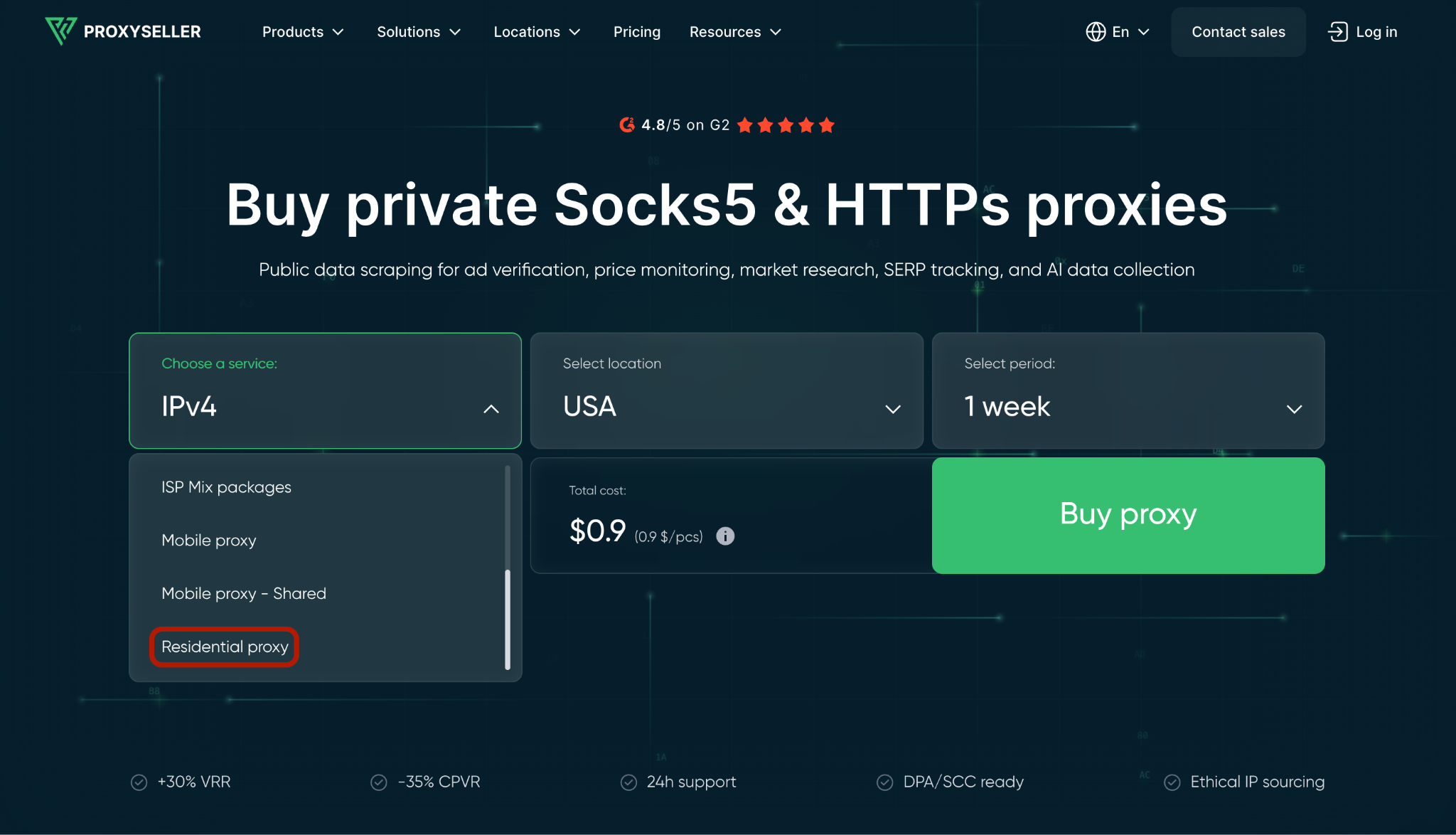
- Head over to Proxy-Seller’s main page and click on the “Choose a service” tab, where you will get the full list of proxy types offered. Select “Residential proxy.”
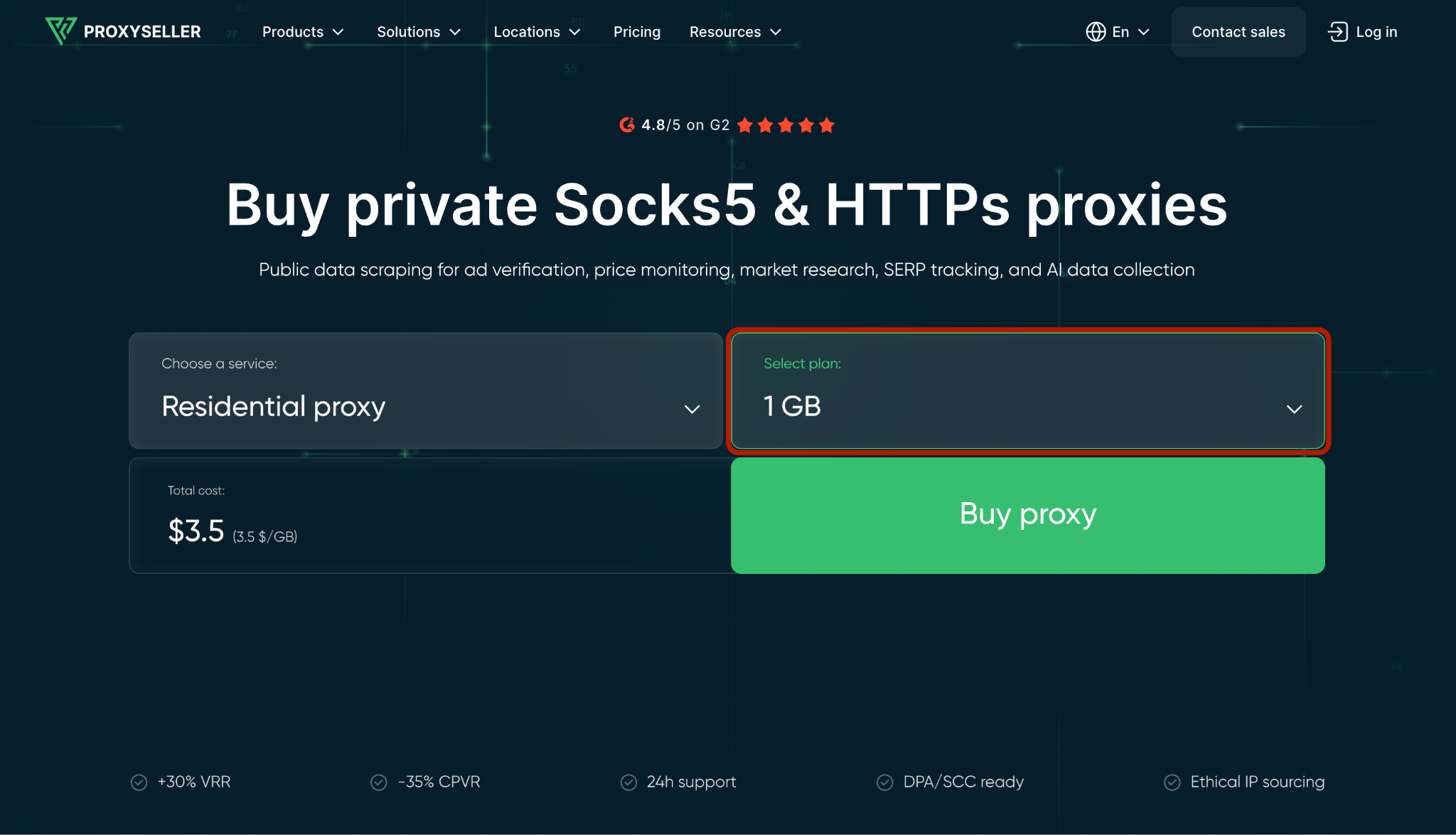
- Next, head over to the “Select plan” tab that appears on the top right and choose the amount of GBs you need (the more traffic you purchase, the cheaper the price/GB). Finally, click “Buy Proxy.”
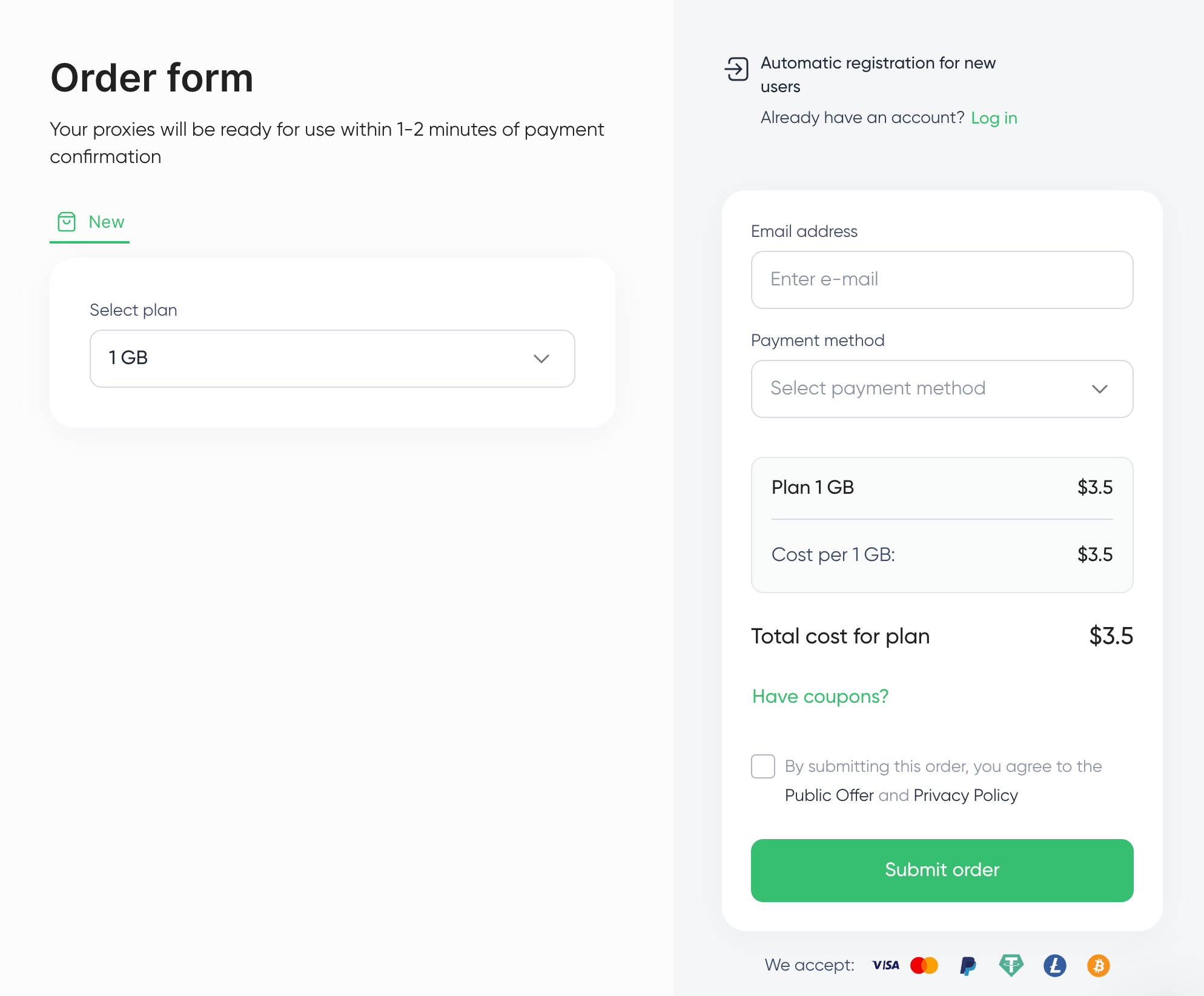
- After that, an Order Form will appear, showing your chosen plan and the total cost. Simply fill in your email address, select your preferred payment method (Visa/Mastercard, PayPal, Crypto), and click “Submit order.”
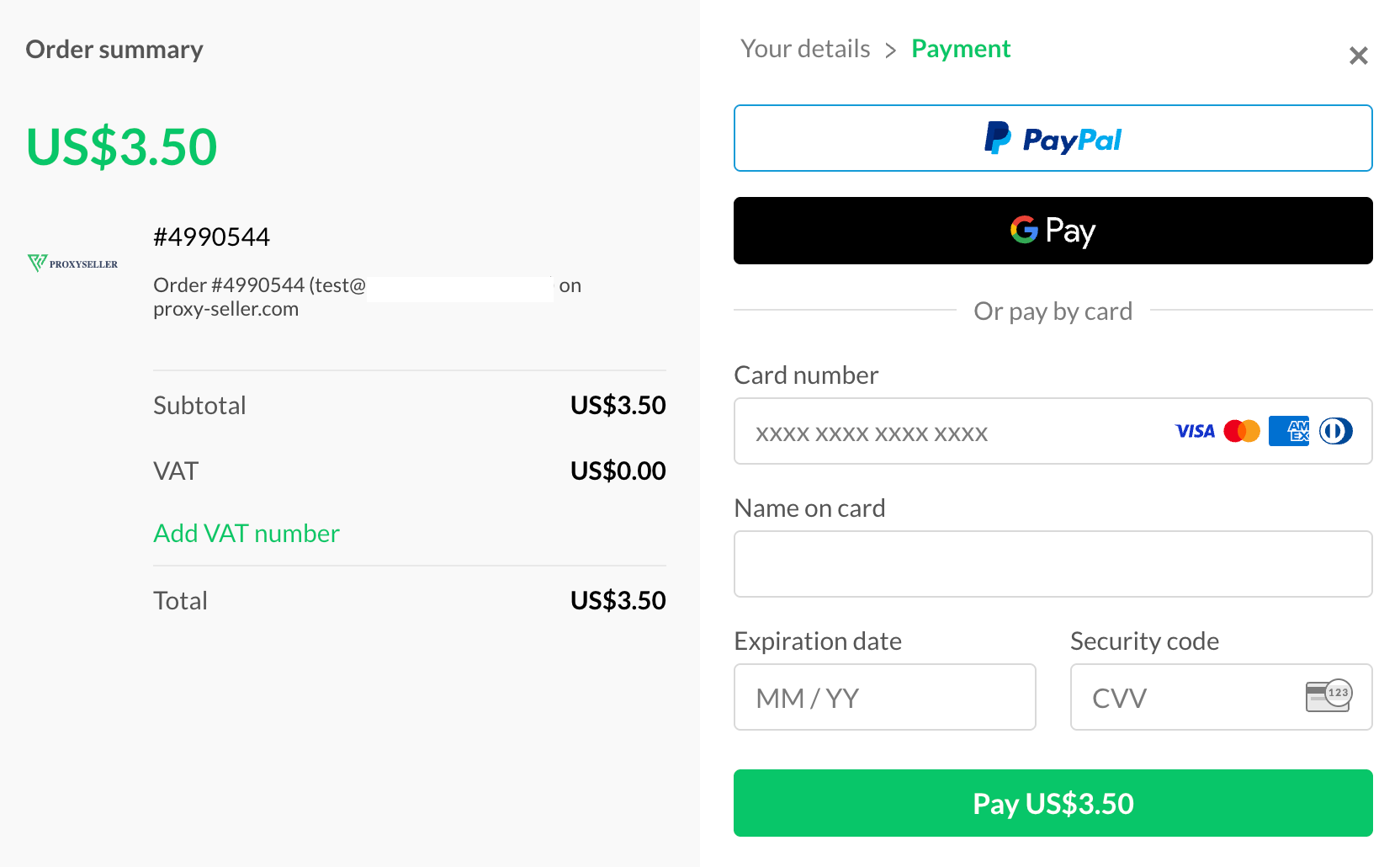
- You will then be redirected to a payment page. Fill in your card information and click Pay. That’s it. Your proxies are on their way and will be ready for use in 1-2 minutes.
- Next, navigate to your profile and access the “Orders” tab where all active orders will be displayed.
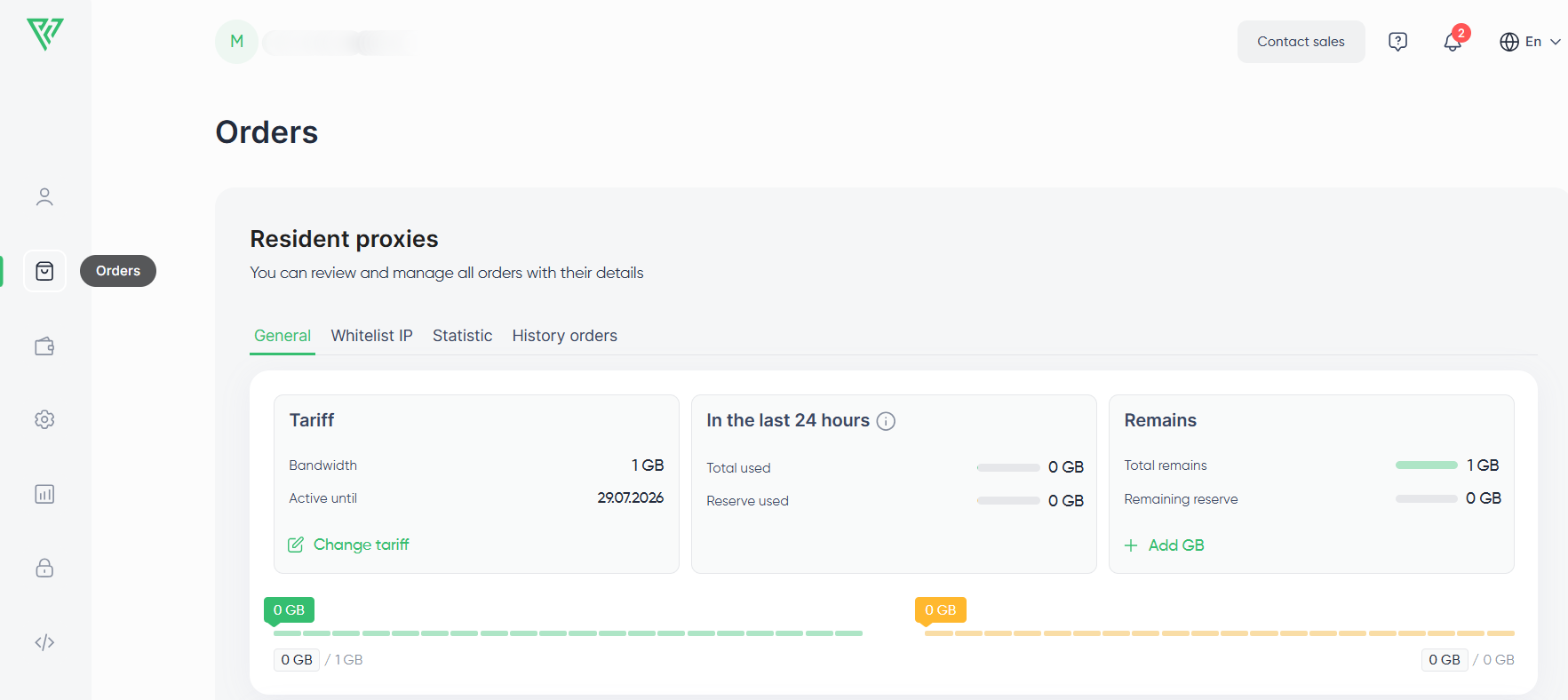
- Move down the page until a menu appears allowing you to create the proxy lists, choose the rotation type, authorization method, and geolocation. From the “ISP” field, you can also specify the provider and the format for proxy list export. Important to note, generated residential proxies will be working with both HTTP/S and SOCKS5 protocols by default.
Depending on the setup, users may also compare network formats, such as proxy IPv6 options, when reviewing broader proxy infrastructure needs.
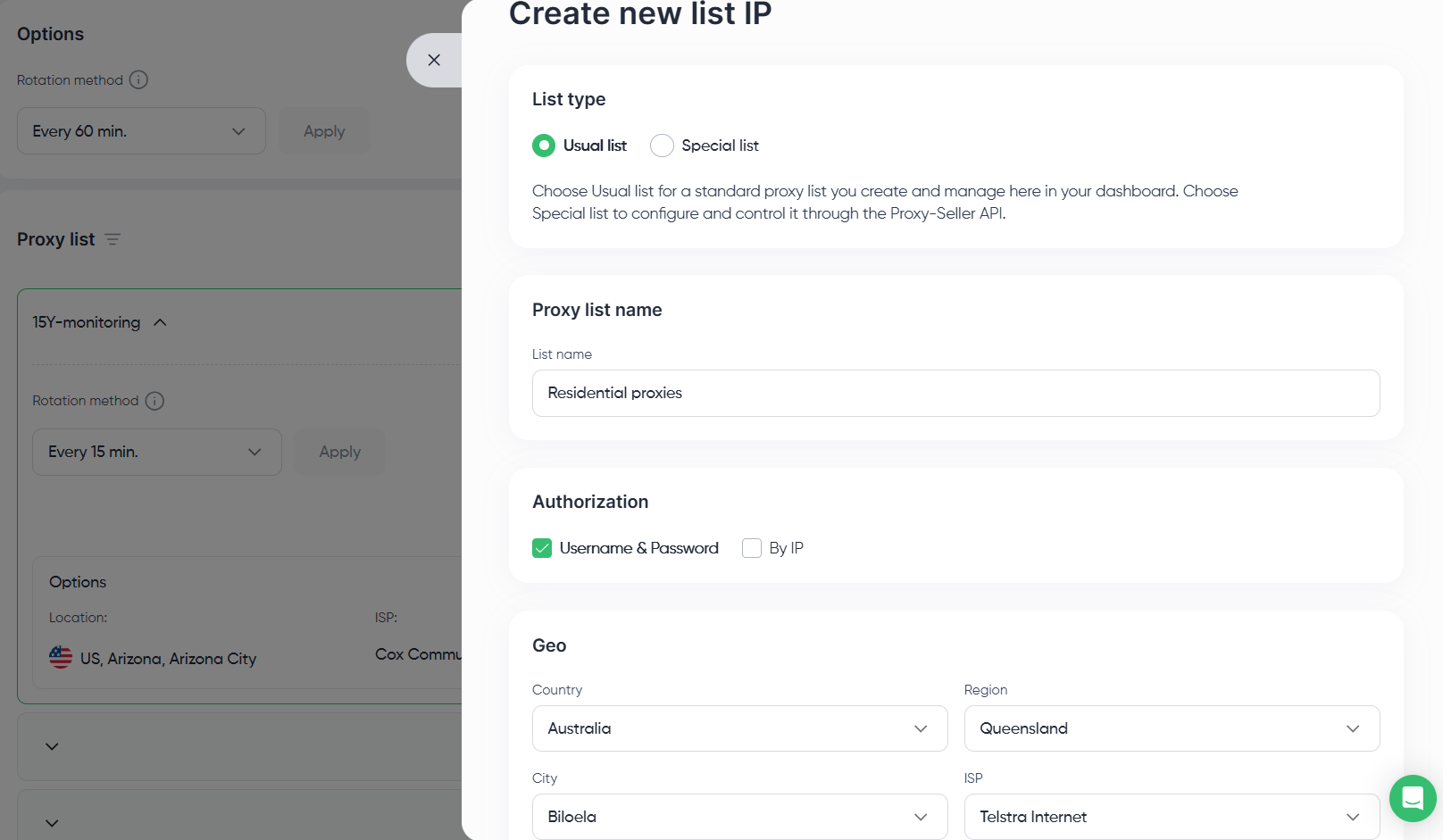
- After setting everything up, simply hit “Create”. You can export your list from here and use it for future tasks.
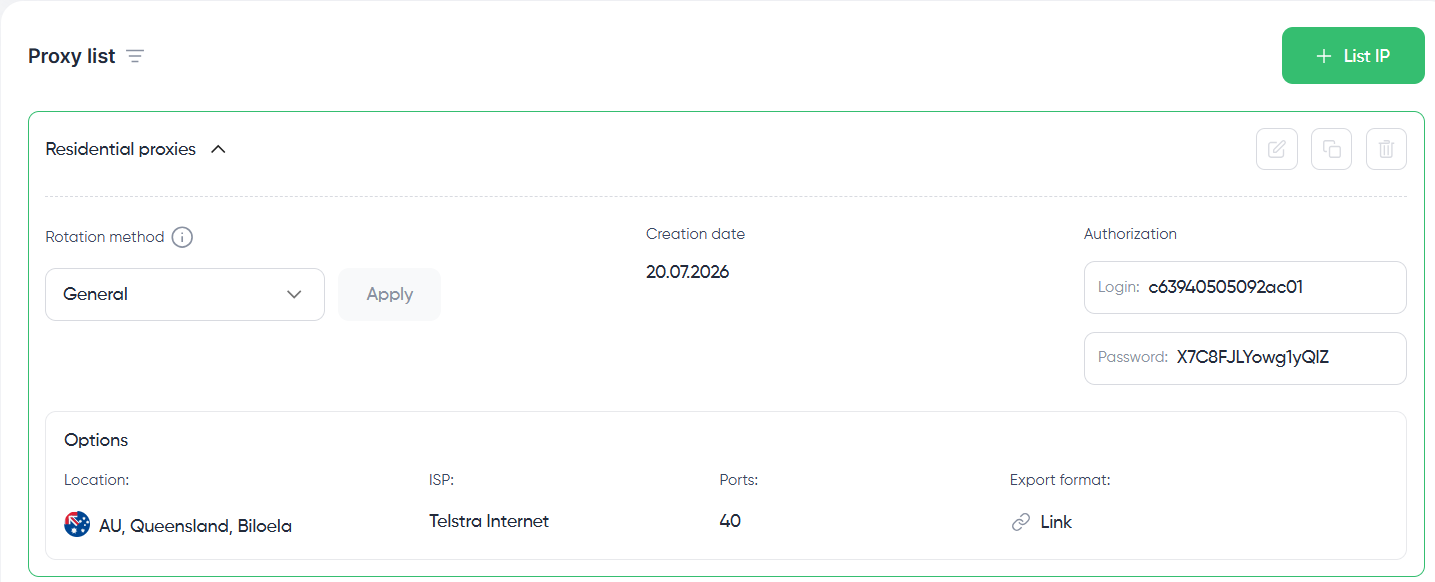
A quick note on what is a residential proxy list: it is a snapshot of the IP addresses available at the moment of creation, filtered to the location and characteristics you selected.
Are residential proxies legal?
In most cases, yes: residential proxies are legal to buy and use. What is a residential proxy in legal context comes down to how the IPs are acquired.
A lawful residential network is constructed on documented consent. Users are given the option to install an application or SDK on their device, explicitly opt in to share their idle bandwidth with the network (usually in exchange for either a free or premium version of the application), and can voluntarily discontinue their participation at any time.
The network maintains a chain-of-custody record for every single IP. That documented consent is what illustrates the difference between a legal network and a botnet, and 2026 has already showcased the consequences of not having it:
- IPIDEA shutdown (January 2026): Google's Threat Intelligence Group obtained a court order and, through collaboration with Cloudflare, dismantled IPIDEA, a network that peaked at over 9 million Android devices whose owners never knowingly opted in. The 13 providers reselling its pool, including LunaProxy, PyProxy, and IP2World, vanished within 24 hours. We elaborated on the case and the migration options in our IPIDEA shutdown analysis.
- Bright Data smart TV SDK (June 2026): Include Security researchers reverse-engineered an SDK embedded in free smart TV applications that allows always-on TVs to become scraping exit nodes. Technically opt-in, but the controls were weak: the peer channel lacked real authentication, and on iOS the traffic even bypassed a configured VPN. More details can be found in our Bright Data smart TV breakdown.
- NetNut takedown (July 2026): A residential network traced to about 2 million compromised devices was disrupted as a result of collaboration between Google and the FBI, with hundreds of domains seized. The most documented use of the network was password spraying. For teams caught mid-contract, we provided a migration guide after the NetNut takedown.
The second part of the compliance equation is what you do with the proxies, and the line between what is a residential proxy legal use case and what is not is worth spelling out rather than implying:
Approved use cases | Restricted use cases |
Scraping publicly available data (prices, listings, SERPs) | Scraping personal, non-public, or login-gated data |
SEO and search monitoring | Evading bans or creating fake accounts at scale |
Ad verification and brand protection | Fraud, phishing, or any deceptive activity |
QA, localization, and market research | Accessing financial platforms or crypto transactions |
AI training data from public sources | DDoS, torrents, piracy, dark web access |
No provider's compliance certificate covers you if the activity itself breaks privacy laws, platform rules, or local regulations.
How to choose a residential proxy provider
Beyond knowing what is a residential proxy, it is just as important to understand who is safe to buy one from. Considering the takedown examples above, the vetting criteria become obvious. Check the provider against this list before you spend any budget:
- Sourcing documentation: Explicit user opt-in, simple opt-out, and chain-of-custody records available on request. If a provider can't give you a sourcing answer, you don't need to ask any more questions.
- Pool size and targeting depth: A healthy residential IP pool should be tens of millions of IPs, with targeting options down to country, region, city, and ISP, not just country.
- Published performance metrics: Look for a stated 95%+ success rate on real targets with 99.5%+ uptime. If they have confidence in their product they will publish metrics, otherwise you will be hearing a lot about "reliability."
- Protocol support: Same endpoints for HTTP/S and SOCKS5, so proxies are usable in any scraper, anti-detect browser, or automation stack with no workarounds.
- Rotation control: Sticky sessions, time-based, and per-request rotation controlled by you, the user, and not the provider.
- Third-party trust signals: Consistent positive ratings on review platforms like G2 and Trustpilot, and being in the market for multiple years. Botnet-based providers tend not to last long enough.
Proxy-Seller is compliant with GDPR and ISO/IEC 27001, with IPs obtained from real users through consent-based agreements. We’ve been in the market for more than 12 years, servicing 185,000+ clients and boasting a 4.8-star G2 rating.
Get geo-accurate data from 220+ locations. Proxy-Seller's residential pool offers country, city, and ISP-level targeting. Buy residential proxies with rotating and sticky sessions, SOCKS5 & HTTP support, and 24/7 live support.
If you’re comparing providers, this is also the stage where people usually assess what they consider the best residential proxies for their workflow, budget, and targeting requirements.
Closing thoughts
At this point, the answer to what is a residential proxy comes down to a single trade: you pay by the GB for IPs that websites treat as real visitors. Whether that trade makes sense depends entirely on your task, so here's how the three most popular options compare:
Criteria | Residential proxies | Datacenter proxies | VPN |
IP origin | Real user home devices, ISP-assigned | Commercial hosting networks | Provider-owned datacenter servers |
Trust level | High | Low | Low |
Block rate on protected sites | Low | High, 40-80% on protected targets | High, VPN ranges are publicly listed |
IP pool | Provider-dependent; Proxy-Seller offers 47M+ rotating household IPs | Fixed subnets (600+ Class C / 200+ Class B) | A few thousand servers shared by all users |
Session control | Rotating or sticky, per request or per session | Static | One tunnel IP, changes only on reconnect |
Geo-targeting | Country / region / city / ISP | Country | Country, occasionally city |
Concurrency | Thousands of parallel sessions | High within owned IP count | One connection per device or app |
Pricing model | Metered, about $3.5/GB & $1.45/GB at volume | Per IP, from as low as $0.02/IP (for IPv6 proxies) | Flat, roughly $3-13/month |
Best for | SERP and price monitoring, ad verification, geo-accurate collection | High-volume scraping of unprotected targets, QA automation | Personal privacy and browsing |
If your data depends on location or IP reputation, use residential proxies. Use datacenter proxies if you need cheap volume on targets without serious protective measures. And keep your VPN for personal browsing: it was never designed to handle parallel data workflows, and there is nothing you can do to change that.
FAQ
For anyone weighing what is a residential proxy against an ISP proxy, the difference is sourcing and behavior. Residential proxies contain IPs sourced from a real user's home device with the owner's consent, and they rotate because those devices go on and offline. ISP proxies contain IPs registered with Internet providers but hosted on datacenter infrastructure, reserved for proxy providers under commercial agreements. With no real user behind them, there is no rotation: the IP stays static and dedicated to you, which facilitates long sessions and repeated logins.
It is standard for billing to be based on GB of traffic rather than IPs. Proxy-Seller pricing starts at $3.5/GB on the 3 GB plan and drops to $0.3/GB at volume. Failed requests consume traffic too, so the practical metric is cost per successful request rather than the sticker price per GB. Most providers allow the purchase of as little as 1GB or even less, so you may quickly measure the real cost on your actual targets.
No, and that is fine. Because datacenter proxies are built on server infrastructure, they achieve much better raw speed and latency than residential proxies. However, residential proxies win on effective throughput. Datacenter pools that lose 40-80% of requests to blocks, they provide less usable data per hour than residential pools that pass 95%+ of requests. For lightly protected targets where nothing gets blocked, datacenter proxies will provide more speed for a cheaper cost.
The most common use case for a residential proxy is gathering location-dependent data: SERP and rank monitoring, competitor price tracking, ad verification, and travel fare aggregation. All of these tasks return different results depending on where the request appears to come from, so teams route them through residential IPs located within each target market. Quality assurance and localization testing, the collection of training data for AI, and threat intelligence checks round out the common workflows.
A residential proxy is an IP address that an Internet Service Provider has assigned to a real home user, and you tunnel your web traffic through it. When you use one to visit a website, that website will think you are using normal home internet. Because the IP address belongs to an actual home network, it carries none of the flags that datacenter ranges contain, which is why residential IPs get through at a 95-99% success rate where server addresses get blocked.
PROXIES FROM $0.02/IP
Ready to put this into practice?
Pick a proxy type and location, and start using it within minutes.
Instant delivery
24/7 support
Refund policy
About the author