 Proxy for Telegram
 Proxy for LinkedIn
 Proxy for Google
 Proxy for Ebay
 Proxy for Twitter
 Proxy for TikTok
What is a mobile proxy? Mobile proxy meaning & how to use

Your ad verification script sends a mobile user agent, a phone-sized viewport, and the right timezone, and still hits a CAPTCHA on most pages. The fingerprint says phone, but the IP says hosting provider. Campaigns targeted by carrier don’t show up at all, because no T-Mobile or Vodafone subscriber ever connects from a datacenter.
Here’s the short version of what is a mobile proxy: a proxy that exits through a carrier IP shared by hundreds of real subscribers, which is why platforms hesitate to block it. I’ll show how that works, which tasks justify the price, and when a residential IP does the same job for less.
What are mobile proxies?
Mobile proxies are servers that route your requests through IP addresses that mobile carriers assign to SIM-based devices on 4G/LTE and 5G networks. Carriers such as AT&T, T-Mobile, Verizon, Vodafone, and Orange issue these IPs. Each exit IP belongs to the carrier’s ASN (autonomous system number), and the carrier shares it among many real subscribers through carrier-grade NAT (CGNAT).
That’s the mobile proxy meaning in one line: a legitimate mobile IP with a carrier ASN, not a hosting ASN. The device behind it can be a phone, a USB modem, or a rack of modems, but the target website only sees the carrier.
Proxy-Seller offers mobile proxies in 20 countries, including the USA, Germany, France, and India, with targeting by country and carrier. In the USA, for example, you pick AT&T, T-Mobile, or Verizon before you buy. Every order works over HTTP(S) or SOCKS5, with username/password or IP allowlist authentication.
How mobile proxies work
Mobile proxies route your traffic through a SIM-enabled device on a carrier network, so every request exits with a carrier IP. Four parts make that work: the provider’s gateway, the SIM hardware, the carrier network with its CGNAT, and the rotation settings. The hardware is interchangeable. The trust comes from where the exit IP lives and how many real subscribers share it.
1. Requests enter the proxy gateway
Your browser, scraper, emulator, or application sends a request to the provider endpoint using HTTP, HTTPS, or SOCKS5. The gateway authenticates the connection by username and password or IP allowlist, then forwards it to the modem assigned to your order. A dedicated modem serves only you, while a shared one is split between several customers, which mainly affects speed.
2. A carrier network supplies the exit IP
The modem holds a SIM card from the carrier you picked, such as T-Mobile in the USA or EE in the UK, and connects to its 4G/LTE or 5G network. The carrier, not the proxy provider, assigns the public IP. The target sees that IP and the carrier’s ASN, never your real IP or a hosting ASN. Speed depends on signal and cell load: Proxy-Seller channels run at 5–30 Mbit/s.
3. CGNAT shares public addresses
Carriers have far more devices than public IPv4 addresses, so they use carrier-grade NAT (CGNAT) to put hundreds, sometimes thousands, of subscribers behind one public IP. Blocking that IP would cut off all of them, including paying customers the platform wants to keep. That’s why most sites answer suspicious mobile traffic with rate limits, CAPTCHAs, and behavioral checks instead of IP bans.
The shared IP also has a history that looks human. Carriers reassign addresses all the time as phones reconnect and move between cell towers, so a mobile IP rarely builds the static reputation that gives a server away. This doesn’t make it undetectable: it moves detection from your IP to your behavior and fingerprint.
4. Rotation controls session continuity
The provider can’t pick a specific IP for you. It makes the modem reconnect, and the carrier hands out a new address from its pool. The gateway, port, and credentials stay the same, so your script doesn’t need a restart.
On Proxy-Seller, you set rotation per order: by link, where opening a URL gets you a new IP on demand, or automatically every 5 or 30 minutes, depending on the location.
COUNTRY + CARRIER TARGETING
Run social and ad workflows from real carrier IPs
Proxy-Seller mobile proxies route requests through AT&T, T-Mobile, Verizon, Vodafone, and other carriers in 20 countries, with rotation by link or every 5 or 30 minutes, from $10 per IP.
What is a mobile proxy used for? Common usage examples
They’re worth paying for on tasks where a carrier ASN and a CGNAT-shared IP change the outcome. These are the five use cases where teams pick them over residential or datacenter alternatives:
SEO and public web data collection
Track mobile Google results and compare localized rankings through a selected country and carrier. SEO teams can route Screaming Frog, Scrapy, Playwright, or a custom Python collector through a mobile endpoint with a matching user agent when datacenter IPs start hitting CAPTCHAs or return results for the wrong location.
In Proxyway’s 2026 benchmarks, datacenter proxies succeeded on Amazon and Google about 57% of the time, versus 74–75% for residential and mobile.
Ad verification and regional campaign checks
Verify whether Google Ads, Meta Ads, or TikTok Ads campaigns show the correct creative, landing page, and redirect in an approved target market. Country-and-carrier targeting helps isolate the network variable, while device and browser settings must be configured separately. Campaigns targeted by carrier only show up on that carrier’s IPs.
Social media management on owned brand accounts
Instagram, TikTok, Facebook, and X are built for phones, so a carrier IP matches how their users actually connect. Use mobile proxies for authorized work on company-owned profiles, such as publishing, moderation, and regional page QA. Keep one controlled session when continuity matters, and don’t use the setup for account farming or unauthorized multi-accounting.
Competitor and market monitoring
E-commerce teams, analysts, and marketers use cellular networks to review competitor pages, pricing, offers, and other public market data on marketplaces like Amazon and Walmart, usually with Playwright or Scrapy collectors. They’re particularly in demand when content changes depending on region, device type, or the kind of network the traffic comes from.
Software testing and 4G/5G environment simulation
QA engineers combine Playwright, Puppeteer, or Selenium device emulation with a mobile IP to test geo-locked features, app store pricing, and localized offers. Cloud phones help here too; see the VMOS Cloud setup guide for connecting one to a Proxy-Seller proxy.
Pros and cons of mobile proxies
You can’t fully understand what is a mobile proxy without an honest look at its trade-offs. Mobile routes solve specific network-origin problems, but their performance, inventory, and pricing depend on real carrier infrastructure.
Pros
Advantage | Why it matters | Proxy-Seller detail |
Carrier ASN | Target websites see the same carrier network their phone users connect through, not a server | AT&T, T-Mobile, Verizon, Vodafone, Orange, Jio, EE |
CGNAT-shared IP | Banning the IP would block real subscribers, so platforms rarely hard-block it | Each IP sits behind the carrier’s CGNAT, like a real subscriber’s phone |
Flexible IP rotation | Get a fresh IP on demand or on a schedule without restarting your script | By link, every 5 minutes, every 30 minutes |
Precise geo-targeting | Check content, ads, and SERPs the way users of a specific carrier see them | Country + carrier targeting in 20 countries |
No per-GB metering | Costs don’t spike when pages get heavier | Billed per IP; carrier fair-usage policy applies |
Cons
Disadvantage | What it means in practice | How to reduce it |
Higher cost | In Proxyway’s 2026 market research, the median entry price was $30 for mobile proxies vs $4 for residential; at 50 GB, it was $3.50/GB vs $3.00/GB | Use mobile IPs only for the steps that need a carrier ASN, and route bulk collection through residential |
Variable connection speed | Throughput depends on signal, cell load, and the network generation | Pick LTE or 5G channels and test speed before scaling |
Shared IP history | Another CGNAT user’s activity can add friction, like an extra CAPTCHA | Rotate by link when a target starts challenging the IP |
Not every IP is from a carrier | Some providers sell residential or datacenter IPs as mobile, and lookup tools don’t always agree on which is which | Check a sample of IPs in two lookup tools before you commit |
Smaller pools | Every IP needs a SIM, a data plan, and a modem, so pools are far smaller than residential | Rotate by link instead of buying more IPs |
3G vs. 4G/LTE vs. 5G mobile proxies
The mobile network generation mainly affects connection speed, latency, and availability. It doesn’t determine IP trust on its own, which also depends on the mobile carrier ASN and the network’s use of CGNAT.
Network generation | Speed and latency | Best for | Availability and limits |
3G | Lower speeds and higher latency than newer standards | Lightweight browsing and workflows that specifically require a 3G connection | Shrinking coverage as carriers phase out legacy networks |
4G/LTE | Balanced speed, latency, and connection stability | Mobile SERP monitoring, ad verification, public-data collection, and application testing | Broad carrier coverage across most markets; slower than 5G for bandwidth-intensive tasks |
5G | Higher potential speeds and lower latency | Bandwidth-intensive data collection and latency-sensitive workflows | Varies by country and operator; less consistent than 4G/LTE |
Proxy-Seller offers 4G, LTE, and 5G mobile proxies, not 3G. The available network generation, carrier, and location depend on the selected country and current inventory.
Mobile proxies vs residential vs datacenter vs ISP
The real difference between a mobile proxy and the other three types is the ASN the target sees. The four types also differ in where the IP comes from and how you pay. Here’s how they compare, with Proxy-Seller’s starting prices:
Criteria | Mobile | Residential | Datacenter | ISP |
IP source | SIM devices on carrier networks | Home users’ devices | Hosting servers | Servers with IPs registered to ISPs |
Trust level | Highest | High | Low | High |
ASN the target sees | Mobile carrier | Home ISP | Hosting provider | Home ISP |
IP sharing | Shared via CGNAT | Shared rotating pool | Dedicated or shared | One customer per IP |
Rotation | By link or on a timer | Per request, timed, or sticky | Static | Static |
Speed | 5–30 Mbit/s | Up to 1 Gbps, varies by device | Up to 1 Gbps | Up to 1 Gbps |
Billing | Per IP | Per GB | Per IP | Per IP |
Starting price | From $10/IP | From $1.45/GB | From $0.02/IP | From $0.98/IP |
Best for | Social media management, mobile ads, app QA | Large-scale scraping, broad geo coverage | High-volume tasks on unprotected targets | Long sessions on a fixed IP |
If your workflow needs city- or ISP-level targeting beyond a carrier ASN, residential proxies cover 220+ locations from $1.45/GB.
If you need private SOCKS5 & HTTPs proxies in other network types, Proxy-Seller sells them under the same account.
What is a mobile proxy pool built from? Carrier deals, SDK networks, and SIM farms
Ask every vendor who owns the SIMs before you buy. The answer decides your compliance risk. There are three common models:
- Carrier agreements and provider-run modems: the provider rents SIM capacity from licensed operators and runs the devices itself, so sourcing is documented end to end
- SDK networks: apps on consumers’ phones share their connection in exchange for a reward; consent quality varies by provider, and Proxyway’s 2026 research notes some major players have dropped peer-to-peer mobile pools altogether
- SIM farms: racks of SIM cards and modems; legitimate when the provider owns the SIMs under carrier contracts, risky when it can’t explain where they come from
This isn’t theoretical. In late January 2026, Google disrupted IPIDEA, one of the largest residential proxy networks, after finding it enrolled consumer devices without proper consent and served 550+ threat groups. Google then acted against 10+ related Chinese providers, and their customers inherited the compliance fallout.
Proxy-Seller sources mobile IPs through official agreements with licensed carriers. It complies with GDPR, CCPA, and the ePrivacy Directive, holds ISO/IEC 27001:2022 and ISO 9001:2015 certifications and the EWDCI Trust Seal, and provides DPA and SCC documentation from day one.
How to choose a mobile proxy provider: an 8-point checklist
Once you know what is a mobile proxy supposed to deliver, the provider decides whether you get it. Before you compare the best mobile proxy providers on price, check these eight points:
Real carrier ASNs: check a sample of IPs in at least two lookup tools and look for a carrier name or a Mobile tag, not just a familiar ISP
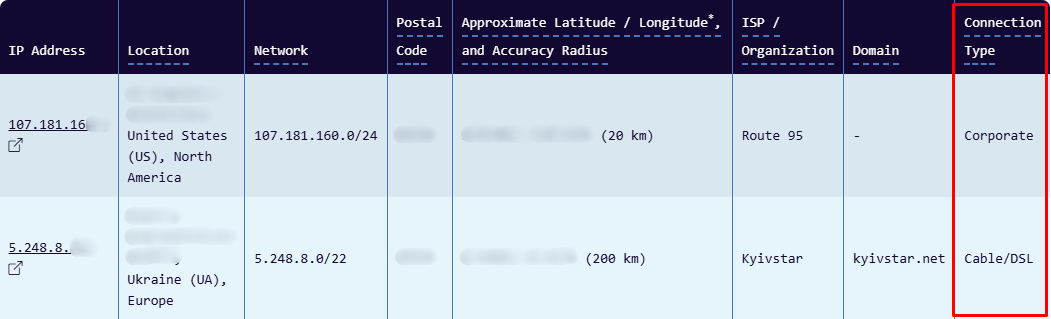
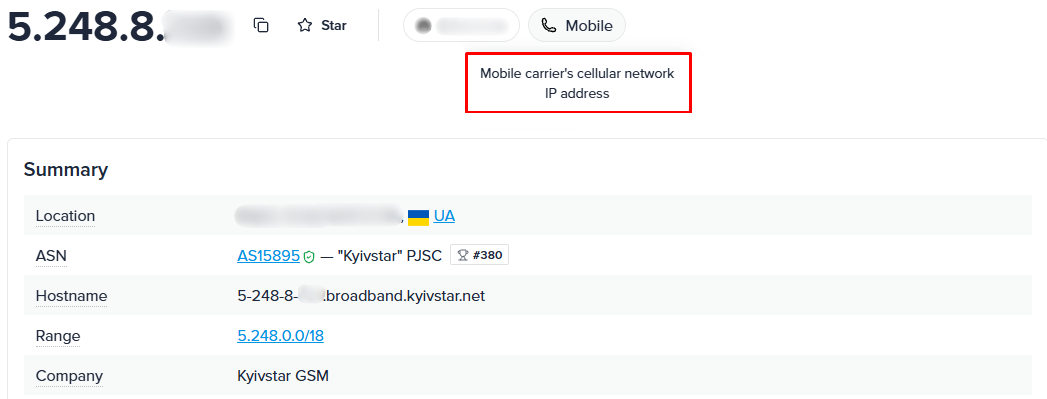
One lookup tool isn’t enough. I checked two IPs: a datacenter IPv4 and a cellular IP from Kyivstar, a Ukrainian carrier. MaxMind got the datacenter IP right, with a hosting provider as ISP and a Corporate connection type. The Kyivstar IP came back as Cable/DSL, because the carrier runs home and mobile internet from the same ASN. IPinfo caught it and tagged the same address as Mobile, a cellular network IP.
Carrier and country targeting: confirm the exact carriers you need, not just the country, and ask how many IPs the carrier pool holds
Rotation control: on-demand rotation by link plus timed options
Dedicated vs shared channels: dedicated for account work, shared for cheaper collection
Protocols and authentication: HTTP, HTTPS, and SOCKS5, with username/password or IP allowlisting
Documented sourcing: an acceptable use policy and a clear answer on where the SIMs come from
Flexible terms: weekly rentals for testing and a stated first-response time from support
Test before you scale: run your real target through a weekly rental and track success rate, p95 latency, and CAPTCHA rate against your current setup
Proxy-Seller rents mobile proxies for 1 or 2 weeks or for 1–12 months, from $10 per IP for a shared channel on a weekly rental, or $49 a month for a dedicated one. Teams from $500 MRR get a named account manager, and median first response in live chat is under 1 minute.
How to use mobile proxy setups in code, browsers, and devices
What is a mobile proxy setup like in practice? The same as any other proxy: pick the country and carrier when you order, set the rotation mode in the dashboard, copy the host, port, and proxy credentials, and paste them into your tool’s mobile proxy settings. Here’s how that works in the three places teams use them most.
Python: Requests with a mobile proxy
Python
import requests
import time

PROXY = "http://USERNAME:PASSWORD@HOST:PORT"  # from your Proxy-Seller dashboard
proxies = {"http": PROXY, "https": PROXY}

r = requests.get("https://ipinfo.io/json", proxies=proxies, timeout=30)
print(r.json()["org"])  # should show a carrier's ASN

# Get a fresh IP on demand: call the rotation link from your order
requests.get("YOUR_ROTATION_LINK", timeout=30)
time.sleep(10) # give the modem time to reconnectFor SOCKS5, install requests[socks] and change the scheme to socks5h://. Scrapy, Playwright, Puppeteer, and Selenium take the same host, port, and credentials in their proxy settings.
Anti-detect browsers and cloud phones
For social media management, assign one mobile proxy per browser profile in AdsPower, Dolphin Anty, Octo Browser, or Incogniton, or on a cloud phone like GeeLark or VMOS Cloud. The WADE X anti-detect browser guide shows the full profile setup with a Proxy-Seller proxy.
Android and iPhone
On both, the proxy lives in your Wi-Fi network settings: set Proxy to Manual and enter the host and port. Android has no username field there, so allowlist your network’s IP in the dashboard first; iPhone lets you turn on Authentication instead. Mobile data and some apps skip this setting, so for app traffic use SOCKS5 through a proxy client app; see the SOCKS5 setup guide for all devices.
Fingerprint alignment: a mobile IP alone won’t make you look mobile
What is a mobile proxy unable to change? Your device. It swaps your IP, not your fingerprint. If a request comes from a T-Mobile IP but carries a Windows Chrome user agent, a 1920×1080 screen, and a timezone from another continent, the mismatch cancels the trust the carrier IP gives you.
Match the whole fingerprint to the proxy: an Android or iOS user agent, a mobile screen size, and the timezone and language of the carrier’s country. Anti-detect browsers do this per profile, which is why teams pair them with mobile proxies.
Final thoughts on how to use mobile proxy solutions
What is a mobile proxy worth to your team? Pick mobile proxies when your workflow hits at least one of these:
- Instagram, TikTok, Facebook, or X management on owned or client accounts: these platforms are built for phones, so a carrier IP matches how their users connect
- Carrier-specific content checks: the page or offer you need to see differs by carrier and location
- Mobile app QA across regions: real 4G/5G routing shows geo and carrier bugs that datacenter proxies hide
- Ad verification on mobile placements: you need to confirm what a Verizon or Vodafone user actually sees
If none of these apply, a residential, ISP, or datacenter proxy will do the job for less. The same goes for real-time gaming: mobile IPs change, and their speed varies, and they don’t carry UDP game traffic, so a PUBG mobile proxy setup runs better on a dedicated datacenter IP. If one does, test on a single carrier first: compare success rate and cost per valid response against your current setup, then scale.
4G/LTE/5G PROXIES IN 20 COUNTRIES
Stop losing accounts and ad checks to datacenter flags
Proxy-Seller mobile proxies route your requests through AT&T, T-Mobile, Verizon, and other carrier IPs, from $10 per IP with no per-GB metering.
FAQ
Datacenter IPs belong to hosting ASNs that commercial blocklists already flag, so platforms can block entire ranges with zero impact on real users. Mobile IPs belong to carrier ASNs and are behind CGNAT, where hundreds of real subscribers are behind a single public IP. Blocking that IP would cut off paying customers, so platforms rely on rate limits and behavioral checks instead.
Not necessarily. Both depend on the connection at the other end: for mobile IPs, the speed is limited by the signal and the cell load (4G/LTE or 5G), while for residential proxies, the speed is limited by the internet connection of the household. Proxy-Seller channels run at 5–30 Mbit/s, which varies based on the carrier and location. If raw speed is more important than the carrier ASN, ISP, or datacenter proxies are the faster option.
You select the method for each order: rotation by link, where you open a URL to get a new IP on demand, or automatic rotation every 5 or 30 minutes, depending on the location. Rotation is seamless: the gateway and credentials stay the same, and the session doesn’t drop. Use 5-minute rotation for distributed data collection, and 30-minute or on-demand rotation for work involving account logins.
Yes, it’s legal to use a mobile proxy in most countries as long as you use it for lawful purposes such as managing your own accounts, verifying ads, testing apps, or scraping public data. The activity is what matters, not the proxy: you still have to comply with privacy regulations (GDPR, CCPA) and the target’s ToS. Select a supplier that details how it obtains its IPs.
A mobile proxy built with USB 4G or 5G dongles consists of a server you set up and manage on your own. It gives you ownership, but you pay for the hardware and data plans, maintain your own rotation scripts, and you’re limited to the carriers in your country. Proxy-Seller allows you to purchase carrier-targeted IPs in 20 countries without needing to run any hardware.
PROXIES FROM $0.02/IP
Ready to put this into practice?
Pick a proxy type and location, and start using it within minutes.
Instant delivery
24/7 support
Refund policy
About the author