

HTTPS, SOCKS and CGI proxies can be combined in chains where a certain number of proxy servers are connected in the chain and used to increase the level of anonymity of a particular user. This article discusses how to set up a proxy chain, how to create one, and what common commands are behind it.
Chains are created by the user. To make such a chain, you need special software. A chain can consist of either one type of proxy or different ones. Each type has its own way of creating a chain. The most complex is HTTP, and the simplest is CGI.
It is important to remember that if at least one proxy in the chain ceases to work, the entire system ceases to function.
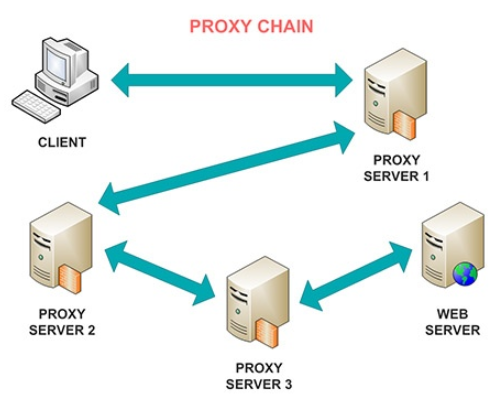
Creating such a chain has a number of problems, the main of which is the use of special programs. To do this, perform the following manipulations:
To implement the entire process, HTTP must necessarily support a similar protocol.
From SOCKS proxies, you can create chains of various lengths. To build them you also need to use special programs, since ordinary ones can work only with one SOCKS proxy server.
The most popular programs for building chains of HTTP(S) and SOCKS proxies are ProxyChain, SocksChain, HTTPort.
Creating a chain from CGI is very easy. To do this, follow a series of recommendations:
Subsequent anonymizers can be used in the same way. In the last proxy chain, type the URL of the necessary site and go to it. Chaining CGI occurs without the use of programs.
For such a union, proxies in the chain must be in a certain order. Without this condition, subsequent work will be impossible.
Creating chains is possible:
Chaining is not allowed:
In terms of anonymity and increased speed, it is enough to use a chain of two proxies. Data will go sequentially through each proxy.
You'll learn how to install the proxy chain software on your Linux system. Use the commands below based on your distribution:
| Distribution | Installation Command |
|---|---|
| Debian, Ubuntu, Linux Mint, Elementary OS | sudo apt-get install proxychains4 |
| OpenSUSE Leap | sudo zypper install proxychains |
| Fedora | sudo dnf install proxychains |
| CentOS/RedHat | sudo yum install proxychains |
| Arch Linux | sudo pacman -S proxychains-ng |
Once installed, verify by running proxychains --version. This confirms that the tool is ready to use.
Note: Kali Linux includes proxychains by default. On Kali, the main config files reside in /etc/proxychains.conf or /etc/proxychains4.conf. You can customize proxy lists and DNS settings here. To use proxychains on Kali, simply prepend your commands with proxychains or proxychains4.
If you want the latest features or expect to apply custom patches, consider installing proxychains from source. Clone the official repo at https://github.com/haad/proxychains and follow the build instructions. You’ll need glibc and development tools like gcc and make to compile successfully.
Ensure you use reliable proxy services with proxychains for best results. Proxy-Seller offers fast, private SOCKS5 and HTTP(S) proxies with global coverage. Their user-friendly dashboard and flexible plans make configuring proxies easy. With 24/7 support and a wide selection including residential, ISP, datacenter, and mobile proxies, Proxy-Seller fits various use cases perfectly. Using Proxy-Seller proxies with proxychains enhances performance, privacy, and reliability.
DNS leaks happen when DNS requests bypass your proxy chain, exposing your real IP and compromising privacy. Proxychains prevents this by forwarding DNS queries internally in most cases, but correct setup matters.
Proxychains supports remote DNS lookup, forwarding queries through proxies to avoid leaks. Local DNS queries run normally unless configured otherwise. You should specify fast, privacy-respecting DNS servers to improve security.
We recommend replacing the default DNS (4.4.2.2) with popular public alternatives like:
Edit the DNS resolver file used by proxychains depending on your distro:
Note: Arch Linux does not have a dedicated proxyresolv file for proxychains. On Arch, you can manually configure your system’s DNS to trusted servers and rely on proxychains’ internal DNS forwarding.
After configuring DNS, test for leaks using websites like dnsleaktest.com or with command-line tools like dig or nslookup through proxychains. For example, run proxychains dig google.com to see which DNS servers respond.
To redirect your network traffic via a proxy chain, prepend proxychains or proxychains4 to your commands. This ensures that all traffic goes through your proxy network.
For apps like youtube-dl without native SOCKS support, wrapping them with proxychains enables video downloads via proxies, boosting privacy and bypassing blocks.
You can launch an interactive shell session tunneled through proxychains by running:
All commands inside this shell then use the proxy chain automatically.
Remember, terminal emulators like gnome-terminal run shells such as bash or zsh. Proxychains works at the shell level, so it affects commands executed inside the shell, not the terminal emulator itself.
Environment variables like http_proxy and https_proxy differ from proxychains. They depend on application support and usually handle HTTP/HTTPS proxies only. Proxychains redirects all TCP traffic transparently, making it more versatile. Use environment variables for programs that don’t work well with proxychains.
Combine proxychains with tools like tcpdump or Wireshark to monitor your proxied traffic. This helps troubleshoot or analyze network behavior.
Here’s a quick guide for common commands behind proxychains:
Use Proxy-Seller proxies with proxychains to elevate anonymity and bypass geo-restrictions. Proxy-Seller covers over 220 countries with IPv4, IPv6, residential, mobile, ISP, and datacenter proxies. Specify your chosen proxies in the proxychains config for tailored routing.
Their proxies support speeds up to 1 Gbps and maintain stable uptime, crucial when redirecting traffic through proxy chains. Proxy-Seller allows IP authentication via username/password or IP whitelisting, ensuring compatibility with proxychains setups.
Take advantage of their personal dashboard and API to manage proxies effortlessly while using proxychains. This integration simplifies configuring proxy-chain npm library projects or any tasks requiring proxy chain setup, including free proxy chain testing before scaling up to paid plans.

 PHP
PHP Node.js
 Python
 Java
Java Golang
 en
en  Español
  中國人
中國人  Tiếng Việt
  Deutsch
  Українська
  Português
  Français
  भारतीय
  Türkçe
  한국인
한국인  Italiano
  Gaeilge
  اردو
اردو  Indonesia
  Polski
Comments: 0