

ScrapeBox is the most powerful and popular SEO tool of its kind! Used by SEO companies and freelancers from all over the world. But to improve such a powerful tool, you should know what is a proxy: methods of use, types. We'll discuss why to use paid private elite proxies with ScrapeBox and explore proxy settings for optimal performance.
The use of ScrapeBox proxies is integral to nearly every function, routing requests through different IPs to protect your identity and improve scraping success.
The Harvester in ScrapeBox uses footprints and keywords to gather URLs from search engines. When you use scrapebox proxies here, each request routes through a different IP. This masks your real IP and avoids rate limits or bans.
The Harvester runs multiple threads – each thread can use a unique proxy to distribute the load evenly. This threading system maximizes speed while minimizing the chance of detection.
Monitoring and managing harvested URLs happens in the URL Harvesting section. Here, proxies help you safely test and validate URLs without exposing your IP. Clean, updated proxy lists prevent using dead IPs and reduce scraping errors.
You choose the search engines to target and input your proxies (HTTP, HTTPS, SOCKS4, or SOCKS5). ScrapeBox rotates proxies across search engine queries in its threads to avoid overusing any single IP. Proxy rotation happens automatically, but each proxy won’t be reused too frequently per thread to prevent bans.
The Comment Poster can ping your harvested URLs to create backlinks. Using proxies is essential here, as many sites block repeated requests from the same IP. Proxies mask your IP during posting. However, automatic commenting carries a higher risk of being flagged – always use proxies wisely and avoid spammy behavior.
In summary, proxies for ScrapeBox interact with every feature by routing requests through different IPs. This protects your identity and improves scraping success. The threading system spreads requests across proxies, while the rotation mechanism handles proxy use per thread. Understanding this will help you optimize your setup of scrapebox proxies.
Free private proxies for ScrapeBox may seem tempting but come with severe risks. Many are slow, unstable, or already blacklisted. Using them often leads to permanent bans from Google and search engines. This results in inconsistent page rank checks and unreliable scraping data.
Paid private elite proxies offer stability and reliability. You get consistent speed, high uptime, and lower chances of being blocked. This means stable results and smoother scraping.
There are three main proxy types to consider:
| Comparison Factor | Residential | Rotating | Datacenter |
|---|---|---|---|
| IP Reputation | Highest | Medium | Lowest |
| Speed | Lowest | Medium | Highest |
| Uptime (Paid) | >95% | >95% | >95% |
| SEO Tool Compatibility | Generally preferred | Can cause login issues | Generally preferred |
Proxy-Seller stands out as a trusted provider with over 10 years of experience. They serve 500,000+ clients with high-quality, elite private proxies.
Their offerings include residential, ISP, datacenter IPv4 and IPv6, plus mobile proxies suitable for SEO and scraping. They deliver speeds up to 1 Gbps, 99% uptime, and cover 220+ countries. IPs come from ethical, GDPR-compliant sources, ensuring trust and safety. Their user-friendly dashboard lets you auto-renew proxies, manage lists, and get 24/7 support.
For advanced users, Proxy-Seller offers API access to manage proxy lists and integrate scraping setups seamlessly with ScrapeBox. Their Mix Packages provide cost-effective access to diverse subnets and IP types – perfect for rotating proxy needs in ScrapeBox.
Understanding rotating proxies is important: they change your IP frequently, helping avoid bans but sometimes breaking login sessions or tools needing static IPs. Paid private proxies, especially from Proxy-Seller, balance these needs well.
Using paid proxies from a reliable provider like Proxy-Seller ensures you avoid the pitfalls of free private proxies for ScrapeBox and get sustained, quality scraping results.
You’ll learn how to configure proxy settings in ScrapeBox to get the best results based on your proxy type.
Configuration for static proxies:
Adjust these dynamically. Reduce connections or increase delays when hitting CAPTCHAs or blocks to stay under the radar.
Configuration for rotating or backconnect proxies:
Use ScrapeBox logs and external tools like PingPlotter to monitor proxy speed and latency. This helps you identify slow or dead proxies quickly.
Set up proxy failover by preparing fallback proxy lists. If a proxy dies mid-scrape, ScrapeBox can switch to a backup proxy, keeping your tasks running smoothly. You can schedule proxy health checks and alerts inside ScrapeBox for ongoing monitoring.
Here’s a sample proxy thread and delay setup:
| Proxies Count | Threads per Proxy | Request Delay |
|---|---|---|
| 100 | 1 | 10 seconds |
| 500 | 3 | 12 seconds |
| 1000 | 5 | 15 seconds |
Adjust these dynamically. Reduce connections or increase delays when hitting CAPTCHAs or blocks to stay under the radar.
Proxy-Seller is the go-to provider for reliable SOCKS5 and HTTP(S) proxies optimized for ScrapeBox. Their dashboard allows fast proxy rotation, easy renewal, and health monitoring. This complements ScrapeBox’s proxy management perfectly.
With 24/7 customer support, Proxy-Seller helps configure proxies for optimal ScrapeBox performance. Their 24-hour proxy replacement or refund policy gives you peace of mind for uninterrupted scraping.
Use Proxy-Seller’s extensive location options to pick proxies that match your scraping targets geographically. This improves success rates and lowers block risks in ScrapeBox operations.
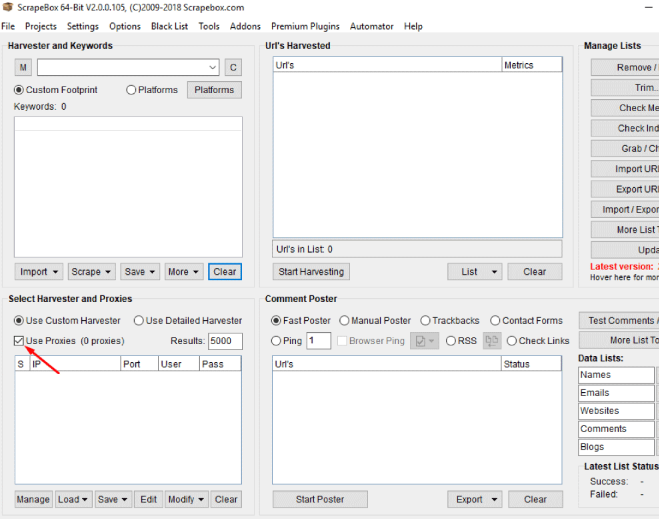
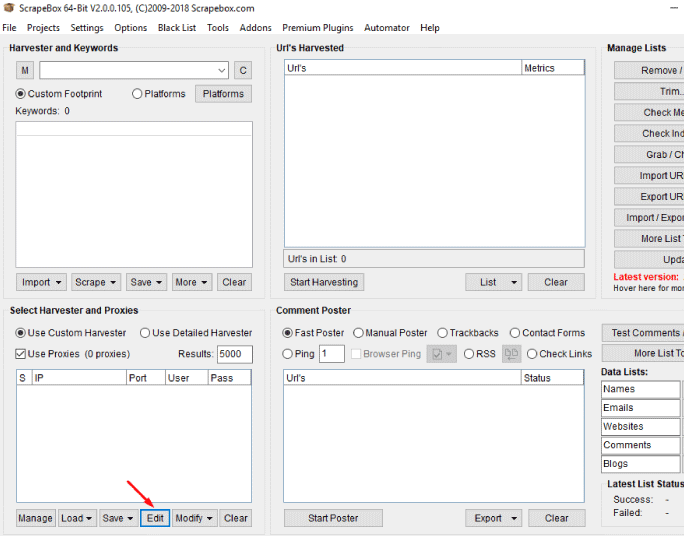
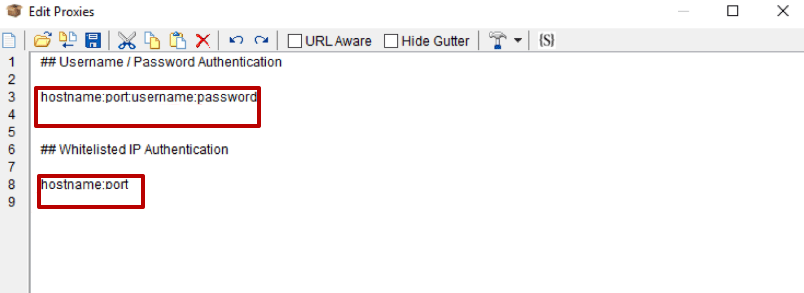
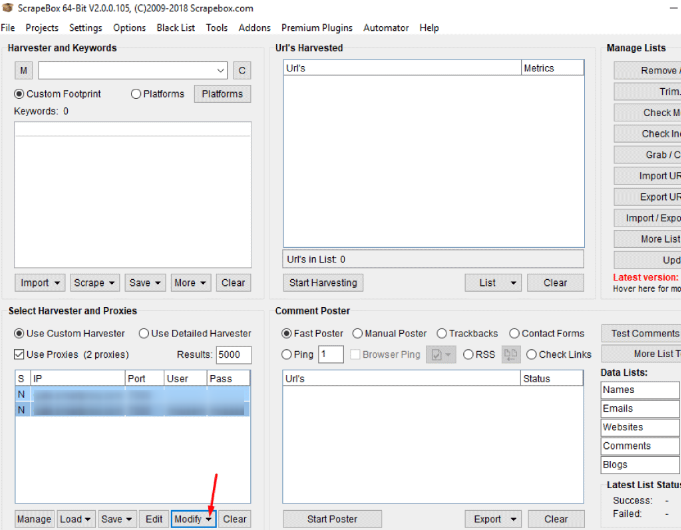
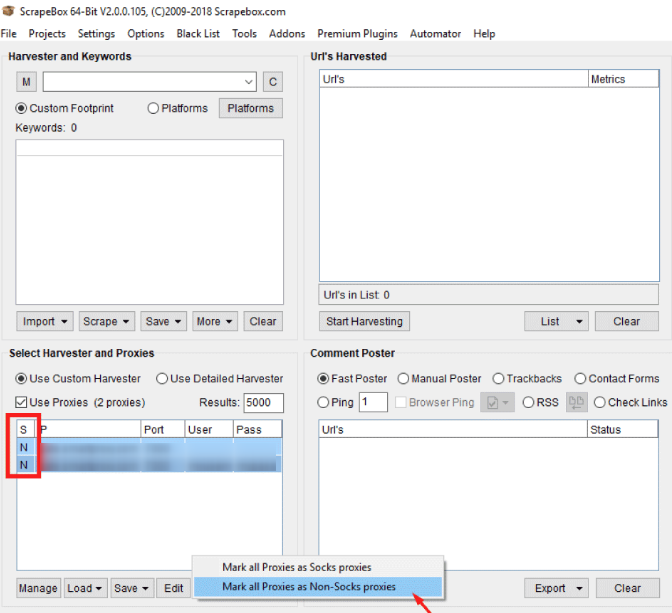
Done! You can proceed with your complete and improved work!

 PHP
PHP Node.js
 Python
 Java
Java Golang
 en
en  Español
  中國人
中國人  Tiếng Việt
  Deutsch
  Українська
  Português
  Français
  भारतीय
  Türkçe
  한국인
한국인  Italiano
  Gaeilge
  اردو
اردو  Indonesia
  Polski
Comments: 0