

This guide demonstrates how to scrape data from Yahoo Finance using Python, employing the requests and lxml libraries. Yahoo Finance offers extensive financial data, such as stock prices and market trends, which are pivotal for real-time market analysis, financial modeling, and crafting automated investment strategies.
The procedure entails sending HTTP requests to retrieve the webpage content, parsing the HTML received, and extracting specific data using XPath expressions. This approach enables efficient and targeted data extraction, allowing users to access and utilize financial information dynamically.
We'll be using the following Python libraries:
Before you begin, ensure you have these libraries installed:
pip install requests
pip install lxmlTo succeed at web scraping Yahoo Finance Python data, craft your requests carefully. Start with a complete Yahoo Finance URL. Include query parameters for the stock symbols you want; for example, https://finance.yahoo.com/quote/AMZN or https://finance.yahoo.com/quote/AAPL for Amazon and Apple data.
Set proper HTTP headers to mimic a real user’s browser. Include:
When using scraping tools like Scrapingdog API, leverage its parameters fully:
For example, a request URL can look like this:
https://api.scrapingdog.com/scrape?url=https://finance.yahoo.com/quote/AMZN&autoparse=1&...
Also, apply rate limiting in your code. Pause between requests to avoid detection and server overload. You can integrate scheduling tools like cron jobs or Python schedulers to run your scraping at controlled intervals, ensuring consistent and safe data collection.
To sum up, efficient scraping requests require:
Below, we will explore the parsing process in a step-by-step manner, complete with code examples for clarity and ease of understanding.
The first step in web scraping is sending an HTTP request to the target URL. We will use the requests library to do this. It's crucial to include proper headers in the request to mimic a real browser, which helps in bypassing basic anti-bot measures.
import requests
from lxml import html

# Target URL
url = "https://finance.yahoo.com/quote/AMZN/"

# Headers to mimic a real browser
headers = {
    'accept': 'text/html,application/xhtml+xml,application/xml;q=0.9,image/avif,image/webp,image/apng,*/*;q=0.8,application/signed-exchange;v=b3;q=0.7',
    'accept-language': 'en-IN,en;q=0.9',
    'cache-control': 'no-cache',
    'dnt': '1',
    'pragma': 'no-cache',
    'priority': 'u=0, i',
    'sec-ch-ua': '"Not)A;Brand";v="99", "Google Chrome";v="127", "Chromium";v="127"',
    'sec-ch-ua-mobile': '?0',
    'sec-ch-ua-platform': '"Linux"',
    'sec-fetch-dest': 'document',
    'sec-fetch-mode': 'navigate',
    'sec-fetch-site': 'none',
    'sec-fetch-user': '?1',
    'upgrade-insecure-requests': '1',
    'user-agent': 'Mozilla/5.0 (X11; Linux x86_64) AppleWebKit/537.36 (KHTML, like Gecko) Chrome/127.0.0.0 Safari/537.36',
}

# Send the HTTP request
response = requests.get(url, headers=headers)After receiving the HTML content, the next step is to extract the desired data using XPath. XPath is a powerful query language for selecting nodes from an XML document, which is perfect for parsing HTML content.
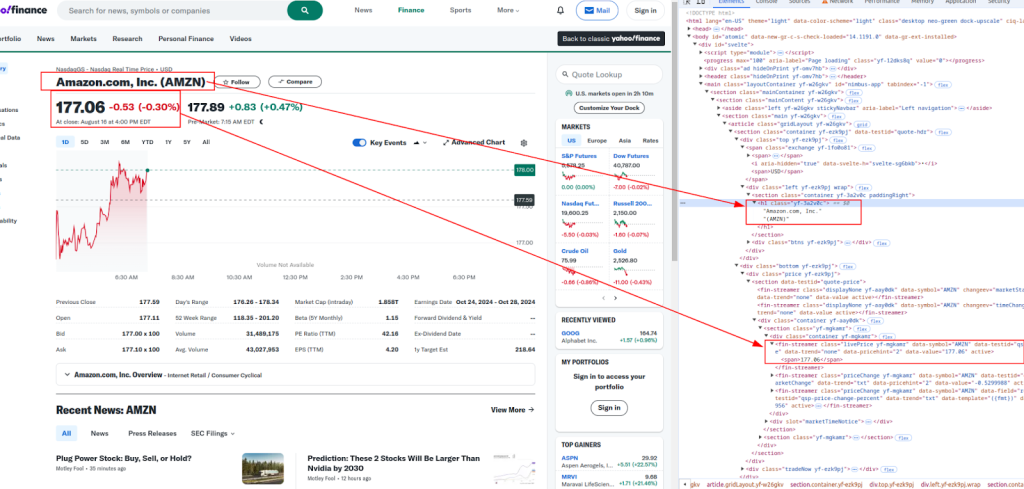
Title and price:
More details:
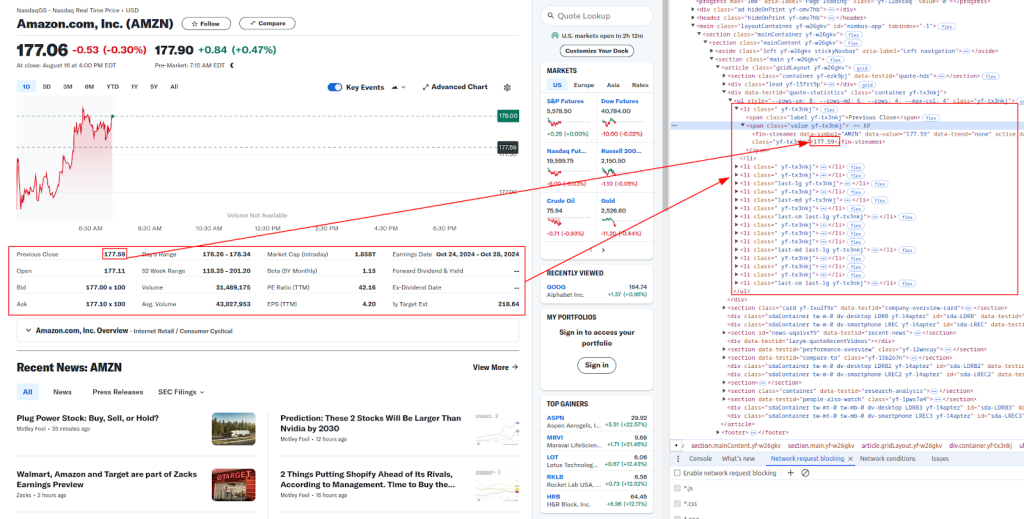
Below are the XPath expressions we'll use to extract different pieces of financial data:
# Parse the HTML content
parser = html.fromstring(response.content)

# Extracting data using XPath
title = ' '.join(parser.xpath('//h1[@class="yf-3a2v0c"]/text()'))
live_price = parser.xpath('//fin-streamer[@class="livePrice yf-mgkamr"]/span/text()')[0]
date_time = parser.xpath('//div[@slot="marketTimeNotice"]/span/text()')[0]
open_price = parser.xpath('//ul[@class="yf-tx3nkj"]/li[2]/span[2]/fin-streamer/text()')[0]
previous_close = parser.xpath('//ul[@class="yf-tx3nkj"]/li[1]/span[2]/fin-streamer/text()')[0]
days_range = parser.xpath('//ul[@class="yf-tx3nkj"]/li[5]/span[2]/fin-streamer/text()')[0]
week_52_range = parser.xpath('//ul[@class="yf-tx3nkj"]/li[6]/span[2]/fin-streamer/text()')[0]
volume = parser.xpath('//ul[@class="yf-tx3nkj"]/li[7]/span[2]/fin-streamer/text()')[0]
avg_volume = parser.xpath('//ul[@class="yf-tx3nkj"]/li[8]/span[2]/fin-streamer/text()')[0]

# Print the extracted data
print(f"Title: {title}")
print(f"Live Price: {live_price}")
print(f"Date & Time: {date_time}")
print(f"Open Price: {open_price}")
print(f"Previous Close: {previous_close}")
print(f"Day's Range: {days_range}")
print(f"52 Week Range: {week_52_range}")
print(f"Volume: {volume}")
print(f"Avg. Volume: {avg_volume}")Websites like Yahoo Finance often employ anti-bot measures to prevent automated scraping. To avoid getting blocked, you can use proxies and rotate headers.
A proxy server acts as an intermediary between your machine and the target website. It helps mask your IP address, making it harder for websites to detect that you're scraping.
# Example of using a proxy with IP authorization model
proxies = {
    "http": "http://your.proxy.server:port",
    "https": "https://your.proxy.server:port"
}

response = requests.get(url, headers=headers, proxies=proxies)
Rotating the User-Agent header is another effective way to avoid detection. You can use a list of common User-Agent strings and randomly select one for each request.
import random

user_agents = [
    "Mozilla/5.0 (Windows NT 10.0; Win64; x64) AppleWebKit/537.36 (KHTML, like Gecko) Chrome/58.0.3029.110 Safari/537.3",
    "Mozilla/5.0 (Windows NT 10.0; Win64; x64; rv:76.0) Gecko/20100101 Firefox/76.0",
    # Add more User-Agent strings here
]

headers["user-agent"]: random.choice(user_agents)

response = requests.get(url, headers=headers)Finally, you can save the scraped data into a CSV file for later use. This is particularly useful for storing large datasets or analyzing the data offline.
import csv

# Data to be saved
data = [
    ["URL", "Title", "Live Price", "Date & Time", "Open Price", "Previous Close", "Day's Range", "52 Week Range", "Volume", "Avg. Volume"],
    [url, title, live_price, date_time, open_price, previous_close, days_range, week_52_range, volume, avg_volume]
]

# Save to CSV file
with open("yahoo_finance_data.csv", "w", newline="") as file:
    writer = csv.writer(file)
    writer.writerows(data)

print("Data saved to yahoo_finance_data.csv")Below is the complete Python script that integrates all the steps we’ve discussed (a full walkthrough about running Python scripts on Windows, check out this tutorial). This includes sending requests with headers, using proxies, extracting data with XPath, and saving the data to a CSV file.
import requests
from lxml import html
import random
import csv

# Example URL to scrape
url = "https://finance.yahoo.com/quote/AMZN/"

# List of User-Agent strings for rotating headers
user_agents = [
    "Mozilla/5.0 (Windows NT 10.0; Win64; x64) AppleWebKit/537.36 (KHTML, like Gecko) Chrome/58.0.3029.110 Safari/537.3",
    "Mozilla/5.0 (Windows NT 10.0; Win64; x64; rv:76.0) Gecko/20100101 Firefox/76.0",
    # Add more User-Agent strings here
]

# Headers to mimic a real browser
headers = {
    'accept': 'text/html,application/xhtml+xml,application/xml;q=0.9,image/avif,image/webp,image/apng,*/*;q=0.8,application/signed-exchange;v=b3;q=0.7',
    'accept-language': 'en-IN,en;q=0.9',
    'cache-control': 'no-cache',
    'dnt': '1',
    'pragma': 'no-cache',
    'priority': 'u=0, i',
    'sec-ch-ua': '"Not)A;Brand";v="99", "Google Chrome";v="127", "Chromium";v="127"',
    'sec-ch-ua-mobile': '?0',
    'sec-ch-ua-platform': '"Linux"',
    'sec-fetch-dest': 'document',
    'sec-fetch-mode': 'navigate',
    'sec-fetch-site': 'none',
    'sec-fetch-user': '?1',
    'upgrade-insecure-requests': '1',
    'User-agent': random.choice(user_agents),
}

# Example of using a proxy
proxies = {
    "http": "http://your.proxy.server:port",
    "https": "https://your.proxy.server:port"
}

# Send the HTTP request with headers and optional proxies
response = requests.get(url, headers=headers, proxies=proxies)

# Check if the request was successful
if response.status_code == 200:
    # Parse the HTML content
    parser = html.fromstring(response.content)

    # Extract data using XPath
    title = ' '.join(parser.xpath('//h1[@class="yf-3a2v0c"]/text()'))
    live_price = parser.xpath('//fin-streamer[@class="livePrice yf-mgkamr"]/span/text()')[0]
    date_time = parser.xpath('//div[@slot="marketTimeNotice"]/span/text()')[0]
    open_price = parser.xpath('//ul[@class="yf-tx3nkj"]/li[2]/span[2]/fin-streamer/text()')[0]
    previous_close = parser.xpath('//ul[@class="yf-tx3nkj"]/li[1]/span[2]/fin-streamer/text()')[0]
    days_range = parser.xpath('//ul[@class="yf-tx3nkj"]/li[5]/span[2]/fin-streamer/text()')[0]
    week_52_range = parser.xpath('//ul[@class="yf-tx3nkj"]/li[6]/span[2]/fin-streamer/text()')[0]
    volume = parser.xpath('//ul[@class="yf-tx3nkj"]/li[7]/span[2]/fin-streamer/text()')[0]
    avg_volume = parser.xpath('//ul[@class="yf-tx3nkj"]/li[8]/span[2]/fin-streamer/text()')[0]

    # Print the extracted data
    print(f"Title: {title}")
    print(f"Live Price: {live_price}")
    print(f"Date & Time: {date_time}")
    print(f"Open Price: {open_price}")
    print(f"Previous Close: {previous_close}")
    print(f"Day's Range: {days_range}")
    print(f"52 Week Range: {week_52_range}")
    print(f"Volume: {volume}")
    print(f"Avg. Volume: {avg_volume}")

    # Save the data to a CSV file
    data = [
        ["URL", "Title", "Live Price", "Date & Time", "Open Price", "Previous Close", "Day's Range", "52 Week Range", "Volume", "Avg. Volume"],
        [url, title, live_price, date_time, open_price, previous_close, days_range, week_52_range, volume, avg_volume]
    ]

    with open("yahoo_finance_data.csv", "w", newline="") as file:
        writer = csv.writer(file)
        writer.writerows(data)

    print("Data saved to yahoo_finance_data.csv")
else:
print(f"Failed to retrieve data. Status code: {response.status_code}")Before you start web scraping Yahoo Finance Python data, you must consider the legal and ethical boundaries to avoid trouble.
To scrape ethically, follow these best practices:
By following these steps, your web scraping Yahoo Finance with Python will be both effective and respectful, minimizing risks and keeping your projects safe.
You’ll face some common hurdles when web scraping Python Yahoo Finance data. The main issues are IP blocking, CAPTCHAs, and dynamic content loading via JavaScript, all designed to prevent automated access.
IP blocking happens when sites detect suspicious traffic from one address and block it. CAPTCHAs force human verification, stopping most bots. Yahoo Finance also loads some data dynamically with JavaScript, which requires special handling since static HTML scraping won’t capture it.
To solve these problems, use proxies and specialized tools. Proxies rotate your IP address to avoid blocks and CAPTCHAs. For example, the Scrapingdog API manages proxy rotation automatically and can bypass CAPTCHAs, making your scraper more reliable.
Yahoo Finance updates its HTML structure often, breaking fixed scraping code. To handle this, build adaptive parsing logic that can adjust to changes without crashing. Use selectors that are less likely to change, like unique element IDs or classes.
When your script fails, debug efficiently by:
Proxy-Seller offers a robust proxy solution perfect for web scraping Yahoo Finance Python tasks. They provide private SOCKS5 and HTTP(S) proxies, ensuring fast and stable connections. Their proxy pool covers over 800 subnets across 400 networks, supports both IPv4 and IPv6, and includes geo-targeting in 220+ countries.
Using Proxy-Seller’s proxies helps you:
They also back you up with a 24-hour refund and replacement policy, plus assistance configuring proxies for smooth integration. This makes your scraping project more reliable and less risky.
Scraping Yahoo Finance data using Python is a powerful way to automate the collection of financial data. By using the requests and lxml libraries, along with proper headers, proxies, and anti-bot measures, you can efficiently scrape and store stock data for analysis. This guide covered the basics, but remember to adhere to legal and ethical guidelines when scraping websites. And if you need professional assistance, don't hesitate to contact 24/7 customer support.

 PHP
PHP Node.js
 Python
 Java
Java Golang
 en
en  Español
  中國人
中國人  Tiếng Việt
  Deutsch
  Українська
  Português
  Français
  भारतीय
  Türkçe
  한국인
한국인  Italiano
  Gaeilge
  اردو
اردو  Indonesia
  Polski
Comments: 0