
Web Scraping vs Web Crawling: Advantages and Disadvantages

Comments: 0

When you need to gather information, parsing can help break down a website's complex structure into its component elements. It's important to understand the difference between web crawling and web scraping for effective parsing.

Difference Between Web Scraping and Web Crawling

Let's start by defining these terms and exploring how web crawling and web scraping work:

  • Web crawling is an automated process where a bot (or spider) crawls web pages, collecting website links and building a network of data for storage and analysis.
  • Web scraping involves collecting specific information from a web page.

Both web scraping and web crawling serve similar purposes but have distinct characteristics. Let's delve into their main uses first:

  • Online monitoring: Both are used to track changes on websites, such as price updates, promotions, and news, which can be crucial for staying competitive.
  • Data collection: They are used to create databases from internet sources, enhancing project effectiveness.
  • Market analysis: Both are employed to gather competitive intelligence, aiding in developing successful business strategies.
  • SEO improvement: By scanning sites, both processes help in assessing backlink quality and other factors, leading to improved site indexing and search result rankings.

While their purposes align, they differ in several key aspects:

  • Scope: Web crawling systematically browses web pages by following links, covering a large volume of pages to index content for search engines. Web scraping, however, is more targeted, extracting specific data from particular web pages as per user requirements.
  • Frequency: Crawlers operate continuously to keep search engine indexes updated, regularly visiting websites to discover and update content. Scraping can be a one-time or periodic action based on specific goals.
  • Interaction with data: Crawlers download and index web page content without always interacting with it, focusing on data discovery and categorization. Scraping, on the other hand, involves extracting specific information, often requiring deeper interaction with the page structure, such as identifying and extracting data from specific HTML elements.

Advantages and Disadvantages of Web Crawling vs Web Scraping

Web crawling and web scraping serve different purposes, so their pros and cons vary. In web crawling vs web scraping debates, knowing these advantages and disadvantages helps you pick the right approach.

Pros and Cons of Web Scraping

Web scraping is a valuable tool for data extraction, offering both advantages and disadvantages. Here's a breakdown of the main ones:

Advantages:

  • Web scraping is a faster and more efficient way to collect large sets of data from websites compared to manual data collection.
  • Automated scraping reduces human error, ensuring accurate monitoring of website updates.
  • Businesses can gather competitor information, market trends, and pricing data, gaining a competitive advantage.
  • Useful for academic, marketing, and other research requiring analysis of large data sets.
  • Extracts precise, targeted data from specific web pages or elements.
  • Produces structured output like CSV or JSON ready for analysis.
  • Efficient for focused data needs, saving processing and storage.

Disadvantages:

  • Scraping can strain website servers, leading to performance issues or crashes.
  • Websites using heavy JavaScript and dynamic content may be challenging to scrape due to content updates.
  • Websites may block scrapers, requiring the use of proxies or other methods to avoid detection.
  • Changes to a website's structure can break existing scraping scripts, necessitating frequent updates and maintenance.
  • Faces potential legal risks if done without permission.

Pros and Cons of Web Crawling

Web crawling, like web scraping, has its own set of advantages and disadvantages. Here's a breakdown of the main ones:

Advantages:

  • Covers vast areas of the web to gather broad information.
  • Web crawling automates the collection of large amounts of data from various websites, making it easier to find extensive information quickly.
  • Crawlers can be programmed to regularly visit websites, tracking real-time changes and additions to content, which is useful for rapidly updating information sources.
  • Crawlers can analyze the link structure of websites, helping to understand relationships between different pages.
  • There are many web crawling applications available, such as Sequntum, Opensearchserver, Apache Nutch, and Stormcrawler, making the crawling process simple and convenient.

Disadvantages:

  • Web crawling can raise legal and ethical issues, especially if done without the permission of website owners, as some sites explicitly prohibit or restrict crawler use.
  • Crawling large websites can be resource-intensive, requiring significant computing power and increasing server load for both the crawler and target website.
  • Websites with AJAX-generated content can pose challenges for crawlers, as they may have difficulty indexing this data.
  • Despite advantages, web crawlers cannot access all parts of the Internet, with only around 60 percent of web pages being crawlable.
  • Must handle rate limiting and restrictions to avoid blocks.
  • Extracted data is less precise since it targets whole sites, not specific elements.

Practical Solutions to Technical Challenges in Web Crawling vs Web Scraping

You’ll face technical hurdles during web crawling vs scraping projects. Here’s how to overcome the most common challenges with practical tools and techniques:

  • Automate scrolling actions or button clicks to load extra content smoothly.
  • Handle cookies and tokens properly to maintain logged-in status during scraping.
  • Use proxy rotation services like Proxy-Seller, Apify Proxy, or Bright Data to switch IPs continuously, avoiding bans. Proxy-Seller offers fast private SOCKS5 and HTTPS proxies with speeds up to 1 Gbps and supports username/password plus IP whitelist authentication.
  • Employ browser impersonation and stealth plugins such as the Stealth Plugin for Puppeteer or Playwright’s built-in stealth to mimic human-like browsing.
  • Run headless browsers with anti-detection features, for example, Puppeteer Extra or Playwright with stealth mode, to avoid bot detection.
  • Randomize request headers and simulate human interactions – mouse movements, scrolling, and random delays help appear less robotic.
  • Integrate CAPTCHA-solving services like 2Captcha or Anti-Captcha when you encounter challenges.
  • Use tools like Pandas or OpenRefine to format and deduplicate raw data.

Proxy-Seller stands out as a reliable proxy provider with an extensive proxy pool of over 20 million residential IPs, ISP, datacenter IPv4/IPv6, and mobile 5G/4G/LTE proxies across 220+ countries. You can geotarget precisely, rely on 24/7 customer support, and manage proxies easily via a user-friendly dashboard or API. Ethical sourcing ensures compliance with GDPR, CCPA, and security standards, making Proxy-Seller ideal for rotating proxies in any web scraping project.

Anti-blocking Checklist

To help you navigate the issues, follow this straightforward checklist:

  • Choose the right tools based on content type (static vs dynamic).
  • Automate dynamic content loading through scrolling or clicking.
  • Manage user sessions securely with cookies and headers.
  • Incorporate CAPTCHA detection and ethical solving mechanisms.
  • Clean data immediately after extraction.
  • Respect target sites using randomized delays and back-off strategies.

Step-by-Step Guide on Configuring a Parser in Python

Web scraping with Python is a powerful way to gather information from websites. In this article, we'll walk through a step-by-step tutorial on how to set up a parser for web scraping using Python.

Steps to Create Your Own Python Parser

  1. Define the problem: Consider a scenario where you need to extract product information from a 10-page online store.
  2. Install necessary libraries: Use pip to install the requests and beautifulsoup4 libraries – pip install requests and pip install beautifulsoup4.
  3. Let's move on to writing the code. We'll declare the first function that will take the last page number as input, collect the URLs of product cards, and return them:
    def crawl_products(pages_count):
        urls = []
        return urls
  4. Let's write the second function, which will take the URLs of product cards as input, visit each of them, parse the data we are interested in, and add it to the common array:
    def parse_products(urls):
        data = []
        return data
  5. In our task, we need to parse 10 pages. Let's declare a global variable PAGES_COUNT = 10 and our main code will look like this:
    def main():
        urls = crawl_products(PAGES_COUNT)
        data = parse_products(urls)
  6. Import the requests library using the import requests command. Then, we'll make a GET request and save the result in the response variable:
    response = requests.get(page_url)
  7. Import another library with the import BeautifulSoup command. We'll move the functionality that we'll need for further parsing into a separate method. In the end, the code should look like this:
    def get_soup(url, **kwargs):
            response = requests.get(url, **kwargs)
            if response.status_code = 200;
                    soup = BeautifulSoup(response.text, features='html.parser')
            else:
                    soup = None
            return soup
            ---------
            print('page: {}'.format(page_n))
            page_url = fmt.format(page=page_n)
            soup = get_soup(page_url)
            if soup is None:
                    break
            for tag in soup.select('.product-card .title'):
                    href = tag.attrs['href']
                    url = 'https://site.com' url.format(href)
                    urls.append(url)
            return urls
  8. Let's add code to print the URLs one per line: print(‘\n’.join(urls))
  9. Let's implement parse_products function. Here is the code for parsing the price, characteristics, and name of each product:
    def parse_products(urls):
            data = [ ]
            for url in urls:
                    soup = get_soup(url)
                    if soup is Non:
                            break
                    name = soup.select_one(‘#product_name’).text.strip()
                    amount = soup.select_one(‘#product_amount’).text.strip()
                    techs = { }
                    for row in soup.select(‘#characteristics tbody tr’):
                            cols = row.select(‘td’)
                            cols = [c.text.strip() for c in cols]
                            techs[cols[0]] = cols[1]
  10. Create an item object where the parsing data of a specific product will be stored. Then, we'll add this item to the common array:
    item = {
            ‘name’: name,
            ‘amount’: amount,
            ‘techs’: techs,
            )
    
    
    data.append(item)
  11. Let's also print the URL of the product currently being processed to see the parsing process: print(‘\product: {}’.format(url))

  12. Import the library for saving files with import json. We'll declare a global variable OUT_FILENAME = 'out.json' and write the code to save the parsing results:
    with open(OUT_FILENAME, ‘w’) as f:
            json.dump(data, f, ensure_ascii=False, indent=1)
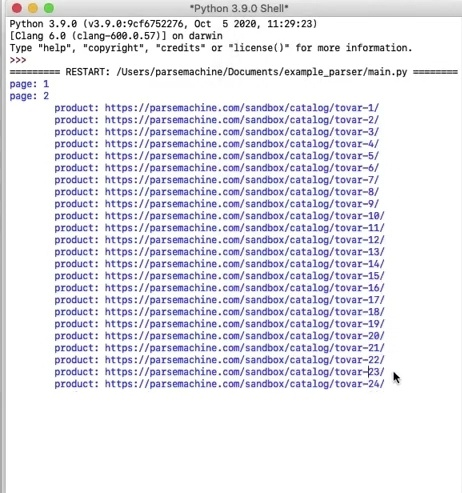
  13. Let's set the variable PAGES_COUNT = 2 to run the parser for two pages. Then, we'll open the file with the parsing result. Everything works correctly, and the parser is ready for further use:

    1.png

Libraries for Web Scraping with Python

Python's web scraping capabilities are greatly enhanced by the use of specialized libraries. Whether you're new to scraping or an experienced developer, mastering these libraries is key to effective web scraping. Here's a closer look at three essential libraries: requests, Selenium, and BeautifulSoup.

Request

The requests library is a cornerstone of many web scraping projects. It's a powerful HTTP library used to make requests to websites. Its simplicity and user-friendliness make it ideal for extracting HTML content from web pages. With just a few lines of code, you can send GET or POST requests and process the response data.

Selenium

Selenium is a crucial tool for web scraping in Python, offering a versatile framework for automating browser interactions. It ensures cross-browser compatibility and is particularly useful for tasks like automated testing and exploring web pages. Selenium can be used to add functionality to web applications, extract data from websites, or automate repetitive tasks.

Beautiful Soup

Beautiful Soup is another essential library for web scraping in Python. It allows you to extract and parse data from HTML or XML documents. By using features such as tag searching, navigating document structures, and content filtering based on common patterns, you can efficiently extract information from web pages. Beautiful Soup can also be used in conjunction with other Python libraries, such as requests, which adds to its flexibility.

Top Web Scraping Tools for Sourcing

When it comes to professional parsing, especially for sourcing purposes, you'll need additional web scraping services. The tools listed below are top-notch and will greatly simplify and optimize the information collection process, speeding up candidate searches or other data analysis tasks.

AutoPagerize

AutoPagerize is a browser extension that enhances your scraping capabilities by automating the often tedious process of navigating website content. What sets AutoPagerize apart is its ability to intelligently identify and process various data patterns across numerous web pages. This eliminates the need to customize scripts for each unique site structure, making it a versatile solution adaptable to different formats used by various sites.

ScraperAPI

ScraperAPI is a powerful and scalable web scraping API for professional sourcing. This web scraping tool handles all the heavy lifting – automating rotating proxies, CAPTCHAs, and JavaScript rendering – which is vital for extracting data from dynamic professional networks and social sites. As a dedicated proxy API for web scraping, it uses a massive pool of residential and mobile IPs to ensure high success rates and minimizes infrastructure overhead, letting analysts focus on getting clean data fast.

Instant Data Scraper

Instant Data Scraper is another user-friendly tool designed for easy web scraping. With its intuitive interface, you can navigate the data collection process without complex coding or technical knowledge. The tool's versatility is notable, as it supports different websites and platforms, allowing you to extract information from various sources, from social networks to news sites. Instant Data Scraper also enables the extraction of various data types, including text, images, and links.

PhantomBuster

PhantomBuster offers a wide range of settings, allowing you to tailor it to your needs. From selecting data sources to defining output structures, you have complete control over the information collection process. PhantomBuster seamlessly integrates with various APIs, providing additional capabilities for data processing. This allows for smooth interoperability with other platforms, making it an excellent tool for web API scraping.

Designing Scalable and Maintainable Web Crawling vs Scraping Systems

You want your system to keep working reliably and grow smoothly. Here’s how to design scalable, maintainable crawling and scraping architectures:

  • Build modular scrapers where crawling and data extraction are separate components. This lets you update one without breaking the other.
  • Use message queues and task schedulers like RabbitMQ, Kafka, or Celery to manage large workloads and retries efficiently.
  • Deploy scrapers on cloud platforms such as AWS Lambda or Apify Cloud for easy scaling and uptime.
  • Monitor your system continuously. Set alerts for scraper failures, site structure changes, and slowdowns.
  • Version your scrapers and write unit tests to catch layout changes early. Use continuous integration pipelines to automate updates.
  • Choose the right storage: relational databases (PostgreSQL, MySQL) for structured data, NoSQL (MongoDB) for flexible formats, or data lakes for huge datasets.
  • Whenever possible, use official APIs instead of scraping. They offer cleaner, faster, and more reliable data access.

Sustainability Steps

To keep your system sustainable, follow this step-by-step approach:

  1. Separate crawling and extraction into distinct services.
  2. Implement message queues for task management.
  3. Use cloud-native tools for effortless scaling.
  4. Monitor scrapers with alerts on errors or changes.
  5. Apply version control and continuous integration for updates.
  6. Pick storage that fits your data and query needs.
  7. Prefer APIs over web scraping when available.

Mastering these practices will help you build robust solutions that handle web crawling vs scraping challenges effectively.

In Conclusion

Web scraping and web crawling are essential tools for implementing automation in information collection. These technologies enhance business projects, scientific research, or any other area requiring the processing and analysis of large amounts of data.

Comments:

0 comments