What is a Proxy Checker and How Does It Work

Comments: 0

There are numerous resources available for automatically checking the functionality of proxies. Online checkers are among the easiest to use, offering significant time savings. The verification process can be particularly time-consuming when installing and operating specialized software and programs, especially when a large number of proxies need to be checked. But this guide will explain the function of a proxy checker, detail how the mechanism operates, and cover the key features you should look for to select an efficient tool for your needs.

What Is a Proxy Checker?

A proxy checker is a tool designed to verify the validity and performance of proxy servers, along with determining additional characteristics. Its primary function is to ensure that the proxies being used are operational and capable of delivering the needed functionality.

Validating the effectiveness of a proxy is crucial when preparing to use proxies and web resources, as non-functional proxy servers can significantly impede work or even prevent the completion of tasks. Employing a proxy checker enhances the safety and efficiency of user interactions with online resources and helps in selecting the most appropriate servers for specific needs.

Why Testing Proxies Matters

You’ll learn how testing proxies impacts your workflow and online security.

  • Proxy speed and latency directly affect your browsing, scraping, or automation tasks. Slow proxies can cause delays and timeouts, disrupting your work and frustrating users. High latency means each request takes longer, reducing efficiency.
  • Consistent reliability is essential. You want proxies that don’t fail mid-session and keep your connection stable. Sticky proxies or session persistence features ensure your IP stays the same across requests, preventing reauthentication or interruptions.
  • Anonymity levels matter because they determine how easily websites can detect you’re using a proxy.
    • Transparent proxies reveal your real IP, which risks exposure and blocks.
    • Anonymous proxies hide your IP but identify as proxy users, which may still trigger restrictions.
    • Elite proxies mask both your IP and proxy status, providing the highest privacy. For example, using an elite proxy helps avoid CAPTCHAs and bans on sensitive tasks like ad verification or data gathering.
  • Using blocked or banned proxies hurts your business continuity. When websites detect and block your IP, your services stall. You lose time and money and potentially damage your brand’s reputation. For instance, an e-commerce scraper failing due to proxy bans can miss pricing updates, impacting competitiveness.
  • Failing to test proxies can cause serious issues like data leaks, IP blacklisting, and wasted resources. Imagine running a campaign using a proxy that leaks your real IP – your data is exposed, and your IP is flagged for abuse. This wastes computational and financial resources on retries and workarounds.

Practical Checklist

Here’s a practical checklist to avoid these risks:

  • Test proxy speed and latency regularly.
  • Verify the anonymity level matches your task.
  • Monitor proxies for bans or blocks.
  • Use proxies with session persistence where needed.
  • Watch for IP leaks and address them immediately.
  • Replace proxies flagged for abuse or blacklisting.

Real cases show companies losing access to services due to proxy failures, leading to lost revenue and damaged operations. Using a reliable proxy checker online or a SOCKS proxy checker helps you identify these issues early and maintain a smooth workflow.

Key Criteria for Evaluating Proxies with a Proxy Checker

You’ll learn how to evaluate proxies systematically for best performance.

Core Validation Steps

  1. Start by checking if the proxy actually works.
  2. Use an IP proxy checker to confirm it masks your real IP and delivers responses successfully.
  3. Check multiple verification endpoints to avoid false positives.
  4. Measure connection speed and response time. Key metrics include ping, time to connect, and download speed. Good proxies often have a ping under 100 ms and maintain high throughput.

Practical Benchmarks:

  • Ping: less than 100 ms.
  • Connection time: under 500 ms.
  • Download speed: as close to your max bandwidth as possible.

Proxy Characteristics

  • Anonymity level matters a lot. Know the difference between transparent (reveals IP), anonymous (hides IP but reveals proxy), and elite proxies (hides both IP and proxy use). Websites detect proxies by checking headers and IP characteristics. Use elite proxies for sensitive tasks requiring high privacy.
  • Geolocation accuracy confirms the proxy IP matches the advertised region. Use geolocation API checks with tools like MaxMind or IP2Location. Be aware of IP spoofing risks and verify more than once to avoid errors.
  • Check success rates on target websites. Your proxy should get HTTP 200 OK responses, not blocks (HTTP 403), rate limits (HTTP 429), or excessive CAPTCHAs. Also, handle redirects properly to avoid errors.
  • IP reputation matters to avoid blocked or blacklisted proxies. Use multiple tools to check if an IP has a history of abuse, spam, or bots. A comprehensive reputation check lowers the risk of disruptions.
  • Protocols supported are another point. Different tasks may need HTTP, HTTPS, or SOCKS5 proxies. SOCKS5 often handles UDP and TCP, offering more flexibility. Consider if you need residential or datacenter proxies since they differ in trust and speed.
  • Additional criteria include bandwidth limits, how many concurrent connections the proxy allows, and supported authentication types like basic, digest, or NTLM.

Evaluation Checklist

Here’s a practical list for evaluating proxies:

  • Confirm working status via multiple endpoints.
  • Measure speed: ping, connection, download.
  • Identify anonymity level (transparent, anonymous, elite).
  • Verify geolocation with APIs.
  • Test success rate on target sites (HTTP 200 vs. blocks).
  • Check IP reputation across multiple sources.
  • Verify protocol support (HTTP, HTTPS, SOCKS5).
  • Assess bandwidth and concurrent connections.
  • Check authentication methods available.

Proxy-Seller stands out by offering a wide proxy range: residential, ISP, datacenter IPv4/IPv6, and mobile proxies. They deliver reliable speeds up to 1 Gbps and 99% uptime. Proxy-Seller supports both SOCKS5 and HTTP(S) protocols.

Their user-friendly dashboard lets you auto-renew, switch proxy types with ease, and automate management through API. With proxies available in over 220 countries, you get precise geolocation targeting. Authentication options include username/password and IP whitelist, matching diverse security needs.

Most importantly, Proxy-Seller proxies maintain high anonymity levels, making them ideal for sensitive workflows.

Features of Using a Proxy Checker

An online proxy checker enables users to analyze and verify a list of proxy servers based on various criteria such as availability, location, degree of anonymity, and protocol type. It provides detailed reports about each proxy, helping users assess which ones best meet their specific requirements.

Key Parameters and Operating Principles of a Proxy Checker

The operating principle of an online proxy checker involves sending requests through each proxy from a user-uploaded list of IP addresses and analyzing the responses received. This process helps verify the functionality and suitability of the proxy servers. Here are the key aspects that the checker evaluates:

  • Availability: the checker tests whether the proxy server is available for connections. If the server is unavailable or takes too long to respond, it is marked as down.
  • Anonymity: this involves analyzing how well the proxy maintains user anonymity. The checker assesses whether the proxy can effectively hide the user's real IP address and whether its use can be detected by web servers.
  • Speed: the checker measures the time it takes to transfer data through the proxy to assess its speed. This is crucial for applications where delay impacts user experience.
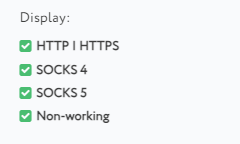
  • Protocol type: the checker verifies the types of protocols supported by the proxy server, such as HTTP, HTTPS, SOCKS4, or SOCKS5.

Additionally, some proxy checkers can detect incorrect proxy performance, including slow response times, frequent errors, or suspicious headers. These issues might indicate potential problems with the proxy server that could compromise privacy and lead to the leakage of users' personal data. This comprehensive analysis helps users select the most reliable and efficient proxies for their needs.

The Importance of Checking Proxy Validity

The validity of a proxy is crucial for maintaining network security and ensuring the effective online activity of users. Here are the key aspects in which proxy validation plays a vital role:

  1. Privacy protection: valid proxies help conceal the user's real IP address, safeguarding their privacy online by shielding personal data from potential tracking.
  2. Increased security: invalid or compromised proxies can be exploited by attackers to intercept data. By regularly checking proxies, users can identify and discontinue the use of such proxies, thereby mitigating potential security threats.
  3. Performance optimization: using stable and reliable proxy servers can enhance connection performance, which is particularly significant for bandwidth-intensive tasks such as video streaming or online gaming.
  4. Bypassing blocks: some web services and websites may block access via proxies. Through effective proxy checking, users can select proxies that maintain anonymity, preventing web resources from detecting their use.

Over time, the characteristics of proxy servers can change. A proxy that was once functional and offered anonymity might become accessible or transparent, leading to potential risks such as data leaks, traffic interception, and account blocking. Regularly checking proxies ensures that users continue to employ reliable and secure proxies, safeguarding their online activities.

How to Perform a Validity Check on a Proxy Server

You can check the validity of your proxy list online using our «Proxy checker» tool. This tool provides a quick and free way to obtain information about the availability, location, speed, and protocol type of proxy servers, facilitating their effective use and integration into your software. Our checker can validate various types of proxies, including server, mobile, and residential proxies, with the capability to check up to 100 proxies at a time.

To get started with an online proxy checker tool, here are the steps you should follow:
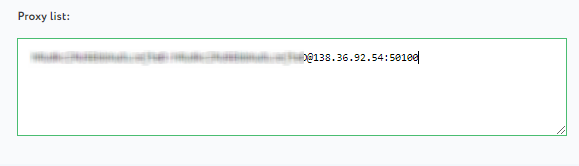
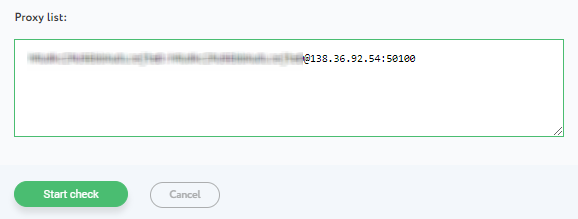
  1. In the “Proxy List” field, type in your proxies in the correct format:
    • IP:PORT - for public proxies;
    • USER:PASS@IP:PORT - for private proxies requiring authentication with a username and password.

    1en.png

  2. Next to the input field, check the boxes for the protocols you want to test for validity.

    2en.png

  3. After inputting your proxies and setting the scan parameters, click the “Start check” button.

    3en.png

  4. The results of the proxy check will be available within a few seconds.

    4en.png

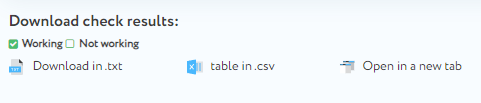
  5. Below the results form, you have options to download the list of proxies. You can choose to download either the working proxies or those that were inaccessible.

    5en.png

  6. If invalid proxies are detected, you might consider purchasing reliable private proxies - for fresh IPv6 ranges, check proxy here.

    6en.png

IP Databases and Reputation Checkers

You’ll learn why checking IP reputation is vital to avoid risky proxies. Proxy IPs with a history of abuse or spam can cause blocks, bans, or poor performance.

Key Tools and Interpretation

  • Start by querying popular reputation tools.
    • AbuseIPDB reports abuse and spam activity, offering APIs for batch checking and integration with your systems.
    • IP2Location combines geolocation with proxy detection and also supports bulk processing, enabling you to verify location claims and proxy status efficiently.
    • Spamhaus provides blacklists focused on email and bot activity, useful for filtering IPs used in spam campaigns.
  • Interpreting results requires care. Some IPs may show false positives or negatives. Cross-reference multiple sources to get a clearer picture. For example, an IP flagged in one database but clean in others may warrant deeper investigation before discarding.
  • Automate reputation checks. Set up scheduled scans and alerts for changes in IP reputation. This proactive approach prevents you from unknowingly using bad proxies. Consistent checks also help maintain business continuity by replacing flagged or banned IPs early.

Here’s a straightforward list to manage reputation checks effectively:

  • Use multiple databases (AbuseIPDB, IP2Location, Spamhaus).
  • Perform batch queries for efficiency.
  • Cross-reference results to reduce false alarms.
  • Automate regular reputation scans and set alerts.
  • Remove or quarantine suspicious IPs immediately.

You can integrate these checks into your proxy checker online or SOCKS proxy checker workflow to maintain a clean, trustworthy proxy pool that keeps your operations smooth and safe.

In Conclusion

Using an automated online proxy checker will assist users in verifying the validity of their proxy servers and analyzing them based on various criteria. This ensures efficient setup and secure interaction with web resources, as using reliable proxies encrypts your traffic and protects personal data from potential leaks.

Comments:

0 comments