
Overview of the Scrapy Web Scraping Framework

Comments: 0

Scrapy is a robust, high-level framework designed for web scraping and data extraction, making it ideal for tasks like data parsing, price monitoring, user behavior analysis, social media insights, and SEO analysis. This framework is equipped to handle large volumes of data efficiently. It includes built-in mechanisms for managing HTTP requests, error handling, and ensuring compliance with robots.txt, which are essential for navigating complex and large-scale web data collection projects. This review will delve into what Scrapy is, how it functions, and the features it offers to users, providing a comprehensive understanding of its capabilities and applications.
1.png

How the Scrapy Framework Works

The Scrapy framework is a powerful open-source web scraping tool written in Python, designed for high-efficiency crawling and extracting structured data from websites. Scrapy can:

  • organize extracted data into JSON and CSV formats;
  • directly store it in databases such as SQLite, MySQL, PostgreSQL, and MongoDB;
  • support various parsing methods, including CSS selectors and XPath;
  • handle JSON and XML responses, which is crucial when dealing with APIs.

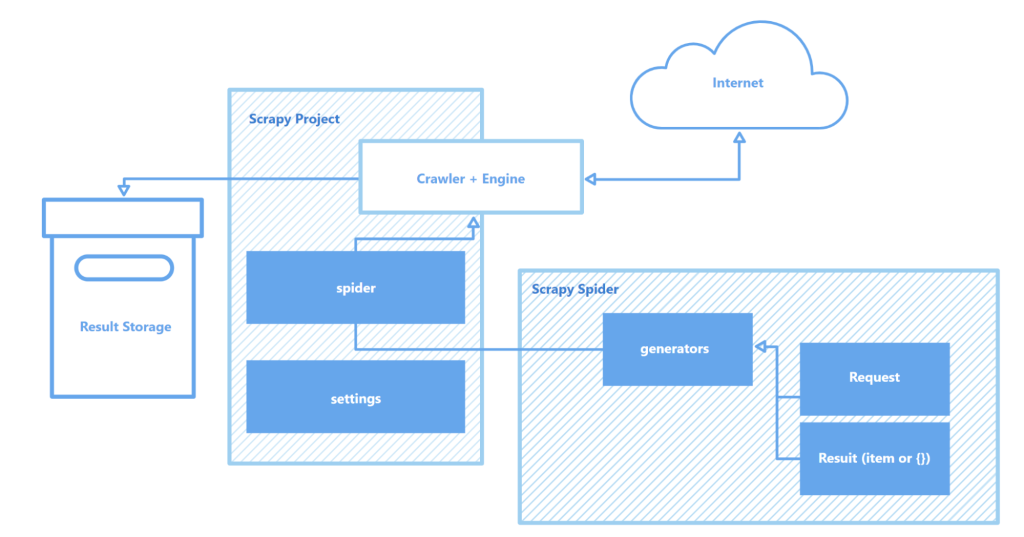
Scrapy operates through “spiders” – specialized crawlers that follow defined instructions to navigate web pages and harvest data. These spiders are essentially scripts that identify and capture specific types of objects like text, images, or links. An interactive crawling shell provided by Scrapy allows for real-time testing and debugging of these spiders, greatly enhancing the setup and optimization process of the crawler.

Scrapy Components

Key components of the Scrapy architecture include:

  • Items: data captured from web pages is structured into items, which are Python objects formatted as key-value pairs. These items, customizable according to user needs, can encapsulate various attributes such as text and images and are easily exportable to formats like JSON or CSV, or directly to databases.
  • Item pipeline: after data is captured by spiders, it enters the item pipeline. This is a series of processing steps where data is validated, cleaned, and possibly stored. Each step in the pipeline is defined by a Python class capable of tasks like error correction and data cleaning.
  • Requests and responses: Scrapy manages its tasks asynchronously, enhancing efficiency by allowing prioritization of requests, automatic retries of failed requests, and handling of common web operations like redirects and cookies.
  • Export feed: Scrapy can generate feeds from extracted data in various formats such as JSON, CSV, or XML, and it supports output to databases or cloud storage, providing flexibility in how data is handled post-extraction.
  • AutoThrottle: this feature automatically manages the rate of requests sent by the spiders based on server load and response time, optimizing efficiency and minimizing the burden on the websites being scraped.
  • Selectors: these are tools within Scrapy that use CSS or XPath to identify and extract elements from web pages. Based on the powerful Parcel library, selectors help to precisely target data needed from complex web pages.
  • Services: Scrapy includes built-in services that enhance functionality, such as event logging, statistics collection, email notifications, and Telnet console access, which aid in monitoring and controlling the scraping process.

Overall, Scrapy stands out as one of the most robust and flexible web scraping tools available, suitable for everything from simple data extraction tasks to complex large-scale web mining projects.

Features of the Scrapy Tool

This section highlights the key features of the Scrapy framework:

  • speed in data collection and processing;
  • the ability to extend functionality;
  • portability.

These attributes differentiate Scrapy from its competitors and establish it as a popular choice in the web scraping arena.

Speed of Operation

Scrapy is powered by Twisted, an asynchronous open-source network engine. Unlike synchronous operations, where one task must be completed before another begins, Twisted allows for tasks to be executed in parallel. This means Scrapy spiders can send multiple requests and process responses simultaneously, enhancing speed and efficiency in data collection, particularly for large-scale projects or when scanning multiple sites simultaneously.

The speed of Scrapy is further boosted by several factors:
  • Request management: Scrapy supports request prioritization, allowing for strategic execution orders during the scraping process. This prioritization can be manually set at request creation and adjusted dynamically as the scraper operates.
  • Caching mechanisms: Scrapy employs caching to reuse previously gathered data, accelerating the scraping process, reducing delays, and lessening the load on servers. The framework supports various caching strategies, such as in-memory or disk-based storage, and allows customization of cache lifespan and other settings.
  • Optimized selectors: the framework utilizes selectors to pinpoint specific parts of an HTML document using XPath or CSS. These selectors can be directly applied through response objects or through methods like response.xpath() and response.css(), streamlining the data extraction process.
  • Parallelism and scalability: Scrapy enables users to set the level of parallelism, optimizing resource use according to the scale of the project, whether it’s gathering data from smaller sites or extensive web portals.
  • Interactive shell: Scrapy includes an interactive shell for testing hypotheses and observing crawler behavior in real time, which is invaluable for speeding up development and debugging.

2en.png

Together, these features establish Scrapy as one of the fastest tools (read more about other various tools) available for efficiently scraping and collecting data from a multitude of websites, making it an invaluable resource for tasks such as product price monitoring, job listings, news gathering, social media analysis, and academic research.

Extensibility of Functionality

Scrapy’s modular architecture enhances its adaptability and extensibility, making it well-suited for a variety of complex data collection tasks. Its support for integration with various data stores such as MongoDB, PostgreSQL, and Elasticsearch, as well as queue management systems like Redis and RabbitMQ, allows for the effective handling of large data volumes. Additionally, Scrapy can integrate with monitoring or logging platforms like Prometheus or Logstash, enabling scalable and customizable scraper configurations for projects ranging from machine learning data collection to search engine development.

Advanced Scrapy customization tools

Scrapy’s architecture consists of:

  • Signals: Scrapy utilizes a signal system that allows developers to customize responses to specific events, such as the start or end of data collection, errors, or spider terminations. For instance, a signal can trigger an email report upon completion of a crawl.
  • Extensions: users can develop custom extensions to introduce unique functionalities to Scrapy. Examples include extensions for uploading data directly to Amazon S3 or Google Cloud.
  • Middleware: Scrapy’s middleware layer offers the ability to alter requests and responses during processing. This feature is particularly useful for adding functionalities like CAPTCHA handling or session management without modifying the core engine.
  • Integration with other libraries: Scrapy seamlessly integrates with popular Python libraries. For example, it can work alongside Pandas for data analysis and filtering or Elasticsearch for efficient data storage and retrieval.
  • Custom selectors: for websites where standard CSS or XPath selectors prove inadequate due to poor structure, Scrapy allows the creation of custom selectors to more precisely extract data.
  • Custom pipelines: users can construct custom data pipelines to perform tasks such as data cleaning, normalization, or validation. These pipelines facilitate processes like auto-saving data in JSON format or direct loading into databases like MongoDB or PostgreSQL.

Furthermore, Scrapy’s ability to support custom modules for API interactions provides a robust framework for scaling and tailoring solutions to meet the demands of large-scale data processing and complex project requirements.

Portability

Another significant advantage of Scrapy is its portability. The framework supports multiple operating systems, including Windows, macOS, and Linux, making it versatile for use across various development environments. Installation is straightforward using the Python package manager (pip), and thanks to Scrapy's modular structure and flexible configuration, projects can easily be transferred between machines without significant changes.

Furthermore, Scrapy supports virtual environments, which isolate project dependencies and avoid conflicts with other installed packages. This feature is particularly valuable when working on multiple projects simultaneously or when deploying applications to a server, ensuring a clean and stable development environment.

Scrapy Client Interface

For more effective work with Scrapy, it is recommended to use a code editor like Visual Studio Code (VS Code) or its analogs, since interaction with the framework is carried out via the command line (CLI). This allows for managing projects, scanning sites, and configuring spiders more efficiently. Additionally, using virtual environments to manage dependencies can help avoid conflicts between libraries and package versions, ensuring a smoother workflow.

Creating and running a project in Scrapy involves a series of straightforward steps:

  1. First, ensure that Scrapy is installed by running the following command in your terminal:
    pip install scrapy
  2. Once Scrapy is installed, create a new directory for your project and navigate into it. Initialize your new project with the command below. For instance, if you're naming your project “myproject”.
    scrapy startproject myproject
  3. This command sets up a standard directory structure for your project as follows.
    myproject/
           scrapy.cfg            # Project settings
           myproject/
                   __init__.py
                   items.py          # Data model definitions
                   middlewares.py    # Middlewares
                   pipelines.py      # Data processing
                   settings.py       # Scrapy settings
                   spiders/          # Spiders folder
                        __init__.py
    
  4. Next, to create a spider, navigate to the “spiders” folder within your project directory and create a new file, for example, “quotes_spider.py”. Populate it with the following basic spider code to scrape quotes:
    import scrapy
    
    class QuotesSpider(scrapy.Spider):
        name = "quotes"
        start_urls = ['http://quotes.toscrape.com/']
    
        def parse(self, response):
            for quote in response.css('div.quote'):
                yield {
                    'text': quote.css('span.text::text').get(),
                    'author': quote.css('span small::text').get(),
                }
    
  5. To start the spider and begin crawling, use the command:
    scrapy crawl quotes

    Here, “quotes” is the name of the spider defined in the QuotesSpider class. Scrapy will execute the spider to crawl the specified URL and extract data according to your defined settings.

  6. If you wish to save the scraped data, for instance in a JSON file, you can do so by adding the -o parameter to specify the output file like this:
    scrapy crawl quotes -o quotes.json

Scrapy is a robust, free web scraping framework designed to give developers comprehensive tools for automated data extraction and processing from web pages. Its asynchronous architecture and modular structure ensure high speed and excellent scalability, facilitating the expansion of functionality as needed. Additionally, Scrapy's seamless integration with various libraries and data storage solutions, along with support for custom protocols, simplifies the customization of the crawler to meet specific project requirements. This makes the web scraping process not only more efficient but also more adaptable and user-friendly.

Pricing and Licensing of Scrapy

Scrapy is 100% open source and free to use. It operates under the BSD license, allowing you to use, modify, and distribute it without any cost. There are no hidden fees or subscriptions attached to Scrapy itself.

However, Scrapy does not list any pricing for advanced features or enterprise support within its core offerings. If you need professional support, additional tools, or cloud services, you should consider contacting Scrapy or Zyte directly.

Zyte, the company behind Scrapy, offers paid plans and subscription services through Scrapy Cloud (formerly Scrapinghub). The platform provides benefits like:

  • cloud deployment;
  • automated scheduling;
  • a scalable scraping infrastructure designed to handle large projects efficiently.

Here’s what to keep in mind:

  • Scrapy is free to start, perfect for hands-on developers who want complete control.
  • For cloud-based scraping, easier management, and enterprise-grade support, explore Zyte’s paid offerings.
  • Contacting Zyte will help you understand pricing and plans tailored to your project scale and needs.

Knowing this helps you decide if you want to build your Scrapy projects solely in your local environment or leverage Zyte’s cloud tools for easier scaling and management.

What Are the Main Competitors, and How Does Scrapy Compare?

When choosing a web scraping tool, it's essential to understand how Scrapy compares to alternatives. The Best Web Scrapers directory highlights various scraping frameworks, but you need to assess their strengths based on your task.

Popular Alternatives and When to Choose Them

Here’s a quick breakdown of popular competitors and when to pick them:

  • Beautiful Soup: Best for smaller, simple scraping jobs. It’s easy to learn and ideal for quick HTML parsing in Python, but it’s slower and less scalable than Scrapy. Use it for simple data extraction or prototyping.
  • Selenium: This is for scraping JavaScript-heavy websites where you need full browser rendering. It’s slower because it controls the actual browser, but it’s necessary when pages rely on dynamic content.
  • Puppeteer: Built on Node.js, Puppeteer uses headless Chrome for automation. It’s great for complex interactions and scraping Single Page Applications (SPAs). If you prefer JavaScript over Python, this might be the tool for you.
  • Portia: Created by Zyte, Portia is a visual scraper that requires minimal coding. It’s perfect if you want to create spiders by annotating web pages rather than writing Python code. It’s more user-friendly but less flexible than Scrapy.
  • Commercial platforms from Zyte: These provide enterprise-level scaling, proxy management, and scheduling. There are services that offer managed services that make large-scale scraping easier but come with added costs.

Scrapy's Strengths and Limitations

Scrapy shines in several areas:

  • It is fast and scalable thanks to asynchronous processing.
  • It gives you full control over scraping logic and workflows.
  • Being open source means it has a transparent development process and an active community ready to help.

But Scrapy also has limitations:

  • It requires programming knowledge, especially Python and web scraping concepts like XPath and CSS selectors.
  • It does not natively manage CAPTCHAs, demanding integration with third-party tools.
  • Proxy handling is external; you must set up proxy services yourself for IP rotation and anonymity.

Understanding these differences helps you pick the scraper that fits your project scope and skill level. You can also explore additional information about web scraping vs web crawling to get a clearer picture of how each approach works.

What Are the Pros and Cons of Using Scrapy?

While this article does not cover explicit pros and cons, here are typical advantages and drawbacks that matter when working with Scrapy Python projects.

Pros:

  • Open source and free to use, backed by a strong community. This means regular updates, security patches, and plenty of tutorials and guides.
  • Fast and scalable architecture using asynchronous programming, making it suitable for medium- to large-sized data scraping tasks.
  • Highly extensible: you can customize middlewares, pipelines, and extensions to tailor data processing and scraping workflows exactly how you want.

Cons:

  • Requires Python skills and a grasp of asynchronous programming, CSS selectors, and XPath. Beginners may find this challenging.
  • Scrapy doesn’t handle CAPTCHA challenges out of the box. You’ll need to integrate third-party solution services or browser automation to bypass them.
  • Proxy management is not built-in. You must rely on external proxy providers for IP rotation, which adds complexity, cost, and maintenance.

Proxy-Seller: A Recommended External Solution

One excellent proxy service to complement the Scrapy proxy setup is Proxy-Seller. It offers a broad range of proxy options, including residential, ISP, data center, and mobile proxies. These proxies support SOCKS5 and HTTP(S) with authentication via username/password or IP whitelisting.

Key practical features of Proxy-Seller for Scrapy users include:

  • Performance: Fast proxy speeds up to 1 Gbps with 99% uptime reliability.
  • Coverage: Extensive global IP coverage for GEO-targeting in over 220 countries.
  • Management: User-friendly dashboard with auto-renewal, easy management, and API access for automation.
  • Support: 24/7 customer support with proxy replacement or refund within 24 hours if issues occur.

Integrating Proxy-Seller with your Scrapy projects helps you avoid IP bans, bypass geo-restrictions, and overcome rate limits, improving your scraping’s reliability and scale.

Proxy-Seller sources IPs ethically, following official agreements to provide clean, non-blacklisted proxies compliant with GDPR and CCPA regulations. Their competitive pricing includes bulk and long-term rental discounts, plus flexible packages designed specifically for web scraping needs such as Scrapy proxy integration.

Using Proxy-Seller alongside Scrapy streamlines proxy management, reduces operational overhead, and enhances overall scraping performance. This makes it a practical solution for beginners and experienced developers aiming to build robust, large-scale Scrapy projects.

Comments:

0 comments