

Your HTTP proxy drops non-web TCP traffic like SSH tunnels or breaks your custom scraping stack because it only understands HTTP and HTTPS. That forces you to manage separate tools for different protocols or waste hours debugging failed handshakes. What is SOCKS5 proxy? It's a proxy server that speaks a session‑level protocol (Layer 5 of the OSI model), sits between your client and the target, and forwards raw TCP traffic. Instead of parsing requests the way an HTTP proxy does, SOCKS5 establishes a tunnel between your client and the target server, replaces your original IP address with its own, and keeps your actual IP private. It natively supports virtually any TCP-based protocol, and you don't need to configure anything for a specific one.
A SOCKS5 proxy typically listens on TCP port 1080 and follows the SOCKS5 protocol specification (RFC 1928). It performs the same core task as an HTTPS proxy by forwarding your traffic through an intermediary server but for different types of data. HTTPS proxies work with only web traffic (HTTP/HTTPS). The SOCKS5 protocol handles both TCP and UDP, which makes it, in principle, suitable for gaming, VoIP, or file transfer. In practice, though, most commercial SOCKS5 providers ship TCP-only. UDP relay is defined in the spec (the UDP ASSOCIATE command), but it's hard to keep stable through NAT and consumer firewalls, so residential, ISP, and datacenter pools usually skip it. We come back to why this matters for your use case below.
The OSI model has seven layers, from physical transmission (Layer 1) to applications (Layer 7). HTTP and DNS proxies operate at Layer 7. They understand the protocols they handle and only work with compatible traffic, usually web. A SOCKS5 proxy operates at the session (Layer 5), not at the application (Layer 7) like HTTP proxies. Because it runs directly on top of TCP (Layer 4) and never parses the payload above, it stays protocol‑agnostic, so any TCP-based protocol passes through unchanged. The proxy doesn’t read or modify your data. It simply forwards it. As a result, it can process any traffic type without interpreting it.
Setting up a SOCKS5 proxy takes only a few minutes.
On Windows there is no native system-wide SOCKS5 setting. The built-in Settings → Network & Internet → Proxy panel only accepts HTTP/HTTPS. To use SOCKS5 you either configure it inside an app that supports it directly (Firefox, most SSH clients), route through a local tunnel with PuTTY / OpenSSH -D, or install a wrapper like Proxifier.
Android's built-in Wi-Fi manual proxy is also HTTP/HTTPS only. It will silently ignore a SOCKS5 endpoint. For SOCKS5 on Android, use routing apps like SocksDroid, Drony, or Postern, which forward traffic through your SOCKS5 upstream.
Firefox browser and macOS have native SOCKS5 fields:
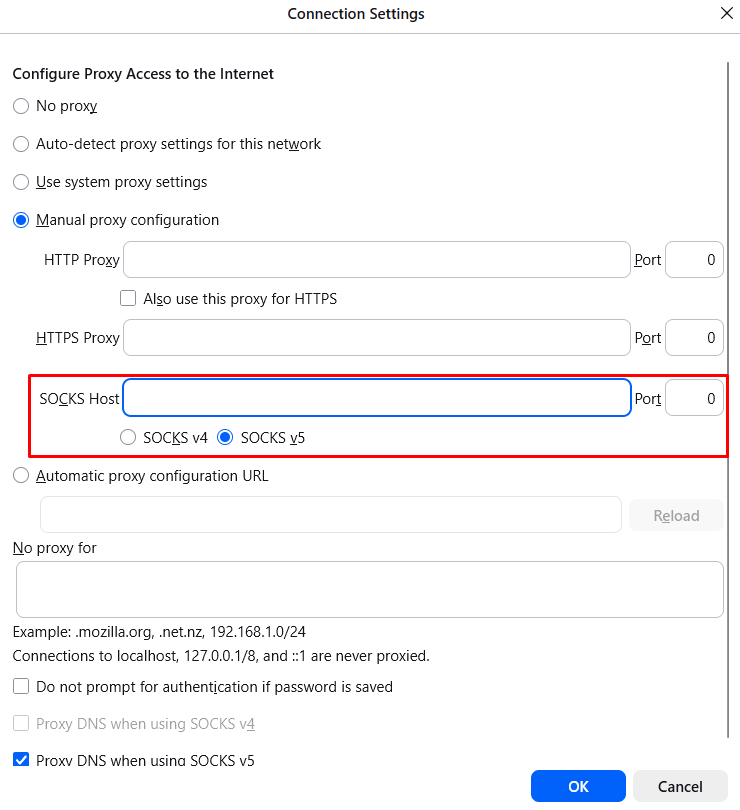
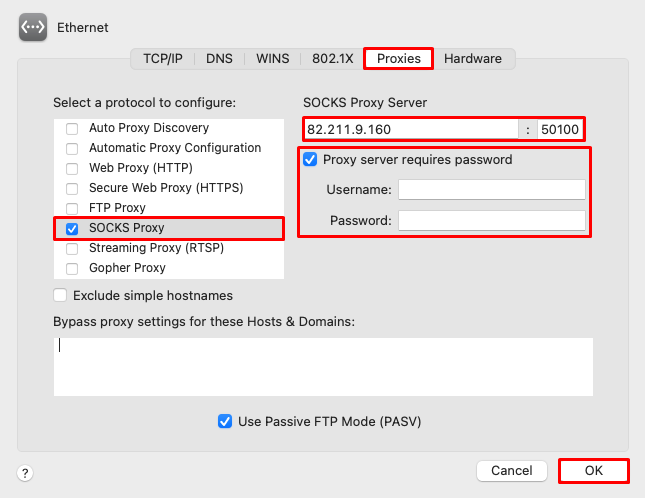
iOS and Chrome do not: iPhone's Wi-Fi proxy is HTTP-only. You can use additional apps like Potatso Lite for SOCKS5 settings on an iPhone. Chrome requires the --proxy-server="socks5://host:port" launch flag or a wrapper app.
SOCKS5 pools ready out of the box. No wrappers, no launch flags. Proxy-Seller ships SOCKS5 and HTTPS support on residential, ISP, datacenter, and mobile networks across 220+ locations. Point your client at the endpoint and go — same-day sandbox, no sales call. Buy proxies from $0.49.
To see what is SOCKS5 proxy server doing beyond just replacing your IP, look at the three low-level features that separate it from application-layer proxies like HTTP. Each capability follows directly from the protocol's session-layer design.
The SOCKS5 standard (RFC 1928) includes UDP support through a separate command called UDP ASSOCIATE. But here's the catch: while the protocol defines how UDP relay should work, actual support depends entirely on your proxy provider. Most commercial services, including residential, ISP, and datacenter pools, implement SOCKS5 as TCP‑only. UDP relay is notoriously difficult to keep stable. It doesn't handle packet loss or reordering natively, and NAT firewalls often drop UDP traffic unpredictably.
That doesn't make SOCKS5 less useful. Almost every real‑world task runs over TCP:
So what is SOCKS5 proxy actually doing between your client and the target? Every session runs the same three-step handshake defined in RFC 1928.
It is in the second step that the true SOCKS5 meaning becomes clear: the protocol merely establishes a transport channel. Because SOCKS5 skips payload parsing, its overhead stays close to raw TCP, and it scales well under concurrent load.
Choosing the right proxy depends on your use case: web scraping or gaming. To make that choice, you need to know what are SOCKS proxy strengths and how they differ from others. Each option works with traffic at a different network layer, supports distinct protocols, and offers a different balance of speed, security, and compatibility.
An HTTP proxy operates at the application layer. It understands web protocols, so it can read, cache, and even modify headers. This makes it useful for content filtering or caching, but it only handles web traffic. SOCKS5 doesn’t inspect or modify data, works with any protocol (TCP, UDP, and beyond), and introduces less overhead because it doesn’t parse application‑layer details.
SOCKS5 is newer. It adds UDP support, remote DNS resolution, IPv6, and built-in authentication (RFC 1929). SOCKS4 only supports TCP and resolves DNS locally on the client, which leaks the destination hostname before the tunnel is established. If your application needs UDP, modern authentication, or domain names, SOCKS5 is the only choice.
A VPN encrypts all traffic from your device at the operating system level, including DNS requests. SOCKS5 doesn't provide encryption, but it is faster and more lightweight because it adds no cryptographic overhead. For bandwidth-sensitive tasks like large file transfers or data pipeline ingestion, SOCKS5 proxy can achieve lower latency and higher throughput than a VPN. If you need UDP support, check whether your provider offers it. Most commercial SOCKS5 proxies are TCP-only.
Most real‑world use cases for SOCKS5 revolve around TCP traffic. Web scraping, ad verification, and penetration testing all benefit from the protocol's ability to forward raw data without inspection or modification. Below we cover the primary TCP scenarios first, followed by UDP‑dependent use cases. For each use case we'll flag whether TCP is enough or you need a UDP-capable provider.
This protocol helps collect publicly available data at scale, such as SERP results, public pricing, or product availability. It hides your original IP and reduces request restrictions. Instead of sending many requests from a single datacenter IP, route traffic through hundreds of proxies from different locations. This makes patterns appear organic.
Common scraping stacks that speak SOCKS5 out of the box:
Advertisers, agencies, and brand-safety teams need to see what their ads actually look like in a target country. A SOCKS5 proxy routes the verification browser or automated checker through a residential or ISP IP in the target country, so the ad server treats the request as an ordinary user and serves the same creative a local viewer would see. Common tasks: catching publishers that swap out approved creatives, spotting affiliate fraud, verifying geo-targeting on programmatic campaigns, checking that competitors aren't running trademark-bidding ads against your brand.
This runs on any TCP-only SOCKS5 setup; no UDP required. Tools that plug in cleanly: headless browsers (Playwright, Puppeteer) with socks5:// in the launch config, curl for spot checks, and enterprise ad-verification platforms that accept a SOCKS5 upstream in their crawler settings.
In internal audits and penetration tests, proxies are useful for routing traffic through a compromised host. Tools like Metasploit and Netcat can speak to a SOCKS5 upstream directly. Nmap doesn't route its core scan engine through SOCKS5 natively — you wrap it in ProxyChains, and only TCP connect scans work (ICMP host discovery is dropped). The proxy still forwards the TCP payload unchanged, so scanner logic and results stay intact. For encryption, an SSH tunnel with dynamic forwarding (ssh -D) gets set up, where traffic is wrapped in a secure channel, and the application logic remains the same. The result is a pivot point that expands data routing capabilities without changing the tools’ operational logic.
The SOCKS5 standard supports UDP through the UDP ASSOCIATE command, which makes it technically suitable for real‑time applications. However, most commercial SOCKS5 providers implement the protocol as TCP‑only because the UDP relay is difficult to stabilize across NAT and firewalls. If you need UDP for gaming, VoIP, or streaming, check whether your provider explicitly supports it.
To understand what is SOCKS5 proxy in the context of P2P, think of it as a pure transport layer that doesn't care what you're sharing; it just forwards bytes. TCP‑based P2P traffic works on any SOCKS5 proxy out of the box. UDP‑based P2P, on the other hand, requires a provider with confirmed UDP support. Always use SOCKS5 for lawful file‑sharing only, never for piracy or copyright infringement.
Understanding what is SOCKS5 proxy boils down to one thing: it's a session‑layer proxy that forwards raw TCP traffic without inspection. For large‑scale data extraction, pair SOCKS5 with residential IP pools to reduce blocks. For ad-verification workflows, route your headless browser through a residential SOCKS5 IP. If you need UDP for gaming or VoIP, confirm provider support first; most commercial SOCKS5 services are TCP‑only. Check our guide on the best proxy server for your specific use case.
Get a SOCKS5 pool that holds under scale
Proxy-Seller's clean dedicated pools deliver +20–30% valid response rate uplift and –20–35% cost per valid response in A/B pilots. Residential, ISP, datacenter, and mobile; SOCKS5 and HTTPS across all four networks.
A SOCKS5 proxy is a session-layer proxy server that sits between your client and the target, replaces your source IP with its own, and forwards TCP (and optionally UDP) traffic without inspecting the payload. It operates at the session layer, so it doesn't parse or modify the data it carries. Any TCP-based protocol passes through unchanged, which makes it useful for scraping, ad verification, penetration testing, and any workflow where an HTTP proxy is too restrictive. SOCKS5 does not encrypt traffic; only your source IP is masked.
Setup depends on the tool, not the operating system. Firefox and macOS accept SOCKS5 natively in their proxy settings. Windows and Android don't. Their built-in proxy fields are HTTP/HTTPS only, so you configure SOCKS5 inside a specific app (curl, PuTTY, most SSH clients) or use a wrapper like Proxifier on Windows or Postern on Android. Chrome needs the --proxy-server="socks5://host:port" launch flag. Once configured, point the client at your provider's host, port, and credentials.
A SOCKS5 proxy is used anywhere you need to route TCP traffic through an intermediate IP without modifying it. Common workloads: web scraping at scale (SERP, pricing, product availability), ad verification from residential IPs in target geos, SSH dynamic port forwarding for secure tunnels, API automation against rate-limited endpoints, penetration testing pivots through compromised hosts. UDP-heavy workloads like gaming, VoIP, or streaming require a provider that specifically supports the UDP ASSOCIATE command; most commercial pools are TCP-only.
Yes. The target server sees the SOCKS5 proxy's IP, not yours. That's the core function. Two caveats worth knowing. First, if your client resolves DNS locally before sending the request through the proxy, the destination hostname leaks in your DNS query — enable remote DNS in the client to fix this. Second, SOCKS5 doesn't encrypt traffic, so anyone on the path can still read the payload. The proxy hides the who, not the what.
A VPN encrypts every packet leaving your device at the operating-system level, including DNS queries. SOCKS5 doesn't encrypt anything. It forwards TCP through a proxy IP with minimal overhead. In practice, a VPN protects the confidentiality of your traffic; a SOCKS5 proxy protects your source IP. If you need speed and per-application routing, for example, sending only your scraper through a residential IP, SOCKS5 wins. If you need every packet on the device tunneled and encrypted, use a VPN.
Three main ones. First, no encryption: traffic between your device and the proxy is readable to anyone on the path, and an untrusted proxy operator can log every request. Second, DNS leaks: if the client isn't configured for remote DNS, your ISP still sees the domain you're contacting. Third, malicious operators: free or unvetted SOCKS5 endpoints can log credentials, inject responses, or route your traffic through man-in-the-middle infrastructure. Mitigation: use a reputable paid provider, enable remote DNS, and pair with SSH or TLS for anything sensitive.

 PHP
PHP Node.js
 Python
 Java
Java Golang
 en
en  Español
  中國人
中國人  Tiếng Việt
  Deutsch
  Українська
  Português
  Français
  भारतीय
  Türkçe
  한국인
한국인  Italiano
  Indonesia
  Polski
Comments: 0