
 Proxy for Telegram
 Proxy for LinkedIn
 Proxy for Google
 Proxy for Ebay
 Proxy for Twitter
 Proxy for TikTok
Step-by-step proxy setup in the Stellar AIO bot

The Stellar AIO app has gained significant popularity in the sneaker botting community because of its user-friendly interface and proxy server connection feature. This allows users to seamlessly make purchase requests while circumventing geolocation restrictions.
The Stellar AIO bot is compatible with all versions of Windows and MacOS and can be easily downloaded.
Setting up a proxy in the Stellar sneaker bot allows you to send hundreds or thousands of purchase requests, keep track of item availability, automate tracking for desired drops, and bypass geo-blocking and Captcha. If you need stable IP reputation without heavy rotation, a dedicated ISP proxy can be a good fit for repeated purchases on the same stores.
How to set up a proxy in the Stellar AIO sneaker bot
To maximize application performance, it is essential to configure a proxy in Stellar AIO. For consistent checkouts and cleaner task separation, a private proxy server is a reliable option because each task can run on its own dedicated IP. The more proxies you connect, the better your chances of quickly purchasing desired products and avoiding being blocked. On the strictest anti-bot systems, a mobile LTE proxy can help because the IP looks like real carrier traffic rather than typical server infrastructure. Follow these steps to use the bot for buying sneakers through a proxy:
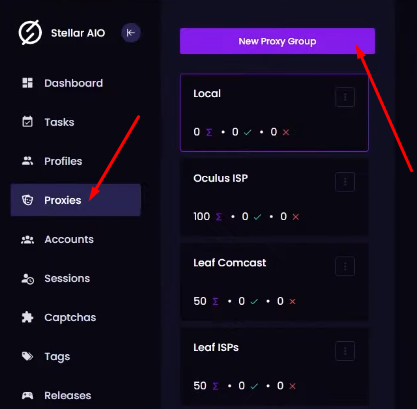
- The menu is located in the main program window on the left side. Select the "Proxies" tab and click the "New Proxy Group" button at the top.
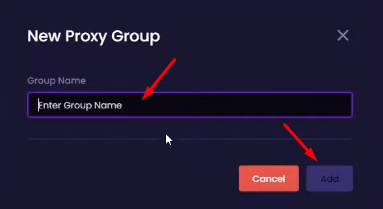
- In the "New Proxy Group" window, you will need to enter the name of the group that you want to create, then click the "Add" button.
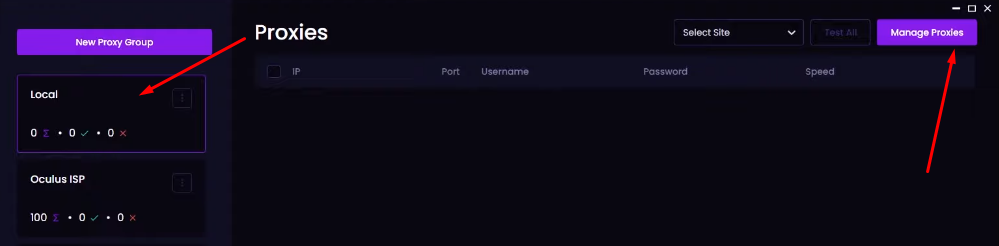
- When you return to the "Proxy Groups" window, select the group you just created and click "Manage Proxies".
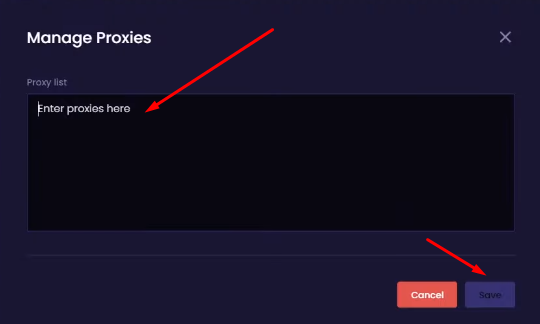
- In the new window, you need to enter the IP addresses, ports, usernames, and passwords of all proxy servers you want to connect to. Use the format of "IP-address:port:username:password". The same input format works for an IPv6 proxy server as well—just paste the IPv6 address, port, and credentials exactly as provided. After entering the data, click the "Save" button.
- To test the functionality of the IP addresses, go to the "Proxies" tab, select the desired website, and click the "Test" button. If you’re still choosing a proxy type, a residential proxies from $1.45 helps you evaluate success rates on your target site before committing to a larger plan.
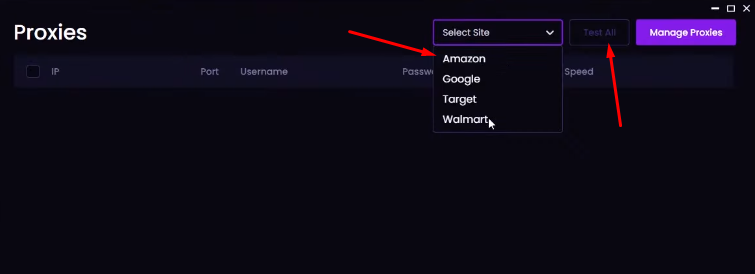
Non-functioning proxies will be removed based on the analysis. You can replace them with new ones.
PROXIES FROM $0.02/IP
Ready to put this into practice?
Pick a proxy type and location, and start using it within minutes.
Instant delivery
24/7 support
Refund policy
About the author