
 Proxy for Telegram
 Proxy for LinkedIn
 Proxy for Google
 Proxy for Ebay
 Proxy for Twitter
 Proxy for TikTok
Setting up a proxy in the Bitdefender

Bitdefender is an antivirus solution known for its robust protection without compromising system performance. It offers enhanced web protection, surpassing the built-in security features of browsers like Chrome, Firefox, and Edge. Key features include:
- virus and vulnerability scanning;
- real-time protection;
- Phishing protection;
- system optimization tools (removal of temporary and unnecessary files);
- password management;
- parental controls.
Configuring a proxy in Bitdefender is essential for users who connect to the internet through a proxy. This adjustment enhances the antivirus's ability to accurately detect threats on websites visited.
How to set up a proxy in the Bitdefender
To set up a proxy in Bitdefender, follow these steps:
- Launch the program and navigate to the “Settings” tab in the main menu.
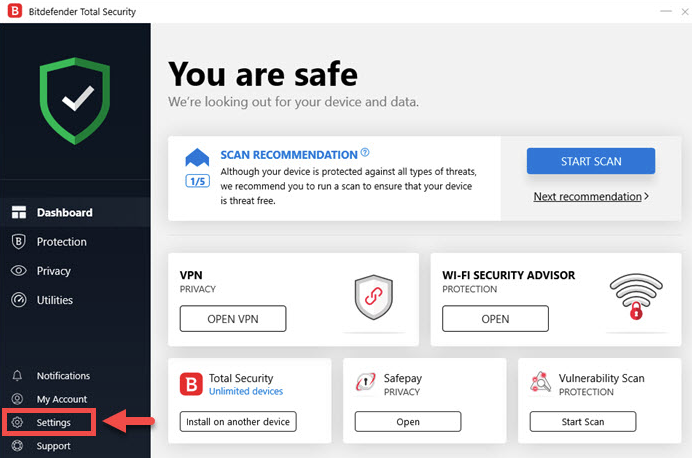
- In the new window, select the “Advanced” tab to open additional settings.
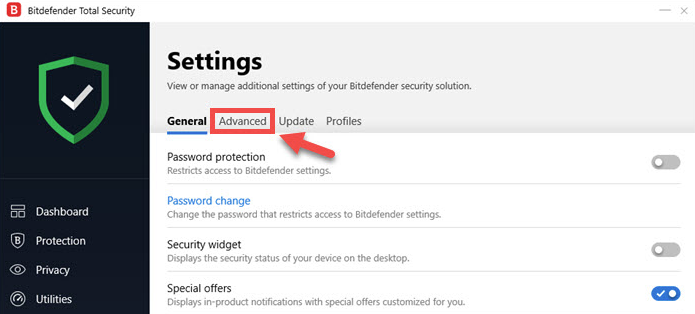
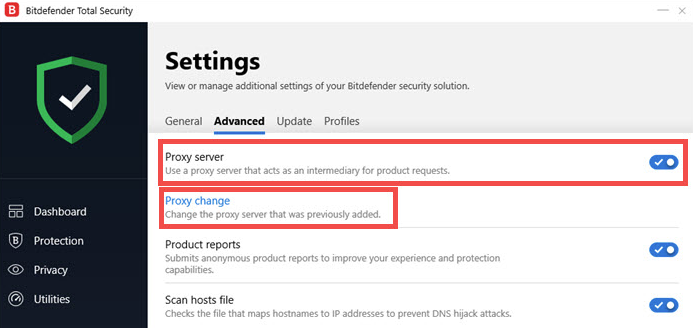
- Activate the “Proxy server” option. Click on the “Proxy change” button below to enter your settings.
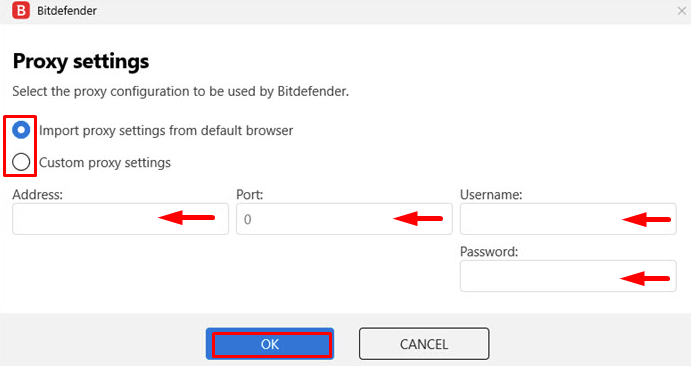
- If you have previously configured a proxy in your browser, click on the “Import proxy settings from default browser” checkbox. Bitdefender will automatically apply the settings from Edge, Mozilla Firefox, Chrome, or Opera.
- Alternatively, you can manually set the proxy by selecting the “Custom proxy settings” option. Enter the credentials of the proxy, such as IP, port, username, and password (if using a proxy with authorization). Click “OK” to confirm.
With these settings in place, Bitdefender will be able to effectively protect your device while you access previously blocked sites or download programs that were not available in your region before.
PROXIES FROM $0.02/IP
Ready to put this into practice?
Pick a proxy type and location, and start using it within minutes.
Instant delivery
24/7 support
Refund policy
About the author