
 Proxy for Telegram
 Proxy for LinkedIn
 Proxy for Google
 Proxy for Ebay
 Proxy for Twitter
 Proxy for TikTok
Configuring a proxy in the Proxy Switcher and Manager extension

The Proxy Switcher and Manager extension enables the addition and management of proxy servers in Chrome and Firefox browsers, allowing the selected browser to use an IP address without needing to change the network. For stable day-to-day browsing and long sessions, an ISP proxies are often the most convenient option, since a fixed IP is easier to keep consistent in a browser profile.Proxy Switcher supports working with multiple proxy profiles and switching between them as needed. This extension facilitates setting up a proxy server to act as a mediator between the user's device and the network. It hides the real geolocation, ensures safe and anonymous site visits, and provides access to blocked websites. You can buy proxy server for use with the extension on our website.
Video guide for setting up a proxy in Proxy Switcher and Manager
Step-by-step proxy configuration in Proxy Switcher and Manager
To configure a proxy in Proxy Switcher and Manager, follow the step-by-step instructions.
- Begin by finding and installing the Proxy Switcher and Manager extension from your browser's web store.
- After installation, click on the extensions icon in your browser, located in the top right corner of the functional panel for Chrome, then navigate to the settings in Proxy Switcher and Manager.
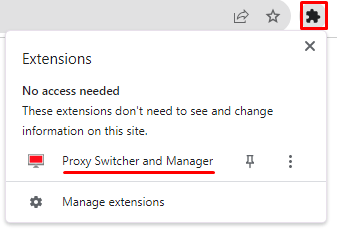
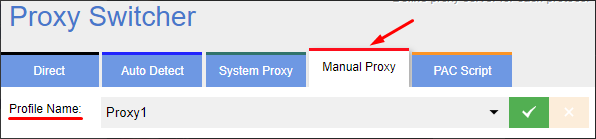
- In the “Manual Proxy” section, assign a name to the profile in the “Profile Name” field for convenience.
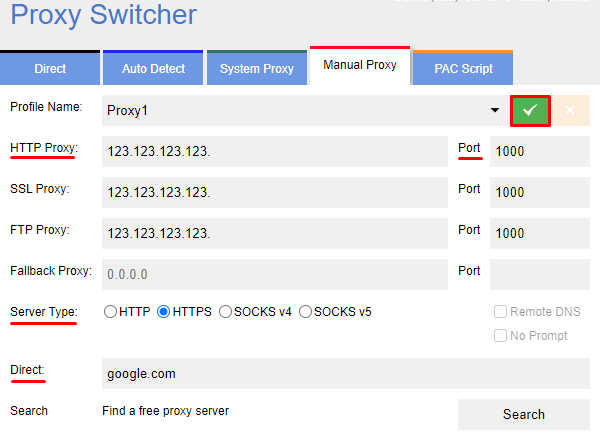
- Next, enter the proxy server details: IP address, and port. If you use a residential proxies, you can usually paste the host and port once and let IP rotation run automatically according to the rules configured in your dashboard. When entering the proxy and port in the “HTTP Proxy” and “Port” fields, all values will be duplicated in the following fields by default. Choose the proxy connection protocol from the options provided in the “Server Type” field. To have the proxy work only with specific resources, enter them in the “Direct” field, separated by commas. If not needed, leave the field as is. To complete the proxy setup, click the green checkmark button.
When working with a dedicated mobile proxy, time-based rotation is typically more convenient for an extension workflow, because link-based rotation requires triggering the refresh manually in the browser.
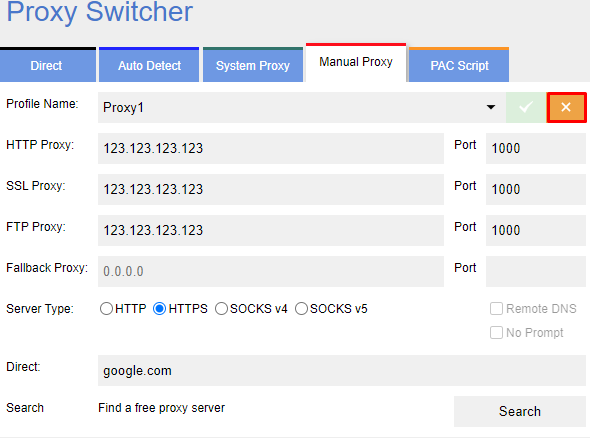
- To disable and deactivate the proxy, click the yellow button in the top right corner of the settings panel.
- To fully disable the Proxy Switcher and Manager in the browser, click on the “Extensions” icon in the top right corner and deactivate the toggle in the opened window.
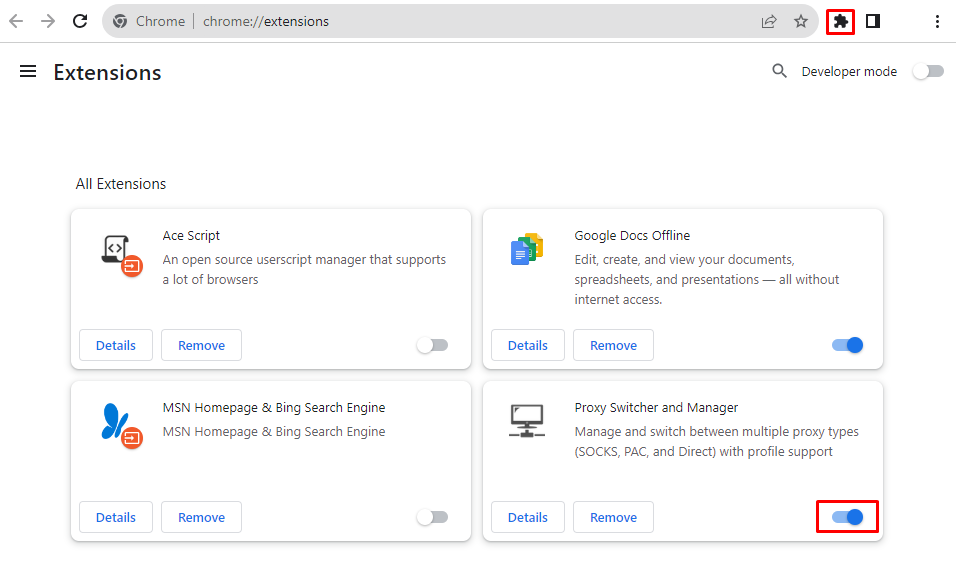
With these steps, the Proxy Switcher and Manager extension is active and ready for use with the configured proxy server for safe browsing and web surfing. If you need a larger pool of unique addresses for technical web tasks, IPv6 proxy can be a practical choice—provided your target services and environment fully support IPv6.
PROXIES FROM $0.02/IP
Ready to put this into practice?
Pick a proxy type and location, and start using it within minutes.
Instant delivery
24/7 support
Refund policy
About the author