

Usually, a standard GUI (Graphical User Interface) browser with tabs of websites and buttons is sufficient to access a website. However, for web application testing, data collection from hundreds of pages, or execution of scripts, the interface can hinder functioning. In these scenarios, resource inefficiency and automation issues arise. So, one might ask, what is a headless browser?
Functionally, it doesn't differ from traditional ones. The striking difference, however, is the absence of an interface. It can do everything that regular ones can, but it operates in the background and much faster.
In this article, we'll explain their structures, discuss application areas, offer guidance on selecting suitable tools for various tasks from testing to scraping, and outline critical considerations for avoiding blocks.
Before explaining how a headless web browser works, it’s important to note that there are two types – true and virtual.
In such browser architecture without visualization or a graphical user interface, the data processing occurs directly in the device’s memory.
In the second case, a frame buffer simulation is used. It acts as a stand-alone display, featuring standard interface building blocks, and simulates a screen display from which the browser interacts with the device.
The first option is usually used: lighter, faster, and easier to configure.
Initially, the term “headless” might appear to mean “cut down”. Indeed, there are no windows opened, pages are not displayed on a monitor, and a mouse is not needed. So, what is the headless browser's main feature? All these actions are performed, but they just occur in the background and are carried out through API calls and commands.
Running processes with a true browser involves:
Important: The lack of output viewing does not inhibit the browser from functioning. This feature makes headless browsers preferable for testing, web scraping, CI/CD, and automation, where the visual result of actions taken is not important.
If making a comparison, the differences go far beyond mere differences in the interface. The latter has an entirely different method of interacting with the particular website. Hence, let us understand the other distinguishing characteristics in the table below.
| Characteristic | Headless | Regular |
|---|---|---|
| CPU resource consumption | Minimal | High |
| RAM consumption | Minimal | High |
| Launch environment | Developer environment or console | User-friendly interface |
| Method of accessing web resources | Via API | Direct |
| Cross-platform compatibility | + | + |
| Cross-browser compatibility | – | + |
| Programming language knowledge | + | – |
| Top-level features | – | + |
| Rendering | Partial | + |
| Extension support | – | + |
| Media support | Partial | + |
From this comparison, we understand that a development environment is required, and proficiency in console interaction and programming languages is essential for the first type to operate.
Analyzing the differences, we can presume that these tools will have different application areas, which leads us to ask: what is a headless browser used for, and in which instances?
You’ll learn to automate a headless browser step-by-step with Playwright (read more Playwright vs Puppeteer). This example shows navigation, clicking buttons, filling forms, and extracting data from the DOM.
Example workflow:
Code snippet:
try {
const { chromium } = require('playwright');
(async () => {
const browser = await chromium.launch({ headless: true });
const page = await browser.newPage();
await page.goto('https://example.com', { timeout: 10000 });
await page.click('#start-button');
await page.fill('#name-input', 'Your Name');
const resultText = await page.textContent('#result');
console.log('Extracted text:', resultText);
await browser.close();
})();
} catch (error) {
console.error('Error during automation:', error);
}
Use try/catch blocks to handle errors like navigation timeouts or element not found. Detect page failures using timeouts and conditional checks.
In production, running headless browser automation reliably requires solving some challenges. Here’s what you should focus on:
Best practices for stable scraping or automation:
High-quality proxies are critical in headless browser automation to maintain uptime and avoid detection. Proxy-Seller offers reliable proxy solutions tailored for automation. They provide fast, private SOCKS5 and HTTPS proxies ideal for web scraping, ad verification, price monitoring, and more.
Proxy-Seller’s proxy options include residential, ISP, datacenter IPv4/IPv6, and mobile proxies. They support unlimited bandwidth up to 1 Gbps and worldwide geolocation coverage, perfect for scaling your headless browser tasks.
By pairing Proxy-Seller’s proxies with your automation scripts, you enable smooth user-agent rotation, session isolation, and IP rotation. This dramatically reduces the chance of detection and blocking during large-scale headless browser automation.
These are the fields where such technology is most frequently applied:
The scope of a headless tool is not limited to the above-mentioned tasks. It also encompasses actions associated with diagnosing problems, managing and protecting traffic, detecting suspicious activities, and reporting activities that are necessary for compliance analysis required by regulations.
Integrating services and developing web applications are two of the many tasks such tools assist services with.
This tool is most effective in the following scenarios:
Such tools in development are not limited to the above-mentioned scenarios. As technology evolves, programmers are challenged to develop new, flexible solutions to automate interaction with web resources.
QA and AQA specialists put their trust in such tools more than any other because they are very light and fast. Hence, these offer advanced testing capabilities for web pages and applications.
The primary application scenarios in this area comprise:
It is evident that the tool enables testers to carry out tests with a high degree of flexibility and swiftness, which in turn impacts test accuracy and the resulting product is likely to be of better quality.
Marketers and SEO experts can scrape sites for relevant data using headless mode for effective product marketing. However, they often run into blocks, which leads to a lack of resources. But why does this happen?
Consider two requests below.
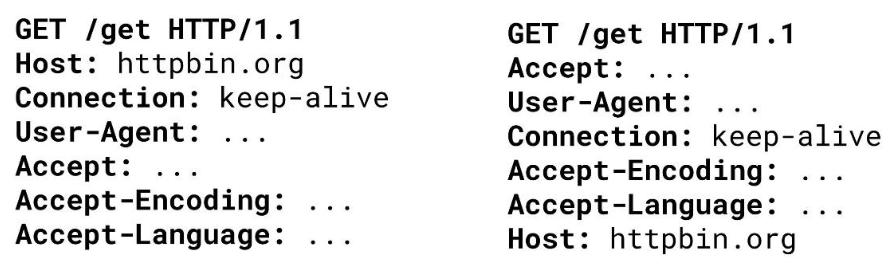
Banning systems that IP addresses for all sorts of infractions need to ascertain whether the request is coming from a bot or natural user for a certain header in the ordering list. A user request from Google Chrome is displayed on the left, while a request coming from a headless browser is on the right.
How do you parse data if there is a chance you might get banned? The integration of proxy for headless browsers that mask their real IP address through correct HTTP request formulation is possible. Hence, one is better off starting with using a proxy for data parsing so information can be pulled selectively with the use of CSS or XPath, elements can be clicked on, and the data can be placed in the required files easily.
Production-ready headless browser infrastructure abstracts away managing browser lifecycles, letting you focus solely on automation logic. It ensures your headless web browser automation is stable, scalable, and easy to operate.
Browserbase is a good example of this type of infrastructure:
This kind of infrastructure helps you:
Other platforms you might consider include browserless.io, AWS Device Farm, and Puppeteer-as-a-Service providers. They offer similar managed browser environments suitable for different workloads.
Security matters in production environments. Make sure to:
Investing in production-grade headless browser infrastructure saves you time and headaches while boosting reliability and scaling your headless browser automation efforts.
Performance, technologies used, design, as well as functionality, often determine the tools of choice. One can get multiple tools that offer different techs and UI. Their Foundation, Engine, and API are what distinguish them.
Every tool claims to be the best, yet that is too subjective. In reality each tool employs different logic and technology in dealing with certain web content methods. Nevertheless, they can be conveniently split into two categories: browsers and “headless” libraries.
The first category includes:
Playwright, Puppeteer, Selenium, and PhantomJS allow for remote control.
Let’s focus on these three most popular ones since the last one is more rarely used.
| Parameter | Selenium | Playwright | Puppeteer |
|---|---|---|---|
| API support | WebDriver | Asynchronous API | High-level API, supports asynchrony, easy integration |
| Multilingual support | JavaScript, Python, Java, C#, Ruby, Go, and .NET | TypeScript, Python, Node.js, Java, .NET | JavaScript/Node.js, TypeScript |
| Web standards | HTML5, CSS3, JavaScript, WebAssembly | HTML5, CSS3, JavaScript | Supports all Chrome technologies |
| Built-in proxy support | + | + | + |
| Performance | High, but resource-intensive | Moderate, resource consumption depends on tasks and tools | High, but resource-intensive |
| Built-in anti-bot support | + | + | + |
| Support for third-party libraries | + | + | + |
| DOM interaction | + | + | + |
| Media support | Partial | Partial | + |
| Network traffic interception | + | + | + |
| Ease of use | Average (requires configuration and additional libraries) | Average (requires installation of drivers for each browser) | Very convenient, high level of abstraction |
| Official support | + | + | + |
Browser automation frameworks simplify working with a headless browser by providing easy-to-use tools that manage complex browser interactions. They help you write and maintain automation scripts faster, with built-in features like retries, network control, and parallel test execution.
| Framework | Key Features & Focus | Ideal Use Case |
|---|---|---|
| Playwright (Microsoft) | Supports Chromium, Firefox, WebKit; promise-based API; automatic waiting, test isolation. | Cross-browser testing and reliable headless automation. |
| Puppeteer (Google) | Deeply integrates with Chrome DevTools Protocol; optimized for single-browser tasks; Chromium-only. | Generating PDFs, taking screenshots, and Chrome-focused scraping. |
| Selenium | Oldest and most mature (WebDriver protocol); supports Chrome, Firefox, Edge, Safari, and others. It has a huge ecosystem, supports many languages (Java, Python, C#, Ruby), and benefits from vast community support | Broad browser compatibility, though less modern than newer options. |
Other emerging tools include Cypress (mainly for frontend testing with GUI), TestCafe, and WebDriverIO, which offer various balances between ease of use and feature sets.
The selection of the best tools from the above is based on the projects you are engaged with as well as the resources utilized.
Now, let’s compare these frameworks on key practical aspects:
| Aspect | Playwright | Puppeteer | Selenium |
|---|---|---|---|
| Retries | Automatic retry and self-healing features | Needs manual retry logic | |
| Network Mocking | Powerful network interception and mocking | Powerful network interception and mocking | Limited capabilities |
| Parallelization | Supports parallel test execution out-of-the-box. | Less optimized for parallelism | Supports parallel runs but requires setup |
| CI/CD Integration | Integrates well; native parallel and flaky test recovery support (Stagehand) | Integrates well | |
Choosing the right framework depends on your headless browser automation goals. For cross-browser testing, pick Playwright. For AI-driven self-healing, Stagehand fits well. Puppeteer suits Chrome-focused automation, and Selenium covers broad legacy needs.
They are outstanding when working with automation and performance tasks and, in general, have a myriad of other benefits, including:
These applications are ideally suited for use in backend and service solutions, as well as in resource-constrained environments.
Before implementing any tool, it is worth understanding the intricacies of such browsers:
We now have an understanding of what headless browsers are – these are new-age technologies in the development, testing, and scraping realms. Their most noteworthy benefit is the conservation of resources, as these do not need a graphical user interface to be executed.
For software developers and testers, these have become instrumental in the construction of robust, repeatable, and rapid CI/CD pipelines, as these allow for quick testing under numerous conditions, which is critical for cross-browser compatibility.
In the case of SEO, these tools become critical when analyzing a website, checking its indexation, or executing multiple actions on the document, like simulating page usage or collecting data for analysis.

 PHP
PHP Node.js
 Python
 Java
Java Golang
 en
en  Español
  中國人
中國人  Tiếng Việt
  Deutsch
  Українська
  Português
  Français
  भारतीय
  Türkçe
  한국인
한국인  Italiano
  Indonesia
  Polski
Comments: 0