

Choosing the best proxy in 2026 isn’t just finding the most trending provider, but rather finding the right fit: what device you use, what workflows you have, the quality of the IP pool, how sessions behave, and which protocols your tools actually support.
In this breakdown, we’ll walk through how the main network types work, when IPv4 still wins over IPv6 (and when it doesn’t), how to match the best proxy server to specific workflows, and how to compare providers without getting tricked by “cheap” specs that fall apart under actual traffic.
A proxy server is the middleman that sits between your device or app and the websites or services you connect to. Instead of hitting the target site directly, your traffic goes through the proxy, which exposes its own IP address.
In real life, this gives you more flexibility with privacy, geo targeting, and stability for your personal and business use cases, including:
Running separate browser profiles for account management, QA, and experiments
Checking search results and localized content across regions in a reliable
Ad verification and placement checks for geo-dependent ad campaigns
Accessing public web data for market research and monitoring while staying compliant
Testing apps and sites from different networks and device environments
Keeping sessions stable for tools that need to stay logged in
One thing worth mentioning as a reality check in 2026 is that free IP networks are often a gamble — heavily reused, unstable uptime, inconsistent speed, and potential compliance issues. That’s why if your workflows need high-quality network IPs, premium proxy providers like Proxy-Seller are usually the reasonable baseline.
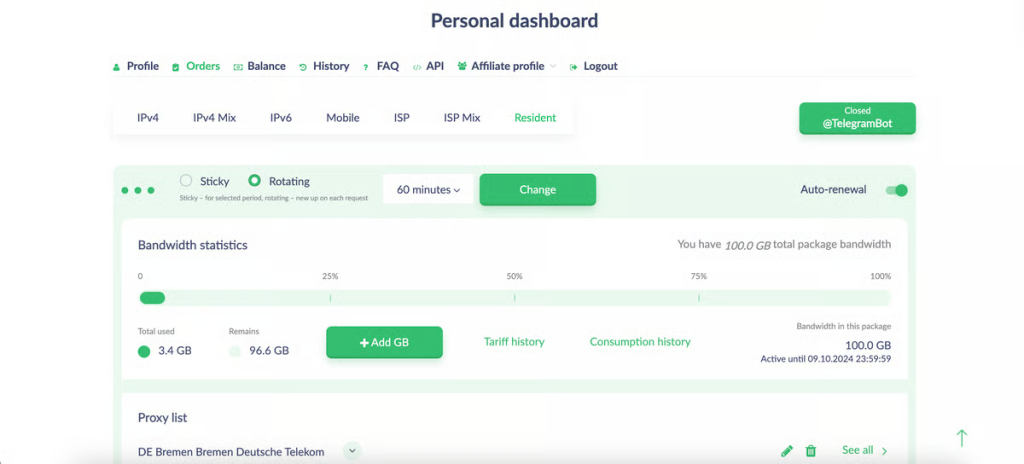
When people look for the best proxy, what they really want is the best setup for their exact targets and workload. The first step is understanding the main categories of network IPs:
Datacenter IP networks live in data centers, not on consumer ISP networks. They’re often the best and fast proxy option when you care about speed and price efficiency at scale, offering:
High-speed workloads (monitoring, QA, bulk requests to more tolerant targets)
Predictable routing and stable latency
Scaling on a budget when IP reputation isn’t the main bottleneck
The main trade-off here is that stricter sites are more likely to flag datacenter ranges compared to ISP, residential, or mobile IPs.
An ISP proxy (often called “static residential” on the market) sits in the middle: data-center-style stability, but IPs that belong to actual consumer ISPs. For long sessions and business workflows where you need a consistent identity, they’re often a very strong default choice:
Long-running sessions and frequent logins
Business workflows where stability beats raw pool size
Scenarios where you want a stable best proxy IP instead of constant rotation
The trade-off here is that they are generally more expensive than basic datacenter IPs, and coverage by country/city may be narrower than huge rotating residential networks.
A residential proxy uses IPs that belong to real household consumer broadband connections. They’re often the first pick when targets are strict about IP reputation or when you need wide geo coverage with realistic footprints, offering:
Harder targets and higher pass rates
Geo testing at the country/city level (depending on the network)
Workflows that need rotation or “sticky” sessions for continuity
A few things to keep in mind here — these are often billed by bandwidth (GB), so heavy data usage can get quite pricey, and performance depends a lot on the region and pool quality.
Despite that, they offer several rotation modes (time-based, per-request, sticky), detailed geo targeting (country/region/city), and ISP selection often across 200+ locations.
A mobile proxy routes traffic through cellular 4G/5G/LTE networks — simple as that. Platforms that heavily rely on mobile traffic or are hypersensitive to reputation often treat these as the gold standard, as they are best for:
Mobile-first platforms and strict environments where mobile IP reputation helps
Workflows that need rotation patterns similar to normal mobile usage
On the other hand, these are usually more expensive and more variable, since performance depends on carrier conditions, and capacity is generally smaller compared to big datacenter or residential pools.
To bring it all together, use this table as a quick mental map of the main network categories, which will eventually help you pick the best proxy types for your actual workloads:
|
Proxy type |
IP source |
Typical speed |
Session style |
Best for |
Trade-offs |
|---|---|---|---|---|---|
|
Datacenter |
Data center networks |
High |
Static/rotating |
Scale, monitoring, QA |
More likely challenges on strict targets |
|
ISP (Static residential) |
ISP-assigned ranges |
High |
Long-lived |
Long sessions, stable identity |
Higher cost than DC |
|
Residential |
Consumer networks |
Medium / High |
Rotating/sticky |
Hard targets, geo testing |
Often bandwidth-priced |
|
Mobile |
Cellular networks |
Medium |
Rotating/sticky |
Social/mobile-first targets |
Higher cost, variable speeds |
In any case, the best proxies are always the ones whose IP source and session behavior line up with how strict your targets are and how stable your workflows need to be.
A practical way to make the right choice is to run everything through five key filters: how strict the target is, how long sessions need to last, which protocols your stack uses, where you need IPs from, and how much concurrency you plan to push.
When choosing the right provider, the goal is simple: don’t pay premium rates for features you’ll never touch, and don’t settle for the cheapest solutions that will collapse once you start scaling.
Use this checklist when you’re evaluating any top proxy servers or reading vendor promises:
IP quality and pool structure: subnet diversity, clear replacement rules, consistent success rates on your actual targets
Session controls: rotating vs sticky options, session length (TTL), concurrency limits per IP/account
Performance: latency expectations, throughput, uptime patterns, and how quickly you can swap out weak IPs
Operations and authentication: username/password vs IP allowlisting; dashboards and APIs that make life easier for teams
Support and documentation: clear setup guides for your OS and tools, and responsive support when things break
Most reliable platforms like Proxy-Seller support both SOCKS5 and HTTP(S), and typically let you choose between username/password or IP allowlisting, both of which are important when you’re looking for the best proxy to buy for business workflows.
When you’re collecting or monitoring public web data, the top choice depends on how strict the target is and whether you need a stable identity or wide coverage. When it comes to stealth and data scraping, the key is to keep things smooth at all times: clean IPs, sane session handling, and patterns that follow compliant online activities.
Residential or mobile is often the right choice when targets aggressively challenge datacenter IPs, or when reputation matters more than raw speed.
Datacenter can still be the top option for more permissive sites where cost and throughput matter most.
Something to keep in mind: use sticky sessions for flows that mimic real multiple users (login → browse → actions), and use rotation for wide coverage (catalog crawling, result pagination, monitoring).
If you need a solid network infrastructure for web scraping, a reliable provider like Proxy-Seller offers all network types with flexible rotation and a neat dashboard. For enterprise customers that also need dedicated scraping APIs, vendors like Oxylabs are a good starting point.
Long sessions are all about keeping identity stable and avoiding unforced errors like unnecessary rotation or noisy IP reuse, so the top choice here is the one that gives you predictable persistence:
ISP (static residential) is a common go-to for stable logins and recurring workflows where you want the same identity for long stretches.
Datacenter can handle long sessions on low-risk targets if IP reputation isn’t a big constraint.
Make sure to maintain one identity per workflow, only rotate when there’s a real reason to, and leave room for maintenance IP replacement.
Social platforms and similar hard targets monitor both IP reputation and behavior closely. In this world, the best proxy providers will contain tools that reduce any unnecessary friction, running fewer, higher-quality sessions rather than rotating aggressively:
Mobile (4G/5G) and high-quality residential are common picks for strict, reputation-driven platforms.
Use separate web browsing profiles, containers, or anti-detect browsers, and keep storage and cookies isolated. Social platforms are also where aligning geo with account history is important, so stick to networks from that specific region.
For SERP checks, ad verification, and any geo-dependent testing, accuracy and repeatability are the main KPIs. The goal here is to determine which network sends the right location signal consistently and lets you reproduce results whenever you need:
Residential or ISP often works best when you need realistic, geo-representative views and stable repeated checks.
Datacenter can still be a strong option when speed matters and the target isn’t very strict.
Start small, verify how the results look, then roll it out properly. Also, use location granularity with purpose — country-level targeting is cheaper, but city/region targeting is more realistic, though it requires better pools.
Professional-grade proxies are all about operational guarantees: predictable uptime, clear replacement rules, stable routing, and tooling that your team can actually live with.
In real use, the best premium proxy setup for business usually offers:
Multiple network types (datacenter, ISP, residential, mobile), so you can map them to different workloads
Both HTTP(S) and SOCKS5, plus flexible authentication options
A neat dashboard that lets you provision, rotate, and manage IPs in bulk
That’s why many teams go for proven providers like Proxy-Seller, Bright Data, and Oxylabs, all of which offer all of the above, rather than simply looking for the cheapest option on the market.
When you’re picking the best private proxy service for specific devices and tasks, the quickest way is to narrow options by network types, geo targeting, and pricing plans, and this table pulls it together for you.
|
Provider |
Proxy types |
Geo targeting |
Residential pool & coverage |
Entry residential pricing |
Best for / strength |
|---|---|---|---|---|---|
|
Proxy-Seller |
DC, ISP, Residential, Mobile |
Country/region/city + ISP |
20M+ IPs, 220+countries/regions |
$0.70/GB |
Best all-round balance (quality + controls + price) |
|
Geonix |
IPv4, IPv6, ISP, Residential, Mobile |
Country (residential: 200+countries) |
Coverage: 200+countries |
$0.70/GB |
Good budget + broad types |
|
Decodo |
DC, ISP, Residential, Mobile + APIs |
Continent/country/state/city/ZIP + ASN |
115M+ IPs, 195+ locations |
$2/GB |
Strong mid-market scale + targeting |
|
Oxylabs |
DC, ISP, Residential, Mobile + APIs |
Country/state/city (varies by product) |
175M+ IPs, 195countries |
$8/GB |
Enterprise networks + data products |
|
IPRoyal |
DC, ISP, Residential, Mobile |
Country/state/city (product-dependent) |
32M+ IPs, 195+countries |
$7/GB |
Clear tiers + wide coverage |
|
Bright Data |
DC, ISP, Residential, Mobile + APIs |
Country/state/city/ZIP |
150M+ IPs, 195countries |
$5.88/GB |
Premium platform + advanced tooling |
The best IP network in 2026 is the one that actually fits how you work, so make sure to pick the right connection type (datacenter, ISP, residential, mobile), confirm whether IPv4 or IPv6 makes more sense for your stack, and stick to protocols your tools handle cleanly.
For everyday work, give priority to clean IP pools and predictable sessions. For stricter targets, test residential or 4G/5G options with careful rotation instead of random hopping.
Start small, verify everything on your real workflows and devices, and only then scale once you’re confident you’ve found a setup that truly matches your business goals.

 PHP
PHP Node.js
 Python
 Java
Java Golang
 en
en  Español
  中國人
中國人  Tiếng Việt
  Deutsch
  Українська
  Português
  Français
  भारतीय
  Türkçe
  한국인
한국인  Italiano
  Indonesia
  Polski
Comments: 0