 텔레그램 프록시
 LinkedIn용 프록시
 Google 프록시
 Ebay용 프록시
 트위터 프록시
 TikTok 프록시
Python을 사용한 Amazon 리뷰 스크래핑 가이드

경쟁사를 분석하거나 실제 고객의 의견을 확인하거나 시장 동향을 파악할 때 Python으로 Amazon 리뷰를 스크랩하는 것은 유용할 수 있습니다. Python을 사용하여 Amazon 리뷰를 스크랩하는 방법이 궁금하다면 이 간단한 튜토리얼에서 요청 패키지와 BeautifulSoup을 사용하여 리뷰 콘텐츠를 프로그래밍 방식으로 가져오는 실습 과정을 안내해 드립니다.
1단계. 필요한 라이브러리 설치
무엇보다도 먼저 몇 가지 라이브러리를 설치해야 합니다. 두 가지 핵심 종속성인 네트워크 호출을 위한 요청과 HTML 트리 탐색을 위한 BeautifulSoup은 모두 단일 터미널 라인에서 보안을 유지할 수 있습니다:
pip install requests
pip install beautifulsoup42단계. 스크래핑 프로세스 구성
파이썬을 사용한 Amazon 리뷰에 초점을 맞추고 스크래핑 프로세스의 각 단계를 단계별로 살펴봅니다.
웹사이트 구조 이해하기
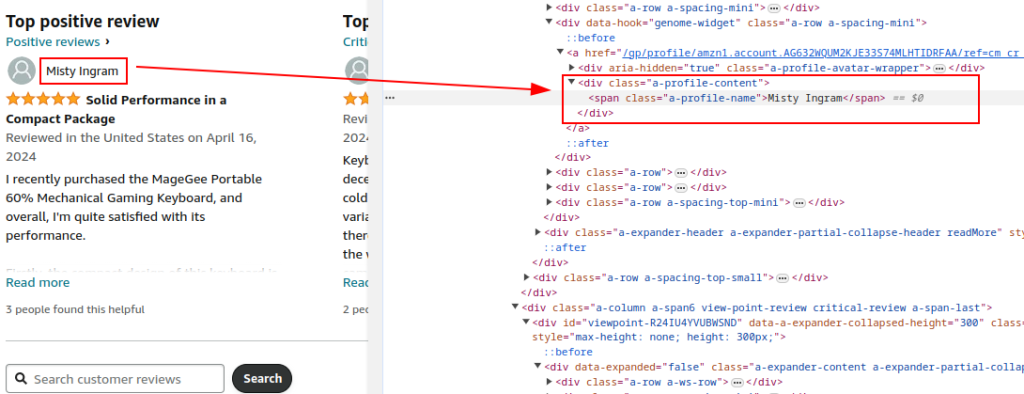
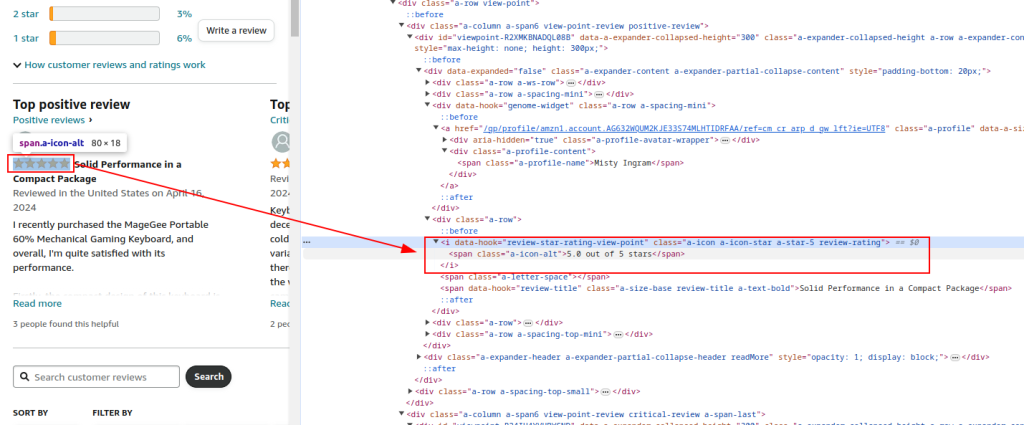
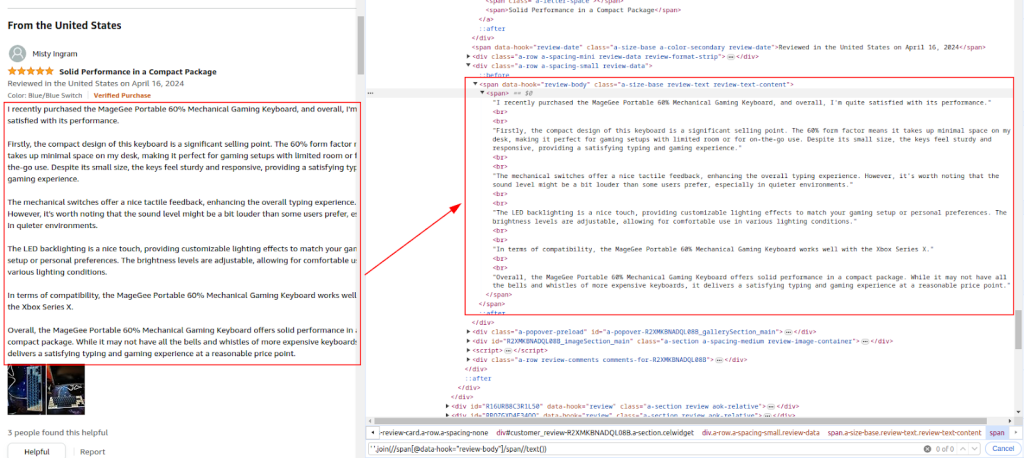
사이트의 HTML 구조를 이해하는 것은 리뷰 요소를 식별하는 데 필수적입니다. 리뷰 섹션에는 리뷰 작성자 핸들, 별점, 작성된 댓글과 같은 필드가 포함되며, 브라우저 검사 도구를 통해 이러한 필드를 찾아야 합니다.
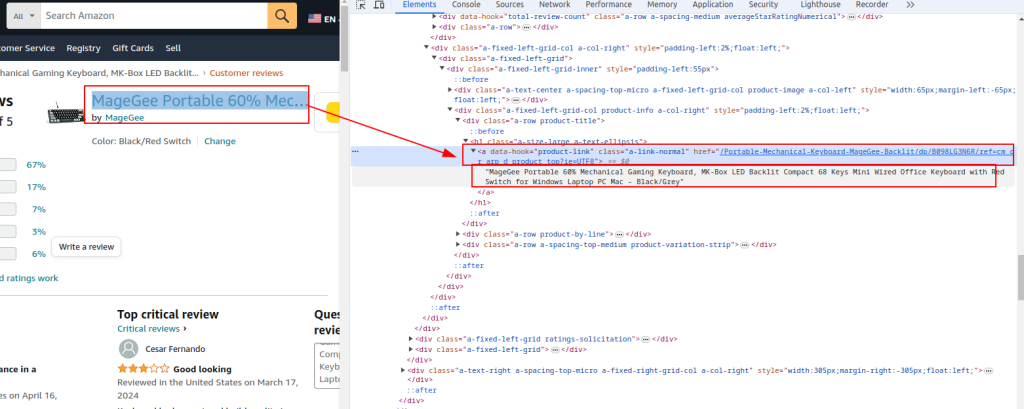
제품 제목 및 URL:
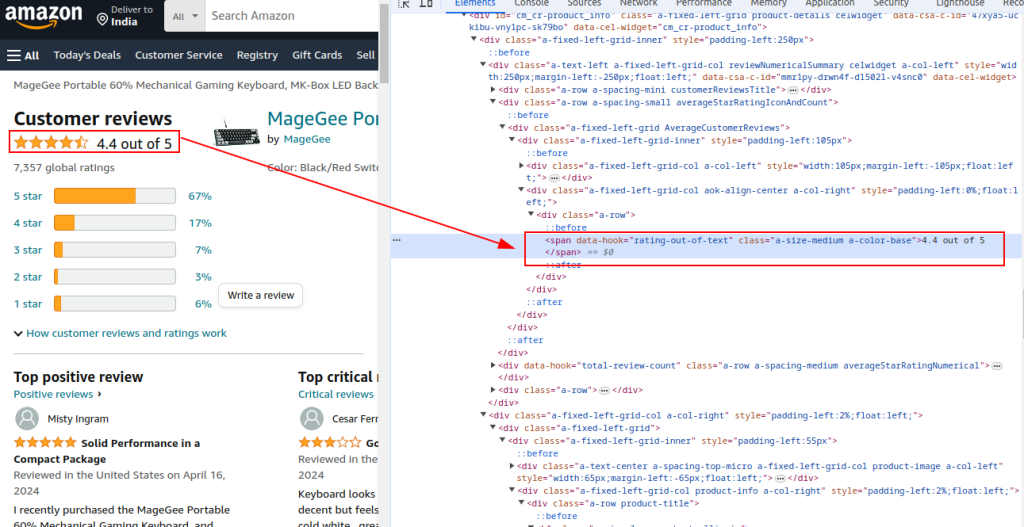
총 평점:
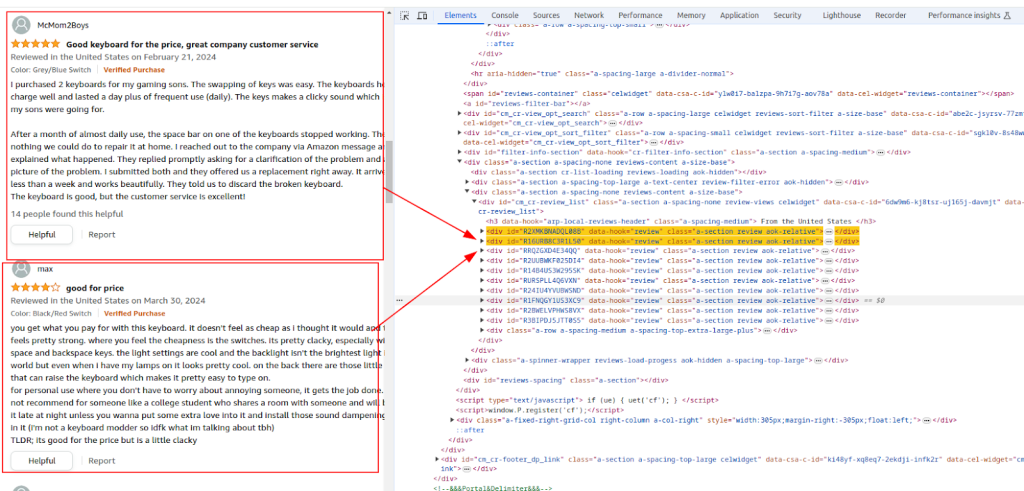
검토 섹션:
작성자 이름:
평가:
방법:
HTTP 요청 보내기
헤더는 중요한 역할을 합니다. 사용자 에이전트 문자열 및 기타 헤더는 일반 브라우저를 모방하여 탐지 가능성을 줄이도록 설정됩니다. 이 작업을 올바르게 수행하려면 Amazon 스크래핑 가이드 파이썬을 따라 프록시와 함께 이러한 헤더를 설정하여 요청을 원활하게 처리하는 방법을 알아보세요. 예를 들어 한국 시장 조사를 위해 현지 사용자 환경을 재현해야 하는 경우 한국 프록시를 함께 설정하면 보다 정확한 수집 조건을 구성할 수 있습니다.
프록시
프록시를 사용하면 IP 로테이션을 통해 차단 및 속도 제한의 위험을 줄일 수 있습니다. 대규모 스크래핑에 특히 중요합니다. 안정적인 대규모 수집 환경을 유지하려면 신뢰할 수 있는 공급처에서 프록시 구매를 진행하는 것이 중요합니다.
전체 요청 헤더
허용 인코딩, 허용 언어, 참조자, 연결, 업그레이드-보안 요청과 같은 다양한 헤더를 포함하면 합법적인 브라우저 요청을 모방하여 봇으로 플래그가 지정될 가능성을 줄일 수 있습니다.
import requests

url = "https://www.amazon.com/Portable-Mechanical-Keyboard-MageGee-Backlit/product-reviews/B098LG3N6R/ref=cm_cr_dp_d_show_all_btm?ie=UTF8&reviewerType=all_reviews"

# Example of a proxy provided by the proxy service
proxy = {
    'http': 'http://your_proxy_ip:your_proxy_port',
    'https': 'https://your_proxy_ip:your_proxy_port'
}

headers = {
    'accept': 'text/html,application/xhtml+xml,application/xml;q=0.9,image/avif,image/webp,image/apng,*/*;q=0.8,application/signed-exchange;v=b3;q=0.7',
    'accept-language': 'en-US,en;q=0.9',
    'cache-control': 'no-cache',
    'dnt': '1',
    'pragma': 'no-cache',
    'sec-ch-ua': '"Not/A)Brand";v="99", "Google Chrome";v="91", "Chromium";v="91"',
    'sec-ch-ua-mobile': '?0',
    'sec-fetch-dest': 'document',
    'sec-fetch-mode': 'navigate',
    'sec-fetch-site': 'same-origin',
    'sec-fetch-user': '?1',
    'upgrade-insecure-requests': '1',
    'user-agent': 'Mozilla/5.0 (Windows NT 10.0; Win64; x64) AppleWebKit/537.36 (KHTML, like Gecko) Chrome/91.0.4472.124 Safari/537.36',
}

# Send HTTP GET request to the URL with headers and proxy
try:
    response = requests.get(url, headers=headers, proxies=proxy, timeout=10)
    response.raise_for_status()  # Raise an error if the request failed

except requests.exceptions.RequestException as e:
print(f"Error: {e}")3단계. BeautifulSoup을 사용하여 제품 세부 정보 추출
페이지가 로드된 후 BeautifulSoup은 원시 HTML을 검색 가능한 트리로 변환합니다. 이 구조에서 스크레이퍼는 표준 제품 링크, 페이지 제목 및 눈에 보이는 모든 평점 집계를 가져옵니다.
from bs4 import BeautifulSoup

soup = BeautifulSoup(response.content, 'html.parser')

# Extracting common product details
product_url = soup.find('a', {'data-hook': 'product-link'}).get('href', '')
product_title = soup.find('a', {'data-hook': 'product-link'}).get_text(strip=True)
total_rating = soup.find('span', {'data-hook': 'rating-out-of-text'}).get_text(strip=True)4단계. BeautifulSoup을 사용하여 리뷰 데이터 추출
이번에는 동일한 HTML 구조로 돌아가서 리뷰어 이름, 별점, 작성된 댓글을 수집하는 데 중점을 두며, 모두 Python을 사용하여 미리 정의된 선택기를 통해 Amazon 리뷰를 효율적으로 스크랩합니다.
reviews = []
review_elements = soup.find_all('div', {'data-hook': 'review'})
for review in review_elements:
    author_name = review.find('span', class_='a-profile-name').get_text(strip=True)
    rating_given = review.find('i', class_='review-rating').get_text(strip=True)
    comment = review.find('span', class_='review-text').get_text(strip=True)

    reviews.append({
        'Product URL': product_url,
        'Product Title': product_title,
        'Total Rating': total_rating,
        'Author': author_name,
        'Rating': rating_given,
        'Comment': comment,
})5단계. 데이터를 CSV로 저장
Python에 내장된 csv.writer를 사용하면 수집된 리뷰 데이터를 나중에 분석할 수 있도록 .csv 파일로 저장할 수 있습니다.
import csv

# Define CSV file path
csv_file = 'amazon_reviews.csv'

# Define CSV fieldnames
fieldnames = ['Product URL', 'Product Title', 'Total Rating', 'Author', 'Rating', 'Comment']

# Writing data to CSV file
with open(csv_file, mode='w', newline='', encoding='utf-8') as file:
    writer = csv.DictWriter(file, fieldnames=fieldnames)
    writer.writeheader()
    for review in reviews:
        writer.writerow(review)

print(f"Data saved to {csv_file}")코드 완성
요청 작성, 구문 분석, 파일 출력 단계를 하나로 묶는 코드 블록이 제공되어 전체 스크래핑 워크플로우를 실행 가능한 단일 스크립트로 캡슐화합니다:
import requests
from bs4 import BeautifulSoup
import csv
import urllib3

urllib3.disable_warnings()

# URL of the Amazon product reviews page
url = "https://www.amazon.com/Portable-Mechanical-Keyboard-MageGee-Backlit/product-reviews/B098LG3N6R/ref=cm_cr_dp_d_show_all_btm?ie=UTF8&reviewerType=all_reviews"

# Proxy provided by the proxy service with IP-authorization
path_proxy = 'your_proxy_ip:your_proxy_port'
proxy = {
   'http': f'http://{path_proxy}',
   'https': f'https://{path_proxy}'
}

# Headers for the HTTP request
headers = {
   'accept': 'text/html,application/xhtml+xml,application/xml;q=0.9,image/avif,image/webp,image/apng,*/*;q=0.8,application/signed-exchange;v=b3;q=0.7',
   'accept-language': 'en-US,en;q=0.9',
   'cache-control': 'no-cache',
   'dnt': '1',
   'pragma': 'no-cache',
   'sec-ch-ua': '"Not/A)Brand";v="99", "Google Chrome";v="91", "Chromium";v="91"',
   'sec-ch-ua-mobile': '?0',
   'sec-fetch-dest': 'document',
   'sec-fetch-mode': 'navigate',
   'sec-fetch-site': 'same-origin',
   'sec-fetch-user': '?1',
   'upgrade-insecure-requests': '1',
   'user-agent': 'Mozilla/5.0 (Windows NT 10.0; Win64; x64) AppleWebKit/537.36 (KHTML, like Gecko) Chrome/91.0.4472.124 Safari/537.36',
}

# Send HTTP GET request to the URL with headers and handle exceptions
try:
   response = requests.get(url, headers=headers, timeout=10, proxies=proxy, verify=False)
   response.raise_for_status()  # Raise an error if the request failed

except requests.exceptions.RequestException as e:
   print(f"Error: {e}")

# Use BeautifulSoup to parse the HTML and grab the data you need
soup = BeautifulSoup(response.content, 'html.parser')

# Extracting common product details
product_url = soup.find('a', {'data-hook': 'product-link'}).get('href', '')  # Extract product URL
product_title = soup.find('a', {'data-hook': 'product-link'}).get_text(strip=True)  # Extract product title
total_rating = soup.find('span', {'data-hook': 'rating-out-of-text'}).get_text(strip=True)  # Extract total rating

# Extracting individual reviews
reviews = []
review_elements = soup.find_all('div', {'data-hook': 'review'})
for review in review_elements:
   author_name = review.find('span', class_='a-profile-name').get_text(strip=True)  # Extract author name
   rating_given = review.find('i', class_='review-rating').get_text(strip=True)  # Extract rating given
   comment = review.find('span', class_='review-text').get_text(strip=True)  # Extract review comment

   # Store each review in a dictionary
   reviews.append({
       'Product URL': product_url,
       'Product Title': product_title,
       'Total Rating': total_rating,
       'Author': author_name,
       'Rating': rating_given,
       'Comment': comment,
   })

# Define CSV file path
csv_file = 'amazon_reviews.csv'

# Define CSV fieldnames
fieldnames = ['Product URL', 'Product Title', 'Total Rating', 'Author', 'Rating', 'Comment']

# Writing data to CSV file
with open(csv_file, mode='w', newline='', encoding='utf-8') as file:
   writer = csv.DictWriter(file, fieldnames=fieldnames)
   writer.writeheader()
   for review in reviews:
       writer.writerow(review)

# Print confirmation message
print(f"Data saved to {csv_file}")신뢰할 수 있는 프록시는 차단을 우회할 가능성을 높이고 봇 방지 필터의 탐지를 줄이는 데 도움이 됩니다. 스크래핑의 경우, 주거용 프록시는 신뢰도 때문에 선호되는 경우가 많으며, 정적 ISP 프록시는 속도와 안정성을 제공합니다.
결론
파이썬을 사용해 Amazon 상품 리뷰를 스크랩하는 것은 전적으로 가능하며, 파이썬은 이를 달성하는 데 필요한 도구를 제공합니다. 라이브러리 몇 개와 페이지를 주의 깊게 살펴보는 것만으로도 고객의 실제 생각부터 경쟁업체의 실수까지 모든 종류의 유용한 정보를 얻을 수 있습니다.
물론 몇 가지 장애물이 있습니다: Amazon은 스크레이퍼를 좋아하지 않습니다. 따라서 대규모로 Amazon 상품 리뷰를 파이썬 스타일로 스크랩하려는 경우, 감시망을 피하기 위해 프록시가 필요합니다. 가장 신뢰할 수 있는 옵션은 주거용 프록시(높은 신뢰 점수, 회전하는 IP) 또는 정적 ISP 프록시(빠르고 안정적인)입니다.
작성자 소개