 Proxy for Telegram
 Proxy for LinkedIn
 Proxy for Google
 Proxy for Ebay
 Proxy for Twitter
 Proxy for TikTok
What is a datacenter proxy? Pros and cons of datacenter proxies

My own scraping runs keep showing the same pattern: datacenter IPs fly through open targets and stall on protected ones. Independent research backs this up. In Proxyway’s 2026 benchmarks, shared datacenter proxies returned a usable page on Amazon and Google only 57.46% of the time. Every failed request still costs you: retries climb, sessions break, and cost per valid response goes up. On targets that accept hosting traffic, though, the same IPs are the cheapest way to run bulk automation, so knowing what is datacenter proxy infrastructure decides whether you overpay or underdeliver.
Below, I break down what is datacenter proxy technology, where it beats ISP, residential, and mobile IPs, and which signals tell you it’s time to switch.
What is a datacenter proxy: key insights
- A datacenter proxy sends requests from an IP registered to a hosting or cloud provider like AWS or OVH, not from your own connection.
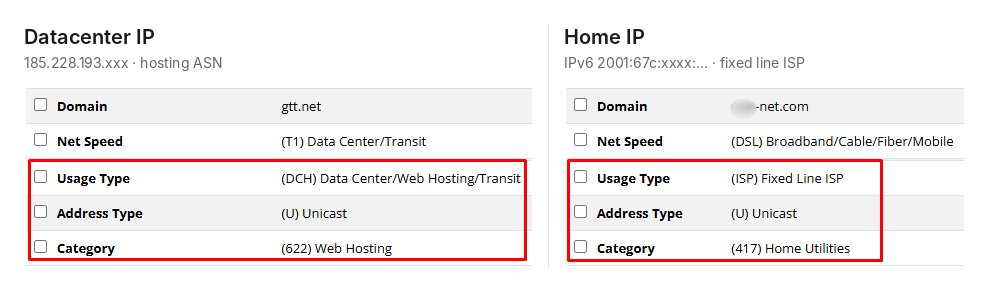
- One IP2Location lookup labels a datacenter IP as “Data Center/Web Hosting/Transit,” while an ISP proxy shows the same Fixed Line ISP type as home broadband.
- In Proxyway’s 2026 research, shared datacenter proxies cost a median $0.54/GB versus $3.00/GB for residential but succeeded on just 57.46% of Amazon and Google requests.
- Before buying IPv6 datacenter IPs, check the target’s AAAA record with Dig or nslookup, then test a small batch, since IPv6 support doesn’t guarantee proxy acceptance.
- If a provider bills datacenter proxies per GB rather than per IP, you are almost always buying into a rotating pool shared with other customers.
What is datacenter proxy technology, and how does it route traffic?
A datacenter proxy is a server that routes your requests through an IP address registered to a hosting or cloud provider, such as AWS, Google Cloud, OVH, or DigitalOcean. As a result, the target website or server sees the datacenter IP as the request source instead of your real IP address. The proxy hides your IP, not your identity: cookies, headers, and browser fingerprints still travel with the request.
Here’s the request flow:
- Your browser, scraper, QA tool, or app sends a request to the proxy hostname and port.
- The server checks your username and password or your allowlisted IP.
- It forwards the request to the target website or app from a datacenter IP.
- The target returns the response to that IP.
- The same route carries the response back to your tool.
For HTTPS sites, the connection runs through a tunnel. Encryption stays end to end between your tool and the target, so nothing in between encrypts your traffic or reads the page.
Key characteristics of datacenter proxies and how sites spot them
If you’ve read our guide on what is a proxy, the key difference here is who owns the IP. Datacenter IPs belong to hosting and cloud companies, and that ownership is public record.
Residential IPs belong to home broadband connections, and mobile IPs to cellular carriers. ISP proxies sit in between: they run on data center servers, but their IPs are registered to consumer internet providers.
I checked one of my datacenter IPs and my home IP in the same lookup tool, IP2Location. The datacenter IP came back as “DCH: Data Center/Web Hosting/Transit,” category “Web Hosting,” while my home IP showed “ISP: Fixed Line ISP.” An ISP proxy I tested matched my home IP on usage type, which is exactly why these IPs pass checks that datacenter ones fail. Any website can run this lookup on every request, before it even looks at your headers or behavior.
Three more traits shape what is datacenter proxy performance in practice:
- Visible ownership: as the lookup above shows, the hosting ASN gives a datacenter IP away in one query. That doesn’t get it blocked by default, but it carries fewer trust signals than a home or mobile IP.
- Centralized proxy infrastructure: the provider controls the servers, not a network of peer devices, so it can replace an IP or regroup a pool by location, subnet, IP version, or rental period in minutes.
- Subnet structure: requests from neighboring IPs like 192.0.2.10, 192.0.2.11, and 192.0.2.12 read as one actor, not three users, and anti-bot systems often block the whole /24 at once. Subnet diversity spreads that risk: Proxy-Seller’s datacenter pool spans 600+ /24 subnets (often called Class C), so a high-volume job can run across unrelated ranges instead of one tight block.
Pros and cons of using datacenter proxies
Here’s what is datacenter proxy technology good at, and where it falls short, in numbers.
Data centers are built for throughput, and the numbers show it. In Proxyway’s 2026 market research, shared datacenter proxies answered real targets in a median of 1.78 s versus 3.21 s for residential, and cost a median of $0.54/GB versus $3.00/GB at the 50 GB tier.
The trade-off is detection: residential IPs succeeded 74.43% of the time on Amazon and Google, against the 57.46% datacenter figure above.
Pros | Cons |
Server-grade speed: requests run on data center links, not home Wi-Fi, so latency stays low and stable at volume | Visible origin: one ASN lookup flags the IP as hosting |
Flat cost: most plans bill per IP, not per GB, so heavy crawls don’t multiply the bill | Protected sites: Cloudflare, Akamai, DataDome, HUMAN, and Kasada raise CAPTCHA and block rates |
Works with any stack: HTTP(S) and SOCKS5 support is standard, so the same IPs plug into browsers, scrapers, and scripts | Subnet risk: one aggressive job can burn the reputation of a whole /24 |
Easy allowlisting: static IPs fit staging, internal tools, and partner APIs | Coarse geo: the IP sits where the servers are, so city-level SERPs and prices may be off |
Fast replacement: the provider controls the servers, so a flagged IP is swapped quickly | Weak for identity work: accounts, checkouts, and strict risk scoring favor ISP, residential, or mobile IPs |
When to use datacenter proxies for business workflows
Knowing what is datacenter proxy infrastructure built for narrows the list fast: any job where the target accepts hosting traffic and speed matters more than looking like a home user.
- Public web scraping: sites and public APIs that cap requests per IP but never check who owns it.
- AI training data collection: a single crawl of open web text can run into terabytes, so per-IP billing beats paying for every gigabyte.
- SEO monitoring: country-level rank tracking and indexation checks. For city-level SERPs or when Google’s CAPTCHA rate climbs, switch to residential or ISP IPs.
- Price monitoring: frequent checks on smaller retailers and SaaS pricing pages. Large marketplaces often block datacenter ranges, so test them before you scale.
- Localization QA: see how your own site redirects and caches content for each country, with every run starting from the same fixed IP.
- Landing page and redirect checks: confirm your campaign URLs resolve correctly by country. To verify how ads reach real users, use residential or mobile IPs.
- Internal automation: any partner API or staging environment that only accepts allowlisted IPs.
DATACENTER PROXIES FROM $0.49 PER IP
Stop paying residential rates for pages that accept datacenter traffic
Run public scraping, SEO checks, and internal automation on Proxy-Seller’s static datacenter IPs: up to 1 Gbps per IP, 99.7% uptime, and one multi-protocol port for HTTP, HTTPS, and SOCKS5. Pick IPv4 for compatibility, or IPv6 from $0.02 per IP when the target supports it.
Types of datacenter proxies and how they differ
Datacenter proxies differ along two axes that combine freely: how the IP behaves (static or rotating) and who else uses it (dedicated or shared). A static IP can still be shared, for example. IP version is a separate choice that mostly affects price and which targets accept the IP.
Static vs rotating datacenter proxies
To pick between them, it helps to know what is datacenter proxy rotation actually solving: per-IP rate limits. It won’t help when a site checks who owns the IP, since every address in a datacenter pool reads as hosting.
Static datacenter proxies keep one IP for the whole rental period. They suit anything that expects the same address every time, like an allowlisted partner API or a QA session that runs for hours.
Rotating datacenter proxies switch IPs on every request or on a timer, spreading a large URL list across many addresses.
Static datacenter IPs can do a rotating pool’s job if you buy a set and rotate it yourself. My go-to move is to check whether the target supports IPv6 first. If it does, I’d build that pool on IPv6: wholesale IPv6 starts at $0.02 per IP, which usually beats paying for a provider’s rotating pool. Proxy-Seller sells dedicated IPv6 proxies alongside IPv4, which many datacenter providers don’t offer at all.
IPv4 vs IPv6 datacenter proxies for different targets
IP version is where what is datacenter proxy pricing splits hardest: IPv4 works everywhere, while IPv6 costs a fraction of the price but only helps if the target accepts it. To check, look up the domain’s AAAA record in Google Admin Toolbox Dig or run nslookup -type=AAAA example.com. A result means the site accepts IPv6 connections, though not necessarily from proxies, so test a small batch before buying at volume.
Dedicated vs shared datacenter proxies
Dedicated datacenter proxies belong to you alone for the rental period. If a block or CAPTCHA spike shows up, it traces back to your own request pattern, not a neighbor’s. That makes them the default for production jobs, though exclusivity won’t stop a site from flagging the IP as hosting.
Shared IPs are the cheap end of what is datacenter proxy pricing because several customers send traffic through them. The catch is reputation you don’t control: someone else may have already burned the IP on the site you need. I’d keep them for tests and jobs where a failed batch costs nothing.
Pricing gives the pool away: if a provider bills datacenter proxies by the GB, you’re almost always buying into a rotating shared pool. DataImpulse, for instance, charges $0.50/GB with a new IP on every request, and Decodo sells per-GB datacenter plans with access to its shared IP pool.
SOCKS5 vs HTTP/HTTPS datacenter proxies
The protocol decides what traffic you can send: HTTP(S) handles web requests, while SOCKS5 passes almost any TCP connection through.
HTTP understands web traffic, which is why most scrapers and browsers support it out of the box. For HTTPS sites, the same server simply opens a CONNECT tunnel.
SOCKS5 operates one layer lower and doesn’t read web content at all, so it carries any TCP connection, from a headless browser to a database client. The standard also defines UDP relay, but only 3 of 9 datacenter providers in Proxyway’s 2026 test supported it. At Proxy-Seller, UDP works on residential packages, while datacenter IPs stay TCP-only.
One detail: in Python’s requests, use socks5h:// instead of socks5://, so domain names resolve on the remote server, not on your own machine.
With Proxy-Seller, you don’t have to pick at checkout: every port is multi-protocol, so the same host and port accept HTTP, HTTPS, and SOCKS5. Switching a scraper from HTTP to SOCKS5 means changing the scheme in your config, not buying new IPs.
How to get datacenter proxies for production workloads
Once the job list is clear, the provider decides what is datacenter proxy uptime and block rate in production. The best proxy providers match the setup to your targets instead of selling a generic IP list. Before you buy private proxy access, check two things the price page won’t show:
- Subnet spread: ask how many /24 ranges your IPs will come from, since one tight block fails as a unit.
- Replacement policy: find out how fast a flagged IP gets swapped and whether unmetered bandwidth comes with a thread limit.
Proxy-Seller is a proxy infrastructure provider that offers dedicated datacenter IPs on IPv4 and IPv6, with up to 1 Gbps per IP, 99.7% uptime, and wholesale pricing from 1,000 units.
Choosing the right IP type starts with the workload, not the price
To put what is datacenter proxy value in context, here’s how it stacks up against the other three types:
Type | Trust signals | Billing | Proxy-Seller price* | Best for |
Datacenter | Low: hosting ASN | Per IP | From $0.02/IP (IPv6), $0.49/IP (IPv4) | Public scraping, SEO and price monitoring, localization QA, internal automation |
ISP | High: consumer ISP ASN | Per IP | From $0.98/IP | Long sessions on a fixed IP, allowlisted APIs, multi-step QA |
Residential | Very high: household IPs | Per GB | From $1.45/GB | Protected targets and city-level geo checks |
Mobile | Highest: carrier ASN, shared by real users via CGNAT | Per IP | From $10/IP (shared) | Owned social accounts, mobile ad checks, app QA |
*From prices apply to volume orders: 1,000 IPv4 or ISP IPs per week, 10,000 IPv6 IPs per week, the 1,000 GB residential pack, and shared weekly mobile access.
My rule: start every new target on datacenter proxies and move up to ISP, residential, or mobile only for the endpoints where retries push your cost per valid response past what residential traffic would cost.
FAQ
Detection comes down to two layers. The network layer is the IP itself: its ASN, subnet, and reputation, which one database lookup reveals, as the IP2Location check above shows. The behavior layer is how you connect: TLS fingerprints such as JA3, header order, and how many requests hit the site per minute. A clean dedicated IP helps with reputation, but it won’t hide that the address belongs to a hosting company.
For automated work, change the whole fingerprint, not just the IP. Timezone, language, and WebRTC should match the proxy’s location, while user agent, screen size, and canvas data should add up to one believable device. Anti-detect browsers let you set all of this per profile. My WADE X setup guide shows how to attach a proxy to a profile and check that its WebRTC and DNS match the IP.
Yes. The proxy itself is legal; what you do through it decides the rest. Collecting public prices, tracking rankings, or testing your own site is fine, as long as you respect site terms and keep request rates reasonable. The line is personal and login-gated data, which GDPR and CCPA cover regardless of the IP you use. Datacenter IPs also avoid the consent questions around residential sourcing, since no real person’s device sits behind them.
Not across the board. Datacenter proxies win on speed and cost: in Proxyway’s 2026 test, they answered real targets in 1.78 s versus 3.21 s for residential. Residential IPs win on trust, with a 74.43% median success rate on Amazon and Google against 57.46% for datacenter. The fastest way to decide is to send the same small batch through both and compare cost per valid response.
Rotation sends each request, or each batch, through a different IP from a pool, so no single address hits a site’s rate limit. A provider’s rotating pool is the quick option, but it’s almost always shared. For a fully dedicated pool, rent static IPs and rotate them yourself: a Scrapy middleware such as scrapy-rotating-proxies, a simple IP list cycled in Python with requests or httpx, or HAProxy in front of your IPs will do the job.
First, allowlist your current IP in your provider’s dashboard, since Windows and Android system settings have no username or password fields. On Windows 11, go to Settings > Network & internet > Proxy, click Set up next to “Use a proxy server,” turn it on, and enter the host and port. On Android, open Settings > Wi-Fi, tap your network, choose Advanced options, set Proxy to Manual, and enter the same details. Browsers pick up these system settings, but scripts and scrapers need the address in their own config. For credential-based auth or SOCKS5, a tool like Proxifier or Drony fills the gap. My guide to setting up a proxy covers both, plus macOS, Linux, iOS, and every major browser.
PROXIES FROM $0.02/IP
Ready to put this into practice?
Pick a proxy type and location, and start using it within minutes.
Instant delivery
24/7 support
Refund policy
About the author