 Proxy for Telegram
 Proxy for LinkedIn
 Proxy for Google
 Proxy for Ebay
 Proxy for Twitter
 Proxy for TikTok
Proxy-Seller for WADE X anti-detect browser profiles

When users visit a website looking for proxies, some beginners don’t really think about which type of proxy they need. “Clean ones,” they say. At Proxy-Seller, proxies are built for reliable traffic routing and smooth anti-detect browser workflows. It is a basic requirement for the service to work properly.
Still, there are a few nuances that can make your work with proxies in an anti-detect browser especially effective. A stable mobile profile and a quick QA profile require a different proxy selection logic.
Let’s look at how to choose the best proxies for your situation.
In this guide, we use the WADE X anti-detect browser as an example for our settings. It provides isolated and proxy-ready browser profiles that keep each session separate, so one profile's fingerprint and IP don't leak into another. You can also find mobile profiles here. Proxy management is built into the browser as part of its infrastructure, making it easy to add, change, and check proxies whenever you need.
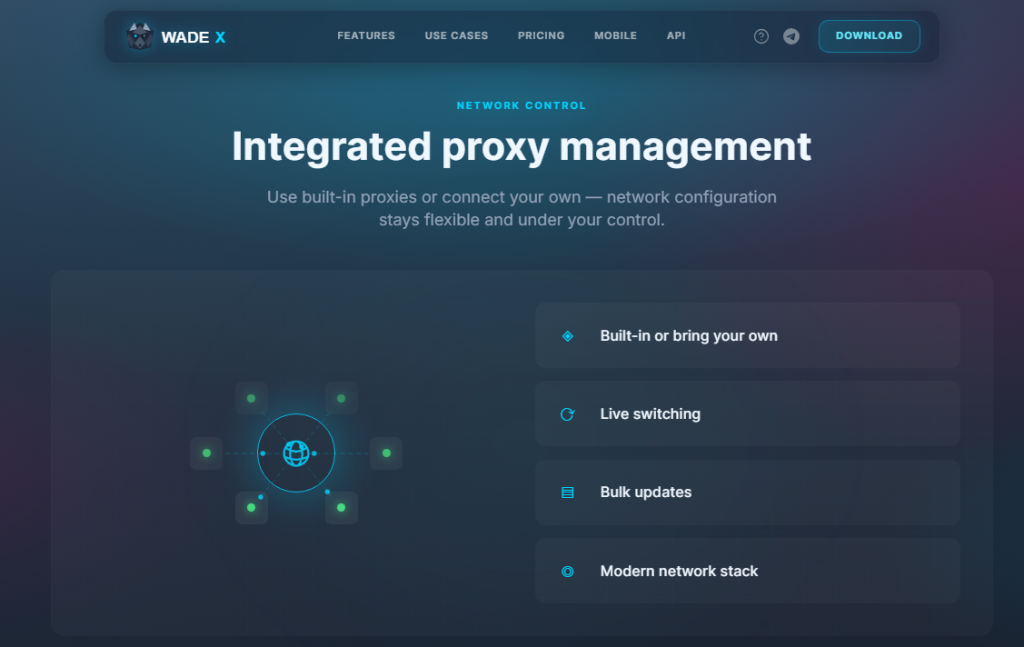
This guide will help you choose the right proxies for an anti-detect browser, then we show you how to add Proxy-Seller credentials to WADE X, test the IP, and avoid common setup mistakes.
What Is WADE X browser and why use it?
WADE X is a browser that integrates key anti-detection technologies, including digital fingerprinting, IP masking with proxy servers, and support for custom scripts through its API. This tool also enhances teamwork with its efficient system for distributing workspaces and setting specific access levels for each employee.
Designed for professionals in affiliate marketing, e-commerce, web scraping, and digital marketing, WADE X simplifies the management of multiple accounts while ensuring a high level of anonymity and protection from anti-fraud systems, thereby minimizing the risk of blocking. It is particularly valuable for specialists engaged in traffic arbitrage, managing social media advertising campaigns, and operations on cryptocurrency platforms.
In this WADE X browser review, we look at how the WADE X anti-detect browser works, its core features, pricing, and interface.
Key features of WADE X browser
The WADE X browser boasts several features that enhance its utility for a broad spectrum of professionals. These features include tools for teamwork, a system of presets for quickly creating profiles, and advanced settings for launch commands and browser customization. In the following sections, we will delve into the key features of the WADE X browser, highlighting why it is considered an indispensable tool for specialists in various fields.
Uniqueness of Profiles
The WADE X browser allows users to create highly unique profiles by offering a wide range of customizable digital fingerprint parameters. Users can edit:
- user agent (browser and OS parameters);
- language, font, screen resolution, geolocation;
- multimedia devices connected to the computer and battery level;
- processor and video card versions and technical characteristics.
Additionally, the browser enables the creation of presets for specific operating systems such as Windows, macOS, and Linux, which can save time when detailed parameter customization is unnecessary.
Further enhancing anonymity, the browser offers options to replace: Canvas, AudioContext, WebGL. Masking these parameters is crucial for hiding unique device fingerprints, which websites might use to track and identify users.
API Automation
The WADE X browser automation API gives you control over routine tasks: navigating links, entering data, clicking buttons, and running scripts. WADE X supports automation with Playwright, Puppeteer, and Selenium, so you can use the same profiles for manual work and scripted runs.
First decision: look at what kind of profile it is
Ask yourself the following questions:
- Is this a mobile profile?
- Will this profile be used regularly?
- Does this scenario require a stable IP?
- Does the scenario involve rotation?
- Is this just a quick test or a QA profile?
- Does the task really require IPv6?
- Will you be working with this profile on your own, or will you hand it over to a team that needs to easily understand the setup later?
This will help you understand which Proxy-Seller option to consider first.
Proxies for a mobile profile
A WADE X mobile profile usually makes more sense when the proxy route also fits a mobile-style environment. That doesn’t mean mobile proxies are always “better.” It means they are often the more logical first choice for mobile profile testing.
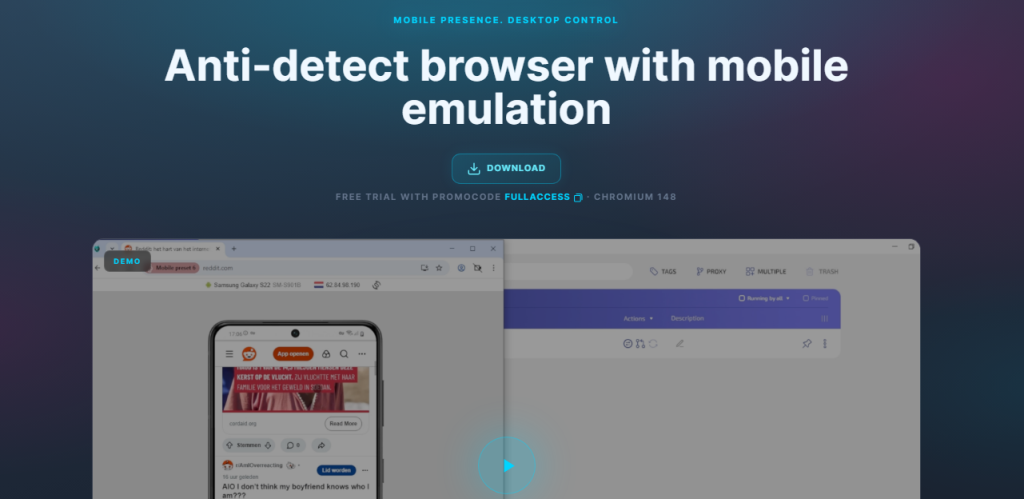
Use Proxy-Seller mobile proxies when:
- You are testing WADE X mobile profiles;
- The workflow depends on mobile network behavior;
- You want the proxy type and profile type to match more closely;
- The location and mobile setup available from Proxy-Seller fit your task.
This is also where the FULLACCESS promo code can help during testing. FULLACCESS gives access to all Starter plan features for 7 days, including mobile profiles, and gives 20% off the first purchase. If you want to compare desktop and mobile profile behavior in WADE X, it’s better to test with the right profile features available from the start.
For mobile profiles, cellular network proxies are usually the more natural match when Proxy-Seller supports the location and setup you need.
If you need a stable desktop profile
In this case, you should choose ISP proxies, also known as static residential proxies. This is a solid option if the profile will be used regularly and you do not want unexpected IP changes. ISP IPs are useful because websites see you as a regular user with a regular IP address.
Proxy-Seller's ISP proxies are static residential IPs, so a long-lived profile can keep the same IP for consistent sessions.
Use static residential proxies if:
- The profile will be used more than once;
- Сontinuity matters;
- Нou want to avoid unnecessary unexpected changes;
- The setup needs to be easy to document for later.
You can also use dynamic residential proxies with sticky sessions for these purposes.
If you need a test or QA profile
A datacenter proxy may be enough if you need to set up an anti-detect browser profile for marketing tests.
Cheap datacenter proxies can be useful for simple checks, browser testing, QA, speed-focused tasks, and low-complexity workflows where mobile or residential IP behavior is not required.
Use datacenter proxies when:
- You need a fast, simple proxy route;
- You are checking a page or browser setting;
- The task doesn’t require a residential or mobile context;
- You want a lower-complexity setup.
Do not use datacenter proxies as the default for every multi-account workflow. They are useful, but not the right fit for every profile.
If the workflow requires IPv6
Use IPv6 proxies only when the workflow and target environment support IPv6.
Don’t choose IPv6 just because it’s affordable. Make sure the WADE X profile and the task actually need IPv6.
Use IPv6 proxies when:
- The workflow specifically calls for IPv6;
- The target environment accepts IPv6 traffic;
- You understand why IPv6 is useful for this profile.
If you are not sure, IPv6 is usually not the best place to start.
Proxy-Seller offers dedicated IPv6 proxies if you want dedicated IPs for specific geo tasks.
Collect the Proxy-Seller details
After you choose the proxy type, copy the connection details from your Proxy-Seller account. New to proxy setup? See our step-by-step guide on how to set up and use proxies.
You need:
- IP address or host;
- port;
- username;
- password;
- protocol: HTTP, HTTPS, or SOCKS5;
- proxy type;
- location, if relevant.
Proxy-Seller proxies commonly support HTTPS and SOCKS5. In WADE X, choose the matching connection type before testing the proxy.
Note: Most SOCKS5 proxies operate only in TCP mode. If the provider claims UDP support, don't assume it works until you test it. Without real UDP, the QUIC and HTTP/3 protocols won't connect, so if your target platform uses QUIC, confirm UDP before committing the profile to it.
If your Proxy-Seller setup uses a username and password, keep those credentials ready.
If your setup uses IP authorization, make sure the correct IP is allowed before testing in WADE X. For most WADE X users, username/password authentication is simpler because it maps directly into the proxy field.
The format change that matters
Once you purchase a proxy, you will see the following details in your Proxy-Seller account:
USER:PASS@IP:PORTWADE X manual proxy input uses:
host:port@login:passwordSo enter your proxy credentials in WADE X as:
IP:PORT@USER:PASSExample:
Proxy-Seller-style format:
user123:pass123@123.45.67.89:8000WADE X format:
123.45.67.89:8000@user123:pass123The values are the same, but the order is different. If the order is wrong, the proxy can fail even when all values are correct. So, before you panic and message support, it’s worth checking whether you entered the details in the correct order.
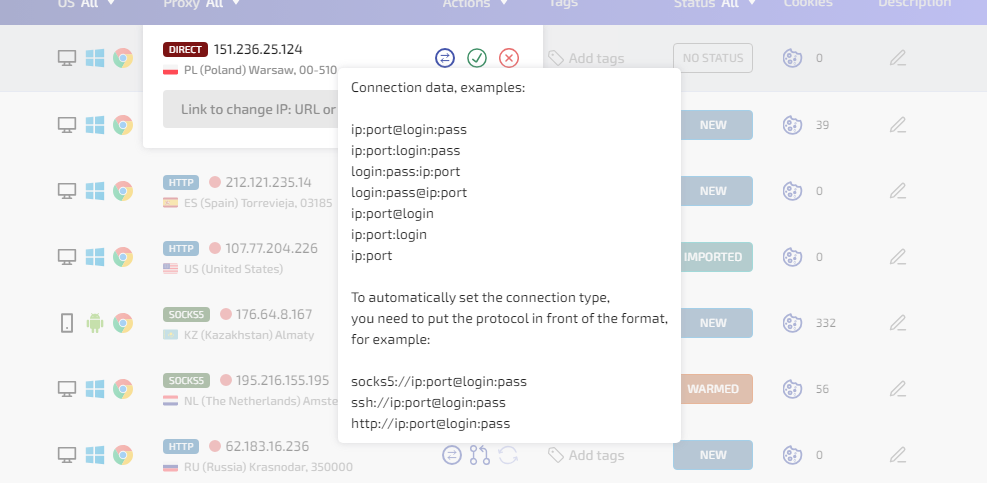
Add Proxy-Seller to a WADE X profile
Open your WADE X account. Choose the profile that should use the Proxy-Seller proxy.
- If you are creating a new profile, click NEW PROFILE.
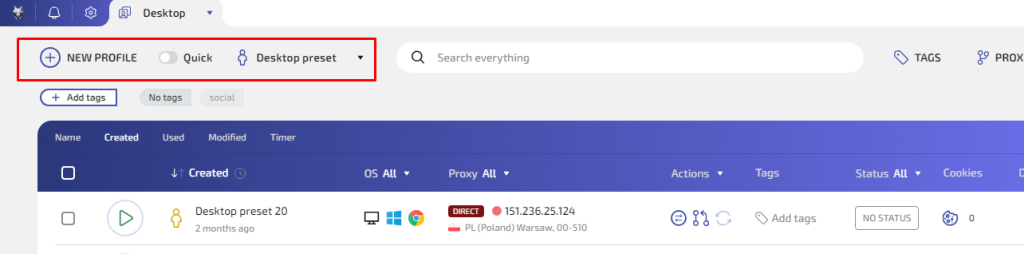
- If you are editing an existing profile, pause and think before changing the proxy. WADE X lets you swap a proxy from the profile list on the fly, without a restart, making the change easy. The reason to pause is the profile's history, not the mechanics: a profile with established activity shouldn't casually switch network routes. A profile that already has history should not switch network routes casually. Most bans and sudden CAPTCHAs happen after an IP address changes or is accidentally leaked. Profiles like this often get flagged.
- Open the profile settings and go to CONNECTION.
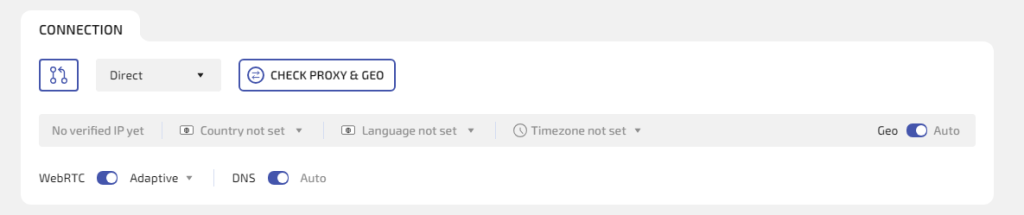
- Choose one of these connection types:
- HTTP for HTTP or HTTPS proxy use;
- SOCKS5 for SOCKS5 proxy use.
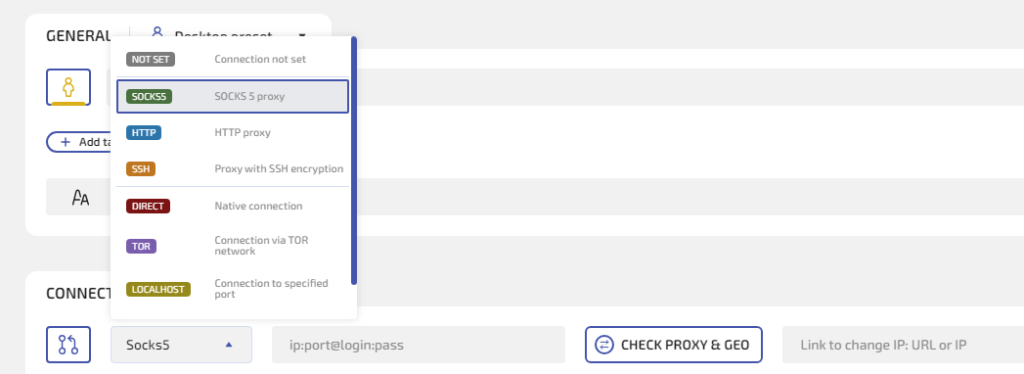
Do not choose DIRECT if you want the profile to use a proxy. DIRECT means WADE X will use your normal connection. This matters because once a profile with your real data has been compromised, you will no longer be able to use it and will have to create a new one.
- Paste the proxy in this format:
host:port@login:password
CHECK PROXY & GEO before launch
Before checking inside the browser, confirm that the following details are present:
- host or IP;
- port;
- username;
- password;
Also, check that there are no extra spaces and the WADE X connection type matches the Proxy-Seller protocol.
Click CHECK PROXY & GEO. You can find this feature in the CONNECTION section while editing or creating your profile.
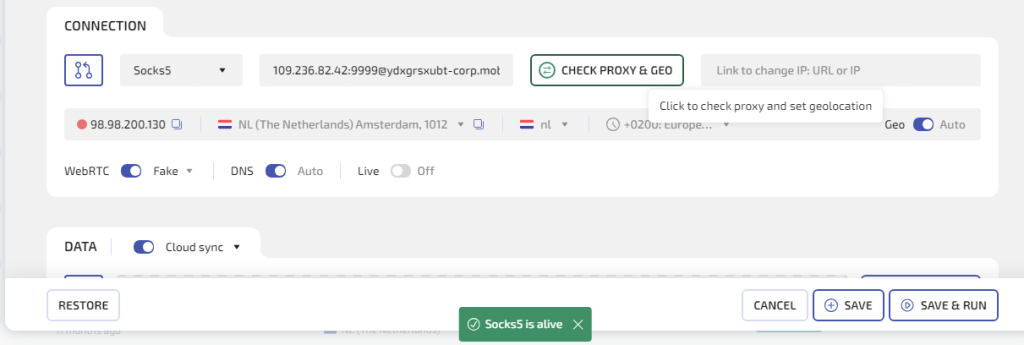
If the check shows good results, click SAVE to keep the settings or SAVE & RUN to launch the profile. If it fails, fix or change the proxy.
This is one of the practical reasons to use an anti-detect browser like WADE X for profile-level proxy setup: you can check the proxy route before launching the profile.
Verification inside the launched profile
After WADE X opens the profile, check the IP again from inside that profile. You shouldn’t use your normal browser for this final check because it may use a different connection.
Inside the launched WADE X profile, you need to review:
- IP address;
- country;
- city;
- timezone;
- DNS result;
- WebRTC result, if your checker shows it.
A quick way to run this check is to open whoer.net inside the launched profile. It shows the proxy IP, geolocation, WebRTC, and DNS in a single view, so you can confirm that none of them leak your real connection. For a deeper read, add an ipqualityscore.com API key in WADE X Settings and check the IP's fraud score directly in the interface before you trust the profile with important work.
Want to learn more first? See how to check your IP address and what WebRTC is and how to disable it for stronger privacy. It also helps to regularly clear cookies and cache to reduce fingerprint risks.
This confirms that the profile is using the Proxy-Seller route. It’s also a good point to check whether the proxy location and profile settings tell the same story. If the proxy country is Spain but the profile timezone points to an unrelated location, review the profile settings before using it for important work.
When Proxy Manager is the better option
For one profile, adding the proxy directly in CONNECTION is enough.
For several profiles, use Proxy Manager.
In WADE X:
- Open Desktop.
- Click PROXY.
- Open Proxy Manager.
- Click NEW PROXY.
- Add the proxy in host:port@login:password format.
- Give it a useful name.
- Save it.
- Assign it to the right profile.
Good names are simple and specific:
- Proxy-Seller mobile: Profile 01
- Proxy-Seller ISP: US profile
- Proxy-Seller residential: shop profile
- Proxy-Seller datacenter: QA test
If you have several proxies, use IMPORT FROM LIST.
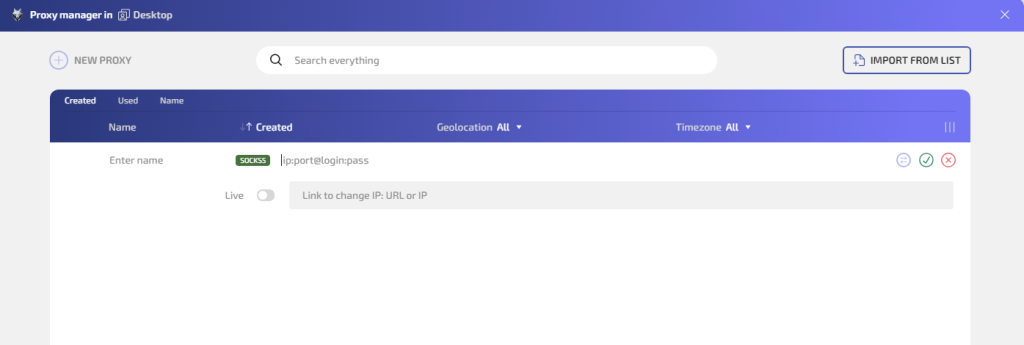
Test one proxy first before importing a full list. A small format mistake is easier to fix once than twenty times.
Keep the proxy and profile aligned
A working proxy is not always the right proxy. For WADE X, the proxy should match the profile’s role.
- If the profile is mobile, mobile proxies are usually the first option to test.
- If the profile will be used repeatedly, avoid unnecessary IP changes.
- If the profile is only for quick testing, a simpler datacenter proxy may be enough.
- If the task expects IP rotation, use rotation deliberately and document it.
For multi-account browser workflows, random proxy changes make profiles harder to review and troubleshoot. A clean assignment is part of the operating process.
Common mistakes to avoid
Most failed proxy setups in WADE X don't stem from a bad proxy; they stem from a small input error. Here are the ones that send people to support most often, and how to avoid each.
Pasting the proxy in the wrong order
Proxy-Seller shows:
USER:PASS@IP:PORTWADE X expects:
IP:PORT@USER:PASSIf the order is wrong, the proxy won’t work.
Choosing SOCKS5 for an HTTP proxy
The protocol in WADE X must match the proxy protocol from Proxy-Seller.
HTTP/HTTPS proxy: choose HTTP.
SOCKS5 proxy: choose SOCKS5.
Using DIRECT by accident
DIRECT means no proxy.
If CHECK PROXY & GEO shows your real IP, check whether the profile is still set to DIRECT.
VPN intercepting browser traffic
If you added a proxy, the connection type isn't DIRECT, and the IP still won't change, check your VPN. A VPN with split tunneling can intercept browser traffic and route it around the proxy. Disable split tunneling, or remove the WADE X browser from its app list, then re-check.
Reusing one proxy everywhere
For casual tests, this may be fine. For organized multi-profile work, it’s better to plan which proxy belongs to which profile.
Testing outside WADE X
Always verify the proxy checking result inside the launched anti-detect browser profile. That is the environment you are configuring.
Quick setup checklist
Before launch, check the following points:
- Proxy-Seller proxy is active.
- Proxy type is chosen for the profile.
- IP or host is copied correctly.
- Port is copied correctly.
- Username and password are copied correctly.
- WADE X connection type matches the proxy protocol.
- Proxy string uses host:port@login:password.
- CHECK PROXY & GEO succeeds.
- IP and location look correct.
- Profile is saved with SAVE or launched with SAVE & RUN.
After launching the profile, pay attention to the following:#
- IP is checked inside the WADE X profile.
- Profile is not using DIRECT.
- DNS and WebRTC are reviewed if needed.
- Timezone and language are checked.
- Proxy assignment is saved or documented.
Why Proxy-Seller for your WADE browser proxy setup
A fast, reliable proxy service is critical for smooth profile isolation and traffic routing. Proxy-Seller stands out here. It offers:
- A wide variety of proxies, including fast residential proxies, ISP proxy server, datacenter IPv4/IPv6, and 5G mobile proxy.
- Speeds up to 1 Gbps for minimal latency.
- Coverage in 220+ locations to maximize geo-diversity.
- A user-friendly dashboard supporting bulk purchases and API integration for effortless automation with WADE X. If you need to scale quickly, you can purchase proxy packages in bulk and assign them to profiles as you create or import them.
Using Proxy-Seller alongside the WADE X browser enhances both performance and anonymity.
Additionally, if you’re exploring other advanced options for multi-account workflows, you might find this comparison of top anti-detect browsers helpful.
Conclusion
Proxy-Seller provides the proxy route, and WADE X anti-detect provides the browser profile in which that proxy is used. If you want your accounts to avoid bans, last longer, and work more efficiently, it’s worth thinking things through during setup. The right proxies deliver the best results when combined with a good anti-detect browser. Although a clean setup is not complicated, it still requires the right proxy type, the correct format, and one careful check before launch, so choose the proxy for the profile, not the other way around.
Proxy type | Use cases |
|---|---|
Mobile | Managing multiple social media accounts, running automated ad campaigns, or scraping mobile-first platforms like Instagram and TikTok. |
Residential | Performing continuous web scraping on e-commerce sites, monitoring localized ad campaigns. |
Datacenter | Automating high-speed bulk data collection, testing initial browser extension configurations; Choose IPv6 for automation workflows explicitly deployed on IPv6-ready infrastructure. |
ISP | Managing long-term business profiles and maintaining persistent stealth accounts on eBay, Amazon, etc., where any sudden IP change triggers instant suspension. |
Start by choosing the proxy type that fits the WADE X profile. Then copy the proxy details, convert them to host:port@login:password, choose the correct connection type, run CHECK PROXY & GEO, and launch only after the results look right. Please do not skip the necessary checks, and you will be less likely to contact support asking why your profile is set up correctly and your proxies are clean, but the website still keeps banning you.
PROXIES FROM $0.02/IP
Ready to put this into practice?
Pick a proxy type and location, and start using it within minutes.
Instant delivery
24/7 support
Refund policy
About the author