
 Proxy for Telegram
 Proxy for LinkedIn
 Proxy for Google
 Proxy for Ebay
 Proxy for Twitter
 Proxy for TikTok
What is an HTTP proxy? HTTP proxy meaning and functions

Proxies don’t all speak the same language. Each one works on a specific protocol, and that protocol decides which requests it can carry. For example, if you send app traffic through one that only understands web requests, the connection will never open. If you send a login flow through one that can’t tunnel TLS, the handshake will fail mid-session. So before you pick an IP pool, you need to know what is HTTP proxy built for and where its limits start.
An HTTP proxy is the default choice for browser-based workflows and web tools because it understands HTTP headers, methods, and status codes. Below, I’ll explore what is HTTP proxy in concrete terms, the use cases that justify it, and the two cases where HTTPS or SOCKS5 wins instead.
What is HTTP proxy server: the plain definition
An HTTP proxy server receives web requests from a browser, scraping script, or web tool and forwards each request to the target website on the client’s behalf. It then returns the website’s response back through the same path. The target site sees the proxy’s IP, not the client’s.
Hypertext Transfer Protocol (HTTP) is the application-layer protocol browsers and web servers use to request and transfer web resources like HTML, images, scripts, and other page assets. The protocol is unencrypted on its own, which is why HTTPS adds a TLS layer (the successor to Secure Sockets Layer, or SSL) on top of the same protocol. The HTTP proxy protocol adds one detail: the client puts the full URL in the request line (GET http://example.com/page HTTP/1.1), so the proxy knows where to forward it.
A clearer way to understand the HTTP proxy meaning is to separate them by traffic flow and disclosure level:
- Forward proxy: also called an “explicit”, used by a browser, scraper, or SEO tool to send requests through another IP. This is the type providers sell.
- Reverse proxy: sits in front of web servers and handles caching and load balancing on their behalf, like Cloudflare or NGINX.
- Transparent proxy: works without client setup inside managed networks and usually passes the client’s real IP in the X-Forwarded-For header.
- Anonymous and high-anonymity proxies: anonymous ones hide the client’s IP but reveal proxy use in Via or X-Forwarded-For headers, while elite ones hide both. Neither type encrypts traffic.
HTTP vs HTTPS: what’s the difference?
The difference is visibility. A normal HTTP proxy reads every request in plain text: the URL, headers, cookies, and body. This allows it to cache, filter, and rewrite traffic, but it also means that anyone on the route between you and the website could read it.
I ran these tests with curl through a local HTTP proxy to show how the protocol works; commercial proxies follow the same flow.
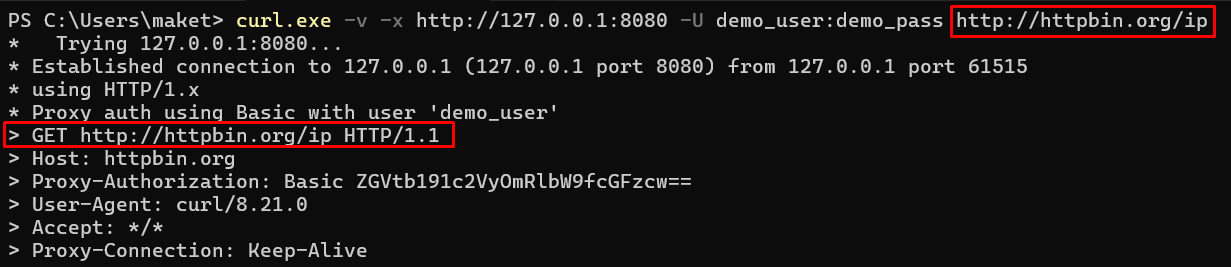
In my test with an http:// site, curl sent the full URL straight to the proxy as GET http://httpbin.org/ip, so it could read the path and every header in plain text.
An HTTPS proxy handles encrypted traffic. Typically, the client issues a CONNECT command, the proxy opens a TCP tunnel to the destination, and TLS is used end-to-end between the client and the website. It only sees the destination host and port, never the page content or your login credentials.
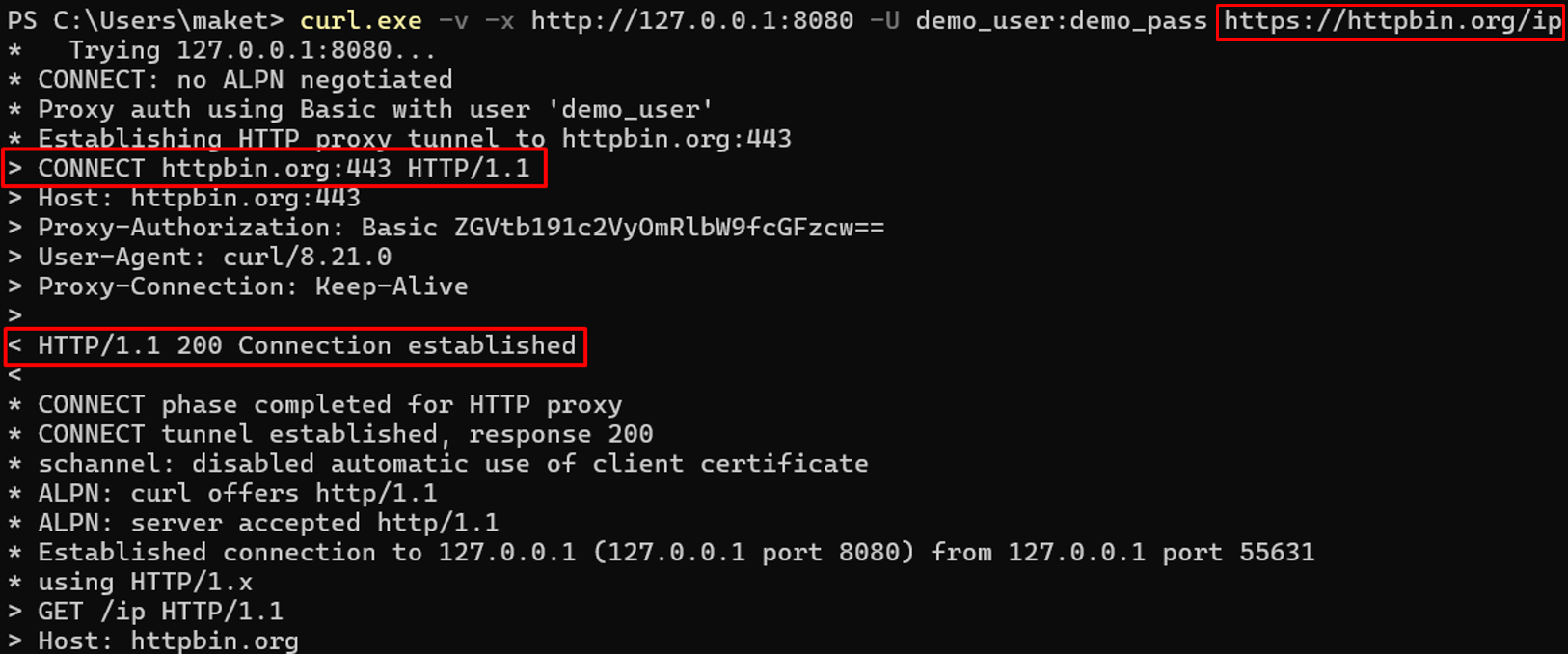
In my test, curl sent CONNECT httpbin.org:443 to the proxy first and sent GET /ip only after it replied with 200 Connection established, inside the encrypted tunnel.
One catch: the CONNECT request itself travels in plain text, so the destination host and your proxy credentials are visible on the way to the proxy.
HTTP vs HTTPS (CONNECT) vs SOCKS5: ports, use cases, and limits
Protocol | Typical ports | What it carries | Typical use case | Limits |
HTTP | 80, 8080, 3128 | Plain HTTP requests the proxy can read and modify | Caching, filtering, header-level logging on plain-HTTP sites | No encryption on either hop; web traffic only |
HTTPS (CONNECT) | Same port as HTTP; tunnels to 443 on the target | An encrypted TCP tunnel to the target host | Scraping HTTPS sites, logins, dashboards, checkout flows, any tool that sends auth tokens | Proxy can’t cache or inspect content; many of them only allow CONNECT to port 443 |
SOCKS5 | 1080 | Any TCP traffic, plus UDP where supported | Desktop and mobile apps, games, messengers, non-HTTP automation | No HTTP awareness, so no header rewriting, caching, or URL-based rules |
How does HTTP proxy work: 4-step traffic flow
Here’s what is HTTP proxy doing at each of the four steps:
- Client makes the request. The client (a browser, script, or tool) connects to the proxy server on the given host and port. It sends credentials or connects from an allowlisted IP.
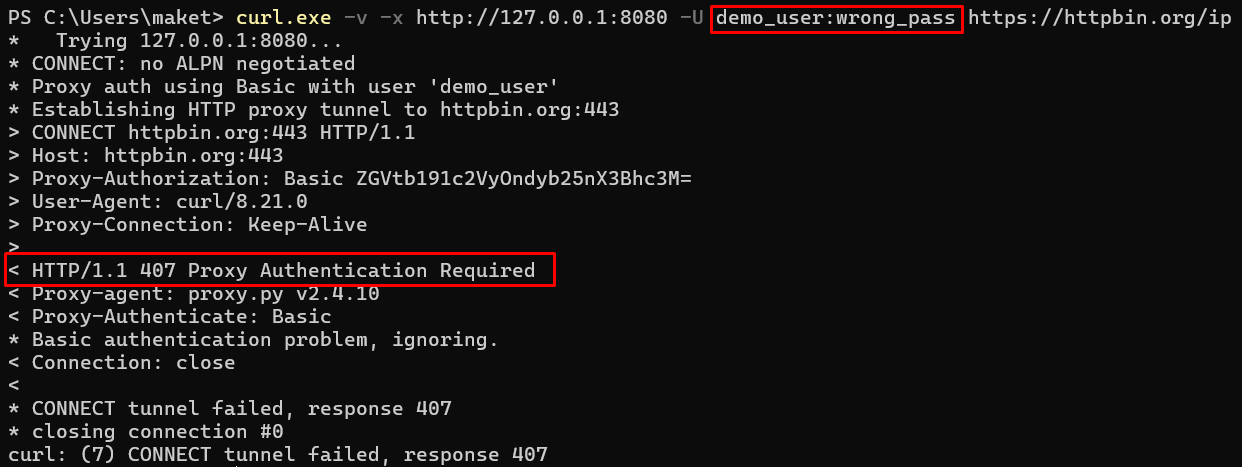
- The proxy authenticates and processes it. It checks the method, URL, and headers (for HTTPS, only the CONNECT host and port) and applies rules related to filtering, logging, caching, and routing. Missing or wrong credentials return a 407 error.
- The proxy connects to the destination server. To the site, the request originates from the proxy’s IP address. For HTTPS, CONNECT creates a tunnel before the client negotiates TLS with the destination.
- The proxy returns the destination’s response to the client. Depending on configuration, Via, Forwarded, and X-Forwarded-For headers may disclose proxy use or the client’s real IP. If the destination fails to respond, the 502 Bad Gateway appears.
In my test of step 2, the proxy rejected a wrong password with 407 Authentication Required, and curl never got to open the tunnel.
How to configure an HTTP proxy in browsers, scripts, and CLI tools
Whatever client you use, what is HTTP proxy setup comes down to three inputs: the host, the port, and credentials, unless an IP allowlist is used. Browsers take them in system or profile proxy settings, and anti-detect browsers store a separate IP per profile. Scripts and CLI tools usually accept them in the format:
Python
http://user:pass@host:portOn the developer side, most HTTP-aware tooling, including curl, wget, and Python’s requests, reads proxy settings from the standard HTTP_PROXY, HTTPS_PROXY, and NO_PROXY environment variables. Switching between configurations rarely requires code changes. Two caveats: curl ignores uppercase HTTP_PROXY and only reads http_proxy, and Node.js fetch uses these variables only when NODE_USE_ENV_PROXY=1 is set.
Key aspects of HTTP proxies
The reason teams reach for HTTP proxies, rather than a lower-level option like SOCKS5, is application-layer visibility. On plain HTTP, the proxy can filter requests by URL, rewrite headers, cache static assets, and log responses by status code. On HTTPS, it routes traffic through a chosen IP and location while the content stays encrypted. Caching mostly happens in corporate proxies like Squid, since data-collection services need fresh responses.
Proxy-Seller supports HTTP, HTTPS, and SOCKS5 on every plan: datacenter IPv4 and IPv6, ISP, residential, and mobile. Each proxy exposes HTTP(S) and SOCKS5 on separate ports, so switching protocols means changing one number in the connection string.
.png)
Access works with username/password authentication or IP allowlisting, and the same connection string plugs into Requests, Scrapy, Playwright, Puppeteer, or an anti-detect browser.
.png)
HTTP(S) AND SOCKS5 ON EVERY PROXY
Stop losing sessions to the wrong protocol
Every Proxy-Seller proxy, from datacenter to mobile, runs HTTP(S) and SOCKS5 on separate ports, so each of your tools connects with the protocol it needs.
Common use cases of HTTP proxies
What is HTTP proxy good for? Any workflow built on web requests, HTTP or HTTPS: browsers, websites, REST APIs, SEO tools, scraping libraries, and web dashboards. Here’s what is HTTP proxy used for in business workflows:
Browser workflows and anti-detect profiles
When a browser session must come from a specific IP or location, teams pair an HTTP proxy with the best proxy browsers and anti-detect browsers like AdsPower, Dolphin Anty, or Octo Browser. Each profile keeps its own cookies and fingerprint.
HTTP is the safer default here, since Chromium doesn’t support username/password auth for SOCKS5 proxies.
Common examples are localized page testing, website QA, and checking region-specific content.
Web scraping with requests, Scrapy, and Playwright
Scraping libraries send HTTP and HTTPS requests by default, so HTTP proxies plug in with one line of config. The syntax differs:
- proxies=dict(...) in requests
- proxy= in HTTPX
- request.meta[‘proxy’] in Scrapy
- proxy=dict(server=...) in Playwright
Per-endpoint allocation splits large jobs across pools by geo, TLD, or target domain. For instance, a price monitoring task can route amazon.de through German IPs and amazon.co.uk through UK IPs, keeping each IP below the rate-limit threshold.
SEO monitoring by country and city
Rank trackers pull SERPs that vary by country, city, and language. From a single office IP, you get the wrong local results, and then CAPTCHAs as the request rate increases. Each request is routed through an IP in the target geo, and the load is distributed across the pool, so no one IP hits the rate limit.
Desktop SEO tools like SEO PowerSuite’s Rank Tracker and Netpeak Spider import proxy lists in bulk, usually in the host:port:user:pass format. Teams use this to track local rankings city by city and to monitor local packs and featured snippets by market.
Ad verification across target markets
Ad verification teams run HTTP proxies to confirm what a viewer in each target geo actually sees: the creative variant, the landing-page version, and the partner ad in the next slot. Without geo-specific exit IPs, QA tests the marketer’s own office network and misses every regional mismatch.
When HTTPS or SOCKS5 proxies are the better choice
Knowing what is HTTP proxy built for also shows where it stops, which leads to a SOCKS5 vs HTTP Proxy comparison:
- HTTPS is the better choice when the workflow needs end-to-end encryption: logins, dashboards, checkout flows, and any tool that carries auth tokens. Without CONNECT support, the TLS handshake fails.
- SOCKS5 is the better option when the workflow goes beyond web traffic: app traffic, games, non-HTTP automation, and other non-web protocols. It can also relay UDP, which VoIP and QUIC-based apps rely on. Proxy-Seller supports UDP over SOCKS5 on residential plans.
RESIDENTIAL PROXIES WITH UDP SUPPORT
Your workflow needs UDP? Start with a residential package
Proxy-Seller supports UDP over SOCKS5 on every residential plan, with 220+ locations and city and ISP targeting, at $3.50/GB for a 1 GB pack.
Choosing HTTP proxies for web-first workflows
So, what is HTTP proxy the right tool for? Use it when your traffic is web requests and you want control at the request level:
- scraping public pages with requests, HTTPX, Scrapy, or Playwright
- SERP and rank tracking by country and city
- ad verification and localized page QA
- browser profiles in anti-detect browsers
- plain-HTTP or internal setups where you need caching, URL filtering, or status-code logging
Skip HTTP proxies and use SOCKS5 instead when the workload runs UDP, WebSockets on non-standard ports, or non-web protocols. Skip a plain HTTP proxy and use HTTPS with CONNECT when the payload includes auth tokens or credentials and TLS termination at the proxy isn’t acceptable.
One Proxy-Seller’s account lets teams match the protocol, IP source, location, and authentication method to each workflow. For larger deployments, a free POC lets you test that setup on your own targets before committing a budget.
FAQ
HTTP proxies fit any workflow running through HTTP or HTTPS. Browser testing teams use them to see how a site looks from a specific location. Scraping setups use them to split jobs across different IP pools and avoid hitting the target from one address too heavily. SEO teams use them to pull SERPs by country or city. Ad verification teams use them to check placement and creatives in each market. Internal IT teams use them to route company web traffic through a controlled exit point with logging and IP allowlisting.
HTTP proxies are built for website traffic, so they make sense for browsers, SEO tools, scraping, and anything else running through normal web requests. SOCKS5 is less web-specific. It’s better when the traffic comes from apps, games, non-HTTP automation, or other protocols outside the browser. Rule of thumb: use HTTP for web requests and SOCKS5 for UDP or non-web protocols.
It tunnels them, as long as the proxy supports HTTPS tunneling. Usually, that means CONNECT: the proxy sets up a tunnel to the destination server and just passes the encrypted traffic through both ways. It doesn’t automatically decrypt HTTPS traffic. That only happens in specific controlled environments where inspection is set up on purpose with a root certificate installed on the client.
On an iPhone, the HTTP Proxy option in Wi-Fi settings controls whether that network’s web traffic goes through an intermediate server. Off is the default. Switch to Manual when you want that traffic to go through a specific server, such as one you bought or one your admin provides. Manual takes a server, port, and optional login, while Automatic loads a PAC configuration URL.
PROXIES FROM $0.02/IP
Ready to put this into practice?
Pick a proxy type and location, and start using it within minutes.
Instant delivery
24/7 support
Refund policy
About the author