
 Proxy for Telegram
 Proxy for LinkedIn
 Proxy for Google
 Proxy for Ebay
 Proxy for Twitter
 Proxy for TikTok
What are ISP proxies? Meaning, features, and use cases

If you’re wondering what are ISP proxies, the simplest way to put it is this: they are a hybrid proxy type that blends datacenter infrastructure with IP addresses assigned by internet service providers.
That combination delivers datacenter speed with a residential-grade trust signal: the same ISP-assigned IPs that anti-bot systems read as legitimate consumer connections. In this guide, we’ll break down what is an ISP proxy, how it works, its main characteristics, which use cases make the most sense, and what to look at before choosing a provider.
What are ISP proxies and how do they work?
An ISP proxy is a proxy server hosted on datacenter hardware that uses a static IP address leased from a consumer internet service provider, not allocated from a cloud-hosting block. They are also known as static residential IPs. Detection systems read the IP's ASN as a residential carrier, so the proxy carries the trust signal of a real subscriber connection while keeping datacenter-grade speed and uptime.
In practice, the flow is straightforward, especially if you already know what is a proxy server. Requests route through the proxy first; the destination site sees the ISP-assigned IP, and your real IP stays hidden.
At the same time, the connection still benefits from datacenter-level infrastructure behind the scenes. That’s why ISP proxy networks deliver up to 1 Gbps throughput and 99.7% uptime in production, whereas peer-to-peer residential pools depend on consumer Wi-Fi and inherit consumer-internet variability.
That clarifies the ISP proxy meaning in practical terms: it’s built for workflows where the same IP needs to stay attached to a session for hours or days. They offer login persistence, long-running scrapes, and regional rank tracking, only without the rotation seen on residential pools.
The role of ASNs (Autonomous System Numbers)
Most detection systems determine whether an IP address belongs to a server or a real user by checking its ASN (Autonomous System Number), which identifies the network owner.
That’s why cloud-hosting IPs are relatively easy to flag. Ranges owned by AWS, DigitalOcean, and Google Cloud are tied to well-known hosting ASNs, many of which are blacklisted at scale by anti-bot systems.
ISP IPs, on the other hand, are associated with ASNs registered to real consumer internet providers such as AT&T, Windstream, and Frontier. This makes them appear like regular household user traffic, which is why they often avoid the same blacklist rules used to catch cloud infrastructure.
Key characteristics of ISP proxies
The easiest way to understand what is ISP proxy is to look at the traits that actually define this category in real use cases.
Static sessions
ISP proxies are static by default, so they can hold the same IP across hours or days. This way, a single profile in an anti-detect browser (AdsPower, GoLogin, Incogniton) keeps a consistent identity through every login and request. That stability is crucial for region-locked dashboards, ad-platform QA, and rank-tracking jobs that break the moment the IP shifts.
Datacenter-backed performance
Hosted in carrier-class datacenters with up to 1 Gbps throughput and sub-100 ms latency, ISP proxies deliver datacenter-grade speed without the per-hop variability typical of residential pools.
ISP-assigned IP addresses
This is the core difference between ISP and regular datacenter networks. The IP is tied to an internet service provider, so websites treat it more like a standard consumer connection than a typical server-based range.
Curated pools, named carriers
Residential proxies still lead on rotation diversity, whereas ISP pools trade that for predictability. Proxy-Seller offers 600+ Class C subnets and 200+ Class B subnets, sourced from established carriers like AT&T, Windstream, and Frontier. The IPs remain online, sessions hold their state, and the pool behaves like infrastructure rather than an open network.
For teams running long-session workflows, Proxy-Seller's ISP pool starts at just $3 per IP per month and scales to $0.98/IP at 1,000 IPs per week. It operates in compliance with the GDPR and CCPA and ships only dedicated static residential IPs, with no shared access. Buy ISP proxies from Proxy-Seller and get same-day sandbox access, a named account manager from $500 MRR, and DPA/SCC documentation from day one.
What are ISP proxies’ pros and limitations?
Now that we’ve covered what are ISP proxies, we can summarize that they score on three major points. 1 Gbps-class speed, session stability over hours or days, and ASN-level trust signals tied to consumer carriers rather than cloud-hosting ranges. That combination is why session-heavy automation and rank-tracking pipelines choose them over rotating residential pools.
They are not the right fit for every use case, however. Check out our comparison table below for a full breakdown of the pros and cons.
Pros | Cons |
Static IP addresses, essential for maintaining consistent identity profiles | Higher cost than datacenter alternatives (from $0.98 per IP vs from $0.49 per IP) |
High authority with anti-bot security systems | Requires manual rotation and demands additional configuration to switch active IPs |
Exceptional high-speed performance (delivers fast and seamless data loading) | Offers fewer geographic choices worldwide |
Stable, long-lasting sessions that are perfect for tasks requiring uninterrupted connection stability | Risk of subnet clustering that increases vulnerability to mass target bans |
Not all downsides are deal-breakers; the right provider easily solves most of them. For instance, Proxy-Seller offers an ISP proxy pool spanning 800+ subnets to completely eliminate clustering risk.
ISP proxies vs datacenter and residential proxies
When people compare different proxy types, the real question is rarely which one is best across the board, but rather which one makes sense for the specific task.
If you’re trying to understand what are ISP proxies, the clearest answer is that they sit between datacenter and residential networks. They match datacenter throughput (1 Gbps class) on one axis, while matching residential trust signals (consumer ASNs) on the other. They’re faster than rotating residential pools and harder to blacklist than cloud-hosted datacenter pools.
Factor | Datacenter proxies | ISP proxies | Residential proxies |
Speed | Highest | High | Variable |
Detection risk on protected sites | High | Low | Very low |
Session stability | High | Very high | Low |
Rotation model | Static, manual only | Static, manual only | Automatic (per request or timed) |
Long sessions (24h+) | Limited | Strong | Limited |
Geo granularity | Country | Country / ASN | Country / Region / City / ISP |
Pool size | Large | Medium | Largest |
Billing model | Per IP | Per IP | Per GB |
Entry price | From $1.64 per IP monthly | From $3 per IP monthly | From $3.5 per GB |
Now that we’ve covered what are ISP proxies, below is a brief overview of the other 2 main networks that are used for business workflows.
Datacenter proxies come from cloud-hosted IP pools (AWS, Google Cloud, DigitalOcean ranges) and are the cheapest and fastest option. They fit high-volume tasks where every request goes to a tolerant target, such as public APIs, internal automation, and sandbox testing, and the target does not read the ASN to filter traffic.
To understand what is a residential proxy, it simply sits on the other end of the spectrum. They route traffic through real household connections, which gives them stronger legitimacy but also less predictability when it comes to workflows needing speed and session length. These are the first choice when broad IP rotation and higher traffic diversity are the bigger priority.
Common usage examples for ISP proxies
The clearest answer to what are ISP proxies actually good for is workflows that need consistency, speed, and cleaner trust signals than basic datacenter ranges can provide.
Public web scraping and SERP collection
SERP layouts now return 10 results instead of the legacy 100 per page, so position-tracking pipelines need to fire 10× more requests for the same coverage. Static ISP IPs let those pipelines run for hours without rotation, which preserves cookie state and helps avoid triggering per-IP velocity limits.
Long-session account workflows
When a brand-owned account session needs to remain active for hours, a static ISP IP preserves that session. A few common examples include region-locked dashboards (Shopify, TikTok Shop, local CRMs) or ad-platform QA in Meta Business Manager / Google Ads / TikTok Ads.
Ad verification across geos
Region-specific ISP IPs allow ad ops teams to verify that creatives are being served to the correct audience in the correct country and ASN. Pair the proxy with trackers like RedTrack or Keitaro to log per-impression delivery, and the static IP preserves cookie state throughout the full audit window.
Multi-day browser automation
Selenium, Playwright, and Puppeteer flows that run for 24+ hours hit auth challenges every time the visible IP shifts. A static ISP IP carries the same session through retries, captchas, and re-checks, all while the test environment looks like one human user across the entire run.
Private proxies beat shared proxies for all these workflows, and dedicated allocation means no other tenant’s traffic can affect the IP’s reputation. Proxy-Seller sells ISP proxies dedicated-only with named-AM support from $1K MRR.
What are ISP proxies and how to buy them?
If you’re asking what are ISP proxies at this point, you’re picking a vendor. That comes down to several checks: session model, geo and subnet coverage, replacement terms, and support response time.
Check the session model: dedicated or shared, static or sticky, and the maximum continuous session length the provider supports. ISP proxies should be dedicated and static, so if a provider sells them as “shared,” that’s a different product.
Review location and network coverage: country targeting alone is not always enough. Depending on the use case, city, region, subnet spread, or broader proxy network diversity may matter too.
Test performance and replacement terms before signing: ask for the throughput band (1 Gbps class is the floor), the uptime SLA (99% as committed, 99.9% better), and the replacement window for an IP that gets blacklisted on a target site (24h is the bar to hold them to).
Match the proxy type to the job: an ISP proxy earns its price tag on stable sessions, repeated logins, and 24h+ automation. It’s the wrong choice when the task depends on rotating IPs per request or sessions. Worth noting that long-session workflows also depend on browser fingerprinting consistency, not just on keeping the same IP address.
Look for verified reviews and clear documentation: strong providers explain how the IPs are allocated, provide clear pricing plans, and reliable customer support, all of which are backed by verified reviews.
Proxy-Seller is built for mid-market teams that need enterprise-grade reliability and compliance without an enterprise sales cycle.From day one you get DPA/SCC documentation and a 24-hour sales response SLA, plus a named account manager from $500 MRR and ISP, residential, datacenter, and mobile pools under one contract. The ISP pool itself runs 99.7% uptime on 1 Gbps channels. Reviews back it up: 4.8 / 5 on G2, with buyers valuing clean pools and reliable performance.
Buying ISP proxies from Proxy-Seller: pricing, plans
Proxy-Seller runs one of the most flexible pricing models in the ISP category. Buy IPs individually or in bundled packages, with dynamic discounts that scale on both rental term and pool size. A standard 1,000-IP enterprise bundle lands at $0.98/IP weekly, cheap enough per unit to justify buying the pool outright and rotating across it in-house. Authentication supports both username/password and IP allowlisting, protocols cover HTTP(S) and SOCKS5, and 24/7 live chat runs with a 30-second median first response. Enterprise accounts get a dedicated account manager.
Large orders arrive with real subnet spread, so a 1,000-IP buy isn’t clustered on a single /24. The infrastructure covers 600+ Class C and 200+ Class B subnets across 22+ countries, distributing across the network instead of concentrating in one range. IP provenance documentation is available on request.
Monthly pricing for US ISP proxies
Package | Price per IP | Volume discount |
1 IP | $3.00 | base |
50 IPs | $2.70 | 10% |
500 IPs | $2.25 | 25% |
1,000 IPs | $1.95 | 35% |
3,000 IPs | $1.89 | 35% |
Weekly rental is also available: inside a 1,000-IP package, the per-IP price drops to $0.98.
How to buy ISP proxies
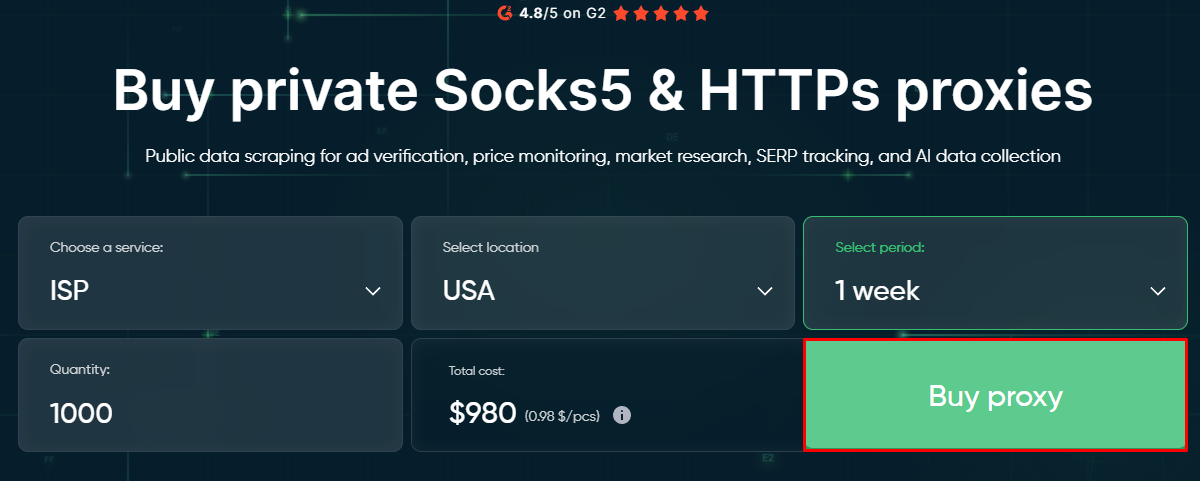
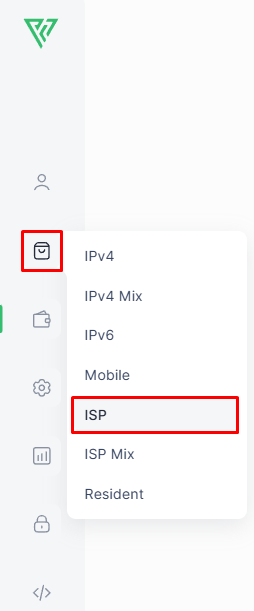
On the Proxy-Seller homepage, pick the service (ISP), the location, the rental period, and the number of IPs, then click Buy proxy.
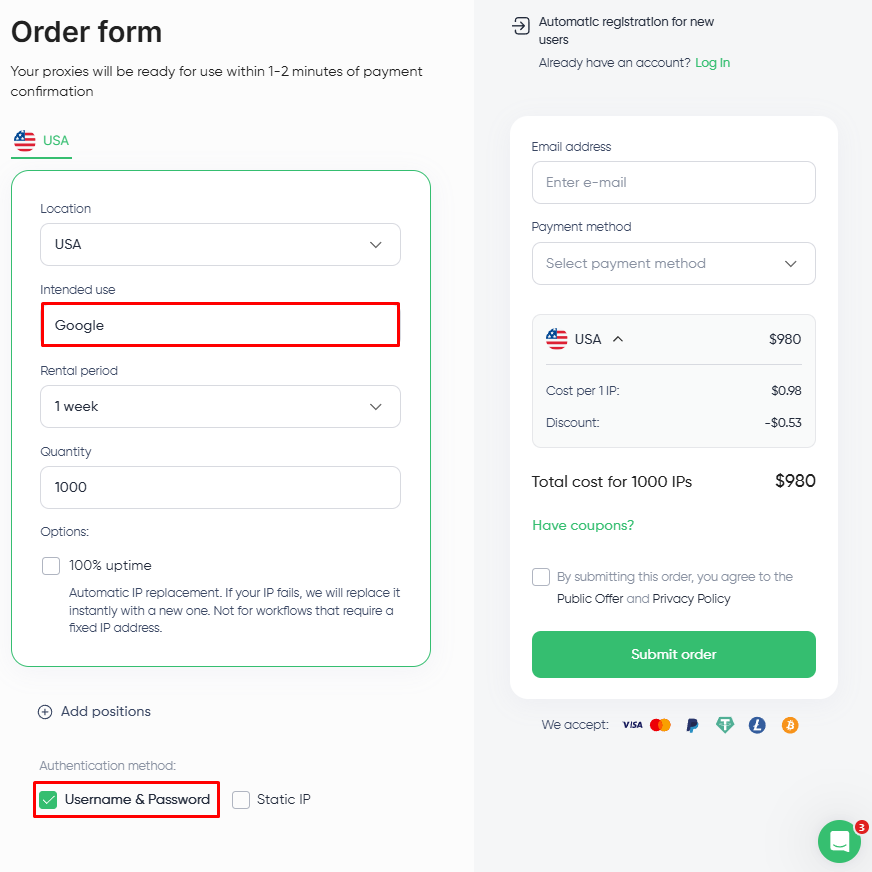
On the order form, fill in Intended use with the target site or workflow you’ll route requests to (Google, TikTok Ads, Shopify, etc.) and pick the authentication method: Username & Password or Static IP allowlisting.
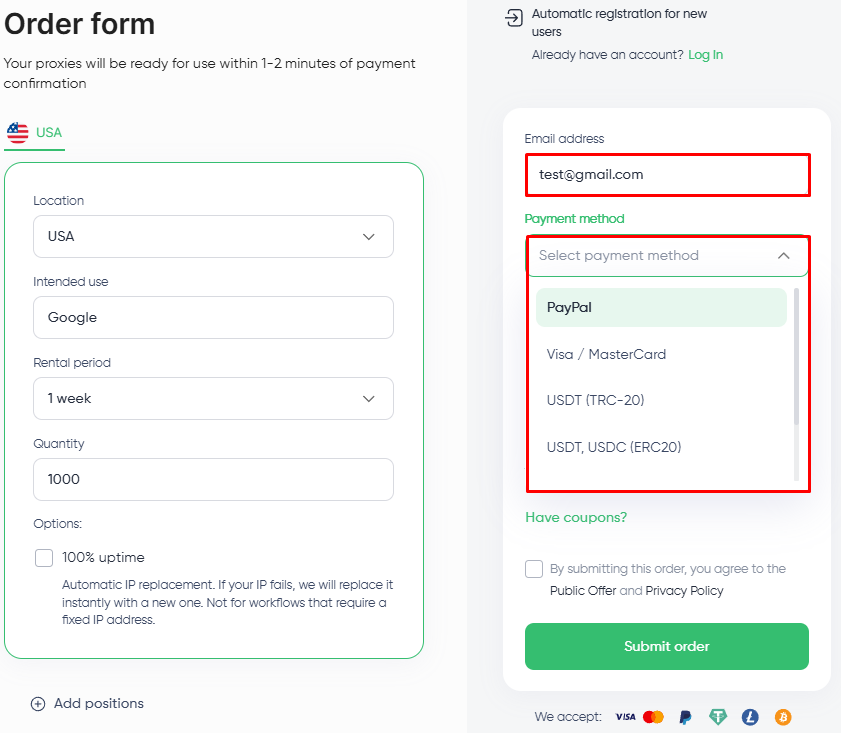
Enter your email and pick a payment method from the dropdown. Choose a payment method available on the order form and complete your purchase.
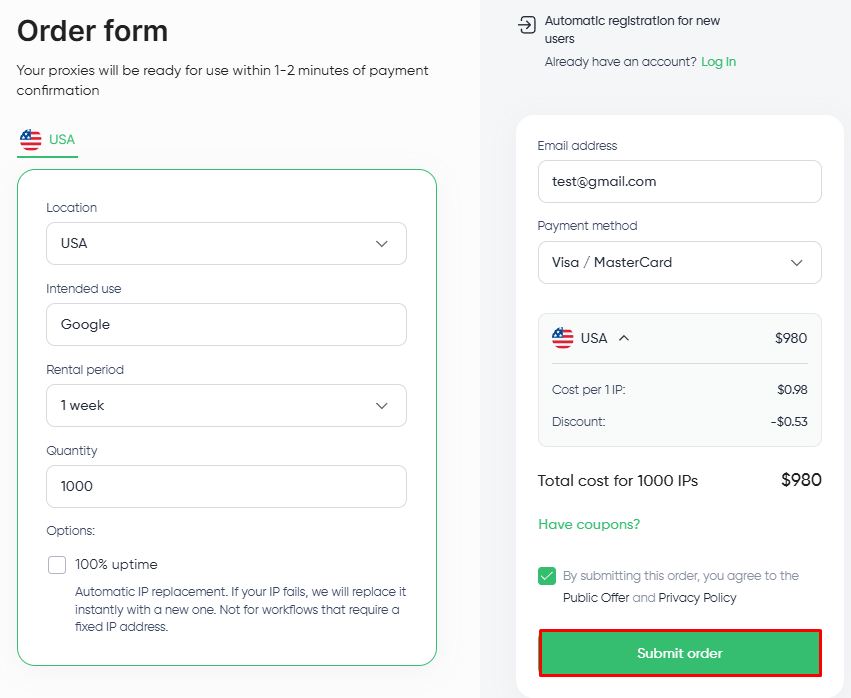
Tick the Public Offer agreement box and click Submit order. After payment confirmation, your proxy access details are sent by email and appear in your dashboard.
Your active proxies live under Orders in the dashboard sidebar, where you can view credentials and manage the pool.
Choosing ISP proxies for long-session work
To close out the “what are ISP proxies” question: buy ISP proxies if your workload involves sessions that stay live for hours or days, runs into ASN-aware detection, and can’t tolerate the per-request IP changes of a rotating residential pool. Also, make sure to go for a provider that offers dedicated allocation, clear sourcing information, and transparent support terms.
Skip them if the workload is short-burst, bandwidth-heavy, and indifferent to ASN; that’s when datacenter is the cheaper and better choice. And if the job requires millions of fresh IPs per hour, then rotating residential is built for that; ISP is not.
FAQ
ISP proxy providers negotiate commercial agreements with internet service providers to lease blocks of IP addresses. Those IPs stay registered to the issuing ISP in ASN databases, so target sites read them as consumer connections. The provider hosts the IPs on datacenter servers and handles routing, authentication, and rotation policy for the block. The ISP itself only allocates the range and doesn’t see the traffic that runs through it. Reputable providers document the chain of custody from allocation through delivery, which matters for procurement teams that need audit trails for compliance reviews.
No proxy type is completely undetectable. ISP proxies are harder to flag than datacenter ones because their IPs are registered to consumer internet service providers in ASN databases, so anti-bot systems read them as legitimate household connections. Detection still depends on the full request signal: browser fingerprint, request cadence, cookie behavior, and whether the IP has been previously abused. Verification tools like Ipinfo or Whoer sometimes show a “dual ISP” result, where the ASN points to one entity (usually the hosting infrastructure announcing the route) and the WHOIS organization points to another (the ISP that owns the IP block). That’s expected for hosted ISP proxies and doesn't mean the IP is low-quality.
ISP proxies are used for workflows that need one IP to stay attached to a session for hours or days. The four most common categories:
-
Public web scraping and SERP tracking: hold a stable identity across paginated scrapes and long-running rank checks.
-
Long-session account workflows: brand-owned dashboards (Shopify, Meta Business Manager, Google Ads) that expect a consistent login IP.
-
Ad verification across geos: confirm creative delivery in a target market with a static country-level IP.
-
Multi-day browser automation: Selenium, Playwright, or Puppeteer runs that would break under per-request IP rotation.
ISP proxies are datacenter-hosted proxy servers that use IPs assigned by internet service providers. These are also called static residential proxies. Residential proxies route traffic through real household devices instead of servers. ISP holds one static IP for hours or days, while residential rotates across many real-user IPs. That trade-off maps to the buying decision: pick ISP for session persistence, residential for footprint diversity and the hardest-to-flag traffic.
PROXIES FROM $0.02/IP
Ready to put this into practice?
Pick a proxy type and location, and start using it within minutes.
Instant delivery
24/7 support
Refund policy
About the author