
 Proxy for Telegram
 Proxy for LinkedIn
 Proxy for Google
 Proxy for Ebay
 Proxy for Twitter
 Proxy for TikTok
ISP vs residential proxies: key differences, pros & best use cases

SERP monitoring and ad verification teams hit the same choice early: ISP vs residential proxies. Both exit from IPs registered to a consumer ISP, but one stays fixed for weeks, and the other rotates through millions of user devices. Run a fixed-session workflow via per-GB residential traffic, and you’re paying for agility the project doesn’t want. Run distributed crawling through a small static pool, and limited subnet diversity caps how many requests you can run in parallel.
I’ll break down where each type wins and when to run ISP vs residential proxies in the same pipeline.
What are ISP proxies?
ISP proxies are static IP addresses hosted in data centers, with ASNs registered to real internet service providers. This structure combines server-based stability with ISP attribution. They’re often called static residential proxies because the address remains fixed while belonging to an ISP-registered network range.
Proxy-Seller is a proxy infrastructure provider that offers ISP IPs from ranges registered to AT&T, Windstream, Frontier, and other providers. With 99.7% uptime, they are a good fit for extended sessions and recurring monitoring, especially when you need to keep the same IP instead of switching it automatically.
ISP proxy use cases that depend on a fixed, trusted IP
Each ISP IP is registered to a consumer internet provider, so it passes the ASN check that flags datacenter ranges. That makes them reliable for:
- recurring public-data collection from the same regional endpoints
- geo-targeting and verifying ad campaigns
- competitor price and assortment checks from one fixed location
- multi-step website and localization testing on owned sites
- access to SaaS and AI tools from one consistent IP
- managing multiple owned brand accounts across ad platforms, marketplaces, and social channels
A trusted ASN plus a fixed address suits SEO teams tracking rankings across markets, price intelligence teams collecting public SKU data from regional marketplaces, and ad verification teams checking placements from a fixed local IP. A stable address maintains session continuity and prevents IP or location changes from distorting the results.
Advantages of ISP proxies
- High trust level: targets see a home internet provider instead of a hosting company, so ISP IPs get the same treatment as residential traffic.
- Stable performance: server-hosted IPs run at 99.7% uptime.
- Fewer interruptions: targets challenge them less often than datacenter IPs, so you hit fewer blocks and CAPTCHAs.
- Fixed cost for traffic-heavy jobs: Proxy-Seller ISP proxies start at $0.98/IP with unlimited traffic under the FUP for the rental term, so heavy workloads don’t add per-GB charges.
- Dedicated IPs: each address serves one customer for the full rental term, so no one else’s traffic affects its reputation.
STATIC ISP IPS WITH PER-IP PRICING
Get fixed IP capacity your workflow actually needs
Choose individual ISP proxies with HTTP, HTTPS, and SOCKS5 support, up to 1 Gbps channel bandwidth, and 99.7% uptime.
Drawbacks of ISP proxies
- ISP pools hold hundreds to thousands of IPs, not millions, because each address is leased from an ISP.
- Targeting stays at the country level, with no city or ISP filters.
- ISP IPs stay fixed, so if a job needs rotation, you cycle through the purchased IP list in your own scraper or proxy manager.
- A ban on one IP can spread to its whole /24 range of 256 addresses, so subnet spread matters: Proxy-Seller distributes ISP IPs across 600+ Class C and 200+ Class B subnets.
What are residential proxies?
Residential proxies route requests through IP addresses that internet service providers assign to real user devices. Because the IP belongs to a real home connection, websites treat the traffic as regular user activity and trigger fewer CAPTCHAs. I cover the setup in more depth in a separate guide on residential proxies meaning, and how they work.
Residential proxies are priced by traffic: you pay per gigabyte transferred, and Proxy-Seller rates start at $1.45/GB. Instead of assigning specific device addresses, providers give customers access to a pool of IPs that changes over time. Billing is where ISP vs residential proxies split most: ISP may be priced by data volume or rented as dedicated, static addresses. Proxy-Seller follows the per-IP approach: customers choose the number of ISP IPs and a rental term from 1 week to 12 months, starting at $0.98/IP.
Proxy-Seller supports three residential rotation modes when customers generate a proxy list:
- Per-requestrotation selects an available residential IP for every new request.
- Timed rotation changes the IP every 5, 10, 15, 20, or 60 minutes. For finer control, customers can set a custom interval in seconds, up to 3,600.
- Sticky sessions keep the same residential IP for typically 6–8 hours, as long as the underlying device stays online.
Proxy-Seller residential plans support HTTP, HTTPS, and SOCKS5, including UDP traffic over SOCKS5, and every rotation mode works with all three protocols.
Residential proxy use cases that need rotation and local IPs
Rotation, a pool of 47M+ IPs, and city-level targeting are what set the best residential proxies apart, and they map to these tasks:
- Collect public web data more reliably on websites with stricter traffic filtering (e.g., Amazon, Cloudflare-protected websites)
- Check SERP results at city level to track local rankings
- Verify whether ads display correctly across target countries, cities, or regions
- Compare pricing, product listings, and offers as they appear in local markets
- Check how owned brand pages and ads render in specific cities
- Test localized pages and user journeys with sticky sessions that hold one local IP
Advantages of residential proxies
- High reliability: most residential networks connect over 99% of the time, with a 99.28% median in Proxyway’s 2026 tests.
- Rotation: get a new IP per request or on a timer, with no manual address swapping.
- Wide geographic coverage: target IPs by country, region, city, or ISP, so results match what a local user sees.
- Fewer blocks and CAPTCHAs: requests spread across many household IPs, so no single address draws enough traffic to get flagged.
RESIDENTIAL IPS WITH FLEXIBLE ROTATION
Pay for the traffic you use, not an oversized IP block
Access 47M+ residential IPs per month across 220+ locations. Buy traffic by the GB and configure per-request, timed, or sticky sessions for each workflow.
Drawbacks of residential proxies
- Higher cost: every IP runs on a real user’s device under a consent agreement, so providers bill per GB, and traffic-heavy jobs scale the bill with every page.
- Unpredictable spend: data usage varies by target, so test first. Proxy-Seller’s 1 GB pack at $3.5/GB shows what your workflow actually consumes.
- Less consistent speed: each request depends on the household connection behind the IP, and a device can drop offline mid-session.
ISP proxies vs residential proxies comparison: price, speed, and trust
The quickest way to split ISP vs residential proxies is to ask whether your job needs one IP for days or a new IP every few requests. Here’s the table I use to explain the difference between residential and ISP proxies when a team asks me which type to buy:
Evaluation criteria | Residential | ISP |
Source of IP addresses | Real residential/household devices | Server-hosted IPs allocated by ISPs |
Allocation | Shared rotating pool | Dedicated to one customer |
Type of IP addresses | Rotating | Static |
Billing model | Per GB | Per IP |
Traffic | Metered per GB | Unlimited (FUP: full speed up to 100 GB/IP per 30 days) |
Price | From $1.45/GB | From $0.98/IP |
Speed | Varies by peer | Up to 1 Gbps |
Geographic coverage | 220+ locations | 25+ countries |
Connection stability | Session ends if the device goes offline | 99.7% uptime |
Trust factor | High | High |
Best for | Large-scale web data collection, broad geo-targeting, rotation-heavy workflows | Long sessions, stable logins, lower-latency tasks |
Pros | Broad location coverage, real-user IP profile, flexible rotation | Static sessions, high speed, predictable performance |
Cons | More variable speed, traffic-based billing, less predictable session duration | Smaller pools, less geo variety, less suited for rotation-based workflows |
Concurrent-request scalability | No cap on concurrent sessions | Bounded by the number of rented IPs |
How to compare residential and ISP proxies for each workflow
I compare residential vs ISP proxy networks by how the IP behaves inside a real workflow, not by how the provider labels it. Both types pass as legitimate traffic, but they behave differently once a job needs rotation or a session that lasts for hours.
Look past the static and dedicated residential labels
Providers sell ISP proxies as “static residential” or “dedicated residential”, and the labels mix two separate things. “Static” describes IP behavior, and “dedicated” describes exclusivity: one customer per IP. A dedicated residential proxy is still a real user device, while a static residential proxy is a datacenter-hosted IP under an ISP’s ASN. Check where the IP is hosted before you compare ISP proxies vs residential proxies on price.
Compare the metrics that decide the type for a workflow
Five questions settle most ISP vs residential proxies decisions:
- How long does the session need to stay stable? ISP proxies hold one IP for the whole rental term. Residential sticky sessions last up to 24 hours and end if the device goes offline.
- How much geo depth do you need? Residential proxies target 220+ locations down to city and ISP level; ISP ones stop at country level.
- How sensitive is the workflow to latency? ISP proxies run on server hardware, so latency stays flat. Residential latency varies with each household connection.
- How much IP diversity does the task require? If a target rate-limits per IP, residential pools spread requests across millions of addresses, while ISP capacity grows only as you rent more IPs.
- How is the service billed? Calculate how much residential traffic the workflow will consume in GB and how many static ISP IPs it requires. Because the billing units differ, compare the total workload cost and cost per valid response rather than the headline unit prices alone. Per-GB billing wins when requests spread wide; per-IP billing wins when a few IPs move heavy traffic. Ten ISP IPs pulling 500 GB a month cost about $29.1, while the same 500 GB on residential costs about $850.
ISP vs residential proxies by workflow
I pick the proxy type by one test: does the job break if the IP changes mid-task? If yes, it goes on ISP. If it breaks when one IP sends too many requests, it goes on residential. Here’s how I map common workflows in the ISP vs residential proxies choice:
Workflow | Which to choose | Why |
SERP tracking across 20+ locations | Residential | City-level targeting and rotation |
Public price and stock data from regional marketplaces | Residential | Requests spread across many IPs |
Ad verification at city level | Residential | Local household IPs |
Localized page tests across markets | Residential | Sticky session per city |
Multi-step QA on owned websites | ISP | One IP for the whole test |
Authenticated sessions on company systems | ISP | Fixed address for logins |
IP-allowlisted API access | ISP | Static IP to add to the allowlist |
Checkout-flow testing | ISP | Same address through every step |
URL discovery plus logged-in follow-up checks | Both | Residential collects, ISP runs the checks |
A mixed setup splits one pipeline by stage: residential pools collect product URLs across 50 cities, and a few ISP IPs then run the logged-in checks on your own seller dashboard.
Proxy management best practices
Most proxy failures I see come from management, not from the IP type: an expired rental, an IP missing from the allowlist, or a traffic balance that hit zero overnight. The same habits prevent them in any ISP vs residential proxies setup.
Tools and automation
Once a job runs on more than a handful of IPs, I stop managing them by hand and route traffic through a proxy manager: a rotating-proxy middleware in Scrapy, or the Proxy-Seller API for orders and proxy lists.
The features worth paying for:
- Rotation to spread requests across multiple IPs
- Failover systems that automatically replace blocked or unstable IPs
- Sticky session controls for workflows that need the same session to hold
- Dashboards that show speed, availability, and error patterns in real time
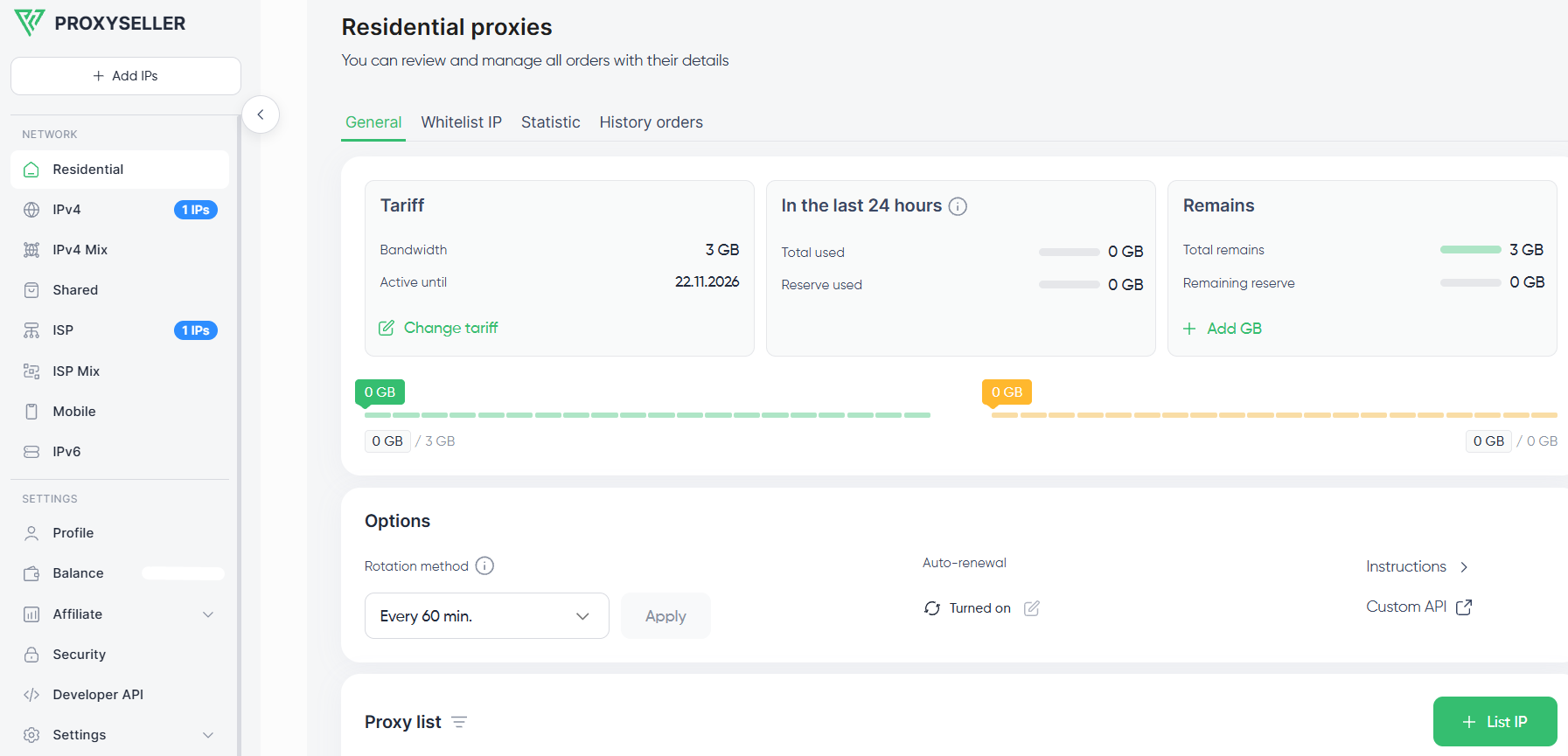
In the Proxy-Seller dashboard, I manage ISP and residential orders from one account: pick a rotation method, allowlist my IPs, turn on auto-renewal, and track the traffic balance and expiration date for each order:
TEST BEFORE YOU SCALE
Stop guessing which proxy type your targets need
Proxy-Seller runs a free POC on your own targets, so you compare valid response rate and cost per valid response before committing a budget.
Monitoring proxy health
I track proxy health in two places: the Proxy-Seller dashboard for account data and my own stack for target-level metrics. Monitor endpoint-specific latency, response codes, and valid response rate (VRR) in your scraper or monitoring tool, since they vary by target.
Monitor the following indicators:
Latency: Perform repeatable curl tests from the same machine to the same allowed endpoint. Track connection time and total response time, then monitor median and p95 latency in Grafana, Datadog, or a similar monitoring system. Don’t replace an IP because of a single slow request.
cURL
curl -x http://USER:PASS@HOST:PORT -o /dev/null -s -w "%{time_connect} %{time_total}\n" https://example.com- Error rate: Group application logs by proxy and endpoint. Separate connection failures and timeouts (a proxy or network issue) from 403 and 429 (the target is blocking or rate-limiting the IP) and 5xx (the target server is failing).
- Valid response rate (VRR): Divide the number of valid responses by the total number of requests and multiply the result by 100. Compare VRR by proxy type, location, and target, not by raw request count.
- Location and ASN: Check the exit IP through IPinfo or a similar service to confirm that its country, city, and ISP match the selected configuration (city applies to residential only).
- Availability: Run a lightweight health check at a fixed interval, such as one request to the same endpoint every 5 minutes. Before changing an IP, verify the credentials, IP allowlist, rental expiration, and the traffic balance left.
Security and access control
A leaked proxy password lets anyone spend your traffic balance, so I lock access down before the first request. My baseline setup:
- Proxy credentials in a secrets manager (e.g., HashiCorp Vault or AWS Secrets Manager), never in code
- IP allowlist authentication, set in the Whitelist IP tab of the Proxy-Seller dashboard
- A monthly review of active orders and allowlisted IPs, with former team members’ IPs removed
- One account for all orders, managed through the dashboard or the Proxy-Seller API
Legal and ethical considerations
The legal rules don’t change with the proxy type: the same privacy laws apply to ISP vs residential proxies.
That means collecting only publicly available data, following GDPR, CCPA, and local privacy laws in your market, respecting website terms of service, and choosing a provider that sources IPs with documented consent.
Proxy-Seller obtains its residential IPs from documented, consent-based sources and maintains an Acceptable Use Policy. AUP prohibits the use of IPs for illegal purposes, including scraping personal or login-gated data. ISP IPs come through direct agreements with internet service providers. We provide DPA and SCC documentation from day one, and IP provenance records are available upon request. Proxy-Seller complies with GDPR, CCPA, and the ePrivacy Directive, holds the EWDCI Trust Seal, and is ISO/IEC 27001:2022 and ISO 9001:2015 certified.
ISP proxies vs residential: closing thoughts
Treat the ISP vs residential proxies choice as a routing preference and not a comparison of which is best. Go for residential pools when you’re doing location-heavy, rotation-heavy activities like SERP monitoring in multiple markets, public price scraping, and city-level ad verification. Opt for ISP plans when you work with IP-allowlisted APIs, run multi-step tests on your own websites, or need one address for the whole task.
I merge both when a pipeline collects wide and then follows up deep: residential for discovery, ISP for the repeat requests.
Test the setup before scaling.Proxy-Seller sells a 1 GB residential pack at $3.5/GB and ISP plans from a single IP, and runs a free POC on your own targets for larger deployments. Compare valid response rate (VRR), p95 latency, and cost per valid response with your current setup, and only scale those proxy types and routing rules that result in improvements.
FAQ
Yes. “Static residential proxy” is another name for an ISP proxy: a static IP hosted in a data center but registered under a consumer internet provider’s ASN. It stays fixed for the whole rental term. A rotating residential proxy is a different product: it exits through a real user device, and the IP changes per request or per session.
Residential plans are the better choice for large-scale web scraping. They spread requests across millions of IPs, rotate automatically, and target down to the city level. ISP packages fit high-volume jobs on a few targets that need speed and one consistent IP. Their capacity grows only as you rent more addresses, since each IP can send only so many requests before a target rate-limits it.
Yes. A mixed setup routes geo-distributed collection through residential pools and sends tasks that need a stable IP to ISP proxies. For example, residential IPs gather localized SERP or pricing data across 20 cities, while ISP IPs run repeatable website tests and long multi-page sessions. At Proxy-Seller, both types run from one account and one dashboard.
The ISP vs residential proxies price gap starts with billing. Residential traffic is priced per GB. At Proxy-Seller, it costs $3.5/GB for a 1 GB pack and drops to $1.45/GB at 1,000 GB. ISP proxies are sold per IP or per GB, depending on the provider. We sell them per IP with unlimited traffic under the Fair Usage Policy, from $3 for one IP per month to $0.98/IP for 1,000 IPs rented weekly.
Yes. Most providers offer both protocols for ISP and residential plans. Proxy-Seller supports HTTP, HTTPS, and SOCKS5 for both types, with username/password or IP allowlist authentication. Use HTTP(S) for browsers, scrapers, and API clients, and SOCKS5 when your tool sends non-HTTP traffic. On residential packages, SOCKS5 also carries UDP traffic.
Traffic isn’t capped, but a Fair Usage Policy applies. Each ISP IP runs at full speed for up to 100 GB per 30-day rental, about 3.3 GB a day. After that, the IP keeps working at up to 10 MB/s with up to 3 connections. For most long sessions and monitoring jobs, 100 GB per IP covers the full rental term.
PROXIES FROM $0.02/IP
Ready to put this into practice?
Pick a proxy type and location, and start using it within minutes.
Instant delivery
24/7 support
Refund policy
About the author