
 Proxy for Telegram
 Proxy for LinkedIn
 Proxy for Google
 Proxy for Ebay
 Proxy for Twitter
 Proxy for TikTok
List crawling at scale: best practices and architecture

A crawl that runs clean on a few pages rarely holds up across thousands. Blocks climb, some pages come back empty, and the catalog, pricing, or SERP data your pipeline depends on quietly goes stale. List crawling is where this pain concentrates. List pages take heavier automated traffic than most of a site, so they draw the strongest defenses. If you treat these pages like casual scraping targets, the crawl breaks fast.
Stable list crawling comes down to a few deliberate choices. A queued request frontier, tuned pacing, rotating IPs, and selectors that survive a redesign keep success rates flat as volume climbs. Get those right, and an infinite-scroll page or a faceted trap becomes routine work instead of an overnight outage.
What is list crawling?
List crawling is the process of extracting the same repeated structured records from web pages that display many similar items, such as categories, search results, or directory listings, across all paginated results. It targets list templates rather than single documents, which makes the output uniform and ready for a pipeline.
What is a list crawler, and when do teams use it?
A list crawler is a crawler configured to recognize a repeating item container on a page and pull the same fields from every item, following pagination until the list ends. Rather than wander a whole domain, it locks onto one template and harvests structured records from it.
Teams reach for lists crawlers when the same source updates on a schedule and the data must stay current. Daily price checks, weekly SERP snapshots, and hourly job board monitors run as recurring jobs, so dashboards reflect live listings instead of a stale snapshot.
List crawling vs. web scraping vs. web crawling
The clearest way to understand the list crawling meaning is to compare it with web scraping and web crawling:
- Web crawling discovers links broadly by mapping a site's URL graph, without necessarily extracting structured data (like Googlebot).
- Web scraping extracts data from any single page: a product detail, an article, a contact page.
- List crawling focuses specifically on list templates and recurring record patterns. It's a subtype of scraping, but optimized for bulk extraction across many identical items and multiple pages.
Core differences by goal, scope, and output
Concept | Primary goal | Scope | Output shape |
Web crawling | Discover and map URLs | Whole site or domain | Link graph |
Web scraping | Extract data from a page | Any single page | Varies by page |
List crawling | Extract repeated records | List and pagination templates | Uniform rows |
The first two concepts are confused most often, so our breakdown of web scraping vs web crawling digs into that pair in depth.
How a list crawler works: the high-level flow
The core crawling loop has five steps, and every list crawler repeats them until the list runs out.
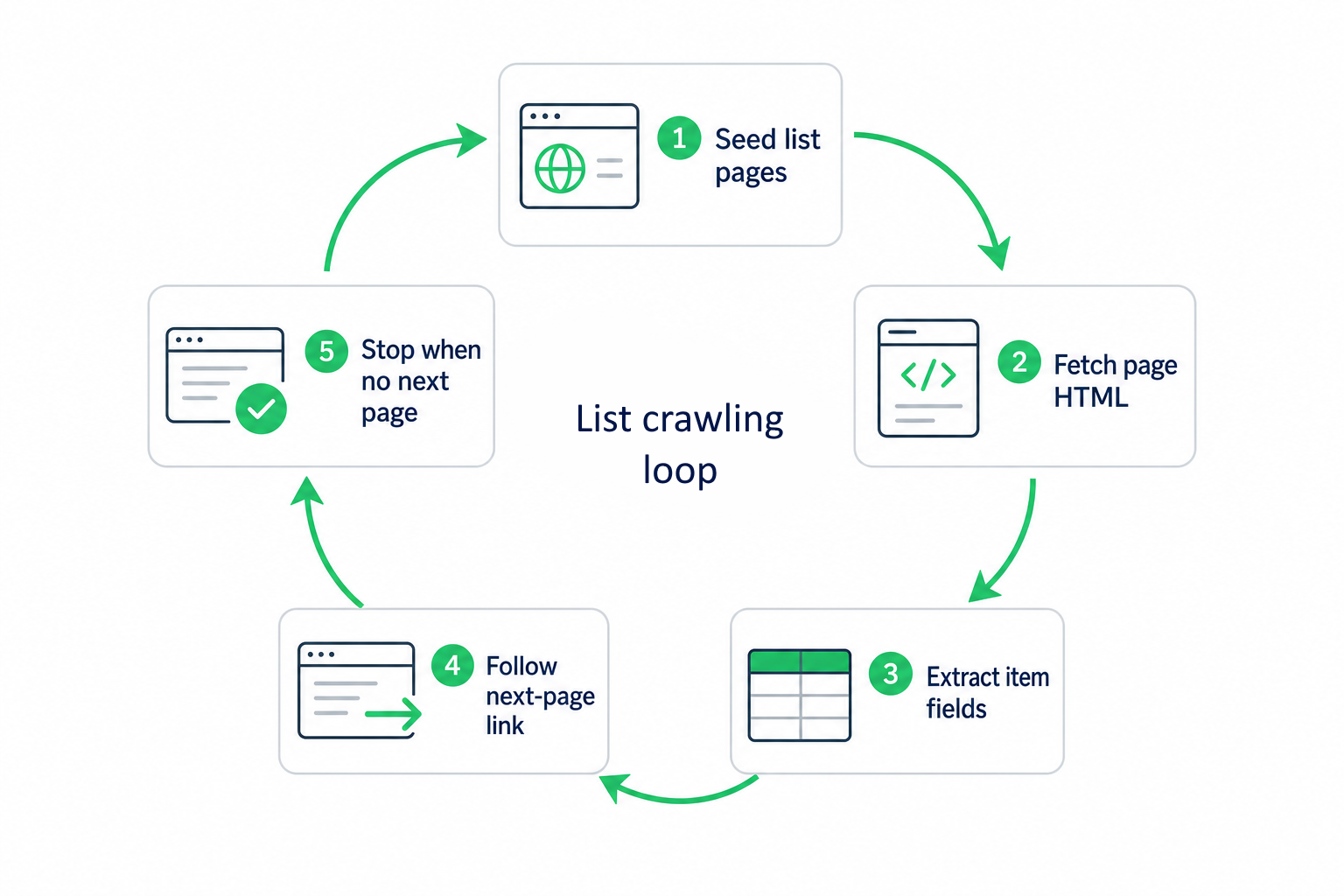
The architecture and tutorial sections below turn this outline into a practical implementation:
- Seed one or more list URLs (category URLs, search result URLs, directory roots) into a queue.
- Fetch a page and parse its repeating item container.
- Extract the target fields (title, price, URL, rating, availability, etc.) from each item into a record.
- Find the next-page link or calculate the next offset, then enqueue it.
- Stop when no next-page link appears or a page returns zero items.
Make the stop condition watch both navigation and extracted records. Pagination cues vary by site, and some keep serving valid-looking pages after the list has ended, so pair “no next link” with “zero records extracted” as twin exit signals.
Why crawling lists matters for data-driven businesses
List pages show what exists on a site now and how it changes over time, making them a practical source of external data. Grand View Research valued the broader finance-led alternative data market, which includes web-scraped data and web traffic, at USD 18.8 billion in 2025 and projects it to reach USD 276.9 billion by 2033.
List crawling turns regularly updated list pages into recurring data pipelines: each scheduled crawl adds a dated snapshot for tracking price movements, inventory changes, and ranking shifts. The resulting time series supplies CRMs, BI dashboards, and analytics workflows with historical context that no one-time scrape can provide.
Key use cases for crawling list pages
Use case | What list crawling captures | Downstream use |
E-commerce & marketplace catalogs | New products, price changes, stock status, promotional flags, discontinued items | Dynamic pricing, competitive benchmarking, inventory monitoring |
Job boards & hiring platforms | New roles, company names, job locations, posting dates | Hiring dashboards and candidate-sourcing alerts |
Business directories & lead generation | Business names, addresses, categories, ratings, websites | Lead lists and CRM enrichment |
Review sites & content feeds | New reviews and posts, rating and review count changes, updates to “best of” lists | Review monitoring, content tracking, trend analysis |
SEO & SERP intelligence | Organic results, featured snippets, local packs, positions across queries and geographies | Competitor monitoring, rank tracking, SERP feature analysis |
Stop watching crawls stall at page 40. Proxy-Seller routes list crawling traffic through clean residential pools with policy-driven routing, delivering a +20–30% VRR in A/B pilots.
Common list structures and the crawl logic they need
The structure of a list dictates the list crawling logic. Identify how it loads and paginates before choosing an approach; the patterns below cover nearly every list you’ll meet in production.
Paginated lists
The most predictable pattern. Pages use sequential numbers, an ?offset= or ?page= parameter, or a visible "Next" link. The crawl logic is a simple loop: fetch the page, extract records, find the next page, repeat. Stop when the next link is absent or the page returns zero items. Predictable URL patterns also make this case easy to parallelize, since URLs like ?page=1, ?page=2, and so on can be enqueued at once.
Some sites return a 200 with an empty list instead of a 404 when you go past the last page. Check item count along with HTTP status, since a successful response can still mean the list has ended.
“Load more” button lists
Here the URL never changes: clicking the button appends more items to the DOM via a background XHR or fetch request. Two approaches work:
- Headless browser: click the button programmatically until it disappears.
- Replay the background call: open DevTools → Network tab, click “Load More”, and find the request. It usually calls an API endpoint with an offset or cursor parameter, so you can replay it directly without a browser.
Infinite scroll & dynamic lists
Items load automatically as the user scrolls, usually through JavaScript and background requests, while the HTML source shows only the first batch. Options:
- Browser scroll loop: use Playwright to scroll, wait for new records, and stop when the item count no longer grows.
- API intercept: inspect Network while scrolling, find the page or cursor request, and crawl it directly instead of the rendered page until it returns an empty batch.
Static parsers like BeautifulSoup or lxml only read the first server-rendered batch, so verify the loading pattern in the Network tab before choosing your tool. Table-based lists
Tabular lists map cleanly: each row is one record, each cell a field addressed by position or header. The catch is that many modern “tables” are or CSS-grid layouts, so target the repeating row container (e.g., div.table-row) rather than , which may not exist in the markup.
Filtered & faceted lists
Each filter combination generates a new URL and a distinct result set. The crawl challenge is combinatorial explosion: 10 categories × 5 locations × 3 price ranges = 150 separate list crawls. Selectivity is the defense: crawl the unfiltered list first and check coverage, then add only filter combinations that reveal missing items or expose records hidden by list caps.
Faceted navigation can create crawl traps: infinite URL chains where filters combine recursively. Allowlist the facets that matter before launch, set a max depth, and track visited filter combinations to avoid re-crawling duplicate result sets.
Search result & SERP lists
Search results depend on the query, filters, sort order, personalization, and the requesting IP's geolocation, so two requests rarely match. SERP pages add device type, language, and regional context. Track all parameters explicitly and treat each query-filter-sort combination as its own list. For localized results, run geo-specific crawls with matching proxy locations.
How do you check if a list page is crawlable?
A crawlable list page has consistently structured list items, traceable pagination or background requests, a clear stop signal, and enough records with consistent fields to support a stable schema.
Assess the target page for list crawling:
- View source and DOM: confirm that the page exposes a stable, repeating item container, either in raw HTML or after JavaScript renders the page.
- Inspect the Network tab: find the XHR/Fetch request that fires on scroll or click and returns a JSON payload with item records. That's the API endpoint to target.
- Check for a pagination signal: a visible "Next" button, a ?page= parameter, or a cursor in the API response. If none exists, the list may require scroll-based extraction.
List crawl architecture: 5 components of a scalable crawl
A production list crawling system typically includes five components that scale independently. Fetch-and-parse tutorials skip this layer, which is why their demo crawlers break at volume.
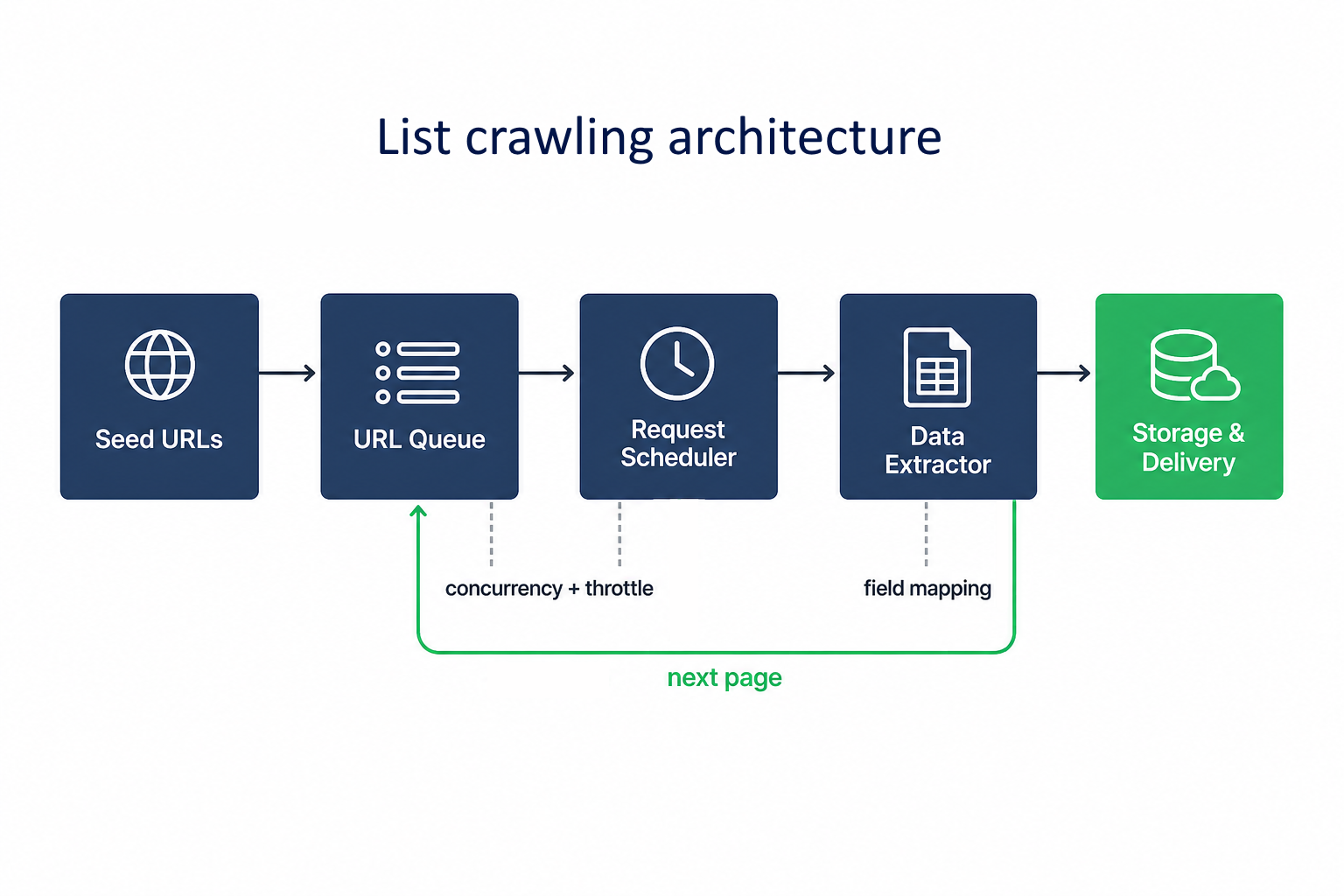
1. URL queue & seed management
Separate three URL types in your data model:
- Seed URLs: the starting list pages (category roots, search result pages)
- Next-page URLs: discovered from the current page's pagination signal
- Item URLs: individual product/listing URLs, if you need to fetch detail pages
Manage the frontier as a persisted queue rather than a recursive function. This lets workers pull URLs in parallel, scale the crawl horizontally, and resume unfinished work after a failed run.
2. Request scheduling, concurrency, and throttling
Request scheduling decides when URLs leave the queue, concurrency sets how many requests run at once, and throttling governs pace and retries.
Keep limits per domain: start with 2–5 concurrent requests and a randomized 1–2.5 second delay between requests to the same host. On 429, 403, or 503 responses, pause and retry with exponential backoff instead of looping immediately. These controls protect both the crawler and the target, since hammering one server can trigger stricter anti-bot responses and legal or ethical flags.
3. Data extraction & field mapping
Design selectors that are specific, stable, and tolerant of missing fields. Prefer semantic attributes such as data-testid, aria-label, or structured microdata over positional CSS paths that break when the layout changes. Map every item to one fixed schema at extraction time, and let absent optional fields pass through without breaking the crawl.
4. Deduplication & crawl state
Deduplication prevents re-processing items you've already seen. It works at two levels:
- Crawl state: track visited pages, pending next-page URLs, and unfinished URLs so the crawler avoids loops and can resume after failures.
- Item-level dedup: track stable record keys, such as item URL or source ID, so each crawl doesn’t emit duplicate items.
5. Storage, scheduling, & delivery
Output format depends on the downstream consumer:
- CSV/JSON: fastest to implement, works for BI tools, spreadsheets, or ad hoc review
- Database (PostgreSQL, BigQuery): better for recurring jobs, versioned snapshots, and queries across runs
- Streaming (Kafka, Pub/Sub): for high-frequency crawls feeding live dashboards
Add snapshot_date from the start, so raw rows become trend data. Schedule recurring list crawling runs with Celery Beat, Airflow, or a simple cron job, and monitor yield changes. A crawl that returns 30% fewer items than the previous run likely hit a block or layout change. Scale list crawling without enterprise overhead. Proxy-Seller delivers clean dedicated pools, endpoint-level logs, and DPA/SCC documentation from day one, with a named account manager from $500 MRR.
Why proxies are essential for crawling list pages at scale
List pages are the most-defended pages on commercial websites, since they aggregate competitive intelligence such as pricing, inventory, and ranking. Sites deploy dedicated anti-bot systems that use rate limits, browser fingerprinting, and IP reputation checks to block automated access to these pages.
Without IP rotation, a production list crawl can stall quickly on defended commercial targets. Stable proxy access is the foundation the rest of a list crawling system sits on.
How anti-bot systems identify crawler patterns
Modern anti-bot systems flag traffic based on a mix of signals:
- Request-frequency spikes from a single IP or subnet.
- Repetitive navigation patterns across list pages, with identical timing.
- Browser fingerprint issues with missing Accept-Language or Referer headers, identical User-Agent across thousands of requests, mismatched TLS signatures, or inconsistent canvas and WebGL output.
- Low-trust IP ranges, especially datacenter subnets.
- Failed JavaScript challenges or repeated CAPTCHA triggers.
Proxy rotation & IP management for large crawl jobs
Proxy rotation spreads requests across many IPs, cutting per-IP load and reducing block risk. Practical strategies:
- Per-request rotation: assign a new IP to every request. Avoid it on sites with multi-step login flows.
- Sticky sessions: hold the same IP for a defined session duration. Required for sites that tie consecutive requests to one visitor.
- Domain-level rotation: rotate IPs within a pool dedicated to one target domain.
Proxy-Seller’s residential proxies support both per-request rotation and sticky sessions, helping list crawling jobs run uninterrupted across long paginated runs.
Residential vs. datacenter proxies: which to use for crawl workloads
Datacenter proxies win on speed and cost, while residential proxies win on trust and geo accuracy.
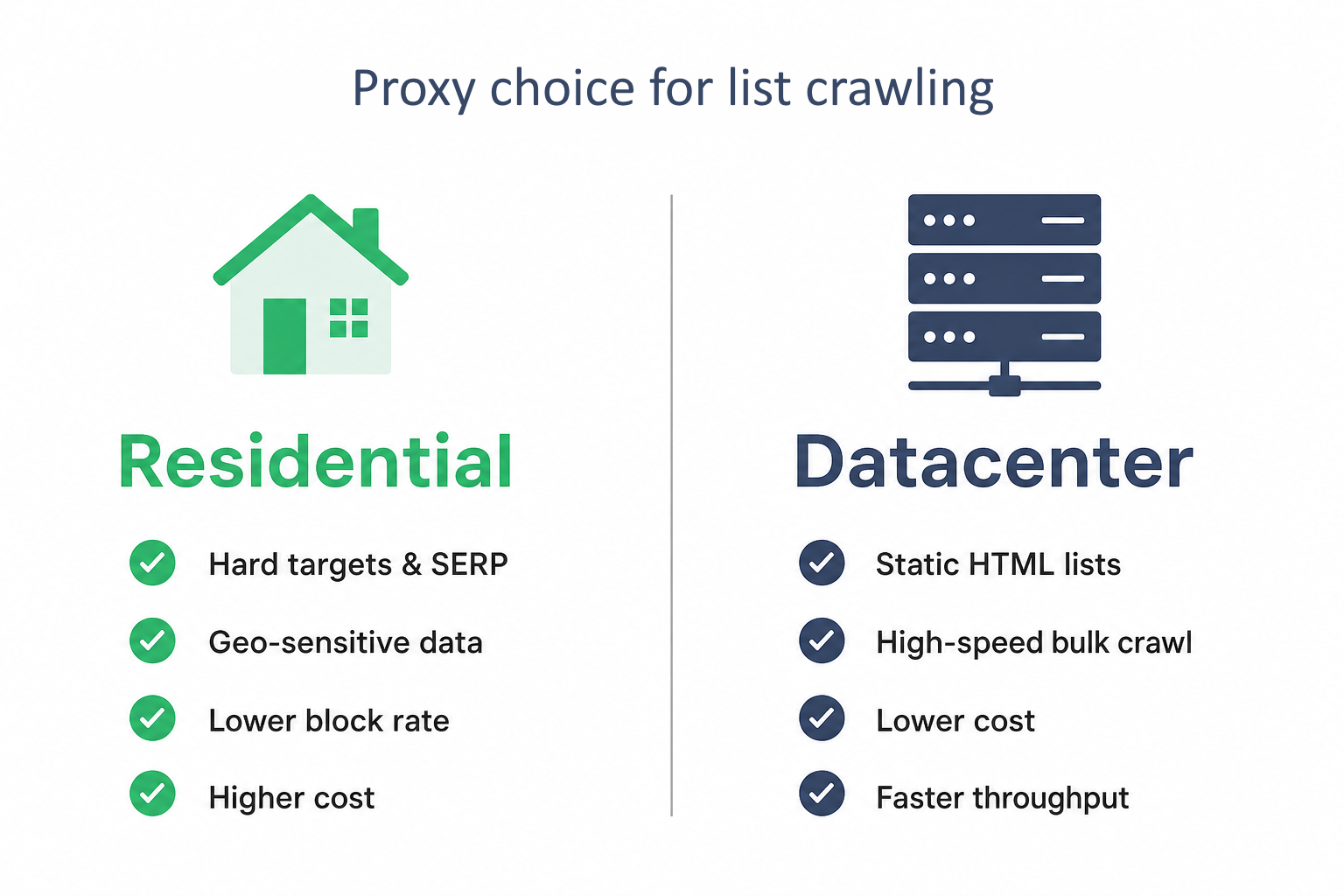
The right choice depends on the target:
- Use datacenter proxies when targets are static HTML sites with light anti-bot defenses and you need high throughput at low cost.
- Use residential proxies for retail sites with Cloudflare or Akamai protection, SERP data collection, and any target where geo-accuracy matters.
Factor | Datacenter proxies | Residential proxies |
Speed | High (10–100ms) | Moderate (100–500ms) |
Cost | Low (starts from $0.49/IP) | Higher (from $1.45/GB at volume; $3.5/GB entry) |
Median protected-target success rate* | 57% | 74% |
Geo-targeting accuracy | Moderate | High |
Best for | Static HTML lists, bulk crawls | SERP, pricing on retail sites, geo-specific data |
*Proxyway 2026 median benchmark results. Actual rates vary by target, provider, and crawler setup.
For teams running at scale, a pipeline hitting static directories alongside JS-rendered retail sites needs a proxy provider that supports both proxy types with domain-based routing.
Headers, user agents, and browser-like request profiles
Proxy rotation changes the IP pattern, but the request profile still has to look browser-like. Headers and user agents shape the browser fingerprint. Rotate user agents alongside IPs, keep browser strings up to date, and use a coherent header set, including Accept, Accept-Language, Accept-Encoding, and Referer where relevant.
Geo-targeting for localized lists and SERP data
Listings, prices, and search results change by region, so list crawling without geo-targeted IPs can return the wrong dataset. Routing requests through proxies in the target region lets the crawler capture localized list data and SERP positions a local user sees.
Get reliable proxies for list crawling at scale. Proxy-Seller's ISP proxies give list crawlers static residential-grade IPs with subnet diversity, a 24h support SLA, and no per-GB billing.
How to choose the right tools for your crawl
Pick list crawling tools by site complexity and scale. Static HTML list crawling needs a lightweight HTTP stack, JavaScript-rendered lists need a headless browser or the underlying API, and high-scale defended sites need managed anti-bot handling.
HTTP client, headless browser, or scraping API
Each option trades speed for capability, as the table below lays out.
Approach | Best for | Speed | JS rendering | Anti-bot handling |
HTTP client + parser | Static list pages | High | No | Manual |
Headless browser | JS-rendered lists, infinite scroll | Low | Yes | Manual |
Managed scraping API | Defended, high-scale targets | Medium | Yes | Managed |
No-code tools, frameworks, and managed services
- No-code tools such as Octoparse suit small, occasional list crawling jobs, but struggle with complex pagination, authentication, and production scale.
- Frameworks like Scrapy and Playwright offer control over scheduling, concurrency, and rendering, but require more engineering time.
- Managed scraping services reduce infrastructure work, handling browser rendering, proxy rotation, and anti-bot defenses at a higher per-request price.
For framework-based crawls that need private IPs across multiple subnets, our proxy for Scrapy plans support HTTP(S) and SOCKS5.
Language and tooling comparison
Python | requests + BeautifulSoup | Direct HTTP requests and HTML parsing | Fast static parsing, minimal setup | No JS rendering or built-in crawl orchestration |
Stack | Tooling | Execution model | Strength | Watch-out |
Python | Scrapy | Asynchronous crawling framework | Built-in scheduler, concurrency, retries | No native JS rendering; steeper learning curve |
Python / Node.js | Playwright | Full browser automation | JS rendering, browser contexts, session handling | Heavier and slower per page |
Node.js | Puppeteer | Full browser automation | Direct browser control through a Node.js API | Chrome-first; Firefox support has API differences |
List crawling success rates depend more on target defenses, request behavior, session handling, and proxy quality than on the language or framework. Compare methods only against the same URLs and traffic conditions.
Practical tutorial: build a list crawler in Python
This list crawling tutorial targets the WebScraper.io e-commerce test site, a training sandbox with categories, product cards, and standard pagination links. The runnable code fetches each category page, extracts the repeating product card, walks the pagination to the last page, and rotates user agents and proxies along the way.
If you want the groundwork first, our separate guide on how to build a web crawler walks through the process from scratch.
Step 1: Inspect the list page and set up the environment
We’ll work through the laptops category as an example. It holds 117 products across 20 pages, each reached through a URL with a standard ?page= parameter. Every product sits in a div.thumbnail card, the repeating unit a list crawler locks onto.
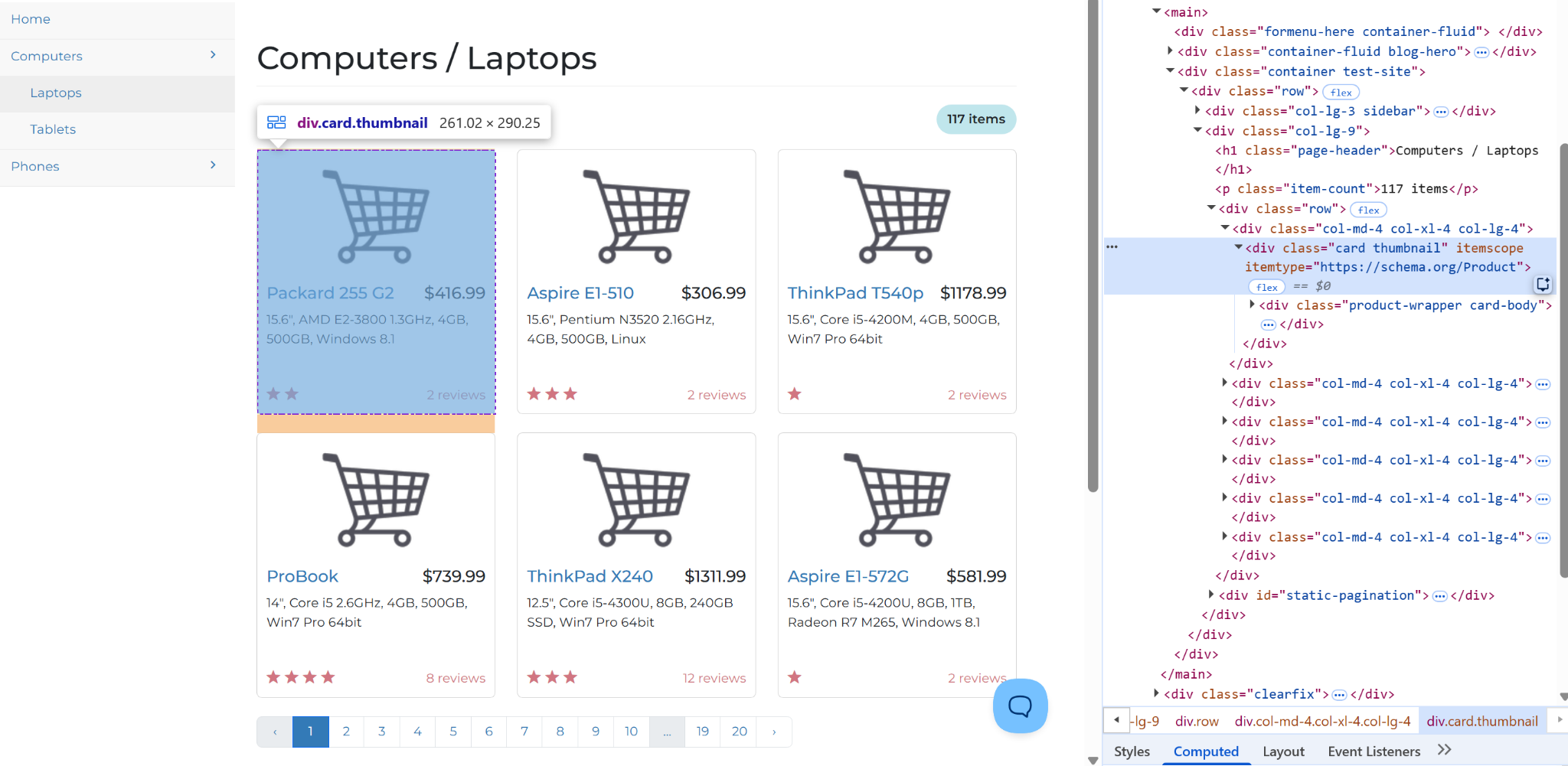
The page source confirms the records sit in the raw HTML, so no JavaScript rendering is required, and a plain HTTP client with a parser is enough. Install the dependencies:
Python
pip install requests beautifulsoup4Step 2: Fetch and parse a single list page
Pull one page first and confirm the parser works before scaling to all 20. Use the repeating container as the anchor: the function below selects every div.thumbnail product card and reads its title, product URL, price, rating, review count, and description.
Python
import requests
from urllib.parse import urljoin
from bs4 import BeautifulSoup

CATEGORY = "https://webscraper.io/test-sites/e-commerce/static/computers/laptops"

def parse_list_page(html, base_url):
    soup = BeautifulSoup(html, "html.parser")
    records = []
    for card in soup.select("div.thumbnail"):
        link = card.select_one("a.title")
        price = card.select_one("h4.price")
        rating = card.select_one("p[data-rating]")
        reviews = card.select_one("p.review-count")
        desc = card.select_one("p.description")
        records.append({
            "title": (
                link.get("title") or link.get_text(strip=True)
            ) if link else None,
            "url": urljoin(base_url, link.get("href")) if link and link.get("href") else None,
            "price_raw": price.get_text(strip=True) if price else None,
            "rating_raw": rating.get("data-rating") if rating else None,
            "reviews_raw": reviews.get_text(strip=True) if reviews else None,
            "description": desc.get_text(strip=True) if desc else None,
        })
    return records

resp = requests.get(f"{CATEGORY}?page=1", timeout=20)
resp.raise_for_status()
html = resp.text
page_one = parse_list_page(html, CATEGORY)
print(len(page_one), "records")   # 6
print(page_one[0])The print(len(page_one), "records") line should return 6 records for page 1, confirming that the container selector matches the list layout. Every field also guards against a missing element, so a robust list crawler returns absent fields as None rather than crashing.
Step 3: Harden the request with rotating user agents and proxies
A single requests.get works for the parser check, but a 20-page run needs sturdier fetch logic. For the full pagination loop, build a fetcher that controls how each page is requested, including headers, user-agent rotation, optional proxy routing, and backoff on 429, 403, or 503.
The WebScraper.io sandbox doesn't block automated traffic, so PROXIES stays empty for this demo. On a production target, populate it with rotating residential or datacenter endpoints, and the same fetcher will select one per request without changing the pagination loop.
Python
import time, random
import requests

USER_AGENTS = [
    "Mozilla/5.0 (Windows NT 10.0; Win64; x64) AppleWebKit/537.36 "
    "(KHTML, like Gecko) Chrome/124.0 Safari/537.36",
    "Mozilla/5.0 (Macintosh; Intel Mac OS X 10_15_7) AppleWebKit/605.1.15 "
    "(KHTML, like Gecko) Version/17.4 Safari/605.1.15",
]
# Add your Proxy-Seller endpoints, e.g. "http://user:pass@gate.proxy-seller.com:10000"
PROXIES = []

def build_session():
    s = requests.Session()
    s.headers.update({
        "Accept": "text/html,application/xhtml+xml,application/xml;q=0.9,*/*;q=0.8",
        "Accept-Language": "en-US,en;q=0.9",
    })
    return s

def make_fetch(session, retries=3):
    def fetch(url):
        for attempt in range(retries):
            headers = {"User-Agent": random.choice(USER_AGENTS)}
            proxy = random.choice(PROXIES) if PROXIES else None
            proxies = {"http": proxy, "https": proxy} if proxy else None
            try:
                resp = session.get(url, headers=headers, proxies=proxies, timeout=20)
                if resp.status_code == 200:
                    return resp.text
                if resp.status_code in (429, 500, 502, 503, 504):
                    time.sleep(2 ** attempt + random.random())
                    continue
                return None  # 4xx -- don't retry
            except requests.RequestException:
                time.sleep(2 ** attempt + random.random())
        return None
return fetchThe backoff keeps retries from hitting the same endpoint too quickly after a 429, 403, or 503. If proxy endpoints are configured, rotation also spreads those attempts across the pool instead of sending every retry through one IP.
Step 4: Walk the pagination to the last page
With the fetcher ready, the crawl loop walks pages by incrementing the ?page= parameter and stops on the first page that returns zero records. Predictable URL patterns like this one keep the loop simple, since the next page is always one number up.
Python
import time, random

def crawl(fetch, category=CATEGORY, max_pages=50):
    rows, page = [], 1
    while page <= max_pages:
        url = f"{category}?page={page}"
        html = fetch(url)
        if not html:
            break  # production: log failed URL or raise
        records = parse_list_page(html, url)
        if not records:
            break
        rows.extend(records)
        page += 1
        time.sleep(random.uniform(1.0, 2.5))
return rowsHere, max_pages=50 acts as a safety cap, so a broken stop condition can’t keep the crawler running indefinitely. The randomized time.sleep gap avoids hitting every page at the same fixed interval, which is an obvious bot signal.
Step 5: Run the crawl and save the output
Wire the pieces together and write the rows to JSON and CSV. The crawl collects every product across the category’s pages, ready for the cleaning step that follows.
Python
import csv, json

def save_csv(records, path):
    if not records:
        return
    with open(path, "w", newline="", encoding="utf-8") as f:
        writer = csv.DictWriter(f, fieldnames=list(records[0].keys()))
        writer.writeheader()
        writer.writerows(records)

def save_json(records, path):
    with open(path, "w", encoding="utf-8") as f:
        json.dump(records, f, ensure_ascii=False, indent=2)

if __name__ == "__main__":
    session = build_session()
    fetch = make_fetch(session)
    rows = crawl(fetch)
    print(f"crawled {len(rows)} records")
    save_json(rows, "laptops_raw.json")
save_csv(rows, "laptops_raw.csv")Keep this crawler running past the first block. Proxy-Seller's rotating residential pool plugs into the fetcher above, spreading requests across 220+ geo-targeted locations. Starts from $1.45/GB.
How to clean, normalize, and validate scraped list-crawler data
Raw list crawling output needs cleanup before it can feed a pipeline. Fields may contain whitespace, currency symbols, inconsistent formats, and missing entries. Cleaning turns them into typed values ready for storage, analysis, and comparison.
Normalize raw fields into typed values
Handle the fields that need casting: strip the currency symbol and cast price to a float, read rating from its attribute, and extract the integer from the review count.
Python
import re

def clean_price(raw):
    if not raw:
        return None
    match = re.search(r"\d+(?:\.\d+)?", raw.replace(",", ""))
    return float(match.group()) if match else None

def to_int(raw):
    if not raw:
        return None
    match = re.search(r"\d+", raw)
    return int(match.group()) if match else None

def normalize_record(r):
    return {
        "title": (r.get("title") or "").strip() or None,
        "url": r.get("url"),
        "price_usd": clean_price(r.get("price_raw")),
        "rating": to_int(r.get("rating_raw")),
        "reviews": to_int(r.get("reviews_raw")),
        "description": (r.get("description") or "").strip() or None,
}The same pattern works for dates, availability labels, job locations, salaries, and stock status.
Validate required fields and value ranges
Validation catches incomplete records and out-of-range values before bad rows reach storage or dashboards. Define required fields and flag rows that miss them or return unexpected values.
Python
REQUIRED = ("title", "url", "price_usd")

def validate(record):
    errors = [
        field for field in REQUIRED
        if record.get(field) is None or record.get(field) == ""
    ]
    rating = record.get("rating")
    if rating is not None and not (1 <= rating <= 5):
        errors.append("rating_out_of_range")
return errorsA spike in validation errors is the earliest warning a site changed its layout, so track the error count per run and alert on jumps.
Deduplicate on a stable key
Paginated and faceted lists surface the same item on multiple pages, so deduplication is mandatory. Use the most stable key available: SKU, listing ID, or product ID if the site exposes one, and canonical item URL when it doesn’t. Keep the first occurrence and drop later matches.
Python
def dedup(records, key="url"):
    seen, out = set(), []
    for r in records:
        value = r.get(key)
        if value and value not in seen:
            seen.add(value)
            out.append(r)
return outRun the cleanup pipeline
Wire the cleanup functions together at the end of the crawl. Keep the raw rows available, so validation errors can be traced back to the original scraped values.
Python
clean = [normalize_record(r) for r in rows]
valid = [r for r in clean if not validate(r)]
final = dedup(valid, key="url")

print(f"{len(final)} clean records")Common list crawl challenges and how to fix them
List crawling jobs break when the site's behavior collides with the crawler's assumptions. The four issues below cause most production incidents, and each has a fix that doesn't involve hammering harder.
Anti-bot defenses and CAPTCHAs
Detect, then respond. A 403, CAPTCHA page, or zero item count on a valid list crawling URL can indicate the target flagged the session. Pause, switch to a fresh IP, add a realistic delay, and route the hardest targets through residential addresses.
Rate limits and IP blocks
Rate limits and blocks often surface as 429 or 403 responses. Use controlled pacing, honor the Retry-After header when present, and apply exponential backoff. Spread traffic across enough IPs to keep each address below the limit.
Changing HTML structures and selector brittleness
In long-running list crawling jobs, selectors break when sites redesign. Anchor on stable attributes, add fallback selectors for critical fields, and monitor item counts and field-fill rates. Sudden drops usually signal a layout change.
Incomplete or missing data
Partial lists usually mean JavaScript didn’t render the items or pagination stopped early. Compare captured totals with the site’s result count, then check for a missed API call or next link.
Legal and ethical practices for sustainable crawling
The rules below reduce legal exposure and the chance of a block, keeping a list crawling project sustainable and low-risk:
- Terms of service and robots.txt: check both before you crawl. Together, they define whether automated access is allowed and which paths are off-limits.
- Public vs. private data under GDPR and CCPA: target publicly available data only. Product prices, business names, job titles, and public reviews are public. Personal email addresses, phone numbers, private profile data, and content behind a login wall aren't. When in doubt, collect less. Serious GDPR violations can carry fines of up to €20 million or 4% of worldwide annual turnover, whichever is higher.
- Politeness and responsible request rates: cap request frequency, run during off-peak hours where you can, and identify your crawler in the User-Agent string when a site expects it. Start with a 1–5 second delay between requests to the same domain, and slow down if the site signals rate limits.
How to keep list crawls stable in production
The list crawling jobs that survive in production share three traits: a pattern identified before any code gets written, an architecture that queues requests and validates each run, and access that stays stable as request volume grows. The first two get most of the attention, yet the third usually decides whether a crawl lasts.
The access layer often fails first, and teams underestimate it most. Pair your crawler with rotating residential and datacenter pools, geo-targeting, and request-level logs, so the rest of the system has room to work. Proxy-Seller delivers that stack with a named account manager from $500 MRR and a 24h sales support response SLA, so a stalled crawl gets a human answer in hours.
Run your next crawl on infrastructure built for it. Proxy-Seller's IPv4 datacenter pool handles high-speed list crawling at cost: clean dedicated subnets, no shared SMB traffic, from $0.49 per IP.
FAQ
List crawling is legal when it targets publicly available data and complies with applicable law and the site’s terms. Always review the target site's ToS and robots.txt before crawling, since some sites prohibit automated access. Avoid personal data that may trigger GDPR or CCPA obligations, and crawl at a polite rate to avoid overloading servers.
Not always. Small crawls on public, lightly protected sites can run without proxies if request rates stay low. Proxies become necessary when a list crawling job is recurring, covers many pages, targets commercial list pages, or needs localized results. At that point, one IP creates rate limits, bans, and geo-accuracy gaps, so proxy rotation becomes required crawl infrastructure.
List crawling is a focused form of web scraping. General scraping extracts data from any single page, whatever its structure. List crawling targets only list templates, recognizes one repeating item container, and follows pagination to capture every record across all pages. The output is uniform rows, suited to scheduled, structured data feeds rather than one-off page grabs.
PROXIES FROM $0.02/IP
Ready to put this into practice?
Pick a proxy type and location, and start using it within minutes.
Instant delivery
24/7 support
Refund policy
About the author