
 Proxy for Telegram
 Proxy for LinkedIn
 Proxy for Google
 Proxy for Ebay
 Proxy for Twitter
 Proxy for TikTok
How to use residential proxies: setup & best practices

If your script ran all night and returned 70% blocked responses, the problem wasn't with your code. It was with the proxy settings. Because residential IPs originate from real ISP-assigned home devices, target websites treat them as genuine user traffic – resulting in significantly lower block rates than datacenter IPs. According to TitanNet's infrastructure tests, data extraction from secured platforms using datacenter proxies triggers a 70–80% block rate. In contrast, switching to residential IPs drops this failure rate to a minimal 1–10%. To use residential proxies effectively, you need to understand how proxy routing works and how to control session persistence.
Preparing for setup
Before you open the dashboard, make one decision: which authentication method fits your setup. If your tool supports proxy auth dialogs, use username and password. If you're running a script or a server where credentials can't be passed interactively, use allowlist. The protocol choice follows the same logic: HTTP for browsers and simple tools, SOCKS5 for automation frameworks and anti-detect browsers. Understanding what is a residential proxy matters when choosing the right solution. It comes in handy when deciding between a sticky session and a rotating one.
Identifying proxy credentials
To configure your proxy settings without errors, you'll need the following credentials:
Server address: the entry point URL (e.g., res.proxy-seller.com).
Port: the port number used to connect to the proxy server.
Authentication method: username and password sets or IP allowlisting.
Protocol: choice between HTTP, HTTPS, or SOCKS5.
Proxy-Seller's residential proxies come with 99.7% uptime, rotating or sticky sessions, and targeting by country, region, city, and ISP. Credentials arrive via dashboard immediately after purchase, with no setup delay
How to set up residential proxy in different OS
Configuring a proxy at the operating system level allows you to route all of your device’s traffic through it. This way, browsers, scripts, and desktop apps will all work through a single proxy, and you won’t need to configure each one separately. This is convenient if you’re running multiple tools. The steps vary depending on the system. See the instructions below for Windows, macOS, iOS, and Android.
How to set up a residential proxy on Windows and macOS
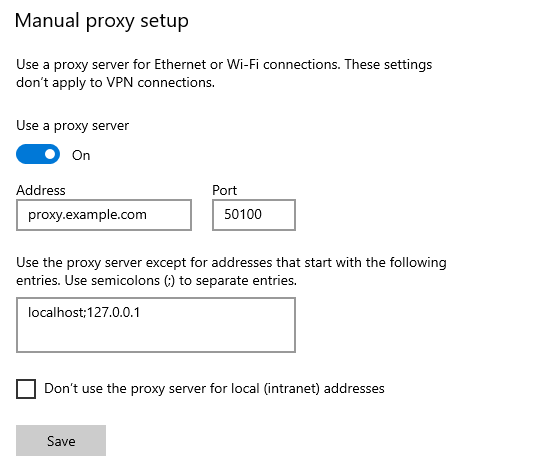
Windows
Open Settings (press Win + I).
Go to Network & Internet and Proxy.
Under Manual proxy setup, turn on Use a proxy server.
Enter the proxy server address and Port provided by your residential proxy service.
Click Save.
The proxy will now apply system-wide (for applications that respect the system proxy).
macOS
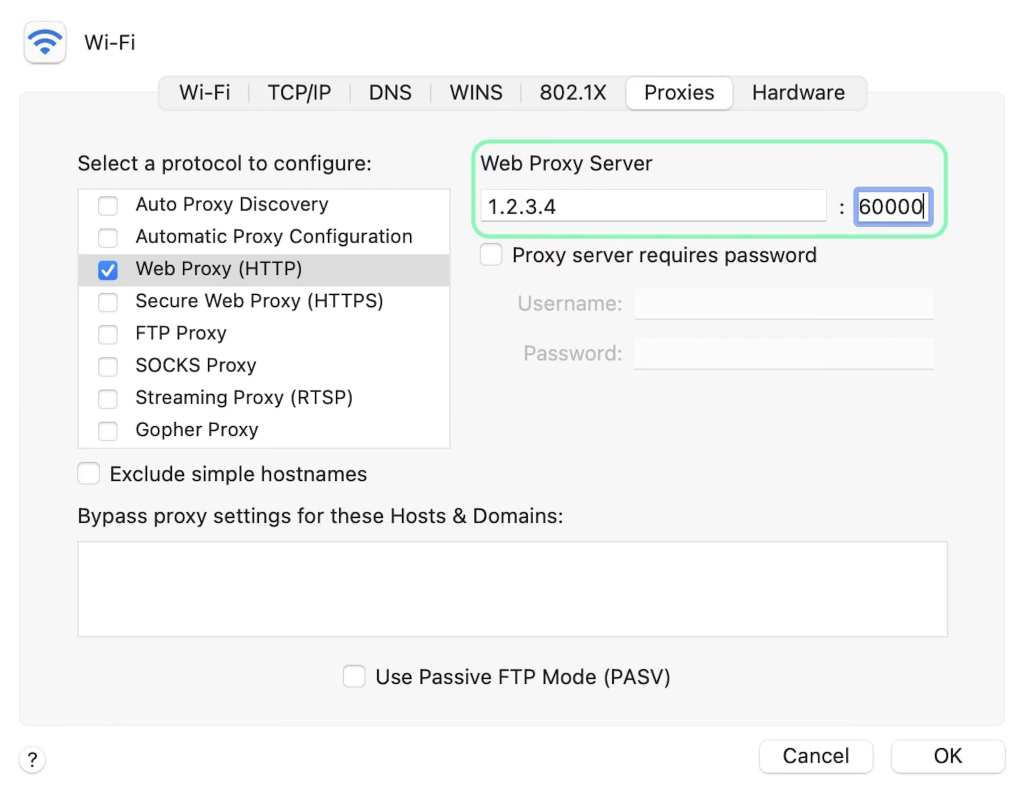
Open System Preferences and go to Network.
Select your active network connection (e.g., Wi-Fi or Ethernet) and click Advanced.
Go to the Proxies tab.
Check the protocol you want to use HTTPS or SOCKS5.
Fill in the proxy server address and port, and if required, enter your username and password (credentials provided by your residential proxy service).
Click OK, then click Apply to save the changes.
How to use residential proxies on iOS and Android
Android
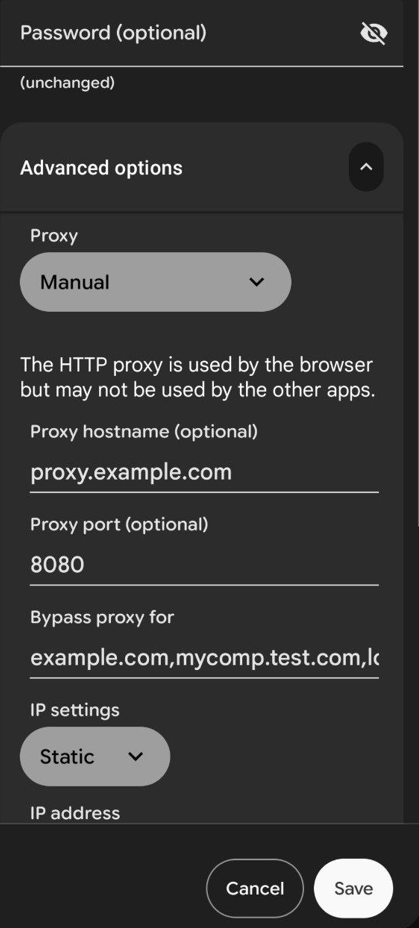
Open Settings and Wi-Fi.
Press the connected network and tap Modify Network (or the gear icon).
Expand Advanced options, set Proxy to Manual.
Enter the proxy hostname and port.
Tap Save.
iOS
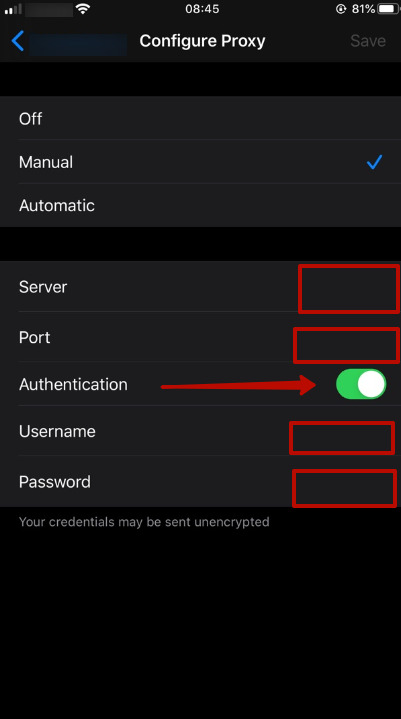
Open Settings and Wi-Fi.
Tap the (i) icon next to your connected network.
Tap Configure Proxy, select Manual.
Enter the proxy Server (host), Port, username, and password provided by your residential proxy service.
Tap Save.
Configuring Chrome and Firefox manually
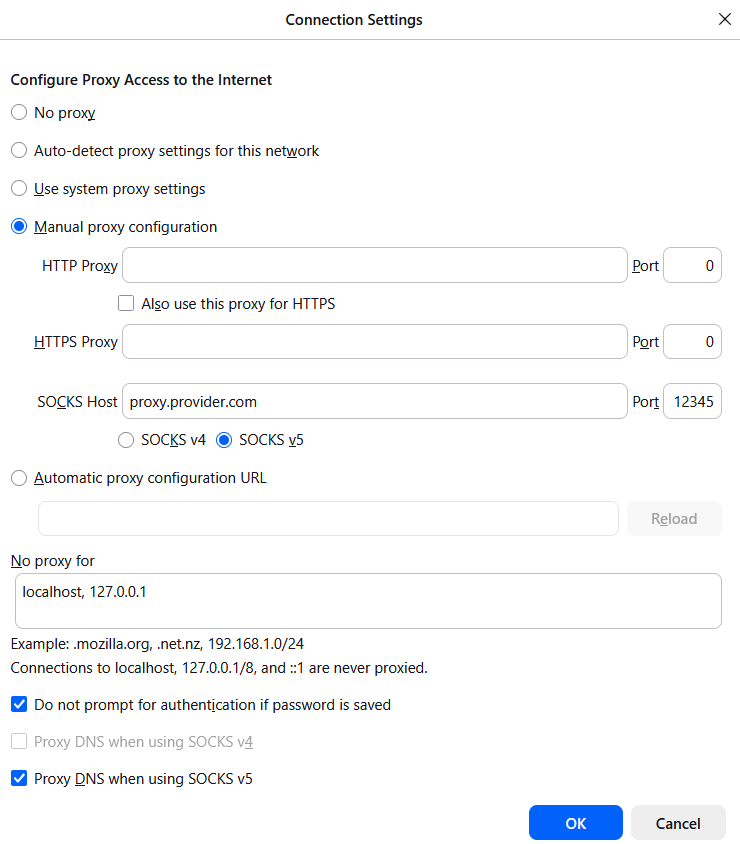
In Firefox, you can configure the necessary parameters in the browser's settings.
In Firefox, go to manual proxy configuration through standard network settings.
Enter the gateway address and port, and select any exclusions in the bottom field.
You can choose to use a proxy for all protocols.
Upon first page load, Firefox will prompt for the username and password.
In Chrome or Edge, authentication is unstable when using a proxy with system dialogues. Most often, the process fails without any warning. Instead, launch the browser using:
Shell
chrome.exe --proxy-server="http://host:port"
This method doesn't handle the transmission of login credentials (user:pass) properly. For maximum stability, use IP authentication in your provider's dashboard. If your proxy requires a username and password, it's better to avoid using command-line flags and use specialized extensions instead.
How to use residential proxies in anti-detect browsers
To use residential proxies in an anti-detect browser, you isolate each session behind a unique residential IP and a separate browser fingerprint. This prevents target sites from linking sessions by IP, canvas hash, or timezone. Straight proxy rotation without fingerprint isolation won't do on its own.
How to use residential proxies:
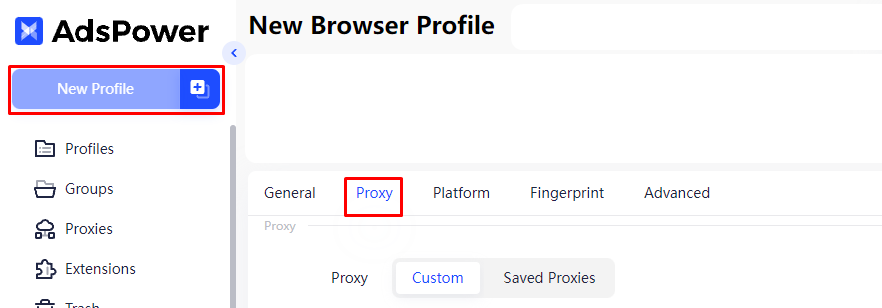
Create a new profile.
Find the proxy tab and select the relevant protocol (preferably SOCKS5).
Fill in the line or fields in the format “host:port:user:pass.”
Check whether WebRTC and DNS leaks are disabled in your browser settings (not all anti-detection tools do this automatically).
Use the “Check Proxy” feature to verify that the residential IPs are active. Some tools do this automatically.
To make sure everything is set up correctly, use a tool like my IP proxy to verify that the system is broadcasting a residential IP address. You can also run curl https://api.ipify.org through the terminal to confirm the exit IP.
How to setup residential proxy with Python
Residential proxies are also frequently used for automation. In most cases, this is done with the Python requests library, which is a common approach to web scraping.
import requests

# for HTTP/HTTPS proxy
proxies_http = {
    'http': 'http://user:pass@host:port',
    'https': 'http://user:pass@host:port'
}

# for SOCKS5 (pip install requests[socks])
proxies_socks = {
    'http': 'socks5://user:pass@host:port',
    'https': 'socks5://user:pass@host:port'
}

# verification
response = requests.get('https://api.ipify.org', proxies=proxies_socks)
print(response.text)You may also need additional frameworks. Playwright is good for modern web applications and provides stealth mode via playwright-stealth. Selenium works with older websites and undetected-chromedriver. Both tools provide more advanced proxy configuration options.
How to use residential proxy for web scraping
The success of the data extraction process depends directly on how you manage the proxy pool. Send too many requests from one IP and you'll hit 429 rate-limit errors, 403 blocks, or CAPTCHA challenges. Each requiring a different retry strategy. Use IP rotation and add 1–2 second randomized delays to stay under detection thresholds. In addition, it is also important to ensure fingerprint matching (user agent, time zone). Keep headers, languages, time zones consistent with your IP address. You can find more life hacks in this article.
For large-scale data extraction requiring high-speed static addresses rather than rotation, an ISP proxy provides a high-uptime alternative to standard peer-to-peer residential networks.
Location targeting and ads
When it comes to advertising, your proxy’s location should match your target market. If you’re running ads in London, your proxy network should ideally provide IP addresses from that city. Here are a couple of tips on how to use residential proxies for this purpose.
Check latency: specify country, city, or ASN-level targeting in Proxy-Seller dashboard or endpoint string to ensure requests resolve from the correct location.
Monitor bandwidth usage: residential data is often billed per GB. Keep an eye on your scripts to prevent them from loading unnecessary media files.
Use sticky sessions: for login-required workflows, use sticky sessions to keep the same IP address for a longer period.
Common setup issues
If the connection fails, check the following:
IP whitelist delay: after adding a new IP in Proxy-Seller dashboard, allow a few minutes for propagation before your first connection attempt.
Port blocking: certain local firewalls or antivirus block non-standard ports (like 10000 or 8000).
Protocol mismatch: ensure you aren't trying to send SOCKS5 traffic through an HTTP configuration.
If the connection establishes but requests fail, the HTTP response code tells you exactly what went wrong:
Response code | Meaning | Fix |
|---|---|---|
407 | Proxy authentication required | Check username and password; ensure no extra spaces |
403 | IP blocked or geo-restricted | Rotate to a new IP; verify your geo targeting matches the target site |
429 | Target site rate-limiting | Throttle request frequency; add 1–2 second delays between requests |
502 | Session expired or no exit node | Start a new session or generate a fresh endpoint |
522 | Upstream timeout | Retry the request; switch to a different geo if persistent |
How to use residential proxies: final checklist
Before your first production request, verify:
Session type matches the workflow: sticky for login-required flows, rotating per-request for scraping
Proxy geo matches the target market
Exit IP confirmed via curl https://api.ipify.org or checker online
WebRTC and DNS leaks are disabled in your browser or scraping tool
Request frequency stays under 1–2 per second with randomized delays
Protocol matches your tool: SOCKS5 for scripts and anti-detect browsers, HTTP for system-level setup
Using Proxy-Seller's residential proxies gives your infrastructure a stable foundation from the first request.Reliable residential routing with rotating or sticky sessions, 99.7% uptime, and 99.5% success rate.
FAQ
Proxy-Seller sticky sessions last as long as the residential device stays active. The IP belongs to a real home connection. If the device goes offline, the session ends regardless of your settings. In practice, sessions hold for 6–8 hours on average. The technical maximum is 24 hours, if the residential device stays online continuously. Once the session expires, Proxy-Seller assigns a new IP from your pool automatically.
Common causes: 407 authentication errors from wrong credentials; port blocking by your network firewall or IP whitelist propagation delays. Verify credentials, check allowed ports (often 80, 8080), and ensure your outgoing IP is whitelisted.
Rotate IPs per request for SERP scraping and high-volume data collection. Keep request frequency under 1–2 per second with randomized delays between batches. Switch to sticky sessions for login-required workflows where the target site tracks session continuity. IP rotation alone won't stop CAPTCHAs: if you're hitting them consistently, add a CAPTCHA-solving service like 2Captcha or CapSolver alongside your proxy setup.
PROXIES FROM $0.02/IP
Ready to put this into practice?
Pick a proxy type and location, and start using it within minutes.
Instant delivery
24/7 support
Refund policy
About the author