 Proxy for Telegram
 Proxy for LinkedIn
 Proxy for Ebay
 Proxy for Twitter
 Proxy for TikTok
 Proxy for Google
Best rank tracking API: how to build scalable SERP solutions

Building a rank tracking API in 2026 means working with a search environment that changes faster than most scraping setups can absorb. Google’s anti-bot updates, the removal of the num=100 parameter, and AI Overviews have made each rank check heavier, harder to validate, and easier to contaminate with blocked, incomplete, or wrong-market data.
Once monitoring grows from a few terms to thousands of localized queries, small collection flaws turn into wasted retries, inconsistent snapshots, and ranking changes you cannot explain. At production scale, you need verifiable SERP collection from the start: clean routing, confirmed location context, complete page capture, and failure codes that point directly to what broke.
What is a rank tracking API?
A rank tracking API is a tool that automates SERP (search engine results page) monitoring. It collects ranking data directly from search engines like Google and returns it in structured formats such as JSON or CSV. This data supports large-scale position monitoring, localized SERP collection by region, language, or device, and automated SEO reporting.
Beyond organic rankings, a rank tracking API can capture SERP features such as knowledge panels, featured snippets, People Also Ask boxes, local packs, shopping ads, and AI Overview citations. Location, device, and timestamp metadata give each result the context needed for market-by-market comparison and trend analysis over time.
Key users who need programmatic SERP access
- SEO agencies monitoring client portfolios across multiple markets and devices
- SaaS platforms embedding live rank data into dashboards and analytics products
- In-house marketing teams tracking brand SERPs, competitor movements, and AI Overview citations
- E-commerce businesses measuring product visibility and competitor rankings by market
Designing a rank check model before writing API endpoints
Every rank tracking API pipeline depends on the quality of the rank check model. It should describe what the system needs to collect, how fresh the result must be, and which market context the response must match. Vague keyword-only requests create validation problems later.
A minimal rank check schema looks like this:
{
  "keyword": "crm software",
  "search_engine": "google",
  "country": "us",
  "language": "en",
  "device": "desktop",
  "location": "New York, NY",
  "depth": 100,
  "include_serp_features": true,
  "freshness_sla_minutes": 60
}Critical features to evaluate in a rank tracking API
The criteria below define what to verify in a rank tracking API before it goes into production.
Evaluation area | What to check | Why it matters |
|---|---|---|
SERP coverage | Organic results, ads, local pack, shopping, snippets, PAA | Missing SERP features mean incomplete ranking interpretation |
Data freshness | Update frequency, timestamp accuracy, SLA per keyword group | Stale ranking data leads to wrong decisions |
Location targeting | Country, city, language, device | Local SEO data breaks without precise market context |
Error taxonomy | Blocks, timeouts, parser misses, empty SERPs | Generic “failed” status blocks debugging and creates operational overhead |
Cost model | Cost per valid result, retries, invalid responses | Economics depend on valid response rates, not raw throughput |
Proxy control | Rotating proxies, sticky sessions, geo pools | Poor routing causes blocks and wrong-market SERPs |
Search engine support | Google, Bing, Yahoo; regional engines like Yandex, Baidu, Naver | Multi-market tracking requires diverse engine coverage |
Rate limits | Requests per second, concurrent queries, batch size | Low limits force sequential processing that kills update frequency |
Response time | Latency SLA, timeout handling, queue visibility | Per-keyword latency scales into multi-hour update windows |
Rank tracking API response time needs extra attention because it compounds across every keyword in a batch. A 5-second latency per keyword turns a 10K-keyword refresh into roughly 14 hours.
How to build a rank tracking API with proxies in 5 steps: the architectural roadmap
A scalable rank tracking API comes down to five layers working together: proxy infrastructure, routing policy, client fingerprint handling, SERP parsing, and response classification.
1. Choose your proxy infrastructure
Proxies are mandatory for a rank tracking API because search engines throttle and block automated requests from a single IP. Without address rotation, Google quickly escalates from CAPTCHAs to IP bans, making a proxy for search engines a standard approach for querying search engines at scale. They also distribute requests across IP pools, route queries through the target city, and keep paginated checks on one stable session to reduce blocks, wrong-market data, and inconsistent SERP snapshots.
The need grew after Google removed num=100: one 100-result check now requires 10 requests, increasing rate-limit pressure. Cloudflare's AI Labyrinth adds another risk by serving AI-generated decoy pages to detected scrapers, so weak routing can silently corrupt SERP data.
Quick comparison of proxy types for rank tracking API:
Proxy type | Google trust level | Speed | Cost | Typical block rate | Best use case for SERP monitoring |
|---|---|---|---|---|---|
High | Medium | $3.5/GB | 5-15% | City-level geo-tracking, local packs, competitive keywords | |
Medium | High | $1,64/IP | 25-40% | 10K+ bulk queries, non-geo checks, internal monitoring | |
Very High | Medium | $49/IP | 1-5% | Finance/health/legal SERPs, residential fallback |
Stop paying for invalid SERP responses. Proxy-Seller’s clean residential and ISP pools deliver +20–30% VRR in A/B pilots. Validate the uplift on your own workload. Start with clean pools.
Step 1 in code: proxy configuration and pool selection
The snippet below defines the ProxyConfig dataclass and a selection function that routes each keyword to the appropriate pool based on its risk profile. A few things to check before running:
- Proxy credentials for a rank tracking API should never be hardcoded; the script loads them from environment variables.
- The risk value comes from the risk column in your keywords CSV: you set it per keyword, and the script reads it at runtime.
- The country, city, and session suffix format in to_url (-country-us-city-new-york-session-abc) varies by provider. Adjust the suffixes to match your proxy provider's documented format before running.
import os
from dataclasses import dataclass
from typing import Literal
from urllib.parse import quote

def get_env(pool: str, key: str) -> str:
    value = os.getenv(f"{pool}_{key}") or os.getenv(key)
    if not value:
        raise RuntimeError(f"Missing env var: {pool}_{key} or {key}")
    return value

@dataclass
class ProxyConfig:
    host: str; port: int; username: str; password: str
    pool_type: Literal["residential", "datacenter", "mobile"] = "residential"
    country: str = "us"; city: str | None = None

    def to_url(self, session_id: str | None = None) -> str:
        user = self.username
        if self.city:
            city_slug = self.city.lower().replace(" ", "-").replace(",", "")
            user = f"{user}-country-{self.country}-city-{city_slug}"
        elif self.country: user = f"{user}-country-{self.country}"
        if session_id: user = f"{user}-session-{session_id}"
        pwd = quote(self.password, safe="")
        return f"http://{user}:{pwd}@{self.host}:{self.port}"

def select_proxy(job: dict) -> ProxyConfig:
    # risk from CSV: "high" -> mobile, "low" (non-geo) -> datacenter, "standard" -> residential
    risk    = job.get("risk", "standard")
    has_geo = bool(job.get("city") or job.get("location"))
    if risk == "high":
        pool_type = "mobile"
    elif risk == "low" and not has_geo:
        pool_type = "datacenter"
    else:
        pool_type = "residential"
    pfx = pool_type.upper()  # RESIDENTIAL, DATACENTER, or MOBILE
    return ProxyConfig(
        host=get_env(pfx, "PROXY_HOST"),
        port=int(get_env(pfx, "PROXY_PORT")),
        username=get_env(pfx, "PROXY_USERNAME"),
        password=get_env(pfx, "PROXY_PASSWORD"),
        pool_type=pool_type, country=job.get("country", "us"),
city=job.get("city") or job.get("location"),2. Route requests by session type and geography
Proxy routing has two variables that determine data accuracy: session stability and geographic precision. Wrong routing gives you data that looks valid but measures the wrong thing.
Per-request rotation vs sticky sessions for rank API endpoints
- Per-request rotation gives every rank tracking API query a new IP. It works perfectly for bulk keyword tracking where each SERP stands alone. Rate limits stay manageable because load distributes across your entire pool.
- Sticky sessions keep the same IP across multiple requests. You need them for paginated results, retries, and multi-step SERP checks where the same keyword must stay tied to one search context. Otherwise, Google sees different “users” and returns different SERPs that look like ranking volatility when they’re just snapshot differences.
City-level geo-targeting vs country codes for SERP accuracy
Google personalizes search results by city, not country or state. For a rank tracking API, that means country-level proxies are often useless for accurate local rank tracking, no matter how “global” the proxy pool looks on paper.
Google uses its own geolocation mapping, not the location declared by your ISP. Before scaling, validate what Google actually detects by running real test queries through the proxy.
Step 2 in code: Google URL builder with UULE city-level geo encoding
The following snippet solves 3 rank tracking API problems: telling Google exactly where to search, handling multi-page depth beyond the 10-result cap, and keeping paginated jobs tied to the same proxy IP.
Since Google’s num parameter is capped at 10 results per page, get_page_starts converts the depth field into a list of start offsets: e.g., depth=30 gives [0, 10, 20], three requests on the same sticky session. SERPMonitor.process_job loops through all offsets in the rank tracking API job, merges organic results across pages, and renumbers positions before writing the final JSON. If some pages fail mid-run, the collected results are still saved as valid_serp with pages_requested and pages_fetched recorded in metadata.
import math
import base64
import re
from urllib.parse import urlencode


def encode_uule(location_name: str) -> str:
    """
    Encode a city name into a UULE-style location parameter.
    This passes a city-level location signal alongside gl, hl, and the proxy route.
    """
    encoded = location_name.encode("utf-8")
    payload = bytes([len(encoded)]) + encoded
    return "a+" + base64.b64encode(payload).decode("utf-8")


def build_google_url(job: dict, start: int = 0) -> str:
    """Build a Google Search URL; start is the result offset for pagination."""
    params = {
        "q":   job["keyword"],
        "hl":  job.get("language", "en"),
        "gl":  job.get("country", "us"),
        "num": 10,  # Google caps at 10 results per page
    }
    if start:
        params["start"] = start
    location = job.get("location") or job.get("city")
    if location:
        params["uule"] = encode_uule(location)
    return "https://www.google.com/search?" + urlencode(params)


def get_page_starts(job: dict) -> list[int]:
    """Return start offsets for all pages required by depth.
    Example: depth=30 -> [0, 10, 20] (three pages of 10 results each).
    """
    depth = int(job.get("depth") or 10)
    return [i * 10 for i in range(math.ceil(depth / 10))]


def slug(value: str) -> str:
    return re.sub(r"[^a-z0-9_-]+", "_", value.lower()).strip("_")


def get_session_id(job: dict) -> str | None:
    """
    Return a sticky session ID for paginated jobs; None for per-request rotation.
    Sticky sessions maintain a consistent session identity across all pages of one keyword query.
    """
    if int(job.get("depth") or 10) > 10 or job.get("sticky"):
        loc = job.get("location") or job.get("city") or "none"
        key = f'{slug(job["keyword"][:16])}-{slug(loc)}'
        return key
return None # Per-request rotation3. Align fingerprints, rate limits, and retry logic
TLS and browser fingerprint mismatches reduce the valid response rate even when the proxy pool itself is clean. Basic HTTP client libraries like requests (Python 3.10+) work for early rank tracking API tests, but their JA3/JA4 signatures can get flagged as concurrency increases.
For workloads where browser-level parity matters, use tools like curl_cffi or browser-backed collectors that impersonate a real browser TLS handshake. curl_cffi keeps a requests-like API, so migrating is usually straightforward.
Rate-limiting policies of your keyword rank checker API should also adapt to what the system is seeing. Static limits are too blunt for SERP monitoring because block patterns vary by market, keyword type, proxy class, and time of day.
Smart retry logic:
- switch endpoint after repeated blocks from the same IP
- throttle traffic to pools showing high failure rates
- change proxy type for high-risk queries
- retry location-sensitive requests through a more precise geo route
- tag parser failures separately from proxy blocks
A practical baseline: randomize delays between 3 and 8 seconds per request for your rank tracking API. Going under 2 seconds at sustained volume substantially increases CAPTCHA escalation rates.
Step 3 in code: browser fingerprinting with curl_cffi and adaptive retry
This snippet handles the actual SERP fetch, routing each request through the proxy with browser-level TLS identification via curl_cffi and backoff delays to reduce rate-limit pressure.
On a block response (HTTP 403 or 429), retrying the same rank tracking API request usually wastes proxy quota and extends the penalty window. To avoid that, fetch_serp returns the status code immediately so the caller can route block responses to the failure log for analysis instead of the output JSON.
import time
import random
import logging
from curl_cffi import requests as cffi_requests

log = logging.getLogger(__name__)


DESKTOP_HEADERS = {
    "Accept": "text/html,application/xhtml+xml,application/xml;q=0.9,image/avif,image/webp,*/*;q=0.8",
    "Accept-Language": "en-US,en;q=0.9",
    "Accept-Encoding": "gzip, deflate, br",
    "DNT": "1",
    "Upgrade-Insecure-Requests": "1",
    "Sec-Fetch-Dest": "document",
    "Sec-Fetch-Mode": "navigate",
    "Sec-Fetch-Site": "none",
    "Sec-Fetch-User": "?1",
}

MOBILE_HEADERS = DESKTOP_HEADERS.copy()


def fetch_serp(
    url: str,
    proxy_config: ProxyConfig,
    session_id: str | None,
    device: str = "desktop",
    max_retries: int = 3,
) -> tuple[int, str | None]:
    """
    Fetch a SERP page via proxy with browser TLS fingerprinting.
    Returns (http_status_code, html_content | None).
    """
    proxy_url   = proxy_config.to_url(session_id)
    impersonate = "chrome120" if device == "desktop" else "chrome99_android"
    headers     = DESKTOP_HEADERS if device == "desktop" else MOBILE_HEADERS

    for attempt in range(max_retries):
        # Baseline delay plus extra backoff on each retry
        delay = random.uniform(3.0, 8.0) + attempt * random.uniform(2.0, 4.0)
        time.sleep(delay)

        try:
            resp = cffi_requests.get(
                url,
                headers=headers,
                proxies={"http": proxy_url, "https": proxy_url},
                impersonate=impersonate,
                timeout=30,
            )
            if resp.status_code == 200:
                return 200, resp.text
            if resp.status_code in {403, 429} or resp.status_code >= 500:
                return resp.status_code, None
        except Exception as exc:
            log.debug("Network error attempt %d: %s", attempt + 1, exc)

return 0, None # All retries exhausted4. Convert SERP pages into a stable JSON output
Raw SERP HTML you get is not a data contract. Google ships new layouts, renames CSS classes, adds SERP features, and breaks your scraper without warning. Your rank tracking API should normalize that unstable input into a fixed JSON schema downstream systems can rely on.
Use predictable SERP layers:
- organic_results: title, URL, description, position, and visible domain
- paid_results: ad title, URL, description, and placement
- featured_snippet: extracted answer, source URL, and ranking page
- local_pack: business names, URLs, ratings, addresses, and map placement
- image_pack: image results and linked sources
- ai_overview: citations, linked sources, and brand mentions inside the generative summary
- related_searches: related query suggestions
- metadata: requested market, resolved location, device type, timestamp, and parser version
Monitor your rank tracking API parser daily against a fixed query set. If Google changes the layout for local packs or AI Overviews, you catch it before bad data reaches reports.
Step 4 in code: SERP parser with schema-stable output
The snippet below uses BeautifulSoup to parse raw HTML and fill each schema layer: organic results, featured snippet, local pack, AI Overview, and related searches. Four things to note:
- parse_serp records two country fields: requested_country from the job and resolved_country from Google's canonical URL. A discrepancy is classified as a location_mismatch in step 5, which helps flag obvious country-level geolocation issues without reading raw HTML.
- paid_results is included but not populated here since ad selectors vary by market and format; fill it using the same pattern as organic_results.
- image_pack follows the same schema-first logic: add image-specific selectors to this empty layer if your keyword set targets image-heavy queries.
- Comma-separated CSS selectors in certain select() calls keep the rank tracking API parser stable across layout variants Google alternates between without versioning.
from bs4 import BeautifulSoup
from datetime import datetime, timezone
from urllib.parse import urlparse


def extract_domain(url: str) -> str:
    try:
        return urlparse(url).netloc.replace("www.", "")
    except Exception:
        return ""


def _resolve_country(soup: BeautifulSoup) -> str:
    """Best-effort detection of the country Google resolved the request from."""
    canonical = soup.select_one("link[rel='canonical']")
    href = canonical.get("href", "") if canonical else ""
    # Extend this mapping for every market you monitor
    if "google.co.uk" in href: return "gb"
    if "google.de"    in href: return "de"
    if "google.com"   in href: return "us"
    return "unknown"


def parse_serp(html: str, job: dict) -> dict | None:
    """Parse raw Google SERP HTML into a schema-stable dict. Returns None on parse failure."""
    try:
        soup = BeautifulSoup(html, "lxml")
    except Exception:
        return None

    result = {
        "organic_results":  [],
        "paid_results":     [],  # ad selectors vary by market and format; extend here
        "featured_snippet": None,
        "image_pack":      [],  # image selectors vary; extend here
        "local_pack":       [],
        "related_searches": [],
        "ai_overview":      None,
        "metadata": {
            "keyword":            job["keyword"],
            "requested_country":  job.get("country", "us"),
            "resolved_country":   _resolve_country(soup),
            "location":           job.get("location") or job.get("city"),
            "device":             job.get("device", "desktop"),
            "timestamp":          datetime.now(timezone.utc).isoformat(),
            "parser_version":     "1.1.0",
        },
    }

    # --- Organic results ---
    position = 0
    for div in soup.select("div.g"):
        link    = div.select_one("a[href^='http']")
        title   = div.select_one("h3")
        snippet = div.select_one(".VwiC3b, .lEBKkf")
        if not (link and title):
            continue
        position += 1
        result["organic_results"].append({
            "position":    position,
            "title":       title.get_text(strip=True),
            "url":         link["href"],
            "description": snippet.get_text(strip=True) if snippet else None,
            "domain":      extract_domain(link["href"]),
        })

    # --- Featured snippet ---
    fs = soup.select_one(".xpdopen .c2xzTb, .V3FYCf")
    if fs:
        fs_link = fs.select_one("a[href^='http']")
        result["featured_snippet"] = {
            "answer":     fs.get_text(strip=True)[:600],
            "source_url": fs_link["href"] if fs_link else None,
        }

    # --- Local pack ---
    if job.get("include_local_pack", "true").lower() != "false":
        for place in soup.select(".rllt__details, .cXedhc"):
            name   = place.select_one(".OSrXXb, .dbg0pd")
            rating = place.select_one(".yi40Hd, .BTtC6e")
            addr   = place.select_one(".rllt__details span, .Io6YTe")
            result["local_pack"].append({
                "name":    name.get_text(strip=True)   if name   else None,
                "rating":  rating.get_text(strip=True) if rating else None,
                "address": addr.get_text(strip=True)   if addr   else None,
                # website url: extract from /url?q= href within the place container
            })

    # --- Related searches ---
    result["related_searches"] = [
        el.get_text(strip=True) for el in soup.select(".k8XOCe, .Q71vJc")
    ]

    # --- AI Overview ---
    ai_box = soup.select_one(".M8OgIe")
    if ai_box:
        result["ai_overview"] = {
            "summary":   ai_box.get_text(strip=True)[:500],
            "citations": [a["href"] for a in ai_box.select("a[href^='http']")][:10],
        }

return result5. Classify responses before they enter storage
HTTP 200 does not mean valid SERP data. Your rank tracking API needs to classify responses before storage, or partial pages, location mismatches, and parser drift will wreck your reports.
A simple response taxonomy can prevent that. Classify every failed response into one of six buckets before it lands in storage: retries_exhausted, blocked_or_limited, target_error, parser_failed, partial_serp, and location_mismatch. Valid responses are stored as valid_serp.
The classifier itself is a few lines of Python:
def classify_response(status_code: int, parsed: dict | None) -> str:
    if status_code == 0:
        return "retries_exhausted"
    if status_code in {403, 429}:
        return "blocked_or_limited"
    if status_code >= 500:
        return "target_error"
    if parsed is None:
        return "parser_failed"
    if not parsed.get("organic_results"):
        return "partial_serp"
    meta = parsed.get("metadata", {})
    req = meta.get("requested_country", "").lower()
    res = meta.get("resolved_country", "unknown").lower()
    if res != "unknown" and req != res:
        return "location_mismatch"
return "valid_serp"Step 5 in code: storage router with failure audit log
The code block below defines store_result, which takes the classification string from classify_response above and routes each response to its destination. valid_serp writes a JSON file named by keyword slug and UTC timestamp; any other rank tracking API status appends a row to the failure log with keyword, classification, and timestamp.
The failure log is append-only: each run adds new rows without overwriting prior ones, so you can track block rate, parser failure rate, and location mismatch rate across runs.
import json
import csv
import re
import uuid
from pathlib import Path
from datetime import datetime, timezone


def store_result(
    parsed: dict | None,
    status: str,
    output_dir: Path,
    failure_log: Path,
    keyword: str = "unknown",
) -> None:
    """Route classified SERP: valid results to JSON, failures to the audit log."""
    output_dir.mkdir(parents=True, exist_ok=True)
    failure_log.parent.mkdir(parents=True, exist_ok=True)

    if status == "valid_serp" and parsed:
        kw   = parsed["metadata"]["keyword"].lower()
        slug = re.sub(r"[^a-z0-9_-]+", "_", kw).strip("_")[:40] or "keyword"
        ts   = parsed["metadata"]["timestamp"].replace(":", "").replace("-", "")[:15]
        (output_dir / f"{slug}_{ts}_{uuid.uuid4().hex[:8]}.json").write_text(
            json.dumps(parsed, indent=2, ensure_ascii=False), encoding="utf-8"
        )
    else:
        logged_keyword = (parsed or {}).get("metadata", {}).get("keyword", keyword)
        ts = datetime.now(timezone.utc).isoformat()
        write_header = not failure_log.exists() or failure_log.stat().st_size == 0
        with open(failure_log, "a", newline="", encoding="utf-8") as f:
            w = csv.writer(f)
            if write_header:
                w.writerow(["keyword", "status", "timestamp"])
w.writerow([logged_keyword, status, ts])How to assemble the scalable SERP monitor script
The five architectural layers above combine into one production-oriented Python file, scalable_serp_monitor.py. This section covers what to install, the keyword CSV format, and how to assemble and run the file. The helper functions come from the Step 1–5 code blocks, and the orchestration layer that ties them together is shown at the end.
Dependencies and setup
Use Python 3.10+ and install the rank tracking API script dependencies with pip:
pip install curl-cffi beautifulsoup4 lxmlSet proxy credentials as environment variables before running. The script supports separate credential sets per pool type. The generic PROXY_* vars act as a fallback for any pool type not explicitly overridden:
# Required fallback: used if pool-specific vars are not set
export PROXY_HOST=residential.proxy-seller.com
export PROXY_PORT=port_number
export PROXY_USERNAME=your_username
export PROXY_PASSWORD=your_password

# Optional: residential pool override (standard risk and low risk with geo)
export RESIDENTIAL_PROXY_HOST=residential.proxy-seller.com
export RESIDENTIAL_PROXY_PORT=port_number
export RESIDENTIAL_PROXY_USERNAME=your_username
export RESIDENTIAL_PROXY_PASSWORD=your_password

# Optional: mobile pool override (high risk keywords)
export MOBILE_PROXY_HOST=mobile.proxy-seller.com
export MOBILE_PROXY_PORT=port_number
export MOBILE_PROXY_USERNAME=your_username
export MOBILE_PROXY_PASSWORD=your_password

# Optional: datacenter pool override (low risk, non-geo keywords)
export DATACENTER_PROXY_HOST=datacenter.proxy-seller.com
export DATACENTER_PROXY_PORT=port_number
export DATACENTER_PROXY_USERNAME=your_username
export DATACENTER_PROXY_PASSWORD=your_password
Keyword CSV format
The script reads keyword jobs for a rank tracking API from a CSV file. The keyword column is mandatory, and the rest of the columns are optional. When omitted, the script falls back to these defaults: country=us, language=en, device=desktop, depth=10 (one results page), risk=standard, and include_local_pack=true.
keyword,country,language,device,location,depth,risk,include_local_pack
crm software,us,en,desktop,New York NY,10,high,true
project management tool,gb,en,desktop,London,10,standard,false
restaurant near me,us,en,mobile,Chicago IL,10,high,true
buy laptop,de,de,desktop,Berlin,10,standard,false
cheap flights,us,en,mobile,,10,low,falseThe risk column controls proxy pool selection: “high” forces mobile proxies, “standard” uses residential, and “low” switches to datacenter for non-geo jobs and to residential for queries with geo.
Running the script
After setting the proxy environment variables and preparing keywords.csv, assemble scalable_serp_monitor.py as shown below. At first, the header and imports, then the helper functions from Steps 1–5, then the orchestration layer.
Save it, then run it with:
python scalable_serp_monitor.py keywords.csv --output ./results --workers 5With these arguments, the script reads the CSV input, writes valid SERP outputs to ./results/serps, logs failures to ./results/failure_log.csv, and uses 5 parallel workers. Scale the worker count gradually after checking the rank tracking API block rates and valid response rates.
Google's SERP CSS selectors (div.g, .VwiC3b, .lEBKkf, .rllt__details, .M8OgIe) change without notice. Before scaling up, run 10–20 test queries and check failure_log.csv for partial_serp entries. If present, rerun with logging enabled, inspect raw HTML, and update the selector strings in the parse_serp section of the script.
Below is the header (imports and logging setup) and the orchestration layer for scalable_serp_monitor.py. Paste the Step 1–5 functions into the marked section to complete the runnable file:
"""
scalable_serp_monitor.py -- Scalable SERP Monitor
Python: 3.10+
Dependencies: pip install curl-cffi beautifulsoup4 lxml
Env vars: PROXY_HOST, PROXY_PORT, PROXY_USERNAME, PROXY_PASSWORD
Usage: python scalable_serp_monitor.py keywords.csv --output ./results --workers 5
"""

import os, csv, json, time, random, logging, argparse, base64, math, re, uuid
from dataclasses import dataclass
from datetime import datetime, timezone
from pathlib import Path
from typing import Literal
from concurrent.futures import ThreadPoolExecutor, as_completed
from urllib.parse import urlencode, urlparse, quote
from bs4 import BeautifulSoup
from curl_cffi import requests as cffi_requests

logging.basicConfig(level=logging.INFO, format="%(asctime)s [%(levelname)s] %(message)s")
log = logging.getLogger(__name__)

# === Assemble the file in this order =================================
# 1. The imports above.
# 2. The helper functions from Steps 1-5, pasted here in order:
#  	Step 1: get_env, ProxyConfig, select_proxy
#  	Step 2: encode_uule, build_google_url, slug, get_page_starts, get_session_id
#  	Step 3: DESKTOP_HEADERS, MOBILE_HEADERS, fetch_serp
#  	Step 4: extract_domain, _resolve_country, parse_serp, classify_response
#  	Step 5: store_result
#	(Drop the duplicate `import ...` lines from those snippets - covered above.)
# 3. The orchestration layer below (SERPMonitor, load_jobs_from_csv, main).
# =====================================================================
class SERPMonitor:
    def __init__(self, output_dir: Path, workers: int = 5):
        self.output_dir = output_dir; self.failure_log = output_dir / "failure_log.csv"
        self.workers = workers; self._total = 0; self._valid = 0

    @property
    def vrr(self) -> float:
        return (self._valid / self._total * 100) if self._total else 0.0

    def process_job(self, job: dict) -> str:
        proxy         = select_proxy(job)
        session_id    = get_session_id(job)
        device        = job.get("device", "desktop")
        pages         = get_page_starts(job)
        combined      = []
        final_parsed  = None
        last_status   = "valid_serp"
        last_parsed   = None
        pages_fetched = 0
        for start in pages:
            url = build_google_url(job, start)
            status_code, html = fetch_serp(url, proxy, session_id, device)
            parsed = parse_serp(html, job) if html else None
            status = classify_response(status_code, parsed)
            if status != "valid_serp":
                last_status = status
                last_parsed = parsed
                break
            combined.extend(parsed["organic_results"])
            if final_parsed is None: final_parsed = parsed
            pages_fetched += 1
        if not combined:
            store_result(last_parsed, last_status, self.output_dir / "serps", self.failure_log, keyword=job["keyword"])
            self._total += 1
            log.info("[%s] %-40s -> %s  (VRR: %.1f%%)",
                     job.get("location", "global"), job["keyword"][:40], last_status, self.vrr)
            return last_status
        for i, r in enumerate(combined): r["position"] = i + 1
        final_parsed["organic_results"] = combined
        final_parsed.setdefault("metadata", {}).update({
            "pages_requested": len(pages),
            "pages_fetched": pages_fetched,
        })
        store_result(final_parsed, "valid_serp", self.output_dir / "serps", self.failure_log)
        self._total += 1; self._valid += 1
        log.info("[%s] %-40s -> valid_serp (pages=%d/%d)  (VRR: %.1f%%)",
                 job.get("location", "global"), job["keyword"][:40], pages_fetched, len(pages), self.vrr)
        return "valid_serp"

    def run(self, jobs: list[dict]) -> dict:
        log.info("Starting SERP monitor: %d keywords, %d workers", len(jobs), self.workers)
        results: dict[str, int] = {}
        with ThreadPoolExecutor(max_workers=self.workers) as pool:
            futures = {pool.submit(self.process_job, job): job for job in jobs}
            for future in as_completed(futures):
                try:
                    s = future.result(); results[s] = results.get(s, 0) + 1
                except Exception as exc:
                    log.error("Worker error: %s", exc)
        log.info("Run complete. VRR: %.1f%% (%d/%d valid)", self.vrr, self._valid, self._total)
        return results

def load_jobs_from_csv(path: str) -> list[dict]:
    with open(path, newline="", encoding="utf-8") as f:
        return [{k: v for k, v in row.items() if v} for row in csv.DictReader(f)]

def main():
    p = argparse.ArgumentParser(description="Scalable SERP Monitor")
    p.add_argument("keywords_csv")
    p.add_argument("--output",  default="./results")
    p.add_argument("--workers", type=int, default=5)
    args = p.parse_args()
    jobs    = load_jobs_from_csv(args.keywords_csv)
    monitor = SERPMonitor(output_dir=Path(args.output), workers=args.workers)
    summary = monitor.run(jobs)
    print("\n--- Run summary ---")
    for status, count in sorted(summary.items()):
        print(f"  {status:<25} {count}")
    print(f"  {'VRR':<25} {monitor.vrr:.1f}%")

if __name__ == "__main__":
    main()
Key metrics for enterprise SERP monitoring: VRR and CPVR explained
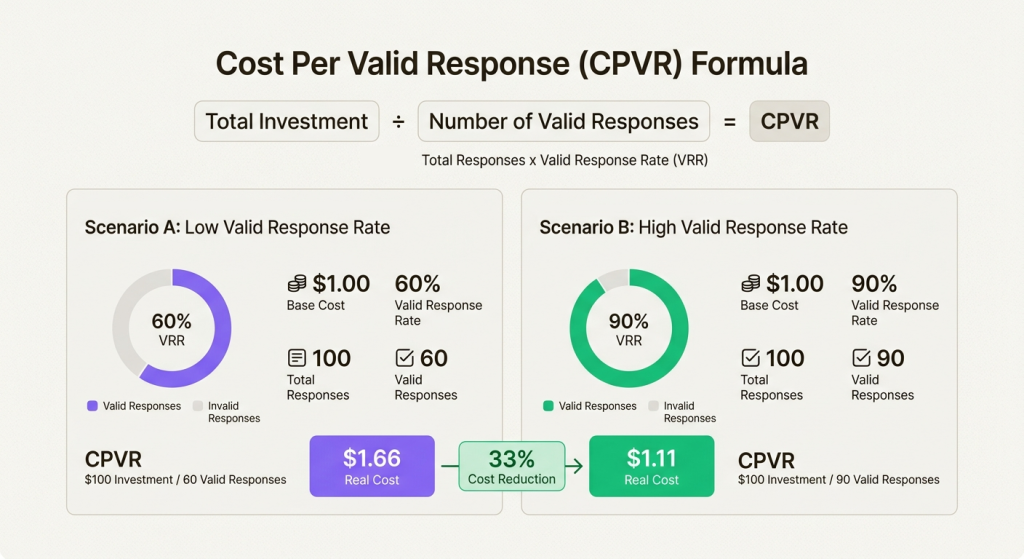
When you move a rank tracking API into production, infrastructure observability becomes part of SERP data quality. For engineering leads, two key metrics show whether the pipeline is healthy: Valid Response Rate (VRR) and Cost Per Valid Response (CPVR).
Valid Response Rate (VRR)
VRR is the percentage of your requests that return a valid SERP instead of a block, CAPTCHA, or error. Data from large-scale scraping infrastructure shows a clear pattern: teams running a rank tracking API on commodity proxy pools often operate in the 60–70% VRR range. That means at least 30% of their budget goes into failed requests even before retries enter the equation.
Switching to clean, dedicated pools from an enterprise-grade proxy provider like Proxy-Seller typically delivers +20–30% VRR improvement.
Cost Per Valid Response (CPVR)
CPVR is the actual cost of getting a single successful rank check. If you pay $1 per 1,000 requests but 40% fail and require a retry, your real cost is $1.66. Failures often stem from contaminated IP pools mixing residential traffic with bots and scrapers.
Proxy-Seller addresses this as an enterprise-grade proxy infrastructure provider, using consent-based residential IP sourcing, policy-driven routing, and clean dedicated pools with no SMB traffic mixing. For rank tracking API workloads, this reduces CPVR by 20–35% compared with generic proxy pools.
Track VRR and CPVR per endpoint and per region, and tie retry routing to the error codes from Step 5 (switch proxy type or location instead of requeuing blindly).
Run a 14-day pilot on your actual keyword set. Compare your current VRR and CPVR against Proxy-Seller’s dedicated pools. Numbers are visible before you commit volume.
The best rank tracker with API support (2026)
If you prefer to outsource the scraping infrastructure, managed rank tracking API providers will cover proxy routing, parser maintenance, and error handling for you. The trade-off is less control and higher per-request costs.
Provider | Type | Pricing model + starting price | Avg. response time* | Best for | Main trade-off |
|---|---|---|---|---|---|
SE Ranking | SEO suite with API |
| 0.5–1.5 sec (Data/DB queries); asynchronous for Audit/Crawling tasks | Teams already using the suite | Less API-focused |
ScrapingBee | Scraping API |
| ~2.0–4.5 sec | Custom SERP pipelines | Needs parser/scheduler |
SerpApi | SERP API |
| ~1.2–2.5 sec | Rapid prototyping | Price jumps at enterprise scale Ongoing legal dispute with Google |
DataForSEO | SEO data API |
| ~4.2–6.0 sec | First-page rank checks | Extra cost for deep results 1–5 min queue delays |
Bright Data | Enterprise SERP API |
| ~1.0–2.5 sec | Enterprise scale | Higher cost and complexity |
*Response-time figures are compiled from public benchmarks, including Proxyway reviews and the providers' own published tests.
The rank tracker API decision: build, buy, or when to switch
Choosing between a managed API and building a custom rank tracking API infrastructure depends on your operational and programmatic requirements.
Opt for a managed API if your primary goal is speed-to-value and you run fewer than 10,000 daily rank checks. It’s the right choice for marketing teams that need quick reporting without heavy engineering support.
Build your own infrastructure if your rankings power customer-facing dashboards in your own SaaS product or if you need to ingest massive datasets for deep cross-channel analytics.
Many enterprise operations deploy a hybrid model: managed APIs for low-volume checks and custom rank tracking API infrastructure powered by best proxy providers for high-volume, mission-critical keyword sets.
Either way, run a 14-day A/B pilot before committing volume. Track VRR and CPVR from the first 1,000 queries: they expose infrastructure problems before you scale. The gap may look small on paper, but 88% versus 95% valid response rate compounds across every keyword you query.
Frequently asked questions
What’s the difference between a rank tracking API and an all-in-one SEO platform?
A rank tracking API provides raw ranking data through endpoints you integrate into your own tools. All-in-one SEO platforms bundle rank tracking, backlinks, site audits, keyword research, and built-in dashboards ready to use. APIs offer flexibility and customization. Platforms offer convenience and speed to value.
How many proxies do I need for keyword rank tracking at scale?
For 10,000 daily rank checks across 5 locations, plan for 100-200 dedicated residential IPs with rotation. For 100,000 daily queries, you’ll need 1,000+ IPs with smart routing and a clean dedicated pool for your rank tracking API. The exact number depends on query frequency, target SERP features, and how aggressively the proxy provider’s pool gets recycled.
How much does it cost to use a rank tracking API for 50,000 keywords?
At 50,000 keywords daily, a managed rank tracking API like DataForSEO might cost $900 per month for top-10 results, but jump to over $7,000 for top-100 results. In contrast, using residential proxies for the same volume would cost roughly $260 to $560 in bandwidth, including 15–25% retry overhead. This cost gap eventually pushes many high-volume operations toward custom infrastructure.
How do proxies improve the accuracy of a rank tracking API?
Proxies improve accuracy by reducing personalization, geo-fencing, and dependence on a single IP’s history and location. Routing requests through location-specific pools lets you collect SERPs a user in a specific city or country would see, ensuring your rank tracking API delivers unbiased data. Tools like proxy in Serposcope simplify city-level geo-targeting configuration.
Is it legal to scrape Google search results with a rank tracking API?
Yes, scraping public, non-personal Google search results is legal. US courts have held it does not violate the Computer Fraud and Abuse Act; GDPR and UK GDPR apply to personal data, leaving public rankings outside their scope. The constraints are personal or login-gated data and each site's terms of service. For rank tracking, collect only public SERP data and route requests through ethically sourced proxies.
PROXIES FROM $0.02/IP
Ready to put this into practice?
Pick a proxy type and location, and start using it within minutes.
Instant delivery
24/7 support
Refund policy
About the author