
 Proxy for Telegram
 Proxy for LinkedIn
 Proxy for Google
 Proxy for Ebay
 Proxy for Twitter
 Proxy for TikTok
How to set up a proxy in WinSCP

WinSCP is a specialized tool for managing file resources on servers, ensuring secure interactions between the local machine and the server via FTP, FTPS, SCP, and SFTP protocols. Originally developed for Windows, WinSCP can be adapted for use on Mac and Linux operating systems through various emulation solutions or subsystems.

The setup of a proxy in WinSCP is crucial for enhancing the security and privacy of connections to servers. As an FTP client, WinSCP provides a user-friendly graphical interface with extensive integration features for file management, making it an essential tool for users who require a reliable and multifunctional solution for efficient file operations on remote servers.
Step-by-step proxy setup in WinSCP
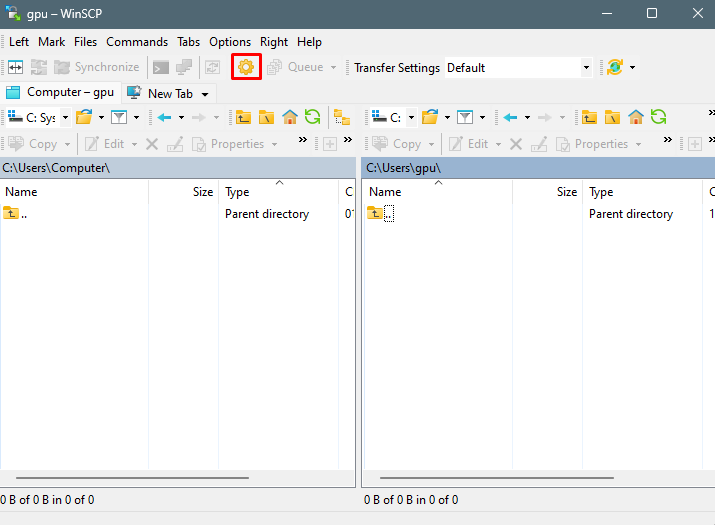
- To access the application settings, click on the gear icon located in the main menu.
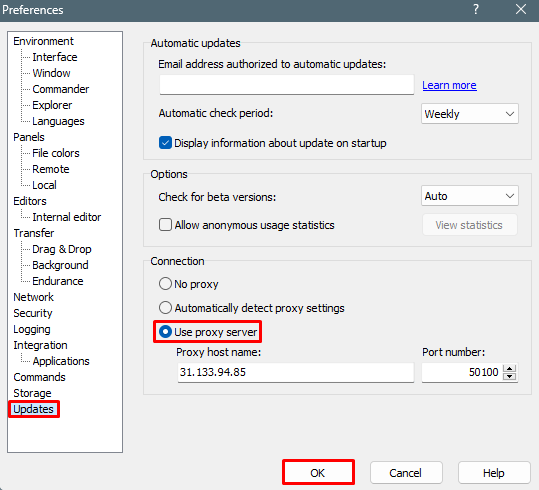
- In the subsequent window, navigate to the “Updates” section. Move to the “Connection” section and check the “Use proxy server” option. Here, enter the IP address and port. If you are utilizing a private proxy, a window for entering authorization data will automatically appear when you are interacting with the application. To finalize the setup, click “OK”.
In conclusion, configuring proxy settings in WinSCP offers an additional layer of security by concealing the user’s real IP address and reducing the risks associated with network attacks or unauthorized access. This enhanced security is crucial for both organizations and individual users who handle confidential information and require robust protection while connecting to remote servers. Furthermore, using a proxy with WinSCP enables the bypassing of geographic restrictions and blockages, thereby broadening access to resources.
PROXIES FROM $0.02/IP
Ready to put this into practice?
Pick a proxy type and location, and start using it within minutes.
Instant delivery
24/7 support
Refund policy
About the author