
 Proxy for Telegram
 Proxy for LinkedIn
 Proxy for Google
 Proxy for Ebay
 Proxy for Twitter
 Proxy for TikTok
SOAX proxy review 2026: features, pricing & performance

Most SOAX reviews that rank today still quote a $1.99 trial, a $99 Starter plan, and ISP proxies. None of those exist anymore. In mid-2026, the company rebuilt its product line, dashboard, and pricing, and stopped selling ISP and datacenter proxies to new customers.
This SOAX review covers the version you can actually buy today. I pulled every figure from soax.com on October 31, 2026, and checked them against independent test results where I could.
SOAX review in brief: verdict, key specs, and best-fit users
SOAX is worth the money if you need session control you can’t get from other networks. Sticky IPs can last up to a week, and you get ISP targeting on every plan. The downside is the credit system. Any balance you don’t use expires after 60 days, which isn’t great for agencies or anyone with seasonal work. Here is the SOAX residential and mobile proxies review features and pricing summary.
Spec | Current state |
Advertised pool | 155M+ residential and 30M+ mobile IPs, per SOAX's docs; 191M+ in total on its About page |
Unique IPs, past 30 days | 12M+, SOAX's own stat |
Locations | 195+ locations |
Proxy types sold today | Residential, mobile |
Discontinued | Not sold to new accounts: ISP, datacenter proxies |
Targeting | Country, region, city, ISP on every plan. ASN and ZIP from Scale up |
Protocols | HTTP, HTTPS, SOCKS5 including UDP |
Sticky sessions | Up to 1 week or 1M requests |
Entry rate | $25 minimum top-up, which buys 5 GB at Tier 1 or 12.5 GB at Tier 3 |
Rate range, Tier 1 | $5/GB on Sandbox down to $0.85/GB on Enterprise |
Free trial | None for new accounts. Sandbox is free to open but ships with zero credits |
Best for | Teams running 40GB+/month who want per-request routing control |
What changed after the 2026 SOAX relaunch
SOAX relaunched in mid-2026. It dropped two product lines, switched to a new pricing model, and changed what support you get on each plan. Here's how the main areas compare before and after the relaunch.
Area | Before the relaunch | After, as of October 2026 |
Product line | Residential, mobile, ISP, datacenter | Residential and mobile only |
Pricing model | Monthly plans, per-GB rates, reported from $25 to $99 depending on the source | Subscription plus prepaid credits, three country tiers |
Entry point | Paid $1.99 trial, low-cost starter plan | Free Sandbox account, $25 minimum top-up before any traffic |
Access control | Account and sub-user level | Proxy packages with their own auth, routing, and caps |
Support | Reported as 24/7 across all plans | Basic on Sandbox, 24/7 for critical incidents on paid plans, business hours for everything else, CSM on Enterprise |
Dashboard | Multi-language | English only |
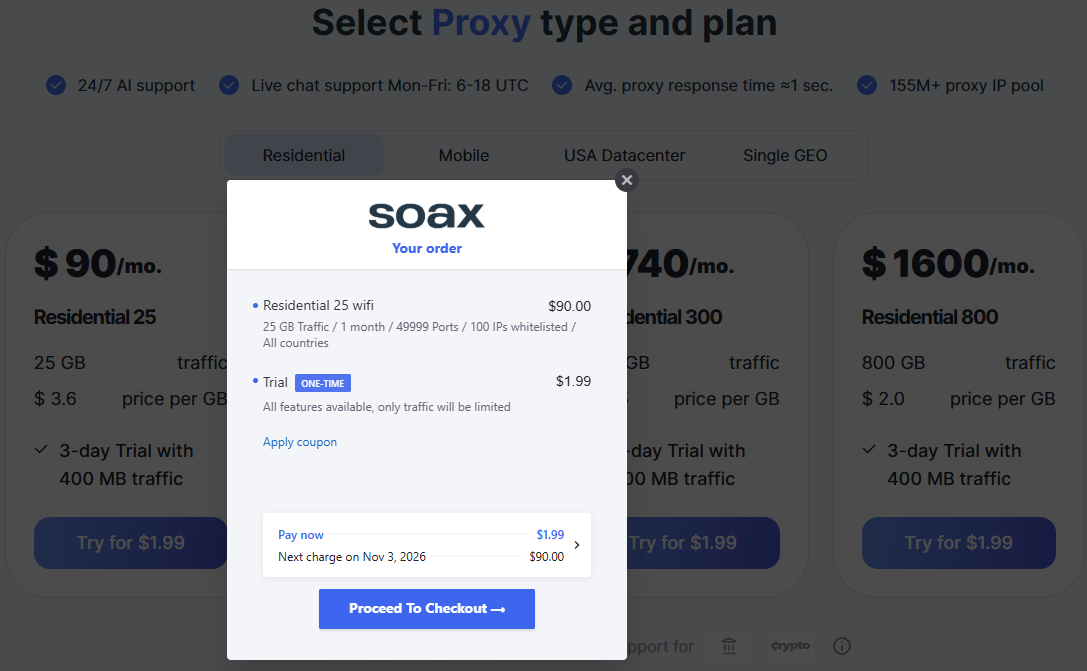
Not every account moved, though. When I logged in with an email registered before the relaunch, the provider sent me to the old dashboard at dashboard.soax.com instead of platform.soax.com. It still sells the pre-relaunch plans there, from Residential 25 at $90 a month for 25 GB ($3.60/GB) to Residential 800 at $1,600 for 800 GB ($2/GB), and lists mobile, USA datacenter, and Single GEO plans too. On October 31, 2026, I bought the 3-day, 400 MB trial for $1.99, and the proxy worked on the first request. The trial renews into the $90 plan unless you cancel. That’s why so many SOAX reviews still quote a $1.99 trial and monthly GB plans. If you sign up today, you’ll only see the platform this review describes.
.png)
SOAX residential proxies and mobile network: key features
SOAX residential proxies and mobile proxies both come under one subscription, with a shared credit balance and the same rate card. I think this setup works best for teams that use both networks, since a lot of providers bill each product separately, and you end up managing two budgets for the same proxy infrastructure. If you’re comparing spec sheets, this is the part of the SOAX review to pay the most attention to.
Pool size and location coverage
SOAX's documentation lists more than 155 million residential IPs and over 30 million mobile IPs, which puts it among the largest residential pool claims on the market. On its own homepage, the provider only shows 12 million unique IPs over the past 30 days, and doesn’t explain how it arrives at the bigger numbers.
Proxyway’s April 2026 testing gives you a better idea of how many different IPs you’ll actually run into. Over three weeks and 3.6 million requests, it found 1,670,306 unique residential IPs worldwide, and 97.39% of them checked out as real residential IPs. Over two weeks, mobile came in at 177,428 unique IPs, with 97.64% confirmed. Proxyway also rated the residential pool above average in size compared to other providers.
Coverage also isn’t even across countries. Proxyway counted 641,157 unique IPs in the US and 357,265 across the EU, but only 14,924 in Australia. Proxyway sent fewer requests to Australia, but IPs still repeated far more often there, so you’ll cycle through the same addresses pretty quickly.
Targeting options and session control
According to SOAX's pricing page, which I checked for this SOAX proxies review, every plan, including the free Sandbox tier, included country-level targeting, plus region, city, and ISP. ASN and ZIP code targeting are only available on the Scale plan at $1,500 a month and on Enterprise at $3,000 a month.
Session control is where SOAX really stands out. According to SOAX's developer documentation, you can rotate IPs on every request, after a set number of requests, after a time interval, or when an error comes up. You can set this up with the Quick connect builder in the dashboard or write the rules straight to your connection string. Timed sessions can last up to a week, and request-based sessions up to a million requests.
However, a session expires after 60 seconds of inactivity, and it keeps its IP only while the device behind it stays online. If the device goes offline or a connection error occurs, the system will automatically select another similar address. In other words, while this is technically possible, no one can guarantee that the session will actually last that long.
Protocols, authentication, and integrations
SOAX supports HTTP, HTTPS, and SOCKS5, and its SOCKS5 setup also handles UDP and QUIC.
You can authenticate with a username and password or allowlist your IP instead. There’s no limit on threads or ports, team members count toward your plan’s seat limit, and targeting options go straight into the connection string.
Here’s what a US-targeted request looked like when I set one up in the dashboard for this SOAX residential proxy service review:
cURL
curl -x country-us-network-res_mob:PASSWORD@proxy.soax.com:1337 https://checker.soax.com/api/ipinfoThere’s also an API for day-to-day account management, although you’ll still have to go through the dashboard to change plans.
ISP proxies, datacenter proxies, and scraping tools
SOAX doesn’t sell ISP or datacenter proxies to new accounts anymore. It phased both out between late 2025 and mid-2026.
Other than residential and mobile proxies, the only thing the provider sells is Managed Data Acquisition, a data collection service where SOAX builds and runs a custom data pipeline for you. You tell it what data you need and how you want it delivered, and it takes care of the rest.
There’s no self-serve scrape API, web unblocker, or AI scraper. SOAX does offer a few free tools, including an IP checker, a proxy checker, a cURL converter, and a browser fingerprinting test.
If you need static IP addresses, that's the biggest reason to look elsewhere.
Static IPs with small entry plans
Get the static IPs SOAX no longer sells
If you need static IP addresses, Proxy-Seller sells ISP proxies from $3 and datacenter proxies from $1.64, so you can add them without switching your whole stack.
Key performance and technical benchmarks: IP quality and speed
I went with Proxyway’s April 2026 research for the figures in this part of the SOAX review. Here are the averages for its residential and mobile networks.
Network | Target | Success rate | Avg response time |
Residential | Neutral test endpoint | 99.78% | 0.89s |
Residential | Amazon, Google, Instagram | 71.49% | 3.21s |
Mobile | Neutral test endpoint | 99.74% | 0.92s |
Mobile | Amazon, Google, Instagram | 70.63% | 3.77s |
The neutral endpoint numbers only show that SOAX got the request through. On protected sites, the picture changes. SOAX's residential proxy succeeded 88.57% of the time on Amazon and 99% on Instagram, but only 26.9% on Google, which pulled the average down to 71.49%. Proxyway noted that its scraper struggled with Google across the board. That put SOAX 11th of 13 residential providers. The median was 74.43%, and the best, Byteful, reached 81.23%. SOAX's 3.21-second response time landed exactly on the median.
For IP quality, IPinfo flagged 27.85% of SOAX's global residential IPs as known proxies, the second-lowest share in the test. Scamalytics gave them an average risk score of 3.2, which is mid-table: 8th lowest of 13, behind Decodo at 2.6 and Oxylabs at 2.61.
Any SOAX review can only tell you so much, so I'd run your own test with the $25 top-up before committing:
- Test the sites you actually plan to scrape, not a test endpoint
- Log status codes and CAPTCHA pages yourself, since SOAX's docs say it can't see them inside an HTTPS connection, and the dashboard doesn't show success rates
- Compare cost per successful request, not just cost per GB
- If you need sticky sessions, keep one running as long as your workflow needs and note when the IP changes
SOAX pricing and plans: credits, country tiers, and pay as you go
Working out what you’ll actually pay can be tricky because SOAX pricing runs on two separate systems at once. Here are the current plans.
Plan | Monthly | Included credits | Tier 1 | Tier 2 | Tier 3 | Packages | Seats |
Sandbox | Free | 0 | $5/GB | $4/GB | $2/GB | 2 | 1 |
Builder | $200 | 200 | $3/GB | $2.25/GB | $1.20/GB | 3 | 2 |
Team | $500 | 500 | $2.20/GB | $1.65/GB | $0.90/GB | 5 | 3 |
Scale | $1,500 | 1,500 | $1.50/GB | $1.15/GB | $0.60/GB | 7 | 5 |
Enterprise | $3,000 | 3,000 | from $0.85/GB | from $0.55/GB | from $0.35/GB | 10 | 10 |
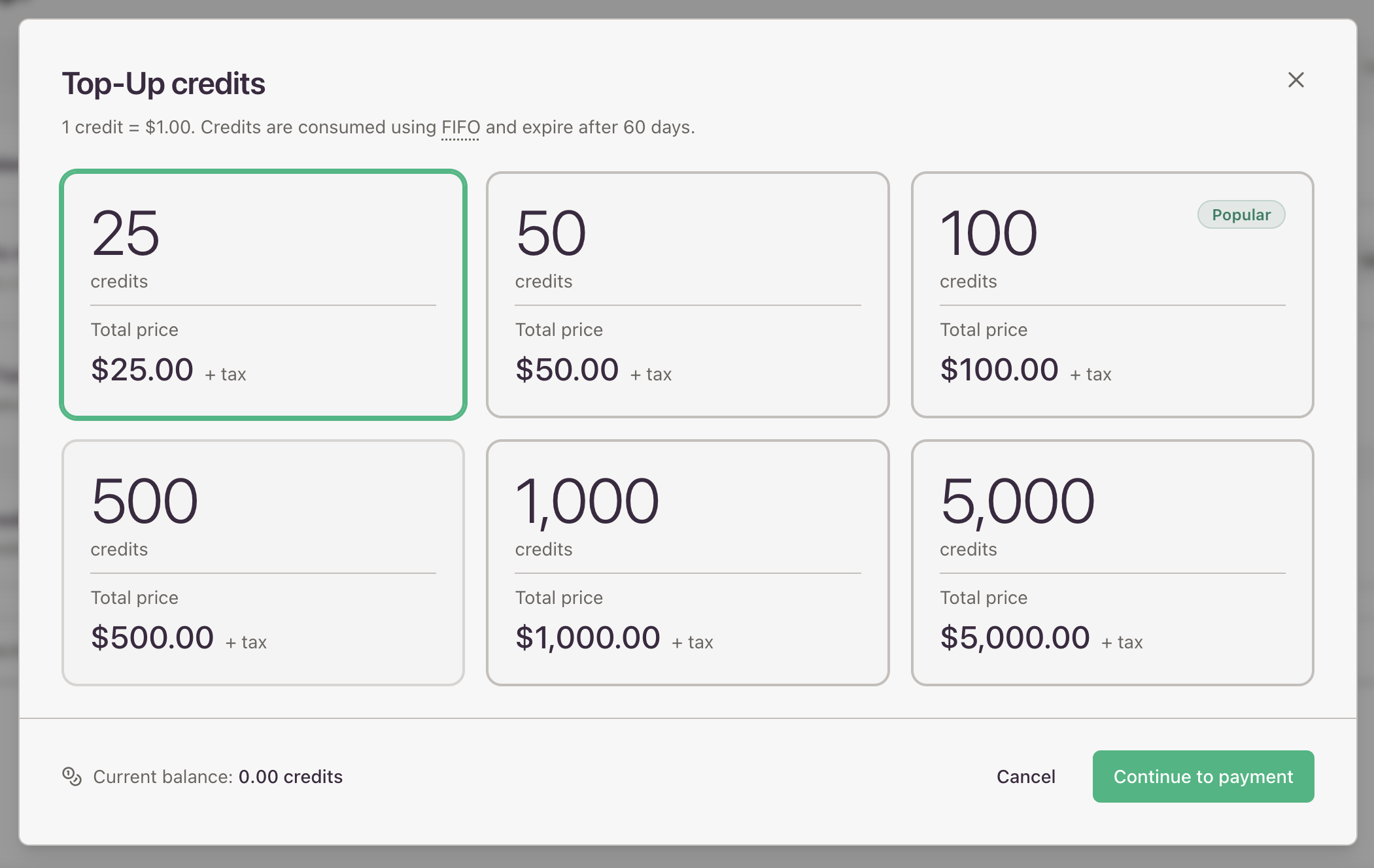
The first system is credits. A credit is a prepaid unit worth about $1 of traffic, and your plan fee converts into credits one for one. So the $200 you pay for Builder is $200 of traffic, not a fee on top of your usage. Credits expire 60 days after they’re added, oldest first, and top-ups come in six fixed sizes from 25 credits up to 5,000.
The second system is geo tiers, which SOAX sets based on how much it costs to serve each country. The tier depends on the country of the exit IP, not where you’re located, so US traffic is billed at Tier 1, India at Tier 2, and the Philippines at Tier 3. Each month, you pay either the plan fee or your usage at your plan’s rate, whichever is higher.
Monthly Tier 1 traffic | Cheapest plan | What you actually pay |
Under 40 GB | Sandbox | $5/GB, $25 minimum |
40 to 167 GB | Builder | $200, then $3/GB |
167 to 682 GB | Team | $500, then $2.20/GB |
682 GB to 2 TB | Scale | $1,500, then $1.50/GB |
Over 2 TB | Enterprise | $3,000, then $0.85/GB and falling |
Say you pull 100 GB a month through US residential IPs. Builder comes out cheapest, since the $200 plan fee covers about 66.7 GB and a $100 top-up handles the rest. On Team, you’d pay $500 plan fee, but 100GB at Team's $2.20/GB rate only uses $220 of the credits it includes. The other $280 would go unused and expire after 60 days.
Seats matter too. Sandbox comes with one and Builder with two, so a team of three has to start at $500 no matter how little traffic it uses.
Out of everything I looked at for this SOAX residential proxies review, IP pool, pricing, and performance included, the 60-day expiry is the part I’d think hardest about before paying. Billing also counts traffic in both directions, retries included, so your invoice will be higher than what your scraper actually received.
SOAX doesn't offer a pay as you go plan by name, but Sandbox works much the same way. It has no subscription fee and no included credits, and you top up at SOAX’s highest per-GB rates.
If you’re an enterprise customer looking for fixed rates, you’ll need Enterprise Annual, the only plan you can’t buy self-serve.
Residential proxies from $1.45
Residential pricing without the math
Proxy-Seller bills residential traffic per GB, from $3.5 down to $1.45/GB at volume, so there are no credits to track and larger plans automatically cost less per GB.
SOAX dashboard, setup, and KYC
Signing up for a Sandbox account took me a couple of minutes, and I didn’t need a credit card. Sending the first request takes a bit longer, though, because the SOAX dashboard makes you create a package first.
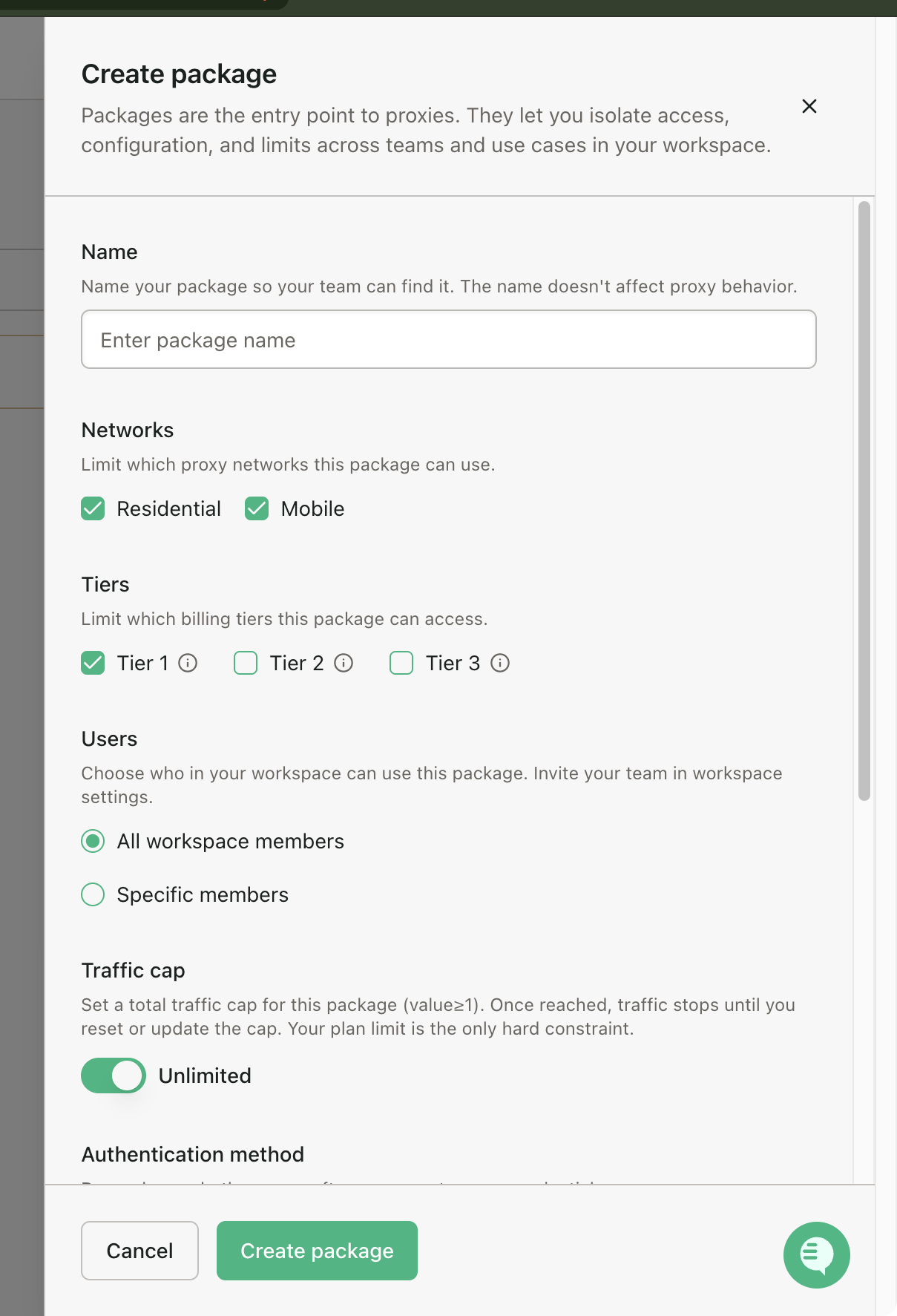
Each package comes with its own authentication, routing, access controls, traffic caps, and usage tracking. If you’re a team splitting access between clients, I think this works better than juggling sub-accounts. If you’re a solo developer who just wants an endpoint and a password, it’s one more thing to do before you can get started. And since targeting settings go into the connection string, you’ll probably spend your first few requests getting the syntax right.
.png)
The analytics got better after the relaunch, but there’s still no success rate, latency, or per-domain breakdown. The dashboard will tell you that you used 40 GB, but you won’t know how much of it came back usable.
When I opened checkout for a $25 top-up on a new account, SOAX let me pay by card without asking for ID. Verification kicks in if you pay with crypto, ask for access to restricted ports or domains, switch to postpaid billing, or sign an Enterprise Annual contract. SOAX’s June 2026 KYC policy also lets it require verification before any purchase, so card checkout without ID isn’t guaranteed.
.png)
The same screen shows that top-up credits can’t be applied to a plan upgrade. If you top up $25 and then move to Builder, you’ll pay the full $200 on top and hold 225 credits that expire on their own 60-day clocks.
Customer support and the dedicated account manager
SOAX advertises 24/7 support on every paid plan, but according to its SLA, the 24/7 part only covers critical outages. Everything else, from setup questions to general requests, gets handled during business hours, which run from 07:00 to 19:00 UTC on weekdays. Enterprise also comes with a customer success manager, while Sandbox only gets support on a reasonable-efforts basis.
That didn’t stop me from getting help when I tried the chat on my Sandbox account for this SOAX review, though. The chat starts with an AI bot, which handled basic questions fine but took 10 to 15 seconds to reply each time. When I asked for a human, I was told to expect a reply within a day, but an agent joined in about an hour. So even on Sandbox, you might get a person.
.png)
You’ll only get a customer success manager, SOAX’s version of a dedicated account manager, on the $3,000 Enterprise plan. Proxy-Seller, for comparison, assigns one from $500 MRR and has a 24-hour response SLA on every tier.
Is SOAX legit? IP sourcing, compliance, and user feedback
Yes, SOAX is a legitimate company registered in England and Wales. It’s been around since 2020, it’s based in Uxbridge, London, and it says it serves over 10,000 customers.
Sourcing is the one area where SOAX is less open than some competitors. It says its residential IPs are ethically sourced, but it doesn’t name the apps or partners they come from. If your legal team needs that information, you’ll have to ask the vendor for it directly.
User reviews are mixed. On October 31, 2026, SOAX had 4.8 stars from 66 reviews on G2 but just 3.3 from 148 reviews on Trustpilot. Most of the complaints I read while researching this SOAX review were about sessions dropping too early or bills coming in higher than expected.
The session complaints I saw were from before the July 2026 relaunch, so they may already be fixed. Still, if you’re reading a SOAX.com review to decide whether to buy, I’d spend $25 on a top-up and check session stability on your own targets first.
On the compliance side, SOAX shows GDPR and CCPA badges on its site and, according to Proxyway, also works with The World Ethical Data Forum.
SOAX pros and cons
Here’s a quick recap of the strengths and weaknesses I found while putting this SOAX review together.
Pros:
- SOAX has the technical capability to hold sticky sessions for up to a week or a million requests
- ISP-level targeting comes with every plan, even the free Sandbox tier
- Residential proxies hit above 99.7% infrastructure success in every market Proxyway tested, and 97.39% of IPs checked out as residential
- Proxy packages let you set separate auth, routing, and traffic caps for each project without opening extra accounts
- Pricing is published all the way down to $0.85/GB, so you don’t need to talk to sales to see rates
Cons:
- New accounts can’t buy ISP or datacenter proxies, so you’ll need a second provider if you use them
- Credits expire after 60 days, which hurts if your usage is seasonal
- The 24/7 support on paid plans only covers critical outages, and everything else waits for business hours.
- ASN and ZIP targeting start at $1,500 a month, and a dedicated account manager at $3,000
SOAX alternatives: Proxy-Seller, Bright Data, Oxylabs, and Decodo
If the credit system or the missing ISP and datacenter proxies rule SOAX out for you, there are a few alternatives worth looking at. I checked the pricing for each one the same week I put this SOAX review together.
Provider | Advertised pool | Proxy types | Entry price | Best for |
SOAX | 155M+ residential, 30M+ mobile | Residential, mobile | $5/GB, $25 minimum | Fine-grained session and ISP targeting |
Proxy-Seller | ~47M/month residential; 50M+ global pool | Residential, ISP, IPv4, IPv6, mobile | From $3.5/GB | Mid-market teams that need enterprise terms early |
Bright Data | 400M+ | Residential, ISP, datacenter | From $4/GB | Largest pool, deepest tooling |
Oxylabs | 177M+ | Residential, ISP, datacenter, mobile | From $6/GB | Enterprise scale with compliance paperwork |
Decodo | 115M+ | Residential, ISP, datacenter, mobile | From $4/GB | Similar benchmarks at lower cost, keeps pay as you go |
Proxy-Seller covers the two biggest gaps I found in SOAX. You can still buy ISP and datacenter IPs there, and you get a named account manager from $500 MRR instead of $3,000. Residential proxies start at $3.5/GB, with 220+ locations to choose from.
Decodo makes sense if you want similar performance for less money and still want pay as you go. Our Decodo review covers it in more detail. Bright Data is the largest proxy provider on this list and has the most tooling, but expect a longer buying process.
Oxylabs is a good pick if you want ready-made scraping tools on top of your proxies. It sells a Web Scraper API and Web Unblocker, neither of which SOAX offers, and it returned the most unique residential IPs in Proxyway's 2026 test.
If you want to compare more options, check out our best proxy providers roundup.
SOAX review verdict: who should choose it
Before you sign up, figure out how many gigabytes you use each month and how much of that traffic goes through Tier 1 countries. Those two numbers will tell you whether SOAX ends up cheap or expensive for you.
From what I’ve seen, SOAX works best for teams that use more than 40 GB a month on a steady basis and actually need the session control. If you hold sessions for days at a time, target by ISP, or give each client a separate package with its own limits, it’s hard to find that combination for less.
It’s a different story if your usage goes up and down from month to month. With credits expiring after 60 days, any slow month means you lose money. I’d also look elsewhere if you need static ISP or datacenter IPs.
Account manager from $500 MRR
Get enterprise terms without the enterprise minimum
Talk to Proxy-Seller's team about wholesale discounts of 25–30% from 1 TB or 1,000 IPs, Net-30 invoicing, a free POC on your own targets, and a named account manager from $500 MRR.
FAQ
Not for new accounts. SOAX’s pricing FAQ says there’s no free trial, and new sign-ups don’t see the $1.99 trial older articles mention. Accounts created before the relaunch can still buy it on the old dashboard: 3 days and 400 MB for $1.99, renewing into a $90 monthly plan unless you cancel. New accounts can open a Sandbox for free without a credit card, but it comes with zero credits. That means you’ll need at least a $25 top-up before you can send any traffic. Plan fees and top-ups are generally non-refundable.
Not officially, but Sandbox works pretty much the same way. There’s no subscription fee, and you buy top-up credits whenever you need them, in fixed amounts starting at $25. Sandbox rates run from $5/GB in Tier 1 down to $2/GB in Tier 3. Credits still expire after 60 days, though, so I’d use it for testing rather than as a long-term setup.
Yes. SOAX supports HTTP, HTTPS, and SOCKS5, and its SOCKS5 support covers UDP and QUIC too. There’s one catch with authentication. IP allowlist filters need a subdomain and only work over HTTPS, so plain HTTP and SOCKS5 traffic won’t route through them. I’d just stick with credentials.
For a standard account paying by card, KYC usually isn’t required. On a new account, the $25 top-up checkout offered card payment without asking for ID, although SOAX’s June 2026 KYC policy lets it request verification before any purchase. You’ll have to verify if you pay with crypto or request access to restricted ports or domains, like port 25 or certain financial sites. Postpaid billing and Enterprise Annual agreements require it too. Verification goes through Sumsub, and you’ll need a photo ID and proof of residence.
SOAX only sells residential and mobile proxies. Proxy-Seller also sells ISP, datacenter, and IPv6 proxies, so it's the better fit if you need static IPs. SOAX comes out ahead on session length, with sticky IPs that can last a week, and on ASN and ZIP targeting from the Scale plan. Proxy-Seller costs less to start with, at $3.5/GB for residential against SOAX's $5/GB Tier 1 Sandbox rate, and it assigns a named account manager from $500 MRR instead of $3,000 a month.
PROXIES FROM $0.02/IP
Ready to put this into practice?
Pick a proxy type and location, and start using it within minutes.
Instant delivery
24/7 support
Refund policy
About the author