
 Proxy for Telegram
 Proxy for LinkedIn
 Proxy for Google
 Proxy for Ebay
 Proxy for Twitter
 Proxy for TikTok
Setting up a proxy in the LinkedIn Helper tool

LinkedIn Helper is a tool developed to automate activities like employee and client searches for businesses. It facilitates the automatic sending of messages, and invitations, and the tracking of account activities. However, employing such automation tools can lead to potential account blocks, as LinkedIn's policies restrict automated interactions. While LinkedIn actively monitors automated behaviour to preserve authentic engagement, managing multiple accounts safely remains a common need across platforms. To streamline such workflows, Proxy-Seller provides dedicated proxy solutions tailored for specific networks. For instance, you can explore our specialized proxy for Wattpad, Instagram and Telegram - each optimized for stable performance, account protection, and effective multi-account management.
To mitigate the risk of blocks and circumvent geographical limitations, integrating a proxy server with LinkedIn Helper can be effective. This approach allows users to manage multiple accounts safely by distributing activity across various IP addresses. Using proxies also helps avoid triggering LinkedIn's limits on frequent activities, which the platform may flag as suspicious. This strategy ensures more secure and efficient use of LinkedIn Helper for professional networking and recruitment tasks.
Step-by-step proxy setup in LinkedIn Helper
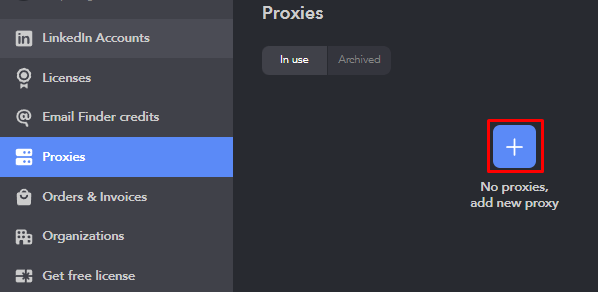
- Open LinkedIn Helper and navigate to the “Proxies” tab. Click the “+” button to initiate the proxy setup process.
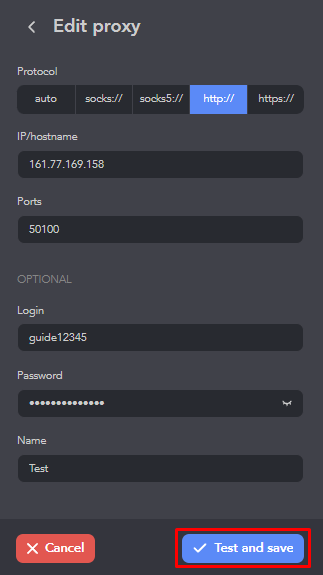
- In the setup window, choose the appropriate protocol and input your proxy's “IP/Hostname” and “Ports”. If using a private proxy, enter the login and password for authentication. Assign a distinctive name to your proxy for easier future reference. Once all information is filled in, select the “Test and save” button to verify the connection and save the proxy to your list.
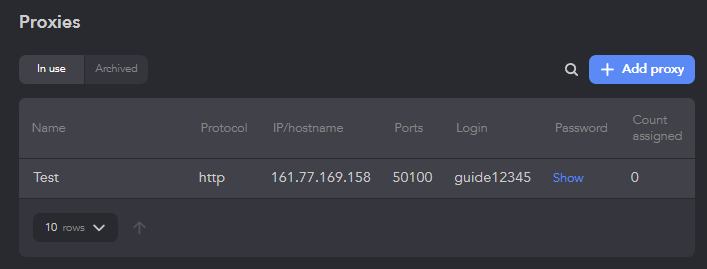
- The proxy is now configured and listed in the “Proxies” tab. You can associate it with specific accounts as needed. The same logic applies to other platforms that rely on account-based operations - for example, using a proxy for Tinder when working with profiles helps maintain consistent performance and stable connection within the app.
To enhance the security of user accounts and prevent potential blocks or restrictions from LinkedIn, it's advisable to use only private proxy servers. ISP proxies are particularly recommended for use with LinkedIn Helper, as they offer a stable and fast connection, making them one of the best choices for maintaining smooth and uninterrupted access. For ready-to-use service options tailored to professional platforms, see Linkedin proxy.
PROXIES FROM $0.02/IP
Ready to put this into practice?
Pick a proxy type and location, and start using it within minutes.
Instant delivery
24/7 support
Refund policy
About the author