 Proxy for Telegram
 Proxy for LinkedIn
 Proxy for Ebay
 Proxy for Twitter
 Proxy for TikTok
 Proxy for Google
Setting up a proxy in the Potatso Lite

Potatso Lite is an iOS tool that simplifies setting up a proxy. It supports several protocols, including Shadowsocks, ShadowsocksR, HTTP, and Socks5. This proxy client operates in the background, allowing you to route traffic over both cellular and Wi-Fi networks. When you specifically need a mobile-looking footprint, a 5g mobile proxy can be useful—especially if you’re routing app traffic over cellular connections. With Potatso Lite, you can bypass geo-blocking, download apps not available in your region, and browse the web anonymously. If you need a balance of speed and stability for everyday browsing, an ISP proxy server is often a solid choice compared to basic datacenter IPs.
Video guide for setting up a proxy in Potatso Lite
How to set up a proxy in Potatso Lite
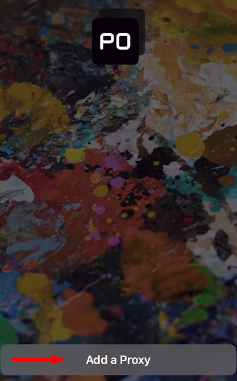
- Open the application and tap on the “Add a Proxy” button on the main screen. Before you start, make sure you purchase proxy access with the protocol you plan to use (HTTP/SOCKS5/Shadowsocks), so you can paste the correct IP, port, and credentials in the next steps.
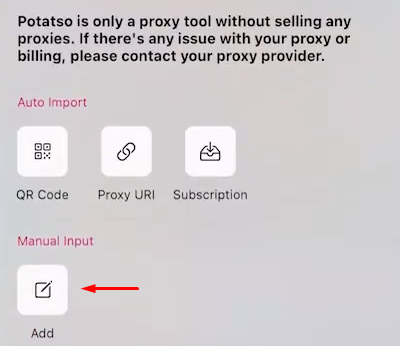
- In the menu at the bottom, select “Manual Input” and tap on the “Add” button.
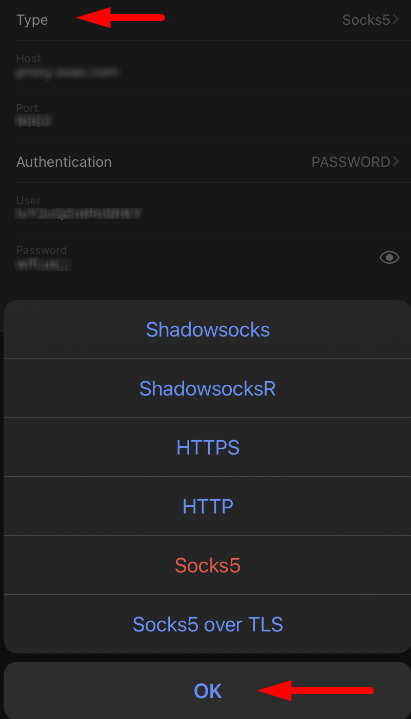
- Choose the protocol type of your proxy in the “Type” category and tap “OK”.
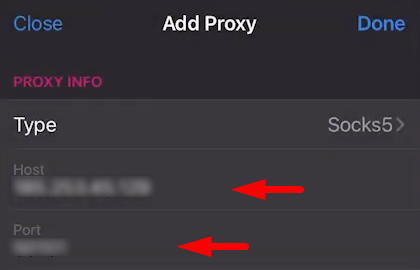
- Enter the IP address and port of your proxy in the corresponding fields. If you want newer address space for specific networks or regions, you can buy proxies IPv6 and add them here the same way—just paste the IPv6 address and port.
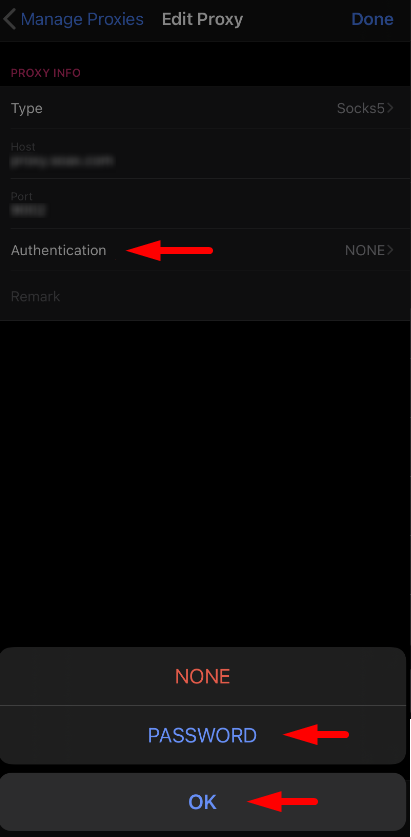
- If your proxy requires authentication, tap on the authentication button, select “PASSWORD”, and tap “OK”.
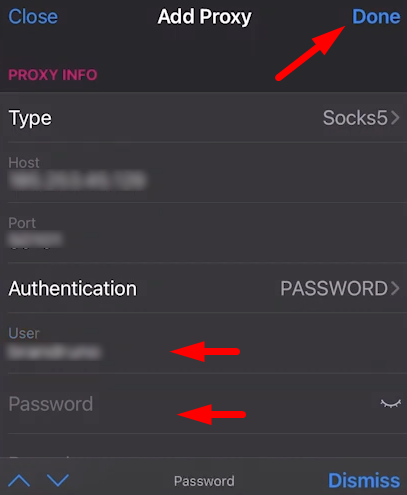
- Enter your username and password, then tap “Done”. For platforms that are sensitive to IP reputation, a private residential proxy can make your connection look more like a real household user while still keeping setup simple in Potatso Lite.
- Your proxy is now configured. It will appear in the main menu of the app. To use it, tap on the launch button in the bottom corner of the screen. To disable the proxy, tap on the same button again.
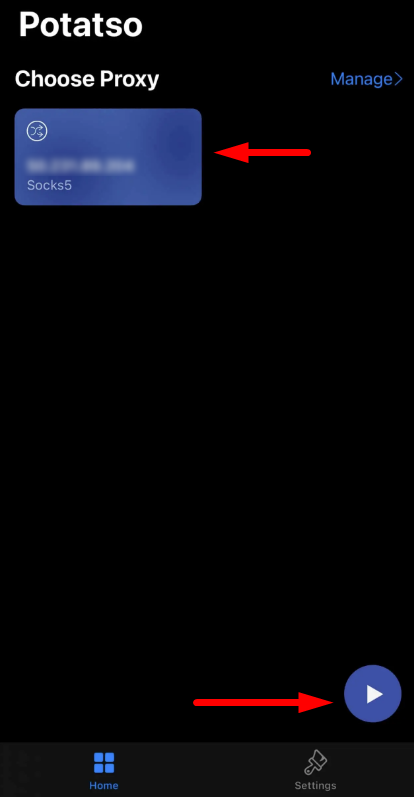

With Potatso Lite, you can access blocked sites, download region-restricted apps, and browse the web anonymously. You can set up multiple proxies and switch between them as needed for different resources or tasks.
PROXIES FROM $0.02/IP
Ready to put this into practice?
Pick a proxy type and location, and start using it within minutes.
Instant delivery
24/7 support
Refund policy
About the author