


 ur
ur  English
  Español
  中國人
中國人  Tiếng Việt
  Deutsch
  Українська
  Português
  Français
  भारतीय
  Türkçe
  한국인
한국인  Italiano
  Gaeilge
  Indonesia
  Polski
 موجودہ ڈیجیٹل منظر میں مخصوص درجہ بند اشتہارات تک رسائی کے لئے کریگ لسٹ اب بھی ایک اہم پلیٹ فارم ہے۔ اشتہارات سے تفصیلات نکالنے کو ہموار کرنے میں ازگر کا استعمال بہت مددگار ثابت ہوتا ہے۔ پیداواری ویب سکریپنگ آپریشنز ازگر میں موافقت اور مضبوط لائبریریوں کے ذریعہ قابل ہیں جیسے درخواستیں یا خوبصورت سوپ۔ یہ گائیڈ ازگر کے ساتھ کریگ لسٹ کھرچنے کے دائرے میں ڈھل جاتا ہے ، جس میں خوبصورت ساس کے استعمال اور مواد کو نکالنے کے لئے درخواستوں کو اجاگر کیا جاتا ہے ، اس کے ساتھ ساتھ اینٹی بوٹ دفاع کو موثر انداز میں نیویگیٹ کرنے کے لئے پراکسی گردش بھی۔
اگلا ، ہم HTTP درخواستوں کو بھیجنے اور صفحہ کے مخصوص عناصر کو نکالنے ، اور مطلوبہ شکل میں ڈیٹا کو محفوظ کرنے کے ساتھ ختم کرنے کے ساتھ ، مرحلہ وار اسکریپنگ عمل سے گزریں گے۔
آپ کو ضروری لائبریریوں کو انسٹال کرنے کی ضرورت ہوگی:
pip install beautifulsoup4
pip install requests
HTTP بھیجنے کے لئے درخواستوں کی لائبریری کا استعمال کریں کریگ لسٹ لسٹنگ صفحات پر درخواستیں حاصل کریں۔
import requests

# List of Craigslist URLs to scrape
urls = [
    "link",
    "link"
]

for url in urls:
    # Send a GET request to the URL
    response = requests.get(url)

    # Check if the request was successful (status code 200)
    if response.status_code == 200:
        # Extract HTML content from the response
        html_content = response.text

    else:
        # If the request failed, print an error message with the status code
        print(f"Failed to retrieve {url}. Status code: {response.status_code}")
بازیافت شدہ مواد کے ذریعے HTML پارسنگ اور تشریف لے جانے کے لئے BeautifulSOUP استعمال کریں۔
from bs4 import BeautifulSoup

# Iterate through each URL in the list
for url in urls:
    # Send a GET request to the URL
    response = requests.get(url)

    # Check if the request was successful (status code 200)
    if response.status_code == 200:
        # Extract HTML content from the response
        html_content = response.text

        # Parse the HTML content using BeautifulSoup
        soup = BeautifulSoup(html_content, 'html.parser')

    else:
        # If the request failed, print an error message with the status code
        print(f"Failed to retrieve {url}. Status code: {response.status_code}")
ڈیٹا نکالیں جیسے آئٹم کے عنوانات اور قیمتوں کو کریگ لسٹ لسٹنگ سے خوبصورت سوپ طریقوں کا استعمال کرتے ہوئے۔
from bs4 import BeautifulSoup

# Iterate through each URL in the list
for url in urls:
    # Send a GET request to the URL
    response = requests.get(url)

    # Check if the request was successful (status code 200)
    if response.status_code == 200:
        # Extract HTML content from the response
        html_content = response.text

        # Parse the HTML content using BeautifulSoup
        soup = BeautifulSoup(html_content, 'html.parser')

        # Extracting specific data points
        # Find the title of the listing
        title = soup.find('span', id='titletextonly').text.strip()

        # Find the price of the listing
        price = soup.find('span', class_='price').text.strip()

        # Find the description of the listing (may contain multiple paragraphs)
        description = soup.find('section', id='postingbody').find_all(text=True, recursive=False)

        # Print extracted data (for demonstration purposes)
        print(f"Title: {title}")
        print(f"Price: {price}")
        print(f"Description: {description}")

    else:
        # If the request fails, print an error message with the status code
        print(f"Failed to retrieve {url}. Status code: {response.status_code}")
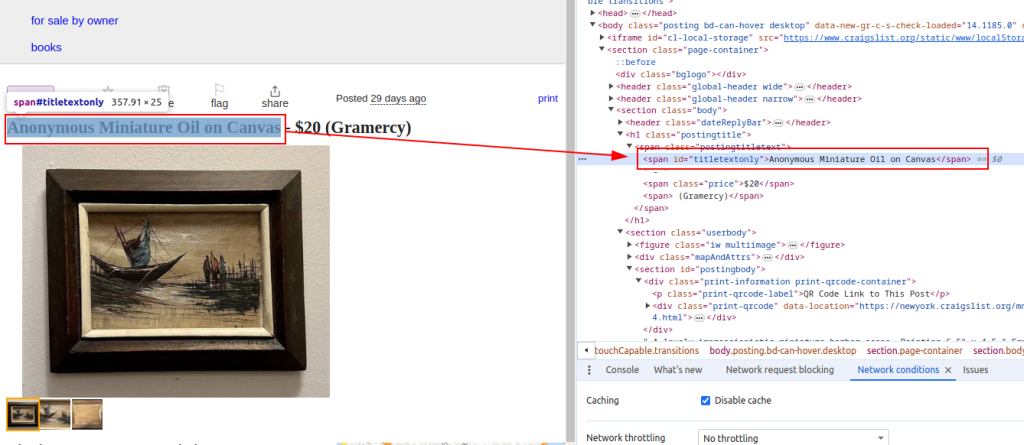
عنوان:
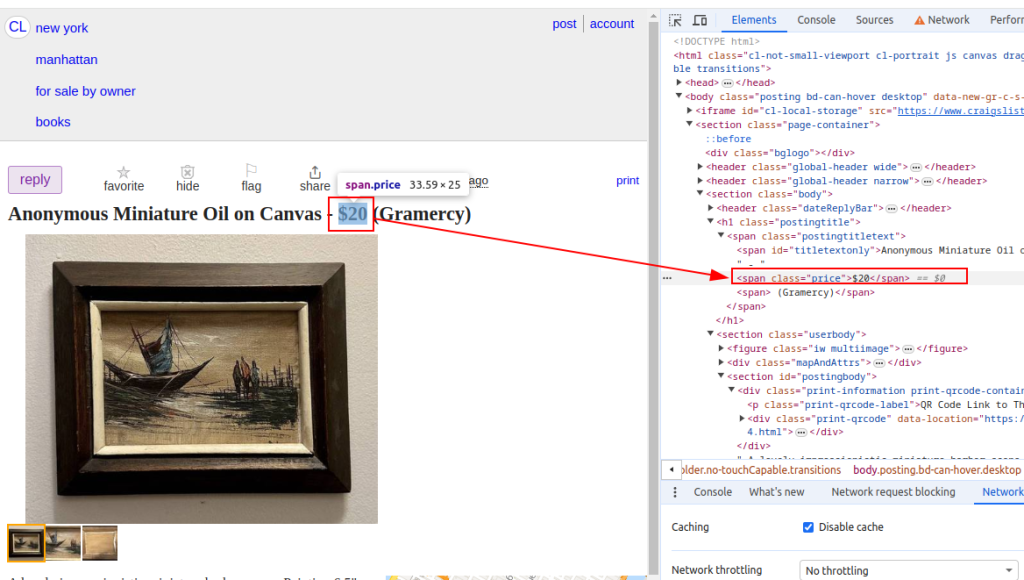
قیمت:
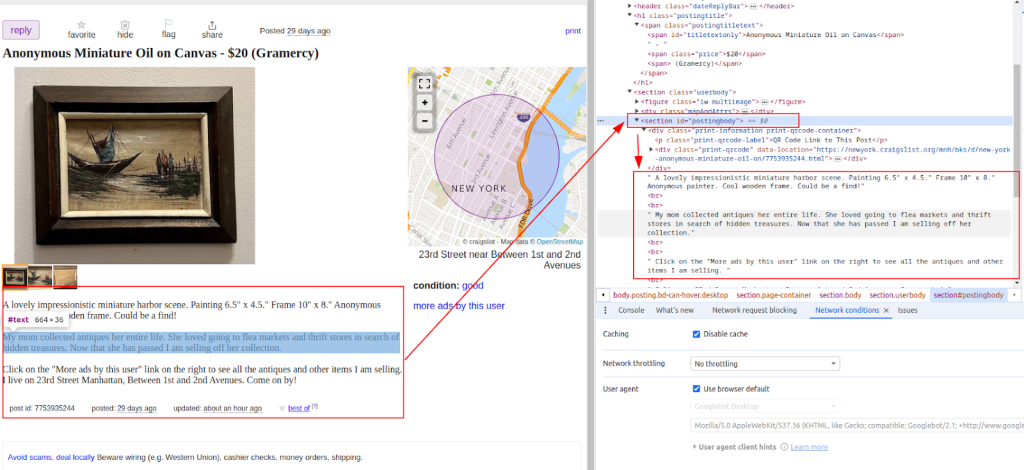
تفصیل:
ایک بار جب ڈیٹا نکالا جاتا ہے تو ، مزید تجزیہ یا دوسرے ٹولز کے ساتھ انضمام کے لئے اسے CSV فائل میں محفوظ کریں۔
import csv

# Define the CSV file path and field names
csv_file = 'craigslist_data.csv'
fieldnames = ['Title', 'Price', 'Description']

# Writing data to CSV file
try:
    # Open the CSV file in write mode with UTF-8 encoding
    with open(csv_file, mode='w', newline='', encoding='utf-8') as file:
        # Create a CSV DictWriter object with the specified fieldnames
        writer = csv.DictWriter(file, fieldnames=fieldnames)

        # Write the header row in the CSV file
        writer.writeheader()

        # Iterate through each item in the scraped_data list
        for item in scraped_data:
            # Write each item as a row in the CSV file
            writer.writerow(item)

    # Print a success message after writing data to the CSV file
    print(f"Data saved to {csv_file}")

except IOError:
    # Print an error message if an IOError occurs while writing to the CSV file
    print(f"Error occurred while writing data to {csv_file}")
کریگ لسٹ کھرچنے سے بچنے کے لئے اقدامات پر عمل درآمد کرسکتی ہے ، جیسے آئی پی بلاکنگ یا کیپچا چیلنجز۔ ان مسائل کو کم کرنے کے لئے ، پراکسیوں اور گھومنے والے صارف ایجنٹوں کے استعمال پر غور کریں۔
پراکسیوں کا استعمال:
یہ مثال IP ایڈریس کی اجازت کے ساتھ پراکسی کے استعمال کو ظاہر کرتی ہے۔
proxies = {
    'http': 'http://your_proxy_ip:your_proxy_port',
    'https': 'https://your_proxy_ip:your_proxy_port'
}

response = requests.get(url, proxies=proxies)
صارف ایجنٹ گردش:
import random

user_agents = [
    'Mozilla/5.0 (Windows NT 10.0; Win64; x64) AppleWebKit/537.36 (KHTML, like Gecko) Chrome/91.0.4472.124 Safari/537.36',
    'Mozilla/5.0 (Windows NT 10.0; Win64; x64) AppleWebKit/537.36 (KHTML, like Gecko) Chrome/91.0.4472.124 Safari/537.36',
    # Add more user agents as needed
]

headers = {
    'User-Agent': random.choice(user_agents)
}

response = requests.get(url, headers=headers)
اس مکمل ازگر اسکرپٹ سے پتہ چلتا ہے کہ ایک موثر کریگ لسٹ کھرچنی بنانے کے ل different مختلف اجزاء کو کس طرح مربوط کیا جائے جو ایک سے زیادہ یو آر ایل سے ڈیٹا نکالتا ہے ، تجزیہ کرتا ہے اور اسے بازیافت کرتا ہے۔
import requests
import urllib3
from bs4 import BeautifulSoup
import csv
import random
import ssl

ssl._create_default_https_context = ssl._create_stdlib_context
urllib3.disable_warnings()


# List of Craigslist URLs to scrape
urls = [
    "link",
    "link"
]

# User agents and proxies
user_agents = [
    'Mozilla/5.0 (Windows NT 10.0; Win64; x64) AppleWebKit/537.36 (KHTML, like Gecko) Chrome/91.0.4472.124 Safari/537.36',
    'Mozilla/5.0 (Windows NT 10.0; Win64; x64) AppleWebKit/537.36 (KHTML, like Gecko) Chrome/91.0.4472.124 Safari/537.36',
]

proxies = [
    {'http': 'http://your_proxy_ip1:your_proxy_port1', 'https': 'https://your_proxy_ip1:your_proxy_port1'},
    {'http': 'http://your_proxy_ip2:your_proxy_port2', 'https': 'https://your_proxy_ip2:your_proxy_port2'},
]

# List to store scraped data
scraped_data = []

# Loop through each URL in the list
for url in urls:
    # Rotate user agent for each request to avoid detection
    headers = {
        'User-Agent': random.choice(user_agents)
    }

    # Use a different proxy for each request to avoid IP blocking
    proxy = random.choice(proxies)

    try:
        # Send GET request to the Craigslist URL with headers and proxy
        response = requests.get(url, headers=headers, proxies=proxy, timeout=30, verify=False)

        # Check if the request was successful (status code 200)
        if response.status_code == 200:
            # Parse HTML content of the response
            html_content = response.text
            soup = BeautifulSoup(html_content, 'html.parser')

            # Extract data from the parsed HTML
            title = soup.find('span', id='titletextonly').text.strip()
            price = soup.find('span', class_='price').text.strip()
            description = soup.find('section', id='postingbody').get_text(strip=True, separator='\n')  # Extracting description

            # Append scraped data as a dictionary to the list
            scraped_data.append({'Title': title, 'Price': price, 'Description': description})
            print(f"Data scraped for {url}")
        else:
            # Print error message if request fails
            print(f"Failed to retrieve {url}. Status code: {response.status_code}")
    except Exception as e:
        # Print exception message if an error occurs during scraping
        print(f"Exception occurred while scraping {url}: {str(e)}")

# CSV file setup for storing scraped data
csv_file = 'craigslist_data.csv'
fieldnames = ['Title', 'Price', 'Description']

# Writing scraped data to CSV file
try:
    with open(csv_file, mode='w', newline='', encoding='utf-8') as file:
        writer = csv.DictWriter(file, fieldnames=fieldnames)

        # Write header row in the CSV file
        writer.writeheader()

        # Iterate through scraped_data list and write each item to the CSV file
        for item in scraped_data:
            writer.writerow(item)

    # Print success message if data is saved successfully
    print(f"Data saved to {csv_file}")
except IOError:
    # Print error message if there is an IOError while writing to the CSV file
    print(f"Error occurred while writing data to {csv_file}")
کریگ لسٹ اہم ہے کیونکہ یہ ایک ایسی جگہ مہیا کرتا ہے جہاں ہم درجہ بند اشتہارات تلاش کرسکتے ہیں جو ہمیں مارکیٹوں کی جانچ پڑتال کے ل useful مفید معلومات فراہم کرتے ہیں ، دوسروں کے درمیان لیڈز تلاش کرتے ہیں۔ کریگ لسٹ ویب سکریپنگ کو لائبریریوں جیسے خوبصورت سوپ اور درخواست کا استعمال کرتے ہوئے ازگر کے ذریعہ آسان بنایا گیا ہے۔ اس ٹیوٹوریل میں زیر بحث کلیدی تدبیریں متحرک مواد کو سنبھال رہی ہیں اور پراکسیوں کو گھوم رہی ہیں۔ ذمہ داری کے ساتھ ازگر کا فائدہ اٹھا کر ، آپ کریگ لسٹ کی فہرستوں سے قابل عمل بصیرت نکال سکتے ہیں ، مختلف ڈومینز میں باخبر فیصلہ سازی کی حمایت کرتے ہیں۔
 PHP
PHP Node.js
 Python
 Java
Java Golang
تبصرے: 0