 Proxy for Telegram
 Proxy for LinkedIn
 Proxy for Ebay
 Proxy for Twitter
 Proxy for TikTok
 Proxy for Google
User Guides
How to set up a proxy on TriBot for RuneScape

TriBot - is a RuneScape Bot for Old-School / OSRS to train your account, harvest gold, do quests and it can do anything you want in the game, but if you know how to make such scripts. It has really good bot movements, so it behaves as a human to prevent a block of your accounts. But there is a need to set a proxy up, to be protected even more. Let’s take a look at the step-by-step proxy configuration for TriBot.
Video guide for setting up a proxy in TriBot
Step-by-step proxy settings in TriBot
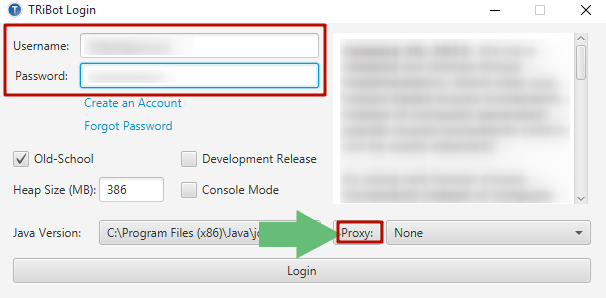
- Open TriBot, enter your username data and click the “Proxy” button.
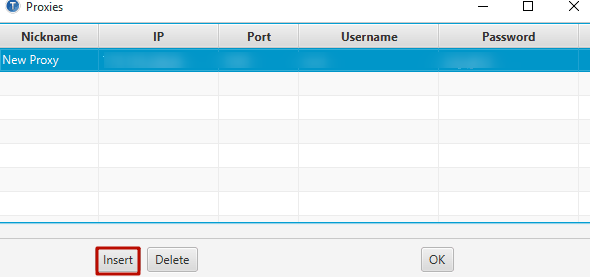
- Create a new proxy connection by pressing the “Insert” button, after these fields will be created - fill them up with data. Nickname - means the nickname of a proxy server, actually, it doesn’t really matter, so you can fill with any. IP and Port - this data could be found in your submission order mail if you have bought the individual proxy server from Proxy-Seller. Username Password data could be found as well as IP and Port in the mail. But if you have chosen the IP authentication method of the proxy server - there will be no need to fill the username and password fields.
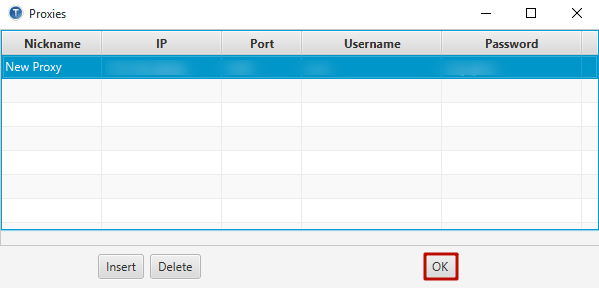
- After this press the “OK” button to save the configuration.
- Go back to the launcher menu. Choose your new created proxy from the drop-down box and press the “Login” button.
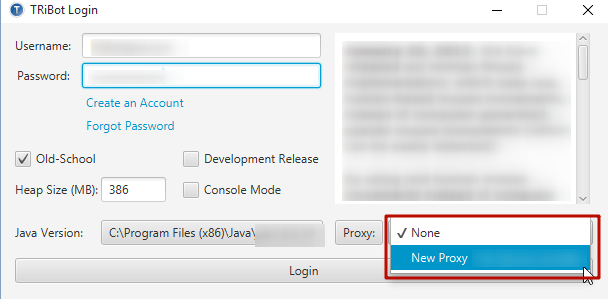
- If you have any type of error - check if the configuration is correct.
That’s it. The configuration is ready to use.
PROXIES FROM $0.02/IP
Ready to put this into practice?
Pick a proxy type and location, and start using it within minutes.
Instant delivery
24/7 support
Refund policy
About the author
Anastasia Lukinova
Editor & Content Manager @ Proxy-SellerRelated articles
User Guides
How to set up a proxy in Kodai Sneaker Bot
Unlock the potential of Kodai AIO sneakerbot to effortlessly purchase and resell sneakers. How to configure a proxy in Kodai AIO to evade blocks and restrictions in our upcoming article.
05 February 2024
User Guides
Setting up a proxy in Runemate for Runescape
How to configure a proxy in RuneMate with our step-by-step guide. Master the process of using the Runescape bot via a proxy to enhance your gaming experience.
02 February 2024
User Guides
Step-by-Step Proxy Setup in EpicBot OSRS
In this complete guide, you will learn how to do the correct step-by-step EpicBot proxy configuration.
05 February 2024